Analyzed URL
https://mboxviewer.net/
AI-Ready Score
Good
out of 100
Token Savings
Score Breakdown
Your site doesn't support Markdown for Agents. This Cloudflare standard lets AI agents request content in markdown format, reducing token usage by ~80%.
How to implement
Implement one or more: (1) Respond to Accept: text/markdown with markdown content. (2) Serve .md URLs (e.g., /page.md). (3) Add <link rel="alternate" type="text/markdown"> tags. (4) Add Link HTTP headers for markdown discovery.
No Content-Signal directives found. These tell AI agents how they may use your content (search indexing, AI input, training data). The recommended location is robots.txt.
How to implement
Add Content-Signal to your robots.txt: User-agent: *\nContent-Signal: search=yes, ai-input=yes, ai-train=no. You can also add it as an HTTP header on markdown responses.
Your page relies heavily on <div> elements. Semantic elements like <section>, <nav>, <header>, <footer>, and <aside> provide meaningful structure for AI agents.
How to implement
Replace generic <div> containers with appropriate semantic elements. Use <section> for thematic groups, <nav> for navigation, <header>/<footer> for page/section headers and footers.
Some images lack descriptive alt text. Good alt text helps AI agents understand image content and context.
How to implement
Add descriptive alt attributes to all images. Describe what the image shows, not just 'image' or 'photo'. For decorative images, use alt="" (empty).
 ## The fastest way to read MBOX files on your Mac Back up your Gmail with Google Takeout and read it offline on your Mac. Open, search, and export emails from MBOX and EML archives of any size. We only store your email. No spam, ever. macOS 14+ Universal Binary Apple Silicon native 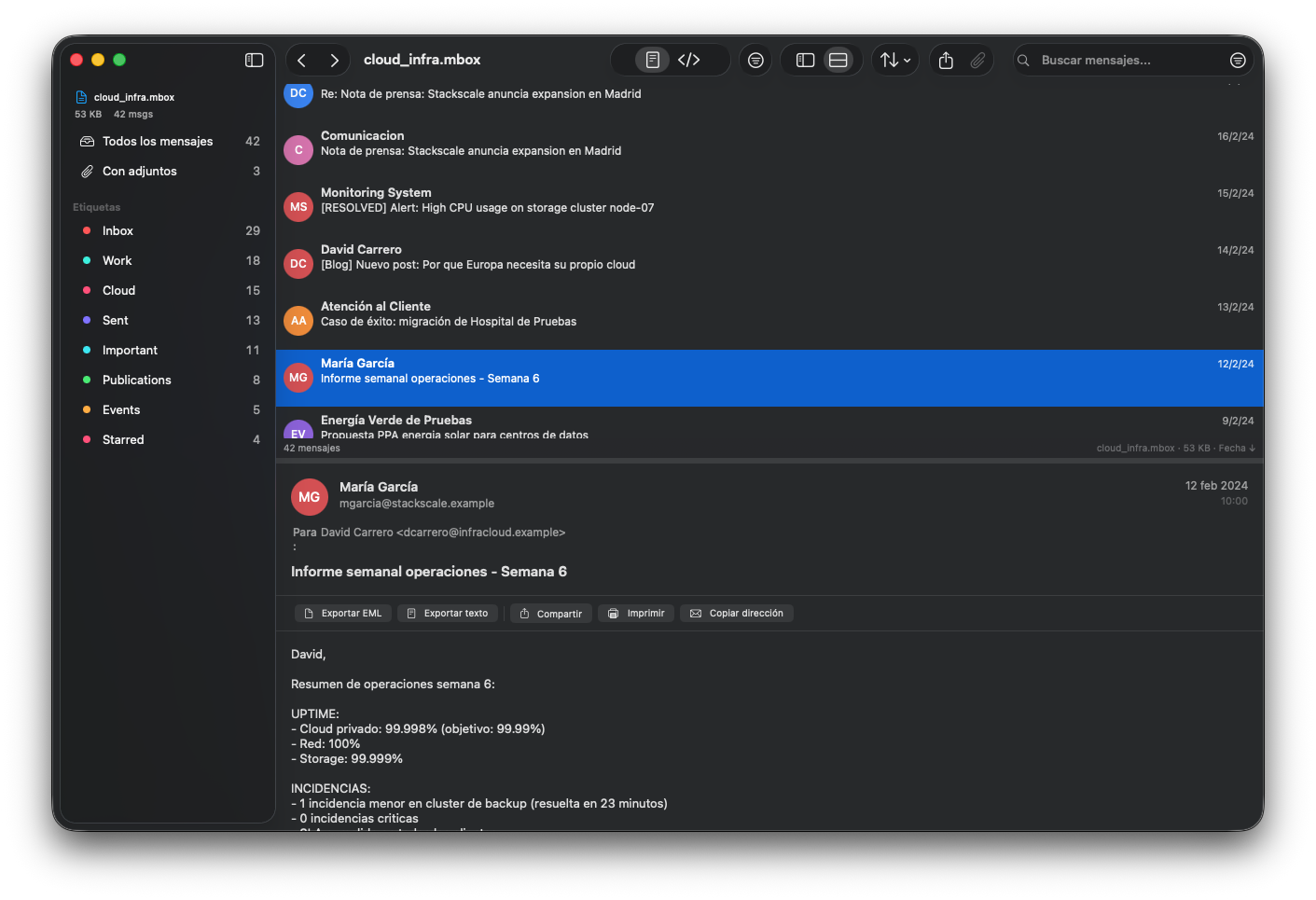 Mbox Viewer — three-column layout with message list, Gmail labels, and text view. ### Your Gmail, offline on your Mac Use Google Takeout to back up your entire Gmail account. Mbox Viewer lets you read, search, and browse those backups offline — no internet required. ### Other tools choke on large files Most MBOX readers crash or freeze on files over a few hundred MB. Many use Electron or Java. ### Built specifically for this Mbox Viewer streams through files of any size without loading them into memory. Native macOS, instant search, full export. ## Features ### Handles any size Streaming parser with 1 MB buffer. Opens files from a few KB to 50+ GB without loading the entire file into memory. ### Instant re-opens Binary index with SHA-256 validation. First open indexes the file; subsequent opens take under 1 second for any size. ### Powerful search Full syntax: from:, to:, subject:, body:, date:, has:attachment, label:, size:>, OR, negation, exact phrase. ### Gmail labels Automatically reads Gmail labels from Google Takeout. Browse by label in the sidebar with message counts. ### Full export Export to EML, CSV, plain text, or extract all attachments. Merge multiple MBOX files with deduplication. ### Conversation threads JWZ threading algorithm groups messages into conversations with visual reply chains up to 4 levels deep. ### Native macOS SwiftUI + AppKit. Dark mode, Drag & Drop, Quick Look, Share, Print. No Electron, no Java, no web wrapper. ### Privacy first Everything runs locally on your Mac. No cloud, no telemetry, no data leaves your machine. Ever. ### Export labels to MBOX Export any Gmail label as a standalone MBOX file. Create smaller, focused archives from your full Gmail backup. ### Print & Share Print messages with formatted headers. Share via Mail, AirDrop, Notes, and other macOS share services. ### Attachments View attachments inline, preview with Quick Look (Spacebar), save individually or in bulk, drag directly to Finder. ### Drag & Drop Drop MBOX or EML files onto the app to open them. Drag messages out as .eml files or drag attachments to Finder. ## Performance Opens a 50 GB MBOX file in under 5 minutes. Re-opens it in under 1 second. | File Size | Messages | First Open | Re-open | RAM Usage | | --- | --- | --- | --- | --- | | 500 MB | ~5,000 | < 5 sec | < 1 sec | < 100 MB | | 5 GB | ~50,000 | < 30 sec | < 1 sec | < 200 MB | | 50 GB | ~500,000 | < 5 min | < 1 sec | < 600 MB | Re-open is always under 1 second regardless of file size, thanks to the binary index. ## Pricing ### Free €0 forever - Up to 500 MB - All features included Coming Soon ### Annual €11.95 /year - Unlimited file sizes - 3 device activations Coming Soon Best value ### Lifetime €109.90 \-50% €54.95 one-time - Unlimited file sizes - 3 device activations Coming Soon Coming soon on Mac App Store All purchases include a license key for 3 devices. Payments processed securely by Lemon Squeezy (a Stripe company). VAT included. Need more licenses or activations? [Contact us](https://colorvivo.com/contacto/). ## Get Early Access Be the first to know when Mbox Viewer is ready. Subscribe to receive early access to the first version. We only store your email. No spam, ever. **Search SyntaxPowerful search with full query syntax. Use the search bar or the visual filter sheet (Cmd+Shift+F).Show full search syntax reference Hide search syntax** ## Search Syntax Powerful search with full query syntax. Use the search bar or the visual filter sheet (Cmd+Shift+F). Show full search syntax reference Hide search syntax | Prefix | Example | Description | | --- | --- | --- | | from: | from:[\[email protected\]](https://mboxviewer.net/cdn-cgi/l/email-protection) | Messages from this sender | | to: | to:team@ | Messages sent to this address | | cc: | cc:manager | Messages CC'd to this person | | subject: | subject:"quarterly report" | Subject contains phrase | | body: | body:invoice | Full-text body search (press Enter) | | has:attachment | has:attachment | Messages with attachments | | has:no-attachment | has:no-attachment | Messages without attachments | | label: | label:Important | Gmail label | | filename: | filename:report.pdf | Attachment filename | | date: | date:2024-03 | Messages from March 2024 | | before: | before:2024-01-01 | Messages before date | | after: | after:2023-06-15 | Messages after date | | size:> | size:>5mb | Messages larger than 5 MB | | size:< | size:<100kb | Messages smaller than 100 KB | | \- | \-spam | Exclude term | | "..." | "exact phrase" | Exact phrase match | | OR | from:alice OR from:bob | Either condition | | (implicit) | invoice 2024 | Both terms (AND) | ## Frequently Asked Questions **What is an MBOX file?** MBOX is a standard format for storing email messages. Gmail's Google Takeout exports your emails as MBOX files. Many email clients and servers use this format for backups and archives. **How do I back up my Gmail as MBOX?** 1\. Go to [takeout.google.com](https://takeout.google.com/) and sign in with your Google account. 2. Click "Deselect all", then scroll down and check only "Mail". 3. Click "All Mail data included" to choose specific labels, or leave it to export everything. 4. Click "Next step", choose your export format (e.g. .zip), file size, and delivery method. 5. Click "Create export" — Google will prepare your archive (this can take hours or days for large accounts). 6. Download the .zip file when ready, extract it, and open the .mbox file with Mbox Viewer. Once exported, you have a full offline backup of your Gmail that you can read anytime without internet. **Can it open very large files?** Yes. Mbox Viewer uses a streaming parser that never loads the entire file into memory. It can open files of 50 GB and beyond. The first open indexes the file (takes a few minutes for very large files), and all subsequent opens are instant (under 1 second). **Does it modify my MBOX file?** Never. Mbox Viewer is strictly read-only. It creates a small index file alongside your MBOX for fast access, but never writes to the original file. **What's the difference between Free and Pro?** Free includes all features but is limited to MBOX files up to 500 MB. Pro removes the file size limit. There's no feature gating — search, export, labels, threading all work in both versions. **Can I use my license on multiple Macs?** Yes. Each license allows activation on up to 3 devices. You can deactivate a device from within the app to free up a slot. **Does it support HTML emails?** Yes. Mbox Viewer renders HTML emails with their original formatting. Remote images are blocked by default for privacy, with an option to load them. **What macOS versions are supported?** macOS 14 Sonoma and later. Universal Binary — runs natively on Apple Silicon (M1/M2/M3/M4) and Intel Macs.
Mbox Viewer — Read MBOX Files on macOS # The fastest way to read MBOX files on your Mac Back up your Gmail with Google Takeout and read it offline on your Mac. Open, search, and export emails from MBOX and EML archives of any size. Notify Me I accept the [Privacy Policy](https://mboxviewer.net/privacy/) We only store your email. No spam, ever. macOS 14+ Universal Binary Apple Silicon native  Mbox Viewer — three-column layout with message list, Gmail labels, and text view. ## Why Mbox Viewer? ### Your Gmail, offline on your Mac Use Google Takeout to back up your entire Gmail account. Mbox Viewer lets you read, search, and browse those backups offline — no internet required. ### Other tools choke on large files Most MBOX readers crash or freeze on files over a few hundred MB. Many use Electron or Java. ### Built specifically for this Mbox Viewer streams through files of any size without loading them into memory. Native macOS, instant search, full export. ## Features ### Handles any size Streaming parser with 1 MB buffer. Opens files from a few KB to 50+ GB without loading the entire file into memory. ### Instant re-opens Binary index with SHA-256 validation. First open indexes the file; subsequent opens take under 1 second for any size. ### Powerful search Full syntax: from:, to:, subject:, body:, date:, has:attachment, label:, size:>, OR, negation, exact phrase. ### Gmail labels Automatically reads Gmail labels from Google Takeout. Browse by label in the sidebar with message counts. ### Full export Export to EML, CSV, plain text, or extract all attachments. Merge multiple MBOX files with deduplication. ### Conversation threads JWZ threading algorithm groups messages into conversations with visual reply chains up to 4 levels deep. ### Native macOS SwiftUI + AppKit. Dark mode, Drag & Drop, Quick Look, Share, Print. No Electron, no Java, no web wrapper. ### Privacy first Everything runs locally on your Mac. No cloud, no telemetry, no data leaves your machine. Ever. ### Export labels to MBOX Export any Gmail label as a standalone MBOX file. Create smaller, focused archives from your full Gmail backup. ### Print & Share Print messages with formatted headers. Share via Mail, AirDrop, Notes, and other macOS share services. ### Attachments View attachments inline, preview with Quick Look (Spacebar), save individually or in bulk, drag directly to Finder. ### Drag & Drop Drop MBOX or EML files onto the app to open them. Drag messages out as .eml files or drag attachments to Finder. ## Performance Opens a 50 GB MBOX file in under 5 minutes. Re-opens it in under 1 second. | File Size | Messages | First Open | Re-open | RAM Usage | | --- | --- | --- | --- | --- | | 500 MB | ~5,000 | < 5 sec | < 1 sec | < 100 MB | | 5 GB | ~50,000 | < 30 sec | < 1 sec | < 200 MB | | 50 GB | ~500,000 | < 5 min | < 1 sec | < 600 MB | Re-open is always under 1 second regardless of file size, thanks to the binary index. ## Pricing ### Free €0 forever - Up to 500 MB - All features included Coming Soon ### Annual €11.95 /year - Unlimited file sizes - 3 device activations Coming Soon Best value### Lifetime €109.90 \-50% €54.95 one-time - Unlimited file sizes - 3 device activations Coming Soon Coming soon on Mac App Store All purchases include a license key for 3 devices. Payments processed securely by Lemon Squeezy (a Stripe company). VAT included. Need more licenses or activations? [Contact us](https://colorvivo.com/contacto/). ## Get Early Access Be the first to know when Mbox Viewer is ready. Subscribe to receive early access to the first version. Notify Me I accept the [Privacy Policy](https://mboxviewer.net/privacy/) We only store your email. No spam, ever. **Search SyntaxPowerful search with full query syntax. Use the search bar or the visual filter sheet (Cmd+Shift+F).Show full search syntax reference Hide search syntax** ## Search Syntax Powerful search with full query syntax. Use the search bar or the visual filter sheet (Cmd+Shift+F). Show full search syntax reference Hide search syntax | Prefix | Example | Description | | --- | --- | --- | | from: | from:[\[email protected\]](https://mboxviewer.net/cdn-cgi/l/email-protection) | Messages from this sender | | to: | to:team@ | Messages sent to this address | | cc: | cc:manager | Messages CC'd to this person | | subject: | subject:"quarterly report" | Subject contains phrase | | body: | body:invoice | Full-text body search (press Enter) | | has:attachment | has:attachment | Messages with attachments | | has:no-attachment | has:no-attachment | Messages without attachments | | label: | label:Important | Gmail label | | filename: | filename:report.pdf | Attachment filename | | date: | date:2024-03 | Messages from March 2024 | | before: | before:2024-01-01 | Messages before date | | after: | after:2023-06-15 | Messages after date | | size:> | size:>5mb | Messages larger than 5 MB | | size:< | size:<100kb | Messages smaller than 100 KB | | \- | \-spam | Exclude term | | "..." | "exact phrase" | Exact phrase match | | OR | from:alice OR from:bob | Either condition | | (implicit) | invoice 2024 | Both terms (AND) | ## Frequently Asked Questions **What is an MBOX file?** MBOX is a standard format for storing email messages. Gmail's Google Takeout exports your emails as MBOX files. Many email clients and servers use this format for backups and archives. **How do I back up my Gmail as MBOX?** 1\. Go to [takeout.google.com](https://takeout.google.com/) and sign in with your Google account. 2. Click "Deselect all", then scroll down and check only "Mail". 3. Click "All Mail data included" to choose specific labels, or leave it to export everything. 4. Click "Next step", choose your export format (e.g. .zip), file size, and delivery method. 5. Click "Create export" — Google will prepare your archive (this can take hours or days for large accounts). 6. Download the .zip file when ready, extract it, and open the .mbox file with Mbox Viewer. Once exported, you have a full offline backup of your Gmail that you can read anytime without internet. **Can it open very large files?** Yes. Mbox Viewer uses a streaming parser that never loads the entire file into memory. It can open files of 50 GB and beyond. The first open indexes the file (takes a few minutes for very large files), and all subsequent opens are instant (under 1 second). **Does it modify my MBOX file?** Never. Mbox Viewer is strictly read-only. It creates a small index file alongside your MBOX for fast access, but never writes to the original file. **What's the difference between Free and Pro?** Free includes all features but is limited to MBOX files up to 500 MB. Pro removes the file size limit. There's no feature gating — search, export, labels, threading all work in both versions. **Can I use my license on multiple Macs?** Yes. Each license allows activation on up to 3 devices. You can deactivate a device from within the app to free up a slot. **Does it support HTML emails?** Yes. Mbox Viewer renders HTML emails with their original formatting. Remote images are blocked by default for privacy, with an option to load them. **What macOS versions are supported?** macOS 14 Sonoma and later. Universal Binary — runs natively on Apple Silicon (M1/M2/M3/M4) and Intel Macs.
Upload this file as /index.md on your server so AI agents can access a clean version of your page. You can also configure Accept: text/markdown content negotiation to serve it automatically.
Our recommendation
# Mbox Viewer

> Native macOS app for opening, searching, and exporting emails from MBOX and EML archive files. Handles Gmail Takeout exports of any size.

## Main
- [Mbox Viewer — Read MBOX Files on macOS](https://mboxviewer.net/): Native macOS app for opening, searching, and exporting emails from MBOX and EML archive files. Handles Gmail Takeout ex…
- [Español](https://mboxviewer.net/es/)
- [Deutsch](https://mboxviewer.net/de/)
- [Français](https://mboxviewer.net/fr/)
- [Português](https://mboxviewer.net/pt-br/)
- [日本語](https://mboxviewer.net/ja/)
- [Italiano](https://mboxviewer.net/it/)
- [Nederlands](https://mboxviewer.net/nl/)
- [한국어](https://mboxviewer.net/ko/)

## Legal
- [Privacy Policy](https://mboxviewer.net/privacy/)
- [Terms of Service](https://mboxviewer.net/terms/)
- [Refund Policy](https://mboxviewer.net/refund/)

## Support
- [Support](https://mboxviewer.net/support/)
Full llms.txt requires domain-wide analysis (coming soon)
Upload this file to https://mboxviewer.net/llms.txt at the root of your domain. AI agents like ChatGPT, Claude, and Perplexity check this file to understand your site structure.
This site already has a llms.txt file.
Valid format# Mbox Viewer > The fastest way to read MBOX files on your Mac Mbox Viewer is a native macOS application for opening, searching, and exporting emails from MBOX and EML archive files. It handles files of any size — from a few kilobytes to over 50 GB — without loading the entire file into memory. Platform: macOS 14 Sonoma or later (Universal Binary: Apple Silicon + Intel). Privacy: 100% local processing — no cloud, no telemetry, no data leaves the Mac. Free version includes all features up to 500 MB. Pro removes the file size limit (annual €11.95/year or lifetime €54.95). ## Documentation - [Full documentation](https://mboxviewer.net/index.md): Complete product information, features, pricing, search syntax, and FAQ - [Full documentation (Español)](https://mboxviewer.net/es/index.md): Documentación completa en español ## Product - [Website](https://mboxviewer.net): Main product page with features, performance benchmarks, and pricing - [Website (Español)](https://mboxviewer.net/es/): Página del producto en español - [Website (Deutsch)](https://mboxviewer.net/de/): Produktseite auf Deutsch - [Website (Français)](https://mboxviewer.net/fr/): Page produit en français - [Website (Português BR)](https://mboxviewer.net/pt-br/): Página do produto em português - [Website (日本語)](https://mboxviewer.net/ja/): 日本語の製品ページ - [Website (Italiano)](https://mboxviewer.net/it/): Pagina del prodotto in italiano - [Website (Nederlands)](https://mboxviewer.net/nl/): Productpagina in het Nederlands - [Website (한국어)](https://mboxviewer.net/ko/): 한국어 제품 페이지 - [Website (Polski)](https://mboxviewer.net/pl/): Strona produktu po polsku ## Legal - [Privacy Policy](https://mboxviewer.net/privacy/): No data collection, no telemetry, fully local processing - [Terms of Service](https://mboxviewer.net/terms/): Software license terms - [Refund Policy](https://mboxviewer.net/refund/): Refund policy handled by Lemon Squeezy ## Support - [Support](https://mboxviewer.net/support/): Get help and report issues - [GitHub](https://github.com/dcarrero/mboxshell): Open source base project (mboxShell, MIT license)
Semantic HTML
Has <main>
1 heading level skip(s)
13 semantic elements, 84 divs (ratio: 13%)
2/4 images with meaningful alt text
Avg div depth: 1.9, max: 5
Content Efficiency
91% token reduction (HTML→Markdown)
Content ratio: 10.8% (6611 content chars / 61260 HTML bytes)
0/516 elements with inline styles (0.0%)
HTML size: 60KB
AI Discoverability
llms.txt exists and is valid
robots.txt exists
All major AI bots allowed
Sitemap found
No markdown content negotiation
No Content-Signal header
Structured Data
JSON-LD found but basic types: SoftwareApplication
All OG tags present
Meta description: 137 chars
Canonical URL present
lang="en"
Accessibility
Content available without JavaScript
Page size: 60KB
Main content starts at 16% of HTML
{
"url": "https://mboxviewer.net/",
"timestamp": 1771149408495,
"fetch": {
"mode": "simple",
"timeMs": 557,
"htmlSizeBytes": 61260,
"supportsMarkdown": false,
"statusCode": 200
},
"extraction": {
"title": "Mbox Viewer — Read MBOX Files on macOS",
"excerpt": "Native macOS app for opening, searching, and exporting emails from MBOX and EML archive files. Handles Gmail Takeout exports of any size.",
"byline": "David Carrero Fernández-Baillo",
"siteName": "Mbox Viewer",
"lang": "en",
"contentLength": 6611,
"metadata": {
"description": "Native macOS app for opening, searching, and exporting emails from MBOX and EML archive files. Handles Gmail Takeout exports of any size.",
"ogTitle": "Mbox Viewer — Read MBOX Files on macOS",
"ogDescription": "Native macOS app for opening, searching, and exporting emails from MBOX and EML archive files. Handles Gmail Takeout exports of any size.",
"ogImage": "https://mboxviewer.net/screenshot-mbox-viewer.png",
"ogType": "website",
"canonical": "https://mboxviewer.net/",
"lang": "en",
"schemas": [
{
"@context": "https://schema.org",
"@type": "SoftwareApplication",
"name": "Mbox Viewer",
"operatingSystem": "macOS",
"applicationCategory": "UtilitiesApplication",
"description": "Native macOS app for opening, searching, and exporting emails from MBOX and EML archive files. Handles Gmail Takeout exports of any size.",
"url": "https://mboxviewer.net",
"image": "https://mboxviewer.net/icon-256.png",
"screenshot": "https://mboxviewer.net/screenshot-mbox-viewer.png",
"softwareVersion": "1.1.0",
"author": {
"@type": "Person",
"name": "David Carrero Fernández-Baillo",
"url": "https://carrero.es"
},
"publisher": {
"@type": "Organization",
"name": "Color Vivo Internet, S.L.",
"url": "https://colorvivo.com"
},
"offers": [
{
"@type": "Offer",
"price": "0",
"priceCurrency": "EUR",
"description": "Free version — all features, up to 500 MB"
},
{
"@type": "Offer",
"price": "11.95",
"priceCurrency": "EUR",
"description": "Annual subscription — unlimited file sizes"
},
{
"@type": "Offer",
"price": "54.95",
"priceCurrency": "EUR",
"description": "Lifetime license — unlimited file sizes, one-time payment"
}
]
}
],
"robotsMeta": "index, follow",
"author": "David Carrero Fernández-Baillo",
"generator": null
}
},
"markdown": "\n\n## The fastest way to read MBOX files on your Mac\n\nBack up your Gmail with Google Takeout and read it offline on your Mac. Open, search, and export emails from MBOX and EML archives of any size.\n\nWe only store your email. No spam, ever.\n\nmacOS 14+ Universal Binary Apple Silicon native\n\n\n\nMbox Viewer — three-column layout with message list, Gmail labels, and text view.\n\n### Your Gmail, offline on your Mac\n\nUse Google Takeout to back up your entire Gmail account. Mbox Viewer lets you read, search, and browse those backups offline — no internet required.\n\n### Other tools choke on large files\n\nMost MBOX readers crash or freeze on files over a few hundred MB. Many use Electron or Java.\n\n### Built specifically for this\n\nMbox Viewer streams through files of any size without loading them into memory. Native macOS, instant search, full export.\n\n## Features\n\n### Handles any size\n\nStreaming parser with 1 MB buffer. Opens files from a few KB to 50+ GB without loading the entire file into memory.\n\n### Instant re-opens\n\nBinary index with SHA-256 validation. First open indexes the file; subsequent opens take under 1 second for any size.\n\n### Powerful search\n\nFull syntax: from:, to:, subject:, body:, date:, has:attachment, label:, size:>, OR, negation, exact phrase.\n\n### Gmail labels\n\nAutomatically reads Gmail labels from Google Takeout. Browse by label in the sidebar with message counts.\n\n### Full export\n\nExport to EML, CSV, plain text, or extract all attachments. Merge multiple MBOX files with deduplication.\n\n### Conversation threads\n\nJWZ threading algorithm groups messages into conversations with visual reply chains up to 4 levels deep.\n\n### Native macOS\n\nSwiftUI + AppKit. Dark mode, Drag & Drop, Quick Look, Share, Print. No Electron, no Java, no web wrapper.\n\n### Privacy first\n\nEverything runs locally on your Mac. No cloud, no telemetry, no data leaves your machine. Ever.\n\n### Export labels to MBOX\n\nExport any Gmail label as a standalone MBOX file. Create smaller, focused archives from your full Gmail backup.\n\n### Print & Share\n\nPrint messages with formatted headers. Share via Mail, AirDrop, Notes, and other macOS share services.\n\n### Attachments\n\nView attachments inline, preview with Quick Look (Spacebar), save individually or in bulk, drag directly to Finder.\n\n### Drag & Drop\n\nDrop MBOX or EML files onto the app to open them. Drag messages out as .eml files or drag attachments to Finder.\n\n## Performance\n\nOpens a 50 GB MBOX file in under 5 minutes. Re-opens it in under 1 second.\n\n| File Size | Messages | First Open | Re-open | RAM Usage |\n| --- | --- | --- | --- | --- |\n| 500 MB | ~5,000 | < 5 sec | < 1 sec | < 100 MB |\n| 5 GB | ~50,000 | < 30 sec | < 1 sec | < 200 MB |\n| 50 GB | ~500,000 | < 5 min | < 1 sec | < 600 MB |\n\nRe-open is always under 1 second regardless of file size, thanks to the binary index.\n\n## Pricing\n\n### Free\n\n€0 forever\n\n- Up to 500 MB\n- All features included\n\nComing Soon\n\n### Annual\n\n€11.95 /year\n\n- Unlimited file sizes\n- 3 device activations\n\nComing Soon\n\nBest value\n\n### Lifetime\n\n€109.90 \\-50%\n\n€54.95 one-time\n\n- Unlimited file sizes\n- 3 device activations\n\nComing Soon\n\nComing soon on\n\nMac App Store\n\nAll purchases include a license key for 3 devices.\n\nPayments processed securely by Lemon Squeezy (a Stripe company). VAT included.\n\nNeed more licenses or activations? [Contact us](https://colorvivo.com/contacto/).\n\n## Get Early Access\n\nBe the first to know when Mbox Viewer is ready. Subscribe to receive early access to the first version.\n\nWe only store your email. No spam, ever.\n\n**Search SyntaxPowerful search with full query syntax. Use the search bar or the visual filter sheet (Cmd+Shift+F).Show full search syntax reference Hide search syntax**\n\n## Search Syntax\n\nPowerful search with full query syntax. Use the search bar or the visual filter sheet (Cmd+Shift+F).\n\nShow full search syntax reference Hide search syntax\n\n| Prefix | Example | Description |\n| --- | --- | --- |\n| from: | from:[\\[email protected\\]](https://mboxviewer.net/cdn-cgi/l/email-protection) | Messages from this sender |\n| to: | to:team@ | Messages sent to this address |\n| cc: | cc:manager | Messages CC'd to this person |\n| subject: | subject:\"quarterly report\" | Subject contains phrase |\n| body: | body:invoice | Full-text body search (press Enter) |\n| has:attachment | has:attachment | Messages with attachments |\n| has:no-attachment | has:no-attachment | Messages without attachments |\n| label: | label:Important | Gmail label |\n| filename: | filename:report.pdf | Attachment filename |\n| date: | date:2024-03 | Messages from March 2024 |\n| before: | before:2024-01-01 | Messages before date |\n| after: | after:2023-06-15 | Messages after date |\n| size:> | size:>5mb | Messages larger than 5 MB |\n| size:< | size:<100kb | Messages smaller than 100 KB |\n| \\- | \\-spam | Exclude term |\n| \"...\" | \"exact phrase\" | Exact phrase match |\n| OR | from:alice OR from:bob | Either condition |\n| (implicit) | invoice 2024 | Both terms (AND) |\n\n## Frequently Asked Questions\n\n**What is an MBOX file?**\n\nMBOX is a standard format for storing email messages. Gmail's Google Takeout exports your emails as MBOX files. Many email clients and servers use this format for backups and archives.\n\n**How do I back up my Gmail as MBOX?**\n\n1\\. Go to [takeout.google.com](https://takeout.google.com/) and sign in with your Google account. 2. Click \"Deselect all\", then scroll down and check only \"Mail\". 3. Click \"All Mail data included\" to choose specific labels, or leave it to export everything. 4. Click \"Next step\", choose your export format (e.g. .zip), file size, and delivery method. 5. Click \"Create export\" — Google will prepare your archive (this can take hours or days for large accounts). 6. Download the .zip file when ready, extract it, and open the .mbox file with Mbox Viewer. Once exported, you have a full offline backup of your Gmail that you can read anytime without internet.\n\n**Can it open very large files?**\n\nYes. Mbox Viewer uses a streaming parser that never loads the entire file into memory. It can open files of 50 GB and beyond. The first open indexes the file (takes a few minutes for very large files), and all subsequent opens are instant (under 1 second).\n\n**Does it modify my MBOX file?**\n\nNever. Mbox Viewer is strictly read-only. It creates a small index file alongside your MBOX for fast access, but never writes to the original file.\n\n**What's the difference between Free and Pro?**\n\nFree includes all features but is limited to MBOX files up to 500 MB. Pro removes the file size limit. There's no feature gating — search, export, labels, threading all work in both versions.\n\n**Can I use my license on multiple Macs?**\n\nYes. Each license allows activation on up to 3 devices. You can deactivate a device from within the app to free up a slot.\n\n**Does it support HTML emails?**\n\nYes. Mbox Viewer renders HTML emails with their original formatting. Remote images are blocked by default for privacy, with an option to load them.\n\n**What macOS versions are supported?**\n\nmacOS 14 Sonoma and later. Universal Binary — runs natively on Apple Silicon (M1/M2/M3/M4) and Intel Macs.\n",
"fullPageMarkdown": "Mbox Viewer — Read MBOX Files on macOS\n\n# The fastest way to read MBOX files on your Mac\n\nBack up your Gmail with Google Takeout and read it offline on your Mac. Open, search, and export emails from MBOX and EML archives of any size.\n\n Notify Me\n\n I accept the [Privacy Policy](https://mboxviewer.net/privacy/)\n\nWe only store your email. No spam, ever.\n\nmacOS 14+ Universal Binary Apple Silicon native\n\n\n\nMbox Viewer — three-column layout with message list, Gmail labels, and text view.\n\n## Why Mbox Viewer?\n\n### Your Gmail, offline on your Mac\n\nUse Google Takeout to back up your entire Gmail account. Mbox Viewer lets you read, search, and browse those backups offline — no internet required.\n\n### Other tools choke on large files\n\nMost MBOX readers crash or freeze on files over a few hundred MB. Many use Electron or Java.\n\n### Built specifically for this\n\nMbox Viewer streams through files of any size without loading them into memory. Native macOS, instant search, full export.\n\n## Features\n\n### Handles any size\n\nStreaming parser with 1 MB buffer. Opens files from a few KB to 50+ GB without loading the entire file into memory.\n\n### Instant re-opens\n\nBinary index with SHA-256 validation. First open indexes the file; subsequent opens take under 1 second for any size.\n\n### Powerful search\n\nFull syntax: from:, to:, subject:, body:, date:, has:attachment, label:, size:>, OR, negation, exact phrase.\n\n### Gmail labels\n\nAutomatically reads Gmail labels from Google Takeout. Browse by label in the sidebar with message counts.\n\n### Full export\n\nExport to EML, CSV, plain text, or extract all attachments. Merge multiple MBOX files with deduplication.\n\n### Conversation threads\n\nJWZ threading algorithm groups messages into conversations with visual reply chains up to 4 levels deep.\n\n### Native macOS\n\nSwiftUI + AppKit. Dark mode, Drag & Drop, Quick Look, Share, Print. No Electron, no Java, no web wrapper.\n\n### Privacy first\n\nEverything runs locally on your Mac. No cloud, no telemetry, no data leaves your machine. Ever.\n\n### Export labels to MBOX\n\nExport any Gmail label as a standalone MBOX file. Create smaller, focused archives from your full Gmail backup.\n\n### Print & Share\n\nPrint messages with formatted headers. Share via Mail, AirDrop, Notes, and other macOS share services.\n\n### Attachments\n\nView attachments inline, preview with Quick Look (Spacebar), save individually or in bulk, drag directly to Finder.\n\n### Drag & Drop\n\nDrop MBOX or EML files onto the app to open them. Drag messages out as .eml files or drag attachments to Finder.\n\n## Performance\n\nOpens a 50 GB MBOX file in under 5 minutes. Re-opens it in under 1 second.\n\n| File Size | Messages | First Open | Re-open | RAM Usage |\n| --- | --- | --- | --- | --- |\n| 500 MB | ~5,000 | < 5 sec | < 1 sec | < 100 MB |\n| 5 GB | ~50,000 | < 30 sec | < 1 sec | < 200 MB |\n| 50 GB | ~500,000 | < 5 min | < 1 sec | < 600 MB |\n\nRe-open is always under 1 second regardless of file size, thanks to the binary index.\n\n## Pricing\n\n### Free\n\n€0 forever\n\n- Up to 500 MB\n- All features included\n\nComing Soon\n\n### Annual\n\n€11.95 /year\n\n- Unlimited file sizes\n- 3 device activations\n\nComing Soon\n\nBest value### Lifetime\n\n€109.90 \\-50%\n\n€54.95 one-time\n\n- Unlimited file sizes\n- 3 device activations\n\nComing Soon\n\nComing soon on\n\nMac App Store\n\nAll purchases include a license key for 3 devices.\n\nPayments processed securely by Lemon Squeezy (a Stripe company). VAT included.\n\nNeed more licenses or activations? [Contact us](https://colorvivo.com/contacto/).\n\n## Get Early Access\n\nBe the first to know when Mbox Viewer is ready. Subscribe to receive early access to the first version.\n\n Notify Me\n\n I accept the [Privacy Policy](https://mboxviewer.net/privacy/)\n\nWe only store your email. No spam, ever.\n\n**Search SyntaxPowerful search with full query syntax. Use the search bar or the visual filter sheet (Cmd+Shift+F).Show full search syntax reference Hide search syntax**\n\n## Search Syntax\n\nPowerful search with full query syntax. Use the search bar or the visual filter sheet (Cmd+Shift+F).\n\nShow full search syntax reference Hide search syntax\n\n| Prefix | Example | Description |\n| --- | --- | --- |\n| from: | from:[\\[email protected\\]](https://mboxviewer.net/cdn-cgi/l/email-protection) | Messages from this sender |\n| to: | to:team@ | Messages sent to this address |\n| cc: | cc:manager | Messages CC'd to this person |\n| subject: | subject:\"quarterly report\" | Subject contains phrase |\n| body: | body:invoice | Full-text body search (press Enter) |\n| has:attachment | has:attachment | Messages with attachments |\n| has:no-attachment | has:no-attachment | Messages without attachments |\n| label: | label:Important | Gmail label |\n| filename: | filename:report.pdf | Attachment filename |\n| date: | date:2024-03 | Messages from March 2024 |\n| before: | before:2024-01-01 | Messages before date |\n| after: | after:2023-06-15 | Messages after date |\n| size:> | size:>5mb | Messages larger than 5 MB |\n| size:< | size:<100kb | Messages smaller than 100 KB |\n| \\- | \\-spam | Exclude term |\n| \"...\" | \"exact phrase\" | Exact phrase match |\n| OR | from:alice OR from:bob | Either condition |\n| (implicit) | invoice 2024 | Both terms (AND) |\n\n## Frequently Asked Questions\n\n**What is an MBOX file?**\n\nMBOX is a standard format for storing email messages. Gmail's Google Takeout exports your emails as MBOX files. Many email clients and servers use this format for backups and archives.\n\n**How do I back up my Gmail as MBOX?**\n\n1\\. Go to [takeout.google.com](https://takeout.google.com/) and sign in with your Google account. 2. Click \"Deselect all\", then scroll down and check only \"Mail\". 3. Click \"All Mail data included\" to choose specific labels, or leave it to export everything. 4. Click \"Next step\", choose your export format (e.g. .zip), file size, and delivery method. 5. Click \"Create export\" — Google will prepare your archive (this can take hours or days for large accounts). 6. Download the .zip file when ready, extract it, and open the .mbox file with Mbox Viewer. Once exported, you have a full offline backup of your Gmail that you can read anytime without internet.\n\n**Can it open very large files?**\n\nYes. Mbox Viewer uses a streaming parser that never loads the entire file into memory. It can open files of 50 GB and beyond. The first open indexes the file (takes a few minutes for very large files), and all subsequent opens are instant (under 1 second).\n\n**Does it modify my MBOX file?**\n\nNever. Mbox Viewer is strictly read-only. It creates a small index file alongside your MBOX for fast access, but never writes to the original file.\n\n**What's the difference between Free and Pro?**\n\nFree includes all features but is limited to MBOX files up to 500 MB. Pro removes the file size limit. There's no feature gating — search, export, labels, threading all work in both versions.\n\n**Can I use my license on multiple Macs?**\n\nYes. Each license allows activation on up to 3 devices. You can deactivate a device from within the app to free up a slot.\n\n**Does it support HTML emails?**\n\nYes. Mbox Viewer renders HTML emails with their original formatting. Remote images are blocked by default for privacy, with an option to load them.\n\n**What macOS versions are supported?**\n\nmacOS 14 Sonoma and later. Universal Binary — runs natively on Apple Silicon (M1/M2/M3/M4) and Intel Macs.\n",
"markdownStats": {
"images": 2,
"links": 3,
"tables": 2,
"codeBlocks": 0,
"headings": 25
},
"tokens": {
"htmlTokens": 19673,
"markdownTokens": 1793,
"reduction": 17880,
"reductionPercent": 91
},
"score": {
"score": 83,
"grade": "B",
"dimensions": {
"semanticHtml": {
"score": 78,
"weight": 20,
"grade": "B",
"checks": {
"uses_article_or_main": {
"score": 100,
"weight": 20,
"details": "Has <main>"
},
"proper_heading_hierarchy": {
"score": 85,
"weight": 25,
"details": "1 heading level skip(s)"
},
"semantic_elements": {
"score": 45,
"weight": 20,
"details": "13 semantic elements, 84 divs (ratio: 13%)"
},
"meaningful_alt_texts": {
"score": 50,
"weight": 15,
"details": "2/4 images with meaningful alt text"
},
"low_div_nesting": {
"score": 100,
"weight": 20,
"details": "Avg div depth: 1.9, max: 5"
}
}
},
"contentEfficiency": {
"score": 85,
"weight": 25,
"grade": "B",
"checks": {
"token_reduction_ratio": {
"score": 100,
"weight": 40,
"details": "91% token reduction (HTML→Markdown)"
},
"content_to_noise_ratio": {
"score": 50,
"weight": 30,
"details": "Content ratio: 10.8% (6611 content chars / 61260 HTML bytes)"
},
"minimal_inline_styles": {
"score": 100,
"weight": 15,
"details": "0/516 elements with inline styles (0.0%)"
},
"reasonable_page_weight": {
"score": 100,
"weight": 15,
"details": "HTML size: 60KB"
}
}
},
"aiDiscoverability": {
"score": 75,
"weight": 25,
"grade": "B",
"checks": {
"has_llms_txt": {
"score": 100,
"weight": 25,
"details": "llms.txt exists and is valid"
},
"has_robots_txt": {
"score": 100,
"weight": 15,
"details": "robots.txt exists"
},
"robots_allows_ai_bots": {
"score": 100,
"weight": 20,
"details": "All major AI bots allowed"
},
"has_sitemap": {
"score": 100,
"weight": 15,
"details": "Sitemap found"
},
"supports_markdown_negotiation": {
"score": 0,
"weight": 15,
"details": "No markdown content negotiation"
},
"has_content_signals": {
"score": 0,
"weight": 10,
"details": "No Content-Signal header"
}
}
},
"structuredData": {
"score": 85,
"weight": 15,
"grade": "B",
"checks": {
"has_schema_org": {
"score": 50,
"weight": 30,
"details": "JSON-LD found but basic types: SoftwareApplication"
},
"has_open_graph": {
"score": 100,
"weight": 25,
"details": "All OG tags present"
},
"has_meta_description": {
"score": 100,
"weight": 20,
"details": "Meta description: 137 chars"
},
"has_canonical_url": {
"score": 100,
"weight": 15,
"details": "Canonical URL present"
},
"has_lang_attribute": {
"score": 100,
"weight": 10,
"details": "lang=\"en\""
}
}
},
"accessibility": {
"score": 100,
"weight": 15,
"grade": "A",
"checks": {
"content_without_js": {
"score": 100,
"weight": 40,
"details": "Content available without JavaScript"
},
"reasonable_page_size": {
"score": 100,
"weight": 30,
"details": "Page size: 60KB"
},
"fast_content_position": {
"score": 100,
"weight": 30,
"details": "Main content starts at 16% of HTML"
}
}
}
}
},
"recommendations": [
{
"id": "add_markdown_negotiation",
"priority": "critical",
"category": "aiDiscoverability",
"titleKey": "rec.add_markdown_negotiation.title",
"descriptionKey": "rec.add_markdown_negotiation.description",
"howToKey": "rec.add_markdown_negotiation.howto",
"effort": "significant",
"estimatedImpact": 4,
"checkScore": 0,
"checkDetails": "No markdown content negotiation"
},
{
"id": "add_content_signals",
"priority": "critical",
"category": "aiDiscoverability",
"titleKey": "rec.add_content_signals.title",
"descriptionKey": "rec.add_content_signals.description",
"howToKey": "rec.add_content_signals.howto",
"effort": "moderate",
"estimatedImpact": 3,
"checkScore": 0,
"checkDetails": "No Content-Signal header"
},
{
"id": "add_semantic_elements",
"priority": "high",
"category": "semanticHtml",
"titleKey": "rec.add_semantic_elements.title",
"descriptionKey": "rec.add_semantic_elements.description",
"howToKey": "rec.add_semantic_elements.howto",
"effort": "moderate",
"estimatedImpact": 5,
"checkScore": 45,
"checkDetails": "13 semantic elements, 84 divs (ratio: 13%)"
},
{
"id": "improve_alt_texts",
"priority": "medium",
"category": "semanticHtml",
"titleKey": "rec.improve_alt_texts.title",
"descriptionKey": "rec.improve_alt_texts.description",
"howToKey": "rec.improve_alt_texts.howto",
"effort": "moderate",
"estimatedImpact": 4,
"checkScore": 50,
"checkDetails": "2/4 images with meaningful alt text"
}
],
"llmsTxtPreview": "# Mbox Viewer\n\n> Native macOS app for opening, searching, and exporting emails from MBOX and EML archive files. Handles Gmail Takeout exports of any size.\n\n## Main\n- [Mbox Viewer — Read MBOX Files on macOS](https://mboxviewer.net/): Native macOS app for opening, searching, and exporting emails from MBOX and EML archive files. Handles Gmail Takeout ex…\n- [Español](https://mboxviewer.net/es/)\n- [Deutsch](https://mboxviewer.net/de/)\n- [Français](https://mboxviewer.net/fr/)\n- [Português](https://mboxviewer.net/pt-br/)\n- [日本語](https://mboxviewer.net/ja/)\n- [Italiano](https://mboxviewer.net/it/)\n- [Nederlands](https://mboxviewer.net/nl/)\n- [한국어](https://mboxviewer.net/ko/)\n\n## Legal\n- [Privacy Policy](https://mboxviewer.net/privacy/)\n- [Terms of Service](https://mboxviewer.net/terms/)\n- [Refund Policy](https://mboxviewer.net/refund/)\n\n## Support\n- [Support](https://mboxviewer.net/support/)\n\n",
"llmsTxtExisting": "# Mbox Viewer\n\n> The fastest way to read MBOX files on your Mac\n\nMbox Viewer is a native macOS application for opening, searching, and exporting emails from MBOX and EML archive files. It handles files of any size — from a few kilobytes to over 50 GB — without loading the entire file into memory. Platform: macOS 14 Sonoma or later (Universal Binary: Apple Silicon + Intel). Privacy: 100% local processing — no cloud, no telemetry, no data leaves the Mac. Free version includes all features up to 500 MB. Pro removes the file size limit (annual €11.95/year or lifetime €54.95).\n\n## Documentation\n\n- [Full documentation](https://mboxviewer.net/index.md): Complete product information, features, pricing, search syntax, and FAQ\n- [Full documentation (Español)](https://mboxviewer.net/es/index.md): Documentación completa en español\n\n## Product\n\n- [Website](https://mboxviewer.net): Main product page with features, performance benchmarks, and pricing\n- [Website (Español)](https://mboxviewer.net/es/): Página del producto en español\n- [Website (Deutsch)](https://mboxviewer.net/de/): Produktseite auf Deutsch\n- [Website (Français)](https://mboxviewer.net/fr/): Page produit en français\n- [Website (Português BR)](https://mboxviewer.net/pt-br/): Página do produto em português\n- [Website (日本語)](https://mboxviewer.net/ja/): 日本語の製品ページ\n- [Website (Italiano)](https://mboxviewer.net/it/): Pagina del prodotto in italiano\n- [Website (Nederlands)](https://mboxviewer.net/nl/): Productpagina in het Nederlands\n- [Website (한국어)](https://mboxviewer.net/ko/): 한국어 제품 페이지\n- [Website (Polski)](https://mboxviewer.net/pl/): Strona produktu po polsku\n\n## Legal\n\n- [Privacy Policy](https://mboxviewer.net/privacy/): No data collection, no telemetry, fully local processing\n- [Terms of Service](https://mboxviewer.net/terms/): Software license terms\n- [Refund Policy](https://mboxviewer.net/refund/): Refund policy handled by Lemon Squeezy\n\n## Support\n\n- [Support](https://mboxviewer.net/support/): Get help and report issues\n- [GitHub](https://github.com/dcarrero/mboxshell): Open source base project (mboxShell, MIT license)",
"snippets": [
{
"id": "add_content_signals",
"title": "Add Content-Signal HTTP header",
"description": "The Content-Signal header tells AI agents about the nature of your content. Add it via your web server or CDN.",
"language": "nginx",
"code": "# Nginx — add to your server block:\nadd_header Content-Signal \"type=website; lang=en\" always;\n\n# Apache — add to .htaccess:\n# Header set Content-Signal \"type=website; lang=en\"",
"filename": "nginx.conf or .htaccess"
},
{
"id": "add_markdown_negotiation",
"title": "Support Accept: text/markdown",
"description": "When a client sends Accept: text/markdown, respond with a Markdown version of the page. This is the gold standard for AI-readiness.",
"language": "nginx",
"code": "# Nginx — serve .md files when client requests Markdown:\n# Option 1: Serve pre-generated .md files\nmap $http_accept $markdown_suffix {\n default \"\";\n \"~text/markdown\" \".md\";\n}\n\n# Then in your location block:\ntry_files $uri$markdown_suffix $uri =404;\n\n# Option 2: Use your app framework to check the Accept header\n# and return Markdown content with Content-Type: text/markdown",
"filename": "nginx.conf or application code"
}
]
}Use our API to get this programmatically (coming soon)
This JSON is for internal use — unlike the Markdown and llms.txt files, it's not meant to be uploaded to your site. Save it as a baseline to track your score over time, share it with your dev team, or integrate it into your CI/CD pipeline.
Embed your badge
Add this badge to your site. It updates automatically as your AI-readiness score changes.

<script src="https://agentready.md/badge.js" data-id="a55183dd-7e3a-4751-b7cc-5a84f1bb2371" data-domain="mboxviewer.net"></script>[](https://agentready.md/r/a55183dd-7e3a-4751-b7cc-5a84f1bb2371)Coming soon: Full Domain Analysis
Crawl your entire domain, generate llms.txt, and monitor your AI-readiness score over time. Join the waitlist to be notified.