已分析URL
https://mboxviewerpro.com/
测量于昨天
AI-Ready评分
优秀
/ 100
Token节省量
评分详情
新兴协议
已检测到 0/6AI代理查找的well-known端点。检测到意味着代理可以自动发现并连接到您的服务。
-
OAuth Protected Resource RFC 9728
/.well-known/oauth-protected-resource -
OAuth Discovery RFC 8414
/.well-known/oauth-authorization-server -
MCP Server Card SEP-1649 draft
/.well-known/mcp/server-card.json -
A2A Agent Card A2A v1.0
/.well-known/agent-card.json -
API Catalog RFC 9727
/.well-known/api-catalog -
Agent Skills index Discovery RFC v0.2.0 draft
/.well-known/agent-skills/index.json
分数不会自己保持不变。 监控功能尚未上线——加入名单,上线时通知你。
您已加入名单!服务上线时我们会通知您。
我们测到的 Content ratio: 7.4% (6217 content chars / 83452 HTML bytes)
您的页面实际内容与总HTML的比率较低。页面重量的大部分是标记、脚本或样式而非内容。
如何实施
将CSS移至外部样式表,删除内联样式,最小化JavaScript,确保HTML专注于内容结构。
我们测到的 21/689 elements with inline styles (3.0%)
许多元素具有内联样式属性。这些会为提取内容的AI代理增加噪声。
如何实施
将所有内联样式移至样式表中的CSS类。如需大量独特样式,使用Tailwind等实用CSS框架。
[Now on the Mac App Store and Microsoft Store](https://apps.apple.com/app/mbox-viewer-pro/id6759237715)
## Read MBOX files on Mac & Windows.
Any size. Instantly.
Back up your Gmail with Google Takeout and read it offline. Open, search and export emails from MBOX and EML archives — from a few KB to 50+ GB — without your computer breaking a sweat.
[Download on the Mac App Store](https://apps.apple.com/app/mbox-viewer-pro/id6759237715) [Microsoft Store](https://apps.microsoft.com/store/detail/9NW3GVFG7DDB)
Recorded on macOS with a sample mailbox. Mbox Viewer is also available for Windows, where the interface differs slightly.
[Try the online viewer](https://onlinemboxviewer.com/)
macOS 14+ · Apple Silicon · Windows 10/11 and Windows Server
No Electron No Java No cloud 100% offline Read-only
How to open an MBOX file
## Three steps, on Mac or Windows
No import, no conversion, no account. Your file is opened exactly as it is, and left exactly as it was.
1. 1### Install Mbox Viewer
Free from the Mac App Store or the Microsoft Store. Mailboxes up to 1 GB open without buying anything.
2. 2### Open the file
Drag it onto the window or double-click it. A Gmail export from Google Takeout, a Thunderbird mailbox and an Apple Mail .mbox folder all open as they are — no conversion step.
3. 3### Read it, search it, take what you need
The archive is indexed once and re-opens in under a second. Search it, print it, or export the messages you need as EML, PDF or a new MBOX file.
## Built for one job, done right
- 01
### Your Gmail, offline on your computer
Use Google Takeout to back up your entire Gmail account, then read, search and browse it offline — no internet required, no account login.
- 02
### Other tools choke on large files
Most MBOX readers crash or freeze past a few hundred MB. Many ship a whole browser or JVM just to show a list of emails.
- 03
### Native, streaming, instant
Mbox Viewer streams through files of any size without loading them into memory. Truly native on Mac and Windows. Indexes once, re-opens in under a second.
## Everything you need to live inside your email archive
A focused, native toolset — not a web app in a window.
### Handles any size
Streaming parser with a 1 MB buffer opens files from a few KB to 50+ GB without loading them into RAM.
### Instant re-opens
A binary index with SHA-256 validation makes every re-open take under a second, whatever the file size.
### Powerful search
Full query syntax: from:, to:, subject:, body:, date:, has:attachment, size:>, OR, negation and exact phrases.
### Gmail labels
Reads Gmail labels straight from Takeout. Browse by label in the sidebar with live message counts.
### Full export
Export to EML, CSV, plain text or extract every attachment. Merge multiple MBOX files with dedup.
### Export a selection as MBOX
Pick the messages that matter — by search, by label or by hand — and write them to a new mailbox that holds only those. The original file is never touched.
### Conversation threads
The JWZ threading algorithm groups messages into conversations with reply chains up to four levels deep.
### Privacy first
Everything runs locally. No cloud, no telemetry, no data ever leaves your computer. Strictly read-only.
### Truly native
Native on Mac and Windows — dark mode, drag & drop, system share and print. No Electron, no Java.
### Repair damaged mailboxes
Deep-scan recovery re-detects lost message boundaries and exports a repaired copy — the original file is never modified. (Pro)
### Export to PDF
Export any message to a self-contained, multi-page PDF with the same layout as printing. One message is free; batch export is Pro.
### Export to HTML
Save any message as a self-contained HTML file with images embedded and attachments as downloadable links — it opens anywhere. One message is free; batch is Pro.
### Properties, MIME & Hex views
Three new ways to inspect a message: a Properties panel, the MIME part tree and a raw hex dump — ideal for technical or forensic work.
[See all features](https://mboxviewerpro.com/features/)
## Works with your email client
Mbox Viewer reads the standard mbox format — the same format virtually every email client and service uses for exports and backups. If your app can export mbox, Mbox Viewer can open it. No import, no conversion, no account: just open the file.
Mozilla ThunderbirdGmail / Google TakeoutApple MailPostboxEudoraEntourageEvolutionClaws MailSeaMonkeyThe Bat!Opera MailSylpheedMuttNetscapeMozilla MailSpicebirdPocoMailMulberryPowerMailSparrowConeGNU MailOutlook for Mac (via converter) …and any client that exports standard mbox
Apple Mail and Thunderbird now open directly, with no extra steps. [Have Outlook (PST/OLM)? See how to convert it in our step-by-step guide.](https://mboxviewerpro.com/guides/convert-outlook-pst-olm-to-mbox/)

Your MBOX came from Google Takeout?
## The archive Google sent you holds much more than mail
Photos, activity, contacts, calendars, bookmarks — and services that came back empty. Takeout Reports, our free app for Mac and Windows, opens the archive and tells you what's inside, without unzipping it.
[Meet Takeout Reports](https://mboxviewerpro.com/takeoutreports/)
## Available in 18 languages
Mbox Viewer's interface and user guide are localized into 18 languages, so you can work through your email in the one you know best.
- English
- Español
- Deutsch
- Français
- Italiano
- 日本語
- 한국어
- Nederlands
- Polski
- Português (BR)
- Português (PT)
- Русский
- Svenska
- Dansk
- Norsk
- Türkçe
- 简体中文
- 繁體中文
## Opens a 50 GB archive in under 5 minutes
And re-opens it in under a second — every time, thanks to the binary index.
| File size | Messages | First open | Re-open | RAM |
| --- | --- | --- | --- | --- |
| 500 MB | ~5,000 | < 5 sec | < 1 sec | < 100 MB |
| 5 GB | ~50,000 | < 30 sec | < 1 sec | < 200 MB |
| 50 GB | ~500,000 | < 5 min | < 1 sec | < 600 MB |
## Free, and Pro when you outgrow it
The free version is the whole app, not a demo: no time limit, no watermarks, no nagging. Pro lifts the size limit and adds the heavy-duty jobs — one payment, no subscription.
### Free
Everything you need to read an archive
- Mailboxes up to 1 GB
- Full search, Gmail labels and threading
- Export to EML, CSV, text and MBOX, and pull out attachments
- PDF and HTML of a single message
### Pro
For archives that do not fit, and jobs that do not stop at one
- No file size limit
- Batch export to PDF and HTML
- Repair damaged mailboxes
- Merge mailboxes of any combined size
[See the full comparison](https://mboxviewerpro.com/features/)
Mbox Viewer — Open & read MBOX files on Mac and Windows — fast and native [Skip to content](https://mboxviewerpro.com/#main)
[ Mbox Viewer](https://mboxviewerpro.com/)
English
- [English](https://mboxviewerpro.com/)
- [Español](https://mboxviewerpro.com/es/)
- [Deutsch](https://mboxviewerpro.com/de/)
- [Français](https://mboxviewerpro.com/fr/)
- [Português (BR)](https://mboxviewerpro.com/pt-br/)
- [日本語](https://mboxviewerpro.com/ja/)
- [Italiano](https://mboxviewerpro.com/it/)
- [Nederlands](https://mboxviewerpro.com/nl/)
- [한국어](https://mboxviewerpro.com/ko/)
- [Polski](https://mboxviewerpro.com/pl/)
English
- [English](https://mboxviewerpro.com/)
- [Español](https://mboxviewerpro.com/es/)
- [Deutsch](https://mboxviewerpro.com/de/)
- [Français](https://mboxviewerpro.com/fr/)
- [Português (BR)](https://mboxviewerpro.com/pt-br/)
- [日本語](https://mboxviewerpro.com/ja/)
- [Italiano](https://mboxviewerpro.com/it/)
- [Nederlands](https://mboxviewerpro.com/nl/)
- [한국어](https://mboxviewerpro.com/ko/)
- [Polski](https://mboxviewerpro.com/pl/)
Download
- [Mac App Store](https://apps.apple.com/app/mbox-viewer-pro/id6759237715)
- [Microsoft Store](https://apps.microsoft.com/store/detail/9NW3GVFG7DDB)
[Mac](https://apps.apple.com/app/mbox-viewer-pro/id6759237715) [Windows](https://apps.microsoft.com/store/detail/9NW3GVFG7DDB)
[Now on the Mac App Store and Microsoft Store](https://apps.apple.com/app/mbox-viewer-pro/id6759237715)# Read MBOX files on Mac & Windows.
Any size. Instantly.
Back up your Gmail with Google Takeout and read it offline. Open, search and export emails from MBOX and EML archives — from a few KB to 50+ GB — without your computer breaking a sweat.
[Download on the Mac App Store](https://apps.apple.com/app/mbox-viewer-pro/id6759237715) [Microsoft Store](https://apps.microsoft.com/store/detail/9NW3GVFG7DDB)
See how it works
## Mbox Viewer in one minute
Recorded on macOS with a sample mailbox. Mbox Viewer is also available for Windows, where the interface differs slightly.
[Try the online viewer](https://onlinemboxviewer.com/)
macOS 14+ · Apple Silicon · Windows 10/11 and Windows Server
macOS Windows
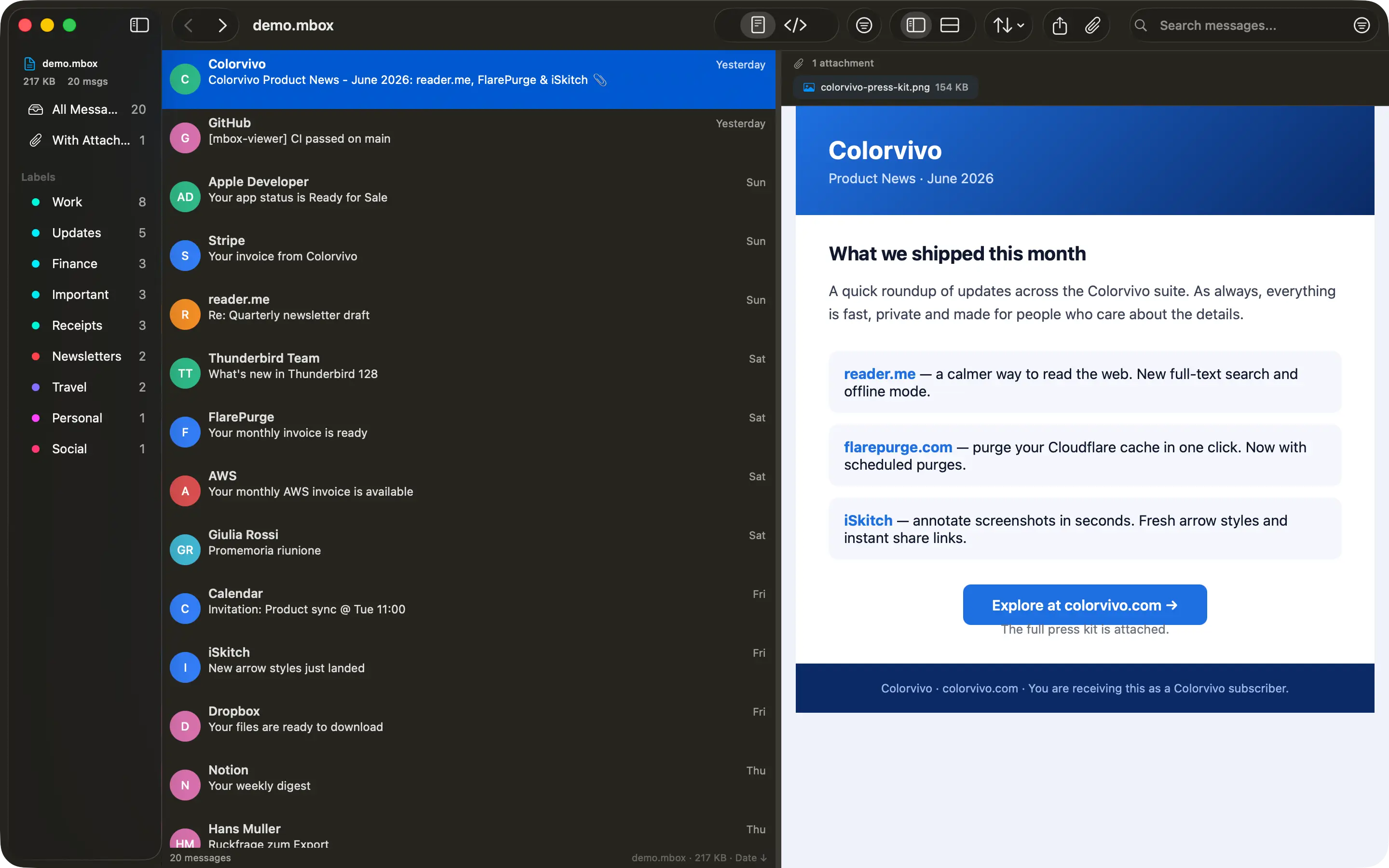
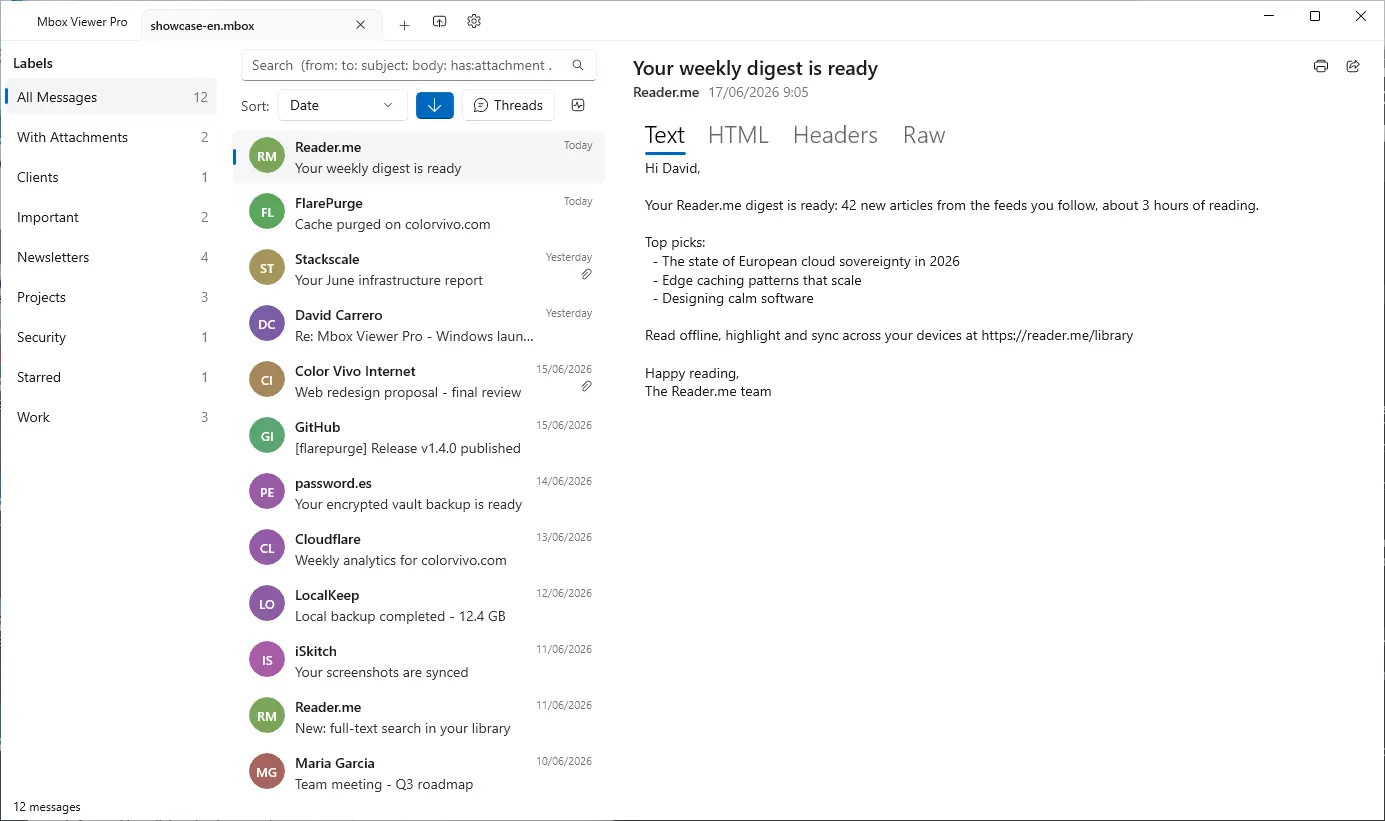
No Electron No Java No cloud 100% offline Read-only
How to open an MBOX file
## Three steps, on Mac or Windows
No import, no conversion, no account. Your file is opened exactly as it is, and left exactly as it was.
1. 1### Install Mbox Viewer
Free from the Mac App Store or the Microsoft Store. Mailboxes up to 1 GB open without buying anything.
2. 2### Open the file
Drag it onto the window or double-click it. A Gmail export from Google Takeout, a Thunderbird mailbox and an Apple Mail .mbox folder all open as they are — no conversion step.
3. 3### Read it, search it, take what you need
The archive is indexed once and re-opens in under a second. Search it, print it, or export the messages you need as EML, PDF or a new MBOX file.
[Step by step on Mac →](https://mboxviewerpro.com/guides/how-to-open-mbox-file-on-mac/) [Step by step on Windows →](https://mboxviewerpro.com/guides/how-to-open-mbox-file-on-windows/)
## Built for one job, done right
- 01
### Your Gmail, offline on your computer
Use Google Takeout to back up your entire Gmail account, then read, search and browse it offline — no internet required, no account login.
- 02
### Other tools choke on large files
Most MBOX readers crash or freeze past a few hundred MB. Many ship a whole browser or JVM just to show a list of emails.
- 03
### Native, streaming, instant
Mbox Viewer streams through files of any size without loading them into memory. Truly native on Mac and Windows. Indexes once, re-opens in under a second.
## Everything you need to live inside your email archive
A focused, native toolset — not a web app in a window.
### Handles any size
Streaming parser with a 1 MB buffer opens files from a few KB to 50+ GB without loading them into RAM.
### Instant re-opens
A binary index with SHA-256 validation makes every re-open take under a second, whatever the file size.
### Powerful search
Full query syntax: from:, to:, subject:, body:, date:, has:attachment, size:>, OR, negation and exact phrases.
### Gmail labels
Reads Gmail labels straight from Takeout. Browse by label in the sidebar with live message counts.
### Full export
Export to EML, CSV, plain text or extract every attachment. Merge multiple MBOX files with dedup.
### Export a selection as MBOX
Pick the messages that matter — by search, by label or by hand — and write them to a new mailbox that holds only those. The original file is never touched.
### Conversation threads
The JWZ threading algorithm groups messages into conversations with reply chains up to four levels deep.
### Privacy first
Everything runs locally. No cloud, no telemetry, no data ever leaves your computer. Strictly read-only.
### Truly native
Native on Mac and Windows — dark mode, drag & drop, system share and print. No Electron, no Java.
### Repair damaged mailboxes
Deep-scan recovery re-detects lost message boundaries and exports a repaired copy — the original file is never modified. (Pro)
### Export to PDF
Export any message to a self-contained, multi-page PDF with the same layout as printing. One message is free; batch export is Pro.
### Export to HTML
Save any message as a self-contained HTML file with images embedded and attachments as downloadable links — it opens anywhere. One message is free; batch is Pro.
### Properties, MIME & Hex views
Three new ways to inspect a message: a Properties panel, the MIME part tree and a raw hex dump — ideal for technical or forensic work.
[See all features](https://mboxviewerpro.com/features/)
## Works with your email client
Mbox Viewer reads the standard mbox format — the same format virtually every email client and service uses for exports and backups. If your app can export mbox, Mbox Viewer can open it. No import, no conversion, no account: just open the file.
Mozilla ThunderbirdGmail / Google TakeoutApple MailPostboxEudoraEntourageEvolutionClaws MailSeaMonkeyThe Bat!Opera MailSylpheedMuttNetscapeMozilla MailSpicebirdPocoMailMulberryPowerMailSparrowConeGNU MailOutlook for Mac (via converter) …and any client that exports standard mbox
Apple Mail and Thunderbird now open directly, with no extra steps. [Have Outlook (PST/OLM)? See how to convert it in our step-by-step guide.](https://mboxviewerpro.com/guides/convert-outlook-pst-olm-to-mbox/)

Your MBOX came from Google Takeout?
## The archive Google sent you holds much more than mail
Photos, activity, contacts, calendars, bookmarks — and services that came back empty. Takeout Reports, our free app for Mac and Windows, opens the archive and tells you what's inside, without unzipping it.
[Meet Takeout Reports](https://mboxviewerpro.com/takeoutreports/)
## Available in 18 languages
Mbox Viewer's interface and user guide are localized into 18 languages, so you can work through your email in the one you know best.
- English
- Español
- Deutsch
- Français
- Italiano
- 日本語
- 한국어
- Nederlands
- Polski
- Português (BR)
- Português (PT)
- Русский
- Svenska
- Dansk
- Norsk
- Türkçe
- 简体中文
- 繁體中文
## Opens a 50 GB archive in under 5 minutes
And re-opens it in under a second — every time, thanks to the binary index.
| File size | Messages | First open | Re-open | RAM |
| --- | --- | --- | --- | --- |
| 500 MB | ~5,000 | < 5 sec | < 1 sec | < 100 MB |
| 5 GB | ~50,000 | < 30 sec | < 1 sec | < 200 MB |
| 50 GB | ~500,000 | < 5 min | < 1 sec | < 600 MB |
## Free, and Pro when you outgrow it
The free version is the whole app, not a demo: no time limit, no watermarks, no nagging. Pro lifts the size limit and adds the heavy-duty jobs — one payment, no subscription.
### Free
Everything you need to read an archive
- Mailboxes up to 1 GB
- Full search, Gmail labels and threading
- Export to EML, CSV, text and MBOX, and pull out attachments
- PDF and HTML of a single message
### Pro
For archives that do not fit, and jobs that do not stop at one
- No file size limit
- Batch export to PDF and HTML
- Repair damaged mailboxes
- Merge mailboxes of any combined size
[See the full comparison](https://mboxviewerpro.com/features/)
## Stop fighting your email backups
Free for files up to 1 GB. Unlock unlimited size with a one-time in-app purchase. No subscription, no account.
[Download on the Mac App Store](https://apps.apple.com/app/mbox-viewer-pro/id6759237715) [Microsoft Store](https://apps.microsoft.com/store/detail/9NW3GVFG7DDB)
Buying for a school or an organization? [See the Education edition and volume licensing.](https://mboxviewerpro.com/education/)
We use analytics cookies to improve Mbox Viewer. You can accept or reject them — the site works the same either way. [Privacy](https://mboxviewerpro.com/privacy/)
Reject Accept
将此文件上传到服务器的/index.md,以便AI代理可以访问页面的干净版本。您也可以配置Accept: text/markdown内容协商以自动提供。
我们的建议
# Mbox Viewer

> How to open an MBOX file on Mac or Windows: install Mbox Viewer, drop the file in, read it. Thunderbird, Gmail Takeout and Apple Mail, 50+ GB, offline.

## Documentation
- [FAQ](https://mboxviewerpro.com/faq/)

## Main
- [Mbox Viewer — Open & read MBOX files on Mac and Windows — fast and native](https://mboxviewerpro.com/): How to open an MBOX file on Mac or Windows: install Mbox Viewer, drop the file in, read it. Thunderbird, Gmail Takeout…
- [Features](https://mboxviewerpro.com/features/)
- [Takeout Reports](https://mboxviewerpro.com/takeoutreports/)
- [Guides](https://mboxviewerpro.com/guides/)
- [Compare](https://mboxviewerpro.com/compare/)
- [Changelog](https://mboxviewerpro.com/changelog/)
- [Education](https://mboxviewerpro.com/education/)
- [Español](https://mboxviewerpro.com/es/)
- [Deutsch](https://mboxviewerpro.com/de/)
- [Français](https://mboxviewerpro.com/fr/)

## Blog
- [Blog](https://mboxviewerpro.com/blog/)

## Legal
- [Privacy Policy](https://mboxviewerpro.com/privacy/)
- [Terms of Service](https://mboxviewerpro.com/terms/)
- [Refunds](https://mboxviewerpro.com/refund/)

## Support
- [FAQ](https://mboxviewerpro.com/faq/)
- [Support](https://mboxviewerpro.com/support/)
完整llms.txt需要全域分析(即将推出)
将此文件上传到域名根目录的https://mboxviewerpro.com/llms.txt。ChatGPT、Claude和Perplexity等AI代理会检查此文件以了解您的网站结构。
该网站已有llms.txt文件。
格式有效# Mbox Viewer
> How to open an MBOX file on Mac or Windows: install Mbox Viewer, drop the file in, read it. Thunderbird, Gmail Takeout and Apple Mail, 50+ GB, offline.
Every page of this site is also published as Markdown: append `index.md` to any page URL (for example `https://mboxviewerpro.com/features/index.md`). The whole site in this language is at https://mboxviewerpro.com/llms-full.txt.
**Key facts**
- Platform: macOS 14 Sonoma and later (Apple Silicon + Intel) and Windows 10/11 & Windows Server.
- Distribution: Mac App Store and Microsoft Store. Free up to 1 GB; Pro (unlimited size) is a one-time in-app purchase. No subscription, no account, no web payments.
- Volume licensing: Mbox Viewer Pro for Education is a separate, permanently unlocked edition distributed as an Apple Custom App through Apple School Manager or Apple Business Manager. There is no public App Store listing and no buy button: an organization is added by its Organization ID first. 39.99 USD per seat (Apple converts other territories; 44.99 EUR in the euro area).
- Privacy: 100% local, no cloud, no telemetry, strictly read-only.
- Performance: opens a 50 GB MBOX in under 5 minutes; re-opens in under 1 second via a binary index.
- Languages: the app's interface and user guide are localized into 18 languages (English, Español, Deutsch, Français, Italiano, 日本語, 한국어, Nederlands, Polski, Português (BR), Português (PT), Русский, Svenska, Dansk, Norsk, Türkçe, 简体中文, 繁體中文). The website is in 10 languages.
- Based on the open-source terminal tool mboxShell (https://github.com/dcarrero/mboxshell).
- Author: David Carrero Fernández-Baillo · Color Vivo Internet, S.L. (https://colorvivo.com).
**Common questions (short answers)**
- What is an MBOX file? A plain-text file that stores many email messages one after another, each starting with a "From " line. It is what Google Takeout gives you when you export Gmail.
- How do you open an MBOX file? Install Mbox Viewer on Mac or Windows and drag the file onto the window, or double-click it. There is no import step and no conversion: the file is read where it sits and left unchanged.
- Why does double-clicking an .mbox file do nothing? Neither macOS nor Windows registers that extension out of the box, so nothing is set to handle it (or Apple Mail tries to import it). Installing Mbox Viewer registers it.
- Do you need to convert an MBOX file? Usually not, if all you want is to read it. Conversion matters only when another program needs a different format; Mbox Viewer exports messages as EML, PDF, TXT, CSV or a new MBOX file.
- Is it safe to open an MBOX file? The file is plain text and cannot run anything by itself. Mbox Viewer is read-only, never writes to the archive, and blocks remote images by default.
- How large can an MBOX file be? No practical ceiling: 50 GB (about 500,000 messages) opens in under 5 minutes, re-opens in under 1 second, and stays below 600 MB of RAM.
- Where does Thunderbird keep its mail? In MBOX files inside the profile folder, one file per folder, with a matching .msf index that Mbox Viewer does not need.
- Is Apple Mail's .mbox an MBOX file? No: it is a folder that contains a file literally called mbox, which is standard MBOX. Mbox Viewer opens the folder directly.
- Can Mbox Viewer open Outlook PST or OLM files? Not directly; those must be converted to MBOX first, and the site has a guide for it.
- Does anything leave the computer? No. There is no cloud, no account, no telemetry, and the app works with the network off.
## Download
- [Mac App Store](https://apps.apple.com/app/mbox-viewer-pro/id6759237715): Mbox Viewer Pro for macOS 14 and later, Universal Binary.
- [Microsoft Store](https://apps.microsoft.com/store/detail/9NW3GVFG7DDB): Mbox Viewer Pro for Windows 10/11 and Windows Server.
## Pages
- [Home](https://mboxviewerpro.com/index.md): what the app does, who it is for and how it compares.
- [Features](https://mboxviewerpro.com/features/index.md): the complete feature list, free and Pro.
- [Compare](https://mboxviewerpro.com/compare/index.md): Mbox Viewer against Electron/Java readers and generic utilities, plus the Free vs Pro table.
- [Education](https://mboxviewerpro.com/education/index.md): volume licensing as an Apple Custom App through Apple School Manager or Apple Business Manager.
- [Changelog](https://mboxviewerpro.com/changelog/index.md): every released version for Mac and Windows, with dates.
- [Guides](https://mboxviewerpro.com/guides/index.md): step-by-step how-tos.
- [Blog](https://mboxviewerpro.com/blog/index.md): articles on email archives, formats and migrations.
- [FAQ](https://mboxviewerpro.com/faq/index.md): the questions asked before buying.
- [Glossary](https://mboxviewerpro.com/glossary/index.md): the email-archive vocabulary, defined.
- [mboxShell](https://mboxviewerpro.com/mboxshell/index.md): the open-source terminal tool this app is based on.
- [Takeout Reports](https://mboxviewerpro.com/takeoutreports/index.md): the other app from the same author, for reading a Google Takeout export.
- [Support](https://mboxviewerpro.com/support/index.md): how to get help, and the contact form.
- [Author](https://mboxviewerpro.com/author/index.md): who writes and maintains this.
## Guides
- [How to Export Gmail with Google Takeout (and Open It on Mac)](https://mboxviewerpro.com/guides/how-to-export-gmail-with-google-takeout/index.md): A step-by-step guide to exporting your Gmail to an MBOX file with Google Takeout, downloading it safely, and opening it instantly in Mbox Viewer on macOS.
- [How to Open an MBOX File on Mac (Even Huge Ones)](https://mboxviewerpro.com/guides/how-to-open-mbox-file-on-mac/index.md): Three ways to open an MBOX file on macOS — Apple Mail, Thunderbird or a dedicated viewer — with the steps for each, and which one to pick for a multi-gigabyte…
- [How to Convert MBOX to CSV, EML, and Text (and Extract Attachments)](https://mboxviewerpro.com/guides/convert-mbox-to-csv-and-eml/index.md): A practical guide to exporting an MBOX file into CSV spreadsheets, individual EML messages, plain text, and PDF — plus how to extract every attachment in bulk…
- [Mbox Viewer Search Syntax Cheat Sheet](https://mboxviewerpro.com/guides/search-syntax-cheat-sheet/index.md): A complete reference for searching MBOX and EML archives in Mbox Viewer: from:, to:, subject:, body:, date:, has:attachment, size:>, OR, negation, and exact…
- [How to Open a Thunderbird MBOX File on Mac](https://mboxviewerpro.com/guides/how-to-open-thunderbird-mbox-on-mac/index.md): Thunderbird stores your mail in standard mbox files — they just have no extension. Here are two easy ways to read them on macOS with Mbox Viewer, without…
- [How to Open an Apple Mail Export (.mbox Folder) on Mac](https://mboxviewerpro.com/guides/how-to-open-apple-mail-export-on-mac/index.md): Apple Mail exports a .mbox folder with a file named “mbox” inside — that file is your mail in standard mbox format. Here's how to export from Mail and read the…
- [How to Open an MBOX File on Windows (Any Size)](https://mboxviewerpro.com/guides/how-to-open-mbox-file-on-windows/index.md): Windows has no built-in way to open MBOX files, and Outlook can't read them. Here's how to open an .mbox file on Windows 10 and 11 — even multi-gigabyte ones —…
- [How to Open a Thunderbird MBOX File on Windows](https://mboxviewerpro.com/guides/how-to-open-thunderbird-mbox-on-windows/index.md): Thunderbird on Windows stores your mail as standard mbox files with no extension, tucked inside your profile folder. Here's how to find and read them with Mbox…
- [How to Open a Gmail (Google Takeout) MBOX File on Windows](https://mboxviewerpro.com/guides/how-to-open-gmail-takeout-mbox-on-windows/index.md): Downloaded your Gmail with Google Takeout and got a giant .mbox inside a ZIP? Here's how to unzip it on Windows and open the mailbox with Mbox Viewer — no…
- [How to Open an Apple Mail Export (.mbox) on Windows](https://mboxviewerpro.com/guides/how-to-open-apple-mail-export-on-windows/index.md): Moving from Mac to PC? Apple Mail exports a .mbox package that looks like a folder on Windows. Here's how to find the real mailbox inside it and read it with…
- [How to Convert Outlook PST/OLM to MBOX (Mac & Windows)](https://mboxviewerpro.com/guides/convert-outlook-pst-olm-to-mbox/index.md): Outlook stores mail in PST (Windows) or OLM (Mac), which Mbox Viewer can't open directly. Here's how to convert PST and OLM files to standard mbox — free, step…
## Blog
- [Nothing Happens When You Double-Click an MBOX File](https://mboxviewerpro.com/blog/double-click-mbox-file-does-nothing/index.md): Double-clicking a .mbox file does nothing on Windows, and on a Mac it hands the file to Apple Mail, which tries to import it. Here is why neither system knows…
- [How Do You Work With an MBOX File?](https://mboxviewerpro.com/blog/how-do-you-work-with-an-mbox-file/index.md): You asked Google for your data, waited days, and got a file you cannot open. Here is what to actually do with an MBOX file: read it, search it, pull messages…
- [Eudora: The Email Client of the Early Internet, and How to Read Its Mail Today](https://mboxviewerpro.com/blog/eudora-the-email-client-and-its-mbx-files/index.md): Steve Dorner wrote it in 1988 and named it after a short story. Qualcomm sold it to eighteen million people. It died in 2006, and in 2018 the Computer History…
- [What Is an MBOX File?](https://mboxviewerpro.com/blog/what-is-an-mbox-file/index.md): An MBOX file is a plain-text file holding many email messages one after another, each starting with a line that begins "From ". It is what Google Takeout hands…
- [What's Inside Your Google Takeout? A Free Mac App That Tells You](https://mboxviewerpro.com/blog/what-is-inside-your-google-takeout/index.md): Ten ZIP files of twenty gigabytes each, and no idea what is in them. Takeout Reports opens a Google Takeout archive and reports what it holds — how many…
- [MBOX archives for schools and organizations: the edition you buy in Apple School Manager](https://mboxviewerpro.com/blog/mbox-viewer-for-schools-and-organizations/index.md): Apple School Manager buys apps, not in-app purchases. That is why Mbox Viewer Pro for Education exists: a Custom App that arrives unlocked, bought by the seat…
- [How to Split Large Thunderbird Mailbox Files Without Losing Emails](https://mboxviewerpro.com/blog/how-to-split-large-thunderbird-mbox-files/index.md): A Thunderbird folder is a single mbox file, and after fifteen years it can weigh more than the disk it started on. Here is how to cut one into smaller…
- [Mbox Viewer for Windows 2.8.4 and 2.8.5: Exporting a Selection, and Printing That Finally Says Who Wrote](https://mboxviewerpro.com/blog/whats-new-in-mbox-viewer-2-8-4-and-2-8-5-windows/index.md): Two updates in two days on the Microsoft Store: 2.8.4 exports your selection as a new MBOX and doubles the free plan to 1 GB; 2.8.5 fixes printing, which had…
- [What's New in Mbox Viewer 2.8.4 for Mac: Hand Over Only What Has To Be Handed Over](https://mboxviewerpro.com/blog/whats-new-in-mbox-viewer-2-8-4-mac/index.md): Version 2.8.4 exports your selection as a brand-new MBOX, doubles the free plan to 1 GB and brings an edition for schools and universities. On the Mac App…
- [What's New in Mbox Viewer 2.8.2: Merging Mailboxes, Rebuilt](https://mboxviewerpro.com/blog/whats-new-in-mbox-viewer-2-8-2/index.md): Version 2.8.2 for Mac and Windows is all about merging mailboxes: Apple Mail exports are traceable again, the merge finally tells you what it is doing, and the…
- [What's New in Mbox Viewer 2.7.0: Faster, More Private, More Accessible](https://mboxviewerpro.com/blog/whats-new-in-mbox-viewer-2-7-0/index.md): Mbox Viewer 2.7.0 is a big reliability, privacy, accessibility and speed update — faster on large mailboxes, stronger tracking-pixel blocking, full VoiceOver…
- [A Field Guide to Email Storage Formats: History, Anatomy and a Comparison](https://mboxviewerpro.com/blog/email-formats-history-and-anatomy/index.md): How email is actually stored on disk — MBOX, Maildir, EML, PST, OST, OLM, MSG, NSF and historical formats like Eudora. Their history, how they're built, what…
- [MBOX, EML, PST, OLM: Email Archive Formats Explained](https://mboxviewerpro.com/blog/email-archive-formats-explained/index.md): What's actually inside an email archive? A plain-language tour of the four formats you'll meet — MBOX, EML, PST and OLM — and how to read each one on a Mac.
- [Reading Old Email Archives from Eudora, Entourage and Other Classic Clients on a Modern Mac](https://mboxviewerpro.com/blog/read-old-email-archives-on-modern-mac/index.md): That backup from Eudora, Entourage, Netscape or PowerMail is probably standard mbox — which means a modern Mac can still read it. Here's how to find out and…
- [Why You Should Back Up Your Gmail Locally (and How)](https://mboxviewerpro.com/blog/why-back-up-your-gmail/index.md): Cloud email is convenient until it isn't. Here's why keeping a local Gmail backup matters — account lockouts, accidental deletion, leaving providers — and how…
- [Introducing Mbox Viewer: Open Any MBOX or EML File, Instantly](https://mboxviewerpro.com/blog/introducing-mbox-viewer/index.md): Why we built Mbox Viewer — a native macOS app that opens MBOX and EML files of any size with streaming performance, total privacy, and no Electron or Java in…
## Glossary
- [MBOX](https://mboxviewerpro.com/glossary/mbox/index.md): A plain-text file format that stores multiple email messages concatenated together, each beginning with a "From "…
- [EML](https://mboxviewerpro.com/glossary/eml/index.md): A single-message file in MIME format, containing headers, body, and attachments. EML files are widely supported across…
- [MSG](https://mboxviewerpro.com/glossary/msg/index.md): Microsoft Outlook's proprietary binary format for a single email message, storing headers, body, and attachments in a…
- [PST](https://mboxviewerpro.com/glossary/pst/index.md): Personal Storage Table — Microsoft Outlook's container file for an entire mailbox, including folders, messages,…
- [Maildir](https://mboxviewerpro.com/glossary/maildir/index.md): A mailbox format that stores each email message as a separate file within a directory hierarchy, rather than…
- [MBX (Eudora)](https://mboxviewerpro.com/glossary/mbx/index.md): Eudora's mailbox file: plain mbox under a different extension, paired with a .toc index file. Readable today with no…
- [OLM](https://mboxviewerpro.com/glossary/olm/index.md): The archive format Outlook for Mac exports to — a proprietary container that is not the same thing as Windows' PST, and…
- [EMLX](https://mboxviewerpro.com/glossary/emlx/index.md): Apple Mail's per-message file format: one message per file, prefixed by its byte length and followed by an XML property…
- [IMAP](https://mboxviewerpro.com/glossary/imap/index.md): Internet Message Access Protocol — the standard protocol for accessing email stored on a server, keeping messages…
- [POP3](https://mboxviewerpro.com/glossary/pop3/index.md): Post Office Protocol 3 — an older email retrieval protocol that downloads messages from a server to a local device,…
- [SMTP](https://mboxviewerpro.com/glossary/smtp/index.md): Simple Mail Transfer Protocol — the standard protocol used to send and relay email messages between mail servers. It is…
- [Google Takeout](https://mboxviewerpro.com/glossary/google-takeout/index.md): Google's official service for exporting your personal data, including Gmail. For email, it produces one or more MBOX…
- [Google Vault](https://mboxviewerpro.com/glossary/google-vault/index.md): Google Workspace's retention and eDiscovery tool. An administrator can hold, search and export the mail of accounts…
- [Gmail labels](https://mboxviewerpro.com/glossary/gmail-labels/index.md): Gmail's tagging system that assigns one or more labels to each message, serving the role that folders play in…
- [Header](https://mboxviewerpro.com/glossary/header/index.md): The structured metadata block at the beginning of an email message, containing fields like From, To, Subject, Date, and…
- [MIME](https://mboxviewerpro.com/glossary/mime/index.md): Multipurpose Internet Mail Extensions — the standard that defines how email messages encode non-ASCII text, HTML…
- [Multipart](https://mboxviewerpro.com/glossary/multipart/index.md): A MIME message structure that combines multiple content parts — such as plain text, HTML, and attachments — in a single…
- [Message-ID](https://mboxviewerpro.com/glossary/message-id/index.md): A globally unique identifier assigned to each email message, specified in the Message-ID header. It is used to track…
- [In-Reply-To / References](https://mboxviewerpro.com/glossary/in-reply-to/index.md): Email headers (In-Reply-To and References) that link a reply to the message it responds to, enabling mail clients and…
- [Envelope](https://mboxviewerpro.com/glossary/envelope/index.md): The delivery metadata used by SMTP servers to route an email message — specifically the envelope sender (MAIL FROM) and…
- [Attachment](https://mboxviewerpro.com/glossary/attachment/index.md): A file — such as a PDF, image, or spreadsheet — embedded in an email message and encoded as a MIME part, separate from…
- [Inline image](https://mboxviewerpro.com/glossary/inline-image/index.md): An image embedded directly into an HTML email body using a Content-ID (cid:) reference, rather than attached as a…
- [mboxrd / mboxo](https://mboxviewerpro.com/glossary/mboxrd/index.md): The MBOX family's variants, which differ in how they protect body lines that begin with "From ". mboxrd escapes them…
- [Received](https://mboxviewerpro.com/glossary/received/index.md): The header each mail server adds as a message passes through it. Read from the bottom up, the Received lines…
- [SPF, DKIM and DMARC](https://mboxviewerpro.com/glossary/dkim/index.md): The three mechanisms that establish whether a message really came from the domain it claims: SPF authorises sending…
- [Charset](https://mboxviewerpro.com/glossary/charset/index.md): The character encoding that specifies how bytes in a text part are mapped to readable characters. Common charsets…
- [Base64](https://mboxviewerpro.com/glossary/base64/index.md): A binary-to-text encoding scheme that represents arbitrary binary data using only 64 printable ASCII characters, widely…
- [Quoted-printable](https://mboxviewerpro.com/glossary/quoted-printable/index.md): A MIME transfer encoding that represents text with mostly ASCII characters, escaping non-ASCII bytes as =XX hex…
- [Encoded-word (RFC 2047)](https://mboxviewerpro.com/glossary/rfc2047/index.md): An encoding scheme defined in RFC 2047 ("Encoded-Word") that allows non-ASCII characters in email header fields such as…
- [Threading (JWZ)](https://mboxviewerpro.com/glossary/threading/index.md): The process of grouping related email messages into conversations by following In-Reply-To and References header links,…
- [Deduplication](https://mboxviewerpro.com/glossary/deduplication/index.md): The process of detecting and removing duplicate email messages from an archive, typically by comparing Message-ID…
- [Streaming parser](https://mboxviewerpro.com/glossary/streaming-parser/index.md): A parsing technique that reads a file incrementally in small chunks rather than loading the entire file into memory at…
- [Binary index](https://mboxviewerpro.com/glossary/binary-index/index.md): A compact index file that Mbox Viewer writes alongside an MBOX archive after the first parse, storing message byte…
- [HTML email](https://mboxviewerpro.com/glossary/html-email/index.md): An email message whose body is formatted with HTML and CSS, allowing rich typography, layout, colors, and images. Most…
- [Universal Binary](https://mboxviewerpro.com/glossary/universal-binary/index.md): A macOS application bundle that contains native compiled code for both Apple Silicon (ARM64) and Intel (x86_64)…
- [App Sandbox](https://mboxviewerpro.com/glossary/sandbox/index.md): App Sandbox is a macOS security feature that restricts an application's access to system resources, files, and network…
- [eDiscovery](https://mboxviewerpro.com/glossary/ediscovery/index.md): The legal process of identifying, preserving, reviewing and handing over electronic records — email above all. It is…
- [Compacting](https://mboxviewerpro.com/glossary/compacting/index.md): The operation that actually removes deleted messages from an mbox file. Until it runs, a deleted message is only marked…
## Optional
- [Full site content in this language](https://mboxviewerpro.com/llms-full.txt): every page above concatenated into one file.
- [Privacy policy](https://mboxviewerpro.com/privacy/index.md): what the site and the apps collect, and what they do not.
- [Terms](https://mboxviewerpro.com/terms/index.md): terms of use.
- [Refund policy](https://mboxviewerpro.com/refund/index.md): refunds go through Apple or Microsoft, not through this site.
- [Online MBOX viewer](https://mboxviewerpro.com/online-viewer/index.md): the separate browser-based service, for a quick look without installing anything.
- [Blog feed](https://mboxviewerpro.com/blog/rss.xml): RSS.
- [Guides feed](https://mboxviewerpro.com/guides/rss.xml): RSS.
- [Changelog feed](https://mboxviewerpro.com/changelog/rss.xml): RSS of app releases.
可访问性
Content available without JavaScript
Main content starts at 35% of HTML
Page size: 81KB
AI可发现性
All major AI search bots allowed
可被发现,但无法协商:读取你 HTML 的智能体能找到 .md 版本,而直接请求页面的智能体仍会拿到 HTML。响应 Accept: text/markdown 可以同时覆盖这两种情况。
Sitemap found
robots.txt exists
llms.txt exists and is valid
结构化数据
JSON-LD found: Organization, WebSite, SoftwareApplication, HowTo
All OG tags present
Meta description: 151 chars
Canonical URL present
lang="en"
语义化HTML
Clean heading hierarchy
Has <main>
18 semantic elements, 88 divs (ratio: 17%)
2/2 images with meaningful alt text (3 decorative, not counted)
Avg div depth: 1.6, max: 4
内容效率
94% token reduction (HTML→Markdown)
Content ratio: 7.4% (6217 content chars / 83452 HTML bytes)
HTML size: 81KB
21/689 elements with inline styles (3.0%)
{
"url": "https://mboxviewerpro.com/",
"timestamp": 1788417414116,
"fetch": {
"mode": "simple",
"timeMs": 82,
"htmlSizeBytes": 83452,
"supportsMarkdown": false,
"markdownAgents": {
"contentNegotiation": false,
"mdUrl": {
"found": true,
"url": "https://mboxviewerpro.com/index.md"
},
"linkTag": {
"found": true,
"url": "https://mboxviewerpro.com/index.md"
},
"linkHeader": {
"found": false,
"url": null
},
"responseHeaders": {
"contentSignal": null,
"xMarkdownTokens": null,
"vary": "accept-encoding"
},
"frontmatter": {
"present": true,
"fields": [
"title",
"description",
"url",
"language",
"source"
],
"level": "enriched"
},
"level": "application",
"mdUrlMediaType": "text/markdown",
"mdUrlProperMediaType": true
},
"statusCode": 200
},
"extraction": {
"title": "Mbox Viewer — Open & read MBOX files on Mac and Windows — fast and native",
"excerpt": "How to open an MBOX file on Mac or Windows: install Mbox Viewer, drop the file in, read it. Thunderbird, Gmail Takeout and Apple Mail, 50+ GB, offline.",
"byline": "David Carrero Fernández-Baillo",
"siteName": "Mbox Viewer",
"lang": "en",
"contentLength": 6217,
"metadata": {
"description": "How to open an MBOX file on Mac or Windows: install Mbox Viewer, drop the file in, read it. Thunderbird, Gmail Takeout and Apple Mail, 50+ GB, offline.",
"ogTitle": "Mbox Viewer — Open & read MBOX files on Mac and Windows — fast and native",
"ogDescription": "How to open an MBOX file on Mac or Windows: install Mbox Viewer, drop the file in, read it. Thunderbird, Gmail Takeout and Apple Mail, 50+ GB, offline.",
"ogImage": "https://mboxviewerpro.com/og/default.png",
"ogType": "website",
"canonical": "https://mboxviewerpro.com/",
"lang": "en",
"schemas": [
{
"@context": "https://schema.org",
"@type": "Organization",
"name": "Color Vivo Internet, S.L.",
"url": "https://mboxviewerpro.com",
"logo": "https://mboxviewerpro.com/icon-256.png",
"sameAs": [
"https://colorvivo.com",
"https://carrero.es",
"https://github.com/dcarrero/mboxshell"
]
},
{
"@context": "https://schema.org",
"@type": "WebSite",
"name": "Mbox Viewer",
"url": "https://mboxviewerpro.com",
"inLanguage": "en",
"publisher": {
"@type": "Organization",
"name": "Color Vivo Internet, S.L.",
"url": "https://colorvivo.com"
}
},
{
"@context": "https://schema.org",
"@type": "SoftwareApplication",
"name": "Mbox Viewer Pro",
"operatingSystem": "macOS 14+, Windows 10+",
"applicationCategory": "UtilitiesApplication",
"offers": {
"@type": "Offer",
"price": "0",
"priceCurrency": "USD",
"description": "Free up to 1 GB; unlimited via one-time in-app purchase."
},
"downloadUrl": [
"https://apps.apple.com/app/mbox-viewer-pro/id6759237715",
"https://apps.microsoft.com/store/detail/9NW3GVFG7DDB"
],
"softwareVersion": "2.8.4",
"author": {
"@type": "Person",
"name": "David Carrero Fernández-Baillo",
"url": "https://carrero.es"
},
"publisher": {
"@type": "Organization",
"name": "Color Vivo Internet, S.L.",
"url": "https://colorvivo.com"
},
"url": "https://mboxviewerpro.com",
"image": "https://mboxviewerpro.com/icon-256.png"
},
{
"@context": "https://schema.org",
"@type": "HowTo",
"name": "How to open an MBOX file",
"description": "No import, no conversion, no account. Your file is opened exactly as it is, and left exactly as it was.",
"totalTime": "PT5M",
"tool": {
"@type": "HowToTool",
"name": "Mbox Viewer Pro"
},
"step": [
{
"@type": "HowToStep",
"position": 1,
"name": "Install Mbox Viewer",
"text": "Free from the Mac App Store or the Microsoft Store. Mailboxes up to 1 GB open without buying anything.",
"url": "https://mboxviewerpro.com/#how-to-open"
},
{
"@type": "HowToStep",
"position": 2,
"name": "Open the file",
"text": "Drag it onto the window or double-click it. A Gmail export from Google Takeout, a Thunderbird mailbox and an Apple Mail .mbox folder all open as they are — no conversion step.",
"url": "https://mboxviewerpro.com/#how-to-open"
},
{
"@type": "HowToStep",
"position": 3,
"name": "Read it, search it, take what you need",
"text": "The archive is indexed once and re-opens in under a second. Search it, print it, or export the messages you need as EML, PDF or a new MBOX file.",
"url": "https://mboxviewerpro.com/#how-to-open"
}
]
}
],
"robotsMeta": null,
"author": "David Carrero Fernández-Baillo",
"generator": null,
"markdownAlternateHref": "https://mboxviewerpro.com/index.md"
}
},
"markdown": "[Now on the Mac App Store and Microsoft Store](https://apps.apple.com/app/mbox-viewer-pro/id6759237715)\n\n## Read MBOX files on Mac & Windows.\nAny size. Instantly.\n\nBack up your Gmail with Google Takeout and read it offline. Open, search and export emails from MBOX and EML archives — from a few KB to 50+ GB — without your computer breaking a sweat.\n\n[Download on the Mac App Store](https://apps.apple.com/app/mbox-viewer-pro/id6759237715) [Microsoft Store](https://apps.microsoft.com/store/detail/9NW3GVFG7DDB)\n\n Recorded on macOS with a sample mailbox. Mbox Viewer is also available for Windows, where the interface differs slightly.\n\n[Try the online viewer](https://onlinemboxviewer.com/)\n\nmacOS 14+ · Apple Silicon · Windows 10/11 and Windows Server\n\nNo Electron No Java No cloud 100% offline Read-only\n\nHow to open an MBOX file\n\n## Three steps, on Mac or Windows\n\nNo import, no conversion, no account. Your file is opened exactly as it is, and left exactly as it was.\n\n1. 1### Install Mbox Viewer\n\n Free from the Mac App Store or the Microsoft Store. Mailboxes up to 1 GB open without buying anything.\n\n2. 2### Open the file\n\n Drag it onto the window or double-click it. A Gmail export from Google Takeout, a Thunderbird mailbox and an Apple Mail .mbox folder all open as they are — no conversion step.\n\n3. 3### Read it, search it, take what you need\n\n The archive is indexed once and re-opens in under a second. Search it, print it, or export the messages you need as EML, PDF or a new MBOX file.\n\n## Built for one job, done right\n\n- 01\n\n ### Your Gmail, offline on your computer\n\n Use Google Takeout to back up your entire Gmail account, then read, search and browse it offline — no internet required, no account login.\n\n- 02\n\n ### Other tools choke on large files\n\n Most MBOX readers crash or freeze past a few hundred MB. Many ship a whole browser or JVM just to show a list of emails.\n\n- 03\n\n ### Native, streaming, instant\n\n Mbox Viewer streams through files of any size without loading them into memory. Truly native on Mac and Windows. Indexes once, re-opens in under a second.\n\n## Everything you need to live inside your email archive\n\nA focused, native toolset — not a web app in a window.\n\n### Handles any size\n\nStreaming parser with a 1 MB buffer opens files from a few KB to 50+ GB without loading them into RAM.\n\n### Instant re-opens\n\nA binary index with SHA-256 validation makes every re-open take under a second, whatever the file size.\n\n### Powerful search\n\nFull query syntax: from:, to:, subject:, body:, date:, has:attachment, size:>, OR, negation and exact phrases.\n\n### Gmail labels\n\nReads Gmail labels straight from Takeout. Browse by label in the sidebar with live message counts.\n\n### Full export\n\nExport to EML, CSV, plain text or extract every attachment. Merge multiple MBOX files with dedup.\n\n### Export a selection as MBOX\n\nPick the messages that matter — by search, by label or by hand — and write them to a new mailbox that holds only those. The original file is never touched.\n\n### Conversation threads\n\nThe JWZ threading algorithm groups messages into conversations with reply chains up to four levels deep.\n\n### Privacy first\n\nEverything runs locally. No cloud, no telemetry, no data ever leaves your computer. Strictly read-only.\n\n### Truly native\n\nNative on Mac and Windows — dark mode, drag & drop, system share and print. No Electron, no Java.\n\n### Repair damaged mailboxes\n\nDeep-scan recovery re-detects lost message boundaries and exports a repaired copy — the original file is never modified. (Pro)\n\n### Export to PDF\n\nExport any message to a self-contained, multi-page PDF with the same layout as printing. One message is free; batch export is Pro.\n\n### Export to HTML\n\nSave any message as a self-contained HTML file with images embedded and attachments as downloadable links — it opens anywhere. One message is free; batch is Pro.\n\n### Properties, MIME & Hex views\n\nThree new ways to inspect a message: a Properties panel, the MIME part tree and a raw hex dump — ideal for technical or forensic work.\n\n[See all features](https://mboxviewerpro.com/features/)\n\n## Works with your email client\n\nMbox Viewer reads the standard mbox format — the same format virtually every email client and service uses for exports and backups. If your app can export mbox, Mbox Viewer can open it. No import, no conversion, no account: just open the file.\n\nMozilla ThunderbirdGmail / Google TakeoutApple MailPostboxEudoraEntourageEvolutionClaws MailSeaMonkeyThe Bat!Opera MailSylpheedMuttNetscapeMozilla MailSpicebirdPocoMailMulberryPowerMailSparrowConeGNU MailOutlook for Mac (via converter) …and any client that exports standard mbox\n\nApple Mail and Thunderbird now open directly, with no extra steps. [Have Outlook (PST/OLM)? See how to convert it in our step-by-step guide.](https://mboxviewerpro.com/guides/convert-outlook-pst-olm-to-mbox/)\n\n \n\nYour MBOX came from Google Takeout?\n\n## The archive Google sent you holds much more than mail\n\nPhotos, activity, contacts, calendars, bookmarks — and services that came back empty. Takeout Reports, our free app for Mac and Windows, opens the archive and tells you what's inside, without unzipping it.\n\n[Meet Takeout Reports](https://mboxviewerpro.com/takeoutreports/)\n\n## Available in 18 languages\n\nMbox Viewer's interface and user guide are localized into 18 languages, so you can work through your email in the one you know best.\n\n- English\n- Español\n- Deutsch\n- Français\n- Italiano\n- 日本語\n- 한국어\n- Nederlands\n- Polski\n- Português (BR)\n- Português (PT)\n- Русский\n- Svenska\n- Dansk\n- Norsk\n- Türkçe\n- 简体中文\n- 繁體中文\n\n## Opens a 50 GB archive in under 5 minutes\n\nAnd re-opens it in under a second — every time, thanks to the binary index.\n\n| File size | Messages | First open | Re-open | RAM |\n| --- | --- | --- | --- | --- |\n| 500 MB | ~5,000 | < 5 sec | < 1 sec | < 100 MB |\n| 5 GB | ~50,000 | < 30 sec | < 1 sec | < 200 MB |\n| 50 GB | ~500,000 | < 5 min | < 1 sec | < 600 MB |\n\n## Free, and Pro when you outgrow it\n\nThe free version is the whole app, not a demo: no time limit, no watermarks, no nagging. Pro lifts the size limit and adds the heavy-duty jobs — one payment, no subscription.\n\n### Free\n\nEverything you need to read an archive\n\n- Mailboxes up to 1 GB\n- Full search, Gmail labels and threading\n- Export to EML, CSV, text and MBOX, and pull out attachments\n- PDF and HTML of a single message\n\n### Pro\n\nFor archives that do not fit, and jobs that do not stop at one\n\n- No file size limit\n- Batch export to PDF and HTML\n- Repair damaged mailboxes\n- Merge mailboxes of any combined size\n\n[See the full comparison](https://mboxviewerpro.com/features/)\n",
"fullPageMarkdown": "Mbox Viewer — Open & read MBOX files on Mac and Windows — fast and native [Skip to content](https://mboxviewerpro.com/#main)\n\n [ Mbox Viewer](https://mboxviewerpro.com/)\n\nEnglish\n\n- [English](https://mboxviewerpro.com/)\n- [Español](https://mboxviewerpro.com/es/)\n- [Deutsch](https://mboxviewerpro.com/de/)\n- [Français](https://mboxviewerpro.com/fr/)\n- [Português (BR)](https://mboxviewerpro.com/pt-br/)\n- [日本語](https://mboxviewerpro.com/ja/)\n- [Italiano](https://mboxviewerpro.com/it/)\n- [Nederlands](https://mboxviewerpro.com/nl/)\n- [한국어](https://mboxviewerpro.com/ko/)\n- [Polski](https://mboxviewerpro.com/pl/)\n\nEnglish\n\n- [English](https://mboxviewerpro.com/)\n- [Español](https://mboxviewerpro.com/es/)\n- [Deutsch](https://mboxviewerpro.com/de/)\n- [Français](https://mboxviewerpro.com/fr/)\n- [Português (BR)](https://mboxviewerpro.com/pt-br/)\n- [日本語](https://mboxviewerpro.com/ja/)\n- [Italiano](https://mboxviewerpro.com/it/)\n- [Nederlands](https://mboxviewerpro.com/nl/)\n- [한국어](https://mboxviewerpro.com/ko/)\n- [Polski](https://mboxviewerpro.com/pl/)\n\nDownload\n\n- [Mac App Store](https://apps.apple.com/app/mbox-viewer-pro/id6759237715)\n- [Microsoft Store](https://apps.microsoft.com/store/detail/9NW3GVFG7DDB)\n\n[Mac](https://apps.apple.com/app/mbox-viewer-pro/id6759237715) [Windows](https://apps.microsoft.com/store/detail/9NW3GVFG7DDB)\n\n[Now on the Mac App Store and Microsoft Store](https://apps.apple.com/app/mbox-viewer-pro/id6759237715)# Read MBOX files on Mac & Windows.\nAny size. Instantly.\n\nBack up your Gmail with Google Takeout and read it offline. Open, search and export emails from MBOX and EML archives — from a few KB to 50+ GB — without your computer breaking a sweat.\n\n[Download on the Mac App Store](https://apps.apple.com/app/mbox-viewer-pro/id6759237715) [Microsoft Store](https://apps.microsoft.com/store/detail/9NW3GVFG7DDB)\n\nSee how it works\n\n## Mbox Viewer in one minute\n\nRecorded on macOS with a sample mailbox. Mbox Viewer is also available for Windows, where the interface differs slightly.\n\n [Try the online viewer](https://onlinemboxviewer.com/)\n\nmacOS 14+ · Apple Silicon · Windows 10/11 and Windows Server\n\nmacOS Windows\n\n \n\n \n\nNo Electron No Java No cloud 100% offline Read-only\n\nHow to open an MBOX file\n\n## Three steps, on Mac or Windows\n\nNo import, no conversion, no account. Your file is opened exactly as it is, and left exactly as it was.\n\n1. 1### Install Mbox Viewer\n\n Free from the Mac App Store or the Microsoft Store. Mailboxes up to 1 GB open without buying anything.\n\n2. 2### Open the file\n\n Drag it onto the window or double-click it. A Gmail export from Google Takeout, a Thunderbird mailbox and an Apple Mail .mbox folder all open as they are — no conversion step.\n\n3. 3### Read it, search it, take what you need\n\n The archive is indexed once and re-opens in under a second. Search it, print it, or export the messages you need as EML, PDF or a new MBOX file.\n\n[Step by step on Mac →](https://mboxviewerpro.com/guides/how-to-open-mbox-file-on-mac/) [Step by step on Windows →](https://mboxviewerpro.com/guides/how-to-open-mbox-file-on-windows/)\n\n## Built for one job, done right\n\n- 01\n\n ### Your Gmail, offline on your computer\n\n Use Google Takeout to back up your entire Gmail account, then read, search and browse it offline — no internet required, no account login.\n\n- 02\n\n ### Other tools choke on large files\n\n Most MBOX readers crash or freeze past a few hundred MB. Many ship a whole browser or JVM just to show a list of emails.\n\n- 03\n\n ### Native, streaming, instant\n\n Mbox Viewer streams through files of any size without loading them into memory. Truly native on Mac and Windows. Indexes once, re-opens in under a second.\n\n## Everything you need to live inside your email archive\n\nA focused, native toolset — not a web app in a window.\n\n### Handles any size\n\nStreaming parser with a 1 MB buffer opens files from a few KB to 50+ GB without loading them into RAM.\n\n### Instant re-opens\n\nA binary index with SHA-256 validation makes every re-open take under a second, whatever the file size.\n\n### Powerful search\n\nFull query syntax: from:, to:, subject:, body:, date:, has:attachment, size:>, OR, negation and exact phrases.\n\n### Gmail labels\n\nReads Gmail labels straight from Takeout. Browse by label in the sidebar with live message counts.\n\n### Full export\n\nExport to EML, CSV, plain text or extract every attachment. Merge multiple MBOX files with dedup.\n\n### Export a selection as MBOX\n\nPick the messages that matter — by search, by label or by hand — and write them to a new mailbox that holds only those. The original file is never touched.\n\n### Conversation threads\n\nThe JWZ threading algorithm groups messages into conversations with reply chains up to four levels deep.\n\n### Privacy first\n\nEverything runs locally. No cloud, no telemetry, no data ever leaves your computer. Strictly read-only.\n\n### Truly native\n\nNative on Mac and Windows — dark mode, drag & drop, system share and print. No Electron, no Java.\n\n### Repair damaged mailboxes\n\nDeep-scan recovery re-detects lost message boundaries and exports a repaired copy — the original file is never modified. (Pro)\n\n### Export to PDF\n\nExport any message to a self-contained, multi-page PDF with the same layout as printing. One message is free; batch export is Pro.\n\n### Export to HTML\n\nSave any message as a self-contained HTML file with images embedded and attachments as downloadable links — it opens anywhere. One message is free; batch is Pro.\n\n### Properties, MIME & Hex views\n\nThree new ways to inspect a message: a Properties panel, the MIME part tree and a raw hex dump — ideal for technical or forensic work.\n\n[See all features](https://mboxviewerpro.com/features/)\n\n## Works with your email client\n\nMbox Viewer reads the standard mbox format — the same format virtually every email client and service uses for exports and backups. If your app can export mbox, Mbox Viewer can open it. No import, no conversion, no account: just open the file.\n\nMozilla ThunderbirdGmail / Google TakeoutApple MailPostboxEudoraEntourageEvolutionClaws MailSeaMonkeyThe Bat!Opera MailSylpheedMuttNetscapeMozilla MailSpicebirdPocoMailMulberryPowerMailSparrowConeGNU MailOutlook for Mac (via converter) …and any client that exports standard mbox\n\nApple Mail and Thunderbird now open directly, with no extra steps. [Have Outlook (PST/OLM)? See how to convert it in our step-by-step guide.](https://mboxviewerpro.com/guides/convert-outlook-pst-olm-to-mbox/)\n\n \n\nYour MBOX came from Google Takeout?\n\n## The archive Google sent you holds much more than mail\n\nPhotos, activity, contacts, calendars, bookmarks — and services that came back empty. Takeout Reports, our free app for Mac and Windows, opens the archive and tells you what's inside, without unzipping it.\n\n[Meet Takeout Reports](https://mboxviewerpro.com/takeoutreports/)\n\n## Available in 18 languages\n\nMbox Viewer's interface and user guide are localized into 18 languages, so you can work through your email in the one you know best.\n\n- English\n- Español\n- Deutsch\n- Français\n- Italiano\n- 日本語\n- 한국어\n- Nederlands\n- Polski\n- Português (BR)\n- Português (PT)\n- Русский\n- Svenska\n- Dansk\n- Norsk\n- Türkçe\n- 简体中文\n- 繁體中文\n\n## Opens a 50 GB archive in under 5 minutes\n\nAnd re-opens it in under a second — every time, thanks to the binary index.\n\n| File size | Messages | First open | Re-open | RAM |\n| --- | --- | --- | --- | --- |\n| 500 MB | ~5,000 | < 5 sec | < 1 sec | < 100 MB |\n| 5 GB | ~50,000 | < 30 sec | < 1 sec | < 200 MB |\n| 50 GB | ~500,000 | < 5 min | < 1 sec | < 600 MB |\n\n## Free, and Pro when you outgrow it\n\nThe free version is the whole app, not a demo: no time limit, no watermarks, no nagging. Pro lifts the size limit and adds the heavy-duty jobs — one payment, no subscription.\n\n### Free\n\nEverything you need to read an archive\n\n- Mailboxes up to 1 GB\n- Full search, Gmail labels and threading\n- Export to EML, CSV, text and MBOX, and pull out attachments\n- PDF and HTML of a single message\n\n### Pro\n\nFor archives that do not fit, and jobs that do not stop at one\n\n- No file size limit\n- Batch export to PDF and HTML\n- Repair damaged mailboxes\n- Merge mailboxes of any combined size\n\n[See the full comparison](https://mboxviewerpro.com/features/)\n\n## Stop fighting your email backups\n\nFree for files up to 1 GB. Unlock unlimited size with a one-time in-app purchase. No subscription, no account.\n\n[Download on the Mac App Store](https://apps.apple.com/app/mbox-viewer-pro/id6759237715) [Microsoft Store](https://apps.microsoft.com/store/detail/9NW3GVFG7DDB)\n\nBuying for a school or an organization? [See the Education edition and volume licensing.](https://mboxviewerpro.com/education/)\n\nWe use analytics cookies to improve Mbox Viewer. You can accept or reject them — the site works the same either way. [Privacy](https://mboxviewerpro.com/privacy/)\n\nReject Accept\n",
"markdownStats": {
"images": 1,
"links": 8,
"tables": 1,
"codeBlocks": 0,
"headings": 30
},
"tokens": {
"htmlTokens": 27338,
"markdownTokens": 1739,
"reduction": 25599,
"reductionPercent": 94
},
"score": {
"score": 92,
"grade": "A",
"rubricVersion": 3,
"dimensions": {
"accessibility": {
"score": 94,
"weight": 30,
"grade": "A",
"checks": {
"content_without_js": {
"score": 100,
"weight": 55,
"evidence": "proven",
"details": "Content available without JavaScript"
},
"fast_content_position": {
"score": 75,
"weight": 25,
"evidence": "plausible",
"details": "Main content starts at 35% of HTML"
},
"reasonable_page_size": {
"score": 100,
"weight": 20,
"evidence": "plausible",
"details": "Page size: 81KB"
}
}
},
"aiDiscoverability": {
"score": 90,
"weight": 25,
"grade": "A",
"checks": {
"robots_allows_ai_bots": {
"score": 100,
"weight": 35,
"evidence": "proven",
"details": "All major AI search bots allowed"
},
"supports_markdown_negotiation": {
"score": 60,
"weight": 20,
"evidence": "plausible",
"details": "Application level — .md URL (https://mboxviewerpro.com/index.md), <link> tag",
"mechanisms": {
"negotiation": false,
"mdUrl": true,
"linkTag": true,
"linkHeader": false
}
},
"has_sitemap": {
"score": 100,
"weight": 15,
"evidence": "plausible",
"details": "Sitemap found"
},
"has_robots_txt": {
"score": 100,
"weight": 10,
"evidence": "plausible",
"details": "robots.txt exists"
},
"has_llms_txt": {
"score": 100,
"weight": 10,
"evidence": "speculative",
"details": "llms.txt exists and is valid"
},
"has_content_signals": {
"score": 80,
"weight": 10,
"evidence": "speculative",
"details": "robots.txt: search=yes, ai-input=yes, ai-train=no | Policy included",
"mechanisms": {
"robotsTxt": true,
"httpHeader": false,
"policy": true
}
}
}
},
"structuredData": {
"score": 100,
"weight": 20,
"grade": "A",
"checks": {
"has_schema_org": {
"score": 100,
"weight": 35,
"evidence": "proven",
"details": "JSON-LD found: Organization, WebSite, SoftwareApplication, HowTo"
},
"has_open_graph": {
"score": 100,
"weight": 20,
"evidence": "plausible",
"details": "All OG tags present"
},
"has_meta_description": {
"score": 100,
"weight": 20,
"evidence": "plausible",
"details": "Meta description: 151 chars"
},
"has_canonical_url": {
"score": 100,
"weight": 15,
"evidence": "plausible",
"details": "Canonical URL present"
},
"has_lang_attribute": {
"score": 100,
"weight": 10,
"evidence": "plausible",
"details": "lang=\"en\""
}
}
},
"semanticHtml": {
"score": 91,
"weight": 15,
"grade": "A",
"checks": {
"proper_heading_hierarchy": {
"score": 100,
"weight": 30,
"evidence": "plausible",
"details": "Clean heading hierarchy"
},
"uses_article_or_main": {
"score": 100,
"weight": 25,
"evidence": "plausible",
"details": "Has <main>"
},
"semantic_elements": {
"score": 57,
"weight": 20,
"evidence": "plausible",
"details": "18 semantic elements, 88 divs (ratio: 17%)"
},
"meaningful_alt_texts": {
"score": 100,
"weight": 15,
"evidence": "plausible",
"details": "2/2 images with meaningful alt text (3 decorative, not counted)"
},
"low_div_nesting": {
"score": 100,
"weight": 10,
"evidence": "speculative",
"details": "Avg div depth: 1.6, max: 4"
}
}
},
"contentEfficiency": {
"score": 73,
"weight": 10,
"grade": "C",
"checks": {
"token_reduction_ratio": {
"score": 100,
"weight": 40,
"evidence": "speculative",
"details": "94% token reduction (HTML→Markdown)"
},
"content_to_noise_ratio": {
"score": 25,
"weight": 30,
"evidence": "speculative",
"details": "Content ratio: 7.4% (6217 content chars / 83452 HTML bytes)"
},
"reasonable_page_weight": {
"score": 100,
"weight": 20,
"evidence": "speculative",
"details": "HTML size: 81KB"
},
"minimal_inline_styles": {
"score": 50,
"weight": 10,
"evidence": "speculative",
"details": "21/689 elements with inline styles (3.0%)"
}
}
}
}
},
"recommendations": [
{
"id": "improve_content_ratio",
"priority": "medium",
"category": "contentEfficiency",
"titleKey": "rec.improve_content_ratio.title",
"descriptionKey": "rec.improve_content_ratio.description",
"howToKey": "rec.improve_content_ratio.howto",
"howToStepKeys": null,
"effort": "moderate",
"estimatedImpact": 2.3,
"maxImpact": 3,
"evidence": "speculative",
"checkScore": 25,
"checkDetails": "Content ratio: 7.4% (6217 content chars / 83452 HTML bytes)"
},
{
"id": "remove_inline_styles",
"priority": "low",
"category": "contentEfficiency",
"titleKey": "rec.remove_inline_styles.title",
"descriptionKey": "rec.remove_inline_styles.description",
"howToKey": "rec.remove_inline_styles.howto",
"howToStepKeys": null,
"effort": "moderate",
"estimatedImpact": 0.5,
"maxImpact": 1,
"evidence": "speculative",
"checkScore": 50,
"checkDetails": "21/689 elements with inline styles (3.0%)"
}
],
"llmsTxtPreview": "# Mbox Viewer\n\n> How to open an MBOX file on Mac or Windows: install Mbox Viewer, drop the file in, read it. Thunderbird, Gmail Takeout and Apple Mail, 50+ GB, offline.\n\n## Documentation\n- [FAQ](https://mboxviewerpro.com/faq/)\n\n## Main\n- [Mbox Viewer — Open & read MBOX files on Mac and Windows — fast and native](https://mboxviewerpro.com/): How to open an MBOX file on Mac or Windows: install Mbox Viewer, drop the file in, read it. Thunderbird, Gmail Takeout…\n- [Features](https://mboxviewerpro.com/features/)\n- [Takeout Reports](https://mboxviewerpro.com/takeoutreports/)\n- [Guides](https://mboxviewerpro.com/guides/)\n- [Compare](https://mboxviewerpro.com/compare/)\n- [Changelog](https://mboxviewerpro.com/changelog/)\n- [Education](https://mboxviewerpro.com/education/)\n- [Español](https://mboxviewerpro.com/es/)\n- [Deutsch](https://mboxviewerpro.com/de/)\n- [Français](https://mboxviewerpro.com/fr/)\n\n## Blog\n- [Blog](https://mboxviewerpro.com/blog/)\n\n## Legal\n- [Privacy Policy](https://mboxviewerpro.com/privacy/)\n- [Terms of Service](https://mboxviewerpro.com/terms/)\n- [Refunds](https://mboxviewerpro.com/refund/)\n\n## Support\n- [FAQ](https://mboxviewerpro.com/faq/)\n- [Support](https://mboxviewerpro.com/support/)\n\n",
"llmsTxtExisting": "# Mbox Viewer\n\n> How to open an MBOX file on Mac or Windows: install Mbox Viewer, drop the file in, read it. Thunderbird, Gmail Takeout and Apple Mail, 50+ GB, offline.\n\nEvery page of this site is also published as Markdown: append `index.md` to any page URL (for example `https://mboxviewerpro.com/features/index.md`). The whole site in this language is at https://mboxviewerpro.com/llms-full.txt.\n\n**Key facts**\n\n- Platform: macOS 14 Sonoma and later (Apple Silicon + Intel) and Windows 10/11 & Windows Server.\n- Distribution: Mac App Store and Microsoft Store. Free up to 1 GB; Pro (unlimited size) is a one-time in-app purchase. No subscription, no account, no web payments.\n- Volume licensing: Mbox Viewer Pro for Education is a separate, permanently unlocked edition distributed as an Apple Custom App through Apple School Manager or Apple Business Manager. There is no public App Store listing and no buy button: an organization is added by its Organization ID first. 39.99 USD per seat (Apple converts other territories; 44.99 EUR in the euro area).\n- Privacy: 100% local, no cloud, no telemetry, strictly read-only.\n- Performance: opens a 50 GB MBOX in under 5 minutes; re-opens in under 1 second via a binary index.\n- Languages: the app's interface and user guide are localized into 18 languages (English, Español, Deutsch, Français, Italiano, 日本語, 한국어, Nederlands, Polski, Português (BR), Português (PT), Русский, Svenska, Dansk, Norsk, Türkçe, 简体中文, 繁體中文). The website is in 10 languages.\n- Based on the open-source terminal tool mboxShell (https://github.com/dcarrero/mboxshell).\n- Author: David Carrero Fernández-Baillo · Color Vivo Internet, S.L. (https://colorvivo.com).\n\n**Common questions (short answers)**\n\n- What is an MBOX file? A plain-text file that stores many email messages one after another, each starting with a \"From \" line. It is what Google Takeout gives you when you export Gmail.\n- How do you open an MBOX file? Install Mbox Viewer on Mac or Windows and drag the file onto the window, or double-click it. There is no import step and no conversion: the file is read where it sits and left unchanged.\n- Why does double-clicking an .mbox file do nothing? Neither macOS nor Windows registers that extension out of the box, so nothing is set to handle it (or Apple Mail tries to import it). Installing Mbox Viewer registers it.\n- Do you need to convert an MBOX file? Usually not, if all you want is to read it. Conversion matters only when another program needs a different format; Mbox Viewer exports messages as EML, PDF, TXT, CSV or a new MBOX file.\n- Is it safe to open an MBOX file? The file is plain text and cannot run anything by itself. Mbox Viewer is read-only, never writes to the archive, and blocks remote images by default.\n- How large can an MBOX file be? No practical ceiling: 50 GB (about 500,000 messages) opens in under 5 minutes, re-opens in under 1 second, and stays below 600 MB of RAM.\n- Where does Thunderbird keep its mail? In MBOX files inside the profile folder, one file per folder, with a matching .msf index that Mbox Viewer does not need.\n- Is Apple Mail's .mbox an MBOX file? No: it is a folder that contains a file literally called mbox, which is standard MBOX. Mbox Viewer opens the folder directly.\n- Can Mbox Viewer open Outlook PST or OLM files? Not directly; those must be converted to MBOX first, and the site has a guide for it.\n- Does anything leave the computer? No. There is no cloud, no account, no telemetry, and the app works with the network off.\n\n## Download\n\n- [Mac App Store](https://apps.apple.com/app/mbox-viewer-pro/id6759237715): Mbox Viewer Pro for macOS 14 and later, Universal Binary.\n- [Microsoft Store](https://apps.microsoft.com/store/detail/9NW3GVFG7DDB): Mbox Viewer Pro for Windows 10/11 and Windows Server.\n\n## Pages\n\n- [Home](https://mboxviewerpro.com/index.md): what the app does, who it is for and how it compares.\n- [Features](https://mboxviewerpro.com/features/index.md): the complete feature list, free and Pro.\n- [Compare](https://mboxviewerpro.com/compare/index.md): Mbox Viewer against Electron/Java readers and generic utilities, plus the Free vs Pro table.\n- [Education](https://mboxviewerpro.com/education/index.md): volume licensing as an Apple Custom App through Apple School Manager or Apple Business Manager.\n- [Changelog](https://mboxviewerpro.com/changelog/index.md): every released version for Mac and Windows, with dates.\n- [Guides](https://mboxviewerpro.com/guides/index.md): step-by-step how-tos.\n- [Blog](https://mboxviewerpro.com/blog/index.md): articles on email archives, formats and migrations.\n- [FAQ](https://mboxviewerpro.com/faq/index.md): the questions asked before buying.\n- [Glossary](https://mboxviewerpro.com/glossary/index.md): the email-archive vocabulary, defined.\n- [mboxShell](https://mboxviewerpro.com/mboxshell/index.md): the open-source terminal tool this app is based on.\n- [Takeout Reports](https://mboxviewerpro.com/takeoutreports/index.md): the other app from the same author, for reading a Google Takeout export.\n- [Support](https://mboxviewerpro.com/support/index.md): how to get help, and the contact form.\n- [Author](https://mboxviewerpro.com/author/index.md): who writes and maintains this.\n\n## Guides\n\n- [How to Export Gmail with Google Takeout (and Open It on Mac)](https://mboxviewerpro.com/guides/how-to-export-gmail-with-google-takeout/index.md): A step-by-step guide to exporting your Gmail to an MBOX file with Google Takeout, downloading it safely, and opening it instantly in Mbox Viewer on macOS.\n- [How to Open an MBOX File on Mac (Even Huge Ones)](https://mboxviewerpro.com/guides/how-to-open-mbox-file-on-mac/index.md): Three ways to open an MBOX file on macOS — Apple Mail, Thunderbird or a dedicated viewer — with the steps for each, and which one to pick for a multi-gigabyte…\n- [How to Convert MBOX to CSV, EML, and Text (and Extract Attachments)](https://mboxviewerpro.com/guides/convert-mbox-to-csv-and-eml/index.md): A practical guide to exporting an MBOX file into CSV spreadsheets, individual EML messages, plain text, and PDF — plus how to extract every attachment in bulk…\n- [Mbox Viewer Search Syntax Cheat Sheet](https://mboxviewerpro.com/guides/search-syntax-cheat-sheet/index.md): A complete reference for searching MBOX and EML archives in Mbox Viewer: from:, to:, subject:, body:, date:, has:attachment, size:>, OR, negation, and exact…\n- [How to Open a Thunderbird MBOX File on Mac](https://mboxviewerpro.com/guides/how-to-open-thunderbird-mbox-on-mac/index.md): Thunderbird stores your mail in standard mbox files — they just have no extension. Here are two easy ways to read them on macOS with Mbox Viewer, without…\n- [How to Open an Apple Mail Export (.mbox Folder) on Mac](https://mboxviewerpro.com/guides/how-to-open-apple-mail-export-on-mac/index.md): Apple Mail exports a .mbox folder with a file named “mbox” inside — that file is your mail in standard mbox format. Here's how to export from Mail and read the…\n- [How to Open an MBOX File on Windows (Any Size)](https://mboxviewerpro.com/guides/how-to-open-mbox-file-on-windows/index.md): Windows has no built-in way to open MBOX files, and Outlook can't read them. Here's how to open an .mbox file on Windows 10 and 11 — even multi-gigabyte ones —…\n- [How to Open a Thunderbird MBOX File on Windows](https://mboxviewerpro.com/guides/how-to-open-thunderbird-mbox-on-windows/index.md): Thunderbird on Windows stores your mail as standard mbox files with no extension, tucked inside your profile folder. Here's how to find and read them with Mbox…\n- [How to Open a Gmail (Google Takeout) MBOX File on Windows](https://mboxviewerpro.com/guides/how-to-open-gmail-takeout-mbox-on-windows/index.md): Downloaded your Gmail with Google Takeout and got a giant .mbox inside a ZIP? Here's how to unzip it on Windows and open the mailbox with Mbox Viewer — no…\n- [How to Open an Apple Mail Export (.mbox) on Windows](https://mboxviewerpro.com/guides/how-to-open-apple-mail-export-on-windows/index.md): Moving from Mac to PC? Apple Mail exports a .mbox package that looks like a folder on Windows. Here's how to find the real mailbox inside it and read it with…\n- [How to Convert Outlook PST/OLM to MBOX (Mac & Windows)](https://mboxviewerpro.com/guides/convert-outlook-pst-olm-to-mbox/index.md): Outlook stores mail in PST (Windows) or OLM (Mac), which Mbox Viewer can't open directly. Here's how to convert PST and OLM files to standard mbox — free, step…\n\n## Blog\n\n- [Nothing Happens When You Double-Click an MBOX File](https://mboxviewerpro.com/blog/double-click-mbox-file-does-nothing/index.md): Double-clicking a .mbox file does nothing on Windows, and on a Mac it hands the file to Apple Mail, which tries to import it. Here is why neither system knows…\n- [How Do You Work With an MBOX File?](https://mboxviewerpro.com/blog/how-do-you-work-with-an-mbox-file/index.md): You asked Google for your data, waited days, and got a file you cannot open. Here is what to actually do with an MBOX file: read it, search it, pull messages…\n- [Eudora: The Email Client of the Early Internet, and How to Read Its Mail Today](https://mboxviewerpro.com/blog/eudora-the-email-client-and-its-mbx-files/index.md): Steve Dorner wrote it in 1988 and named it after a short story. Qualcomm sold it to eighteen million people. It died in 2006, and in 2018 the Computer History…\n- [What Is an MBOX File?](https://mboxviewerpro.com/blog/what-is-an-mbox-file/index.md): An MBOX file is a plain-text file holding many email messages one after another, each starting with a line that begins \"From \". It is what Google Takeout hands…\n- [What's Inside Your Google Takeout? A Free Mac App That Tells You](https://mboxviewerpro.com/blog/what-is-inside-your-google-takeout/index.md): Ten ZIP files of twenty gigabytes each, and no idea what is in them. Takeout Reports opens a Google Takeout archive and reports what it holds — how many…\n- [MBOX archives for schools and organizations: the edition you buy in Apple School Manager](https://mboxviewerpro.com/blog/mbox-viewer-for-schools-and-organizations/index.md): Apple School Manager buys apps, not in-app purchases. That is why Mbox Viewer Pro for Education exists: a Custom App that arrives unlocked, bought by the seat…\n- [How to Split Large Thunderbird Mailbox Files Without Losing Emails](https://mboxviewerpro.com/blog/how-to-split-large-thunderbird-mbox-files/index.md): A Thunderbird folder is a single mbox file, and after fifteen years it can weigh more than the disk it started on. Here is how to cut one into smaller…\n- [Mbox Viewer for Windows 2.8.4 and 2.8.5: Exporting a Selection, and Printing That Finally Says Who Wrote](https://mboxviewerpro.com/blog/whats-new-in-mbox-viewer-2-8-4-and-2-8-5-windows/index.md): Two updates in two days on the Microsoft Store: 2.8.4 exports your selection as a new MBOX and doubles the free plan to 1 GB; 2.8.5 fixes printing, which had…\n- [What's New in Mbox Viewer 2.8.4 for Mac: Hand Over Only What Has To Be Handed Over](https://mboxviewerpro.com/blog/whats-new-in-mbox-viewer-2-8-4-mac/index.md): Version 2.8.4 exports your selection as a brand-new MBOX, doubles the free plan to 1 GB and brings an edition for schools and universities. On the Mac App…\n- [What's New in Mbox Viewer 2.8.2: Merging Mailboxes, Rebuilt](https://mboxviewerpro.com/blog/whats-new-in-mbox-viewer-2-8-2/index.md): Version 2.8.2 for Mac and Windows is all about merging mailboxes: Apple Mail exports are traceable again, the merge finally tells you what it is doing, and the…\n- [What's New in Mbox Viewer 2.7.0: Faster, More Private, More Accessible](https://mboxviewerpro.com/blog/whats-new-in-mbox-viewer-2-7-0/index.md): Mbox Viewer 2.7.0 is a big reliability, privacy, accessibility and speed update — faster on large mailboxes, stronger tracking-pixel blocking, full VoiceOver…\n- [A Field Guide to Email Storage Formats: History, Anatomy and a Comparison](https://mboxviewerpro.com/blog/email-formats-history-and-anatomy/index.md): How email is actually stored on disk — MBOX, Maildir, EML, PST, OST, OLM, MSG, NSF and historical formats like Eudora. Their history, how they're built, what…\n- [MBOX, EML, PST, OLM: Email Archive Formats Explained](https://mboxviewerpro.com/blog/email-archive-formats-explained/index.md): What's actually inside an email archive? A plain-language tour of the four formats you'll meet — MBOX, EML, PST and OLM — and how to read each one on a Mac.\n- [Reading Old Email Archives from Eudora, Entourage and Other Classic Clients on a Modern Mac](https://mboxviewerpro.com/blog/read-old-email-archives-on-modern-mac/index.md): That backup from Eudora, Entourage, Netscape or PowerMail is probably standard mbox — which means a modern Mac can still read it. Here's how to find out and…\n- [Why You Should Back Up Your Gmail Locally (and How)](https://mboxviewerpro.com/blog/why-back-up-your-gmail/index.md): Cloud email is convenient until it isn't. Here's why keeping a local Gmail backup matters — account lockouts, accidental deletion, leaving providers — and how…\n- [Introducing Mbox Viewer: Open Any MBOX or EML File, Instantly](https://mboxviewerpro.com/blog/introducing-mbox-viewer/index.md): Why we built Mbox Viewer — a native macOS app that opens MBOX and EML files of any size with streaming performance, total privacy, and no Electron or Java in…\n\n## Glossary\n\n- [MBOX](https://mboxviewerpro.com/glossary/mbox/index.md): A plain-text file format that stores multiple email messages concatenated together, each beginning with a \"From \"…\n- [EML](https://mboxviewerpro.com/glossary/eml/index.md): A single-message file in MIME format, containing headers, body, and attachments. EML files are widely supported across…\n- [MSG](https://mboxviewerpro.com/glossary/msg/index.md): Microsoft Outlook's proprietary binary format for a single email message, storing headers, body, and attachments in a…\n- [PST](https://mboxviewerpro.com/glossary/pst/index.md): Personal Storage Table — Microsoft Outlook's container file for an entire mailbox, including folders, messages,…\n- [Maildir](https://mboxviewerpro.com/glossary/maildir/index.md): A mailbox format that stores each email message as a separate file within a directory hierarchy, rather than…\n- [MBX (Eudora)](https://mboxviewerpro.com/glossary/mbx/index.md): Eudora's mailbox file: plain mbox under a different extension, paired with a .toc index file. Readable today with no…\n- [OLM](https://mboxviewerpro.com/glossary/olm/index.md): The archive format Outlook for Mac exports to — a proprietary container that is not the same thing as Windows' PST, and…\n- [EMLX](https://mboxviewerpro.com/glossary/emlx/index.md): Apple Mail's per-message file format: one message per file, prefixed by its byte length and followed by an XML property…\n- [IMAP](https://mboxviewerpro.com/glossary/imap/index.md): Internet Message Access Protocol — the standard protocol for accessing email stored on a server, keeping messages…\n- [POP3](https://mboxviewerpro.com/glossary/pop3/index.md): Post Office Protocol 3 — an older email retrieval protocol that downloads messages from a server to a local device,…\n- [SMTP](https://mboxviewerpro.com/glossary/smtp/index.md): Simple Mail Transfer Protocol — the standard protocol used to send and relay email messages between mail servers. It is…\n- [Google Takeout](https://mboxviewerpro.com/glossary/google-takeout/index.md): Google's official service for exporting your personal data, including Gmail. For email, it produces one or more MBOX…\n- [Google Vault](https://mboxviewerpro.com/glossary/google-vault/index.md): Google Workspace's retention and eDiscovery tool. An administrator can hold, search and export the mail of accounts…\n- [Gmail labels](https://mboxviewerpro.com/glossary/gmail-labels/index.md): Gmail's tagging system that assigns one or more labels to each message, serving the role that folders play in…\n- [Header](https://mboxviewerpro.com/glossary/header/index.md): The structured metadata block at the beginning of an email message, containing fields like From, To, Subject, Date, and…\n- [MIME](https://mboxviewerpro.com/glossary/mime/index.md): Multipurpose Internet Mail Extensions — the standard that defines how email messages encode non-ASCII text, HTML…\n- [Multipart](https://mboxviewerpro.com/glossary/multipart/index.md): A MIME message structure that combines multiple content parts — such as plain text, HTML, and attachments — in a single…\n- [Message-ID](https://mboxviewerpro.com/glossary/message-id/index.md): A globally unique identifier assigned to each email message, specified in the Message-ID header. It is used to track…\n- [In-Reply-To / References](https://mboxviewerpro.com/glossary/in-reply-to/index.md): Email headers (In-Reply-To and References) that link a reply to the message it responds to, enabling mail clients and…\n- [Envelope](https://mboxviewerpro.com/glossary/envelope/index.md): The delivery metadata used by SMTP servers to route an email message — specifically the envelope sender (MAIL FROM) and…\n- [Attachment](https://mboxviewerpro.com/glossary/attachment/index.md): A file — such as a PDF, image, or spreadsheet — embedded in an email message and encoded as a MIME part, separate from…\n- [Inline image](https://mboxviewerpro.com/glossary/inline-image/index.md): An image embedded directly into an HTML email body using a Content-ID (cid:) reference, rather than attached as a…\n- [mboxrd / mboxo](https://mboxviewerpro.com/glossary/mboxrd/index.md): The MBOX family's variants, which differ in how they protect body lines that begin with \"From \". mboxrd escapes them…\n- [Received](https://mboxviewerpro.com/glossary/received/index.md): The header each mail server adds as a message passes through it. Read from the bottom up, the Received lines…\n- [SPF, DKIM and DMARC](https://mboxviewerpro.com/glossary/dkim/index.md): The three mechanisms that establish whether a message really came from the domain it claims: SPF authorises sending…\n- [Charset](https://mboxviewerpro.com/glossary/charset/index.md): The character encoding that specifies how bytes in a text part are mapped to readable characters. Common charsets…\n- [Base64](https://mboxviewerpro.com/glossary/base64/index.md): A binary-to-text encoding scheme that represents arbitrary binary data using only 64 printable ASCII characters, widely…\n- [Quoted-printable](https://mboxviewerpro.com/glossary/quoted-printable/index.md): A MIME transfer encoding that represents text with mostly ASCII characters, escaping non-ASCII bytes as =XX hex…\n- [Encoded-word (RFC 2047)](https://mboxviewerpro.com/glossary/rfc2047/index.md): An encoding scheme defined in RFC 2047 (\"Encoded-Word\") that allows non-ASCII characters in email header fields such as…\n- [Threading (JWZ)](https://mboxviewerpro.com/glossary/threading/index.md): The process of grouping related email messages into conversations by following In-Reply-To and References header links,…\n- [Deduplication](https://mboxviewerpro.com/glossary/deduplication/index.md): The process of detecting and removing duplicate email messages from an archive, typically by comparing Message-ID…\n- [Streaming parser](https://mboxviewerpro.com/glossary/streaming-parser/index.md): A parsing technique that reads a file incrementally in small chunks rather than loading the entire file into memory at…\n- [Binary index](https://mboxviewerpro.com/glossary/binary-index/index.md): A compact index file that Mbox Viewer writes alongside an MBOX archive after the first parse, storing message byte…\n- [HTML email](https://mboxviewerpro.com/glossary/html-email/index.md): An email message whose body is formatted with HTML and CSS, allowing rich typography, layout, colors, and images. Most…\n- [Universal Binary](https://mboxviewerpro.com/glossary/universal-binary/index.md): A macOS application bundle that contains native compiled code for both Apple Silicon (ARM64) and Intel (x86_64)…\n- [App Sandbox](https://mboxviewerpro.com/glossary/sandbox/index.md): App Sandbox is a macOS security feature that restricts an application's access to system resources, files, and network…\n- [eDiscovery](https://mboxviewerpro.com/glossary/ediscovery/index.md): The legal process of identifying, preserving, reviewing and handing over electronic records — email above all. It is…\n- [Compacting](https://mboxviewerpro.com/glossary/compacting/index.md): The operation that actually removes deleted messages from an mbox file. Until it runs, a deleted message is only marked…\n\n## Optional\n\n- [Full site content in this language](https://mboxviewerpro.com/llms-full.txt): every page above concatenated into one file.\n- [Privacy policy](https://mboxviewerpro.com/privacy/index.md): what the site and the apps collect, and what they do not.\n- [Terms](https://mboxviewerpro.com/terms/index.md): terms of use.\n- [Refund policy](https://mboxviewerpro.com/refund/index.md): refunds go through Apple or Microsoft, not through this site.\n- [Online MBOX viewer](https://mboxviewerpro.com/online-viewer/index.md): the separate browser-based service, for a quick look without installing anything.\n- [Blog feed](https://mboxviewerpro.com/blog/rss.xml): RSS.\n- [Guides feed](https://mboxviewerpro.com/guides/rss.xml): RSS.\n- [Changelog feed](https://mboxviewerpro.com/changelog/rss.xml): RSS of app releases.",
"emergingProtocols": {
"oauthProtectedResource": {
"exists": false,
"url": "https://mboxviewerpro.com/.well-known/oauth-protected-resource"
},
"oauthDiscovery": {
"exists": false,
"url": "https://mboxviewerpro.com/.well-known/oauth-authorization-server"
},
"mcpServerCard": {
"exists": false,
"url": "https://mboxviewerpro.com/.well-known/mcp/server-card.json",
"draft": true
},
"a2aAgentCard": {
"exists": false,
"url": "https://mboxviewerpro.com/.well-known/agent-card.json"
},
"apiCatalog": {
"exists": false,
"url": "https://mboxviewerpro.com/.well-known/api-catalog"
},
"agentSkills": {
"exists": false,
"url": "https://mboxviewerpro.com/.well-known/agent-skills/index.json",
"draft": true
},
"count": 0,
"total": 6
},
"botAccess": {
"probed": true,
"bot": "OAI-SearchBot",
"controlStatus": 200,
"botStatus": 200,
"discriminates": false,
"refusedAsBot": false,
"edge": "Cloudflare",
"verifiable": false,
"detail": "This origin answers OAI-SearchBot exactly as it answers any other client (200). No edge-level filtering of AI crawlers observed."
},
"snippets": []
}使用我们的API以编程方式获取此内容(即将推出)
此JSON供内部使用 — 与Markdown和llms.txt文件不同,它不适合上传到您的网站。将其保存为基准值以跟踪评分变化,与开发团队共享,或集成到CI/CD流水线中。
分享您的结果
或者让 AI 帮你改进
想听听第二种意见?
Cloudflare 也提供免费扫描工具,但它问的是另一个问题。他们评分的是你的站点为智能体调用而发布的东西:MCP server card、Agent Skills、API 目录、DNS 记录。我们评分的是智能体能否访问、读取并理解你的内容。一个站点可能在其中一项表现很好、另一项很差,所以看到两个不同的分数很正常:它们是两个不同问题的答案,都值得了解。
用 Cloudflare 扫描 mboxviewerpro.com嵌入您的徽章
将此徽章添加到您的网站。当您的 AI 就绪评分发生变化时,它会自动更新。

<script src="https://agentready.md/badge.js" data-id="1327a66e-18b5-4083-bfb0-8cffbdd35437" data-domain="mboxviewerpro.com"></script>[](https://agentready.md/zh/r/mboxviewerpro.com)即将推出:全域分析
爬取您的整个域名,生成llms.txt,并随时间监控您的AI就绪度评分。加入等候名单以获取通知。
您已加入名单!服务上线时我们会通知您。