분석된 URL
https://iskitch.com/es/
AI-Ready 점수
양호
/ 100
토큰 절감량
점수 상세
신흥 프로토콜
3개 중 0개 감지AI 에이전트가 찾는 well-known 엔드포인트. 감지되면 에이전트가 서비스를 자동으로 발견하고 연결할 수 있습니다.
-
OAuth Discovery RFC 8414
/.well-known/oauth-authorization-server -
MCP Server Card Anthropic
/.well-known/mcp.json -
A2A Agent Card Google
/.well-known/agent.json
페이지의 실제 콘텐츠와 전체 HTML의 비율이 낮습니다. 페이지 무게의 상당 부분이 콘텐츠가 아닌 마크업, 스크립트, 스타일입니다.
구현 방법
CSS를 외부 스타일시트로 이동하고, 인라인 스타일을 제거하고, JavaScript를 최소화하고, HTML이 콘텐츠 구조에 집중하도록 하세요.
사이트맵을 찾을 수 없습니다. 사이트맵은 AI 에이전트가 사이트의 모든 페이지를 발견하는 데 도움을 줍니다.
구현 방법
모든 공개 페이지를 나열하는 /sitemap.xml을 만드세요. 대부분의 CMS 플랫폼에서 자동 생성할 수 있습니다.
robots.txt가 일부 AI 봇(GPTBot, ClaudeBot, PerplexityBot)을 차단하고 있습니다. 이로 인해 AI 에이전트가 콘텐츠를 색인할 수 없습니다.
구현 방법
robots.txt를 업데이트하여 AI 봇을 허용하세요. GPTBot, ClaudeBot, PerplexityBot에 대한 명시적 Allow 규칙을 추가하세요.
일부 이미지에 설명적인 alt 속성이 없습니다. 좋은 alt 속성은 AI 에이전트가 이미지 내용과 맥락을 이해하는 데 도움을 줍니다.
구현 방법
모든 이미지에 설명적인 alt 속성을 추가하세요. '이미지'나 '사진'이 아닌 이미지가 보여주는 내용을 설명하세요. 장식용 이미지에는 alt="" (빈 값)을 사용하세요.
%20%5BVer%20qu%C3%A9%20incluye%5D(https%3A%2F%2Fiskitch.com%2Fes%2F%23features)%0A%0A-%20%20%20Gratis%20en%20beta%0A-%20%20%20Sin%20seguimiento%0A-%20%20%20Universal%20Binary%0A-%20%20%20Ingl%C3%A9s%20%C2%B7%20Espa%C3%B1ol%0A%0A%20%20!%5BCaptura%20del%20editor%20de%20anotaciones%20de%20iSkitch%20mostrando%20una%20web%20de%20marketing%20capturada%20con%20flechas%20rojas%2C%20etiquetas%20de%20texto%2C%20un%20resaltado%20magenta%20y%20zonas%20pixeladas%20%E2%80%94%20herramientas%20de%20anotaci%C3%B3n%20funcionando%20en%20macOS.%5D(https%3A%2F%2Fiskitch.com%2Fassets%2Feditor-hero-es-1280.webp)Pr%C3%B3ximamente%20en%20la%20Mac%20App%20Store%0A%0A%23%23%20Pensada%20para%20el%20macOS%20de%20hoy%0A%0ASwiftUI%20%2B%20AppKit%20nativos.%20Vive%20en%20la%20barra%20de%20men%C3%BAs.%20Dise%C3%B1ada%20para%20no%20estorbar%20hasta%20que%20pulsas%20%E2%8C%A5%E2%8C%984.%0A%0A%23%23%23%20Captura%20cualquier%20cosa%0A%0ARegi%C3%B3n%20(%E2%8C%A5%E2%8C%984)%2C%20ventana%20o%20pantalla%20completa.%20Se%20abre%20directamente%20en%20el%20editor.%0A%0A%23%23%23%2014%20herramientas%20de%20marcado%0A%0AFlechas%20afiladas%2C%20texto%20con%20fuentes%20del%20sistema%2C%20formas%2C%20resaltado%2C%20l%C3%A1piz%2C%20sellos%20y%20m%C3%A1s.%0A%0A%23%23%23%20Oculta%20informaci%C3%B3n%20sensible%0A%0APixelar%2C%20difuminar%2C%20bloque%20s%C3%B3lido%20o%20rayado%20%E2%80%94%20ilegible%20de%20forma%20fiable.%0A%0A%23%23%23%20Compartir%20nativo%0A%0AHoja%20de%20macOS%2C%20arrastrar%20a%20cualquier%20app%2C%20copiar%20o%20guardar%20como%20PNG%2FJPG%2FPDF.%0A%0A%23%23%23%20Foco%20y%20recorte%0A%0ADestaca%20lo%20que%20importa.%20Recorta%20con%20proporciones%20predefinidas.%0A%0A%23%23%23%20Privacidad%20ante%20todo%0A%0ASin%20cuentas.%20Sin%20seguimiento.%20Tus%20datos%20no%20salen%20del%20Mac.%0A%0A%23%23%20Todas%20las%20herramientas%20que%20necesitas%0A%0A14%20herramientas%2C%20siempre%20a%20un%20clic.%0A%0ASeleccionar%0A%0AFlecha%0A%0ATexto%0A%0ARect%C3%A1ngulo%0A%0AElipse%0A%0AL%C3%ADnea%0A%0AResaltado%0A%0APixelar%0A%0ASello%0A%0AL%C3%A1piz%0A%0AFoco%0A%0ASticker%0A%0AImagen%0A%0ARecortar%0A%0ABeta%20abriendo%20pronto%0A%0A%23%23%20S%C3%A9%20de%20los%20primeros%20en%20probar%20iSkitch%0A%0AAp%C3%BAntate%20a%20la%20beta%20privada%20y%20recibe%20la%20app%20antes%20de%20su%20llegada%20a%20la%20Mac%20App%20Store.%0A%0ATu%20email%20%20%20Apuntarme%20a%20la%20beta%0A%0ASolo%20usamos%20tu%20email%20para%20la%20beta.%20Sin%20marketing.%20Puedes%20darte%20de%20baja%20en%20cualquier%20momento.%0A%0A%23%23%20%C2%BFQuieres%20probar%20iSkitch%20antes%20que%20nadie%3F%0A%0AAp%C3%BAntate%20a%20la%20beta%20y%20te%20enviaremos%20el%20enlace%20en%20cuanto%20se%20abra.%0A%0A%5B**Apuntarme**%5D(https%3A%2F%2Fiskitch.com%2Fes%2F%23beta)%0A)
Próximamente · Mac App Store

## Captura. Marca.
Comparte en un clic.

iSkitch es la versión moderna y nativa del clásico Skitch para macOS. Vive en la barra de menús, lista para ⌥⌘4 en cualquier momento — y comparte con la hoja nativa de macOS.

## Pensada para el macOS de hoy

SwiftUI + AppKit nativos. Vive en la barra de menús. Diseñada para no estorbar hasta que pulsas ⌥⌘4.

### Captura cualquier cosa

Región (⌥⌘4), ventana o pantalla completa. Se abre directamente en el editor.

### 14 herramientas de marcado

Flechas afiladas, texto con fuentes del sistema, formas, resaltado, lápiz, sellos y más.

### Oculta información sensible

Pixelar, difuminar, bloque sólido o rayado — ilegible de forma fiable.

### Compartir nativo

Hoja de macOS, arrastrar a cualquier app, copiar o guardar como PNG/JPG/PDF.

### Foco y recorte

Destaca lo que importa. Recorta con proporciones predefinidas.

### Privacidad ante todo

Sin cuentas. Sin seguimiento. Tus datos no salen del Mac.

## Todas las herramientas que necesitas

14 herramientas, siempre a un clic.

Seleccionar

Flecha

Texto

Rectángulo

Elipse

Línea

Resaltado

Pixelar

Sello

Lápiz

Foco

Sticker

Imagen

Recortar

Beta abriendo pronto

## Sé de los primeros en probar iSkitch

Apúntate a la beta privada y recibe la app antes de su llegada a la Mac App Store.

Solo usamos tu email para la beta. Sin marketing. Puedes darte de baja en cualquier momento.

## ¿Quieres probar iSkitch antes que nadie?

Apúntate a la beta y te enviaremos el enlace en cuanto se abra.

[**Apuntarme**](https://iskitch.com/es/#beta)
iSkitch — Captura, marca y comparte para macOS Próximamente · Mac App Store # Captura. Marca. Comparte en un clic. iSkitch es la versión moderna y nativa del clásico Skitch para macOS. Vive en la barra de menús, lista para ⌥⌘4 en cualquier momento — y comparte con la hoja nativa de macOS. [Apuntarme a la beta](https://iskitch.com/es/#beta) [Ver qué incluye](https://iskitch.com/es/#features) - Gratis en beta - Sin seguimiento - Universal Binary - Inglés · Español 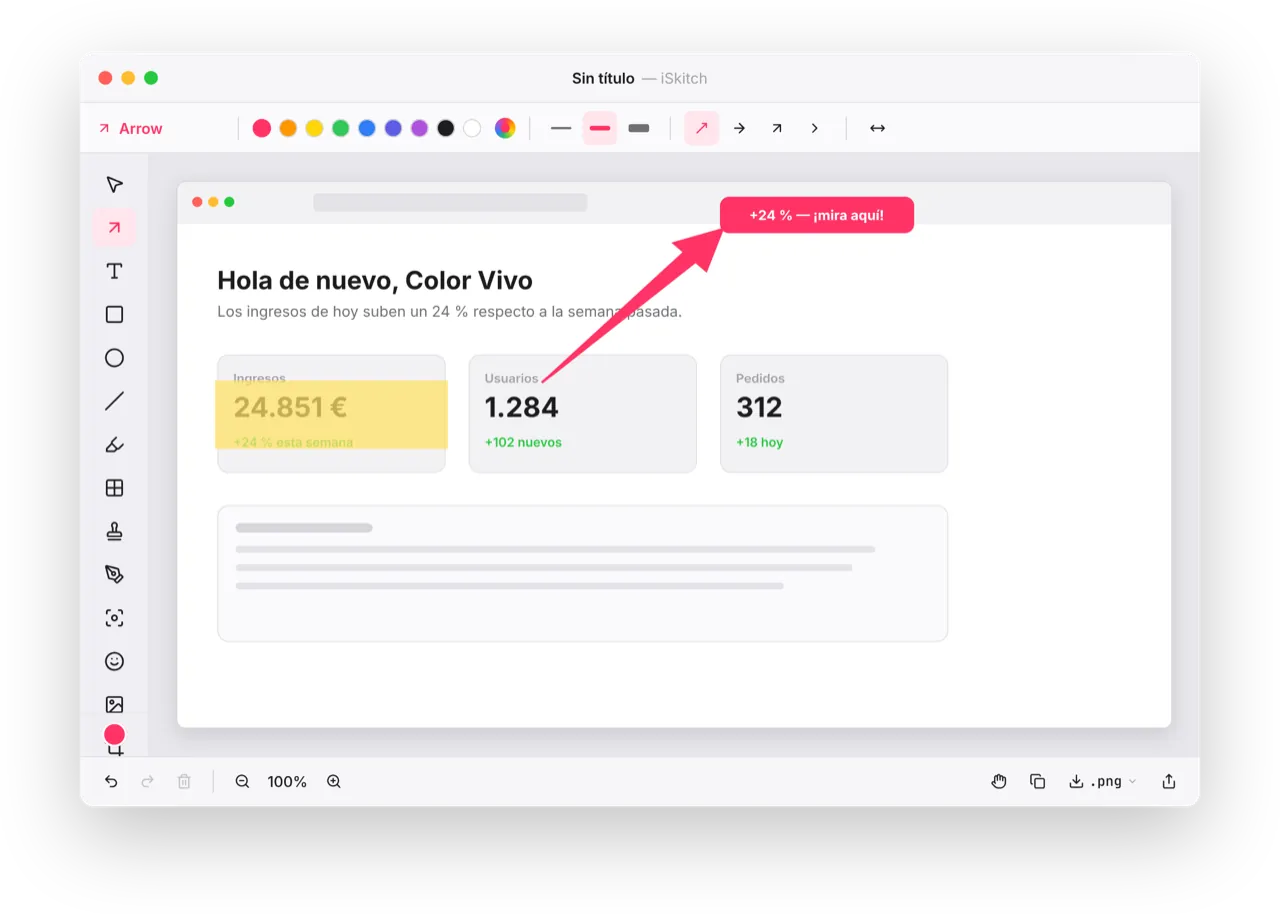Próximamente en la Mac App Store ## Pensada para el macOS de hoy SwiftUI + AppKit nativos. Vive en la barra de menús. Diseñada para no estorbar hasta que pulsas ⌥⌘4. ### Captura cualquier cosa Región (⌥⌘4), ventana o pantalla completa. Se abre directamente en el editor. ### 14 herramientas de marcado Flechas afiladas, texto con fuentes del sistema, formas, resaltado, lápiz, sellos y más. ### Oculta información sensible Pixelar, difuminar, bloque sólido o rayado — ilegible de forma fiable. ### Compartir nativo Hoja de macOS, arrastrar a cualquier app, copiar o guardar como PNG/JPG/PDF. ### Foco y recorte Destaca lo que importa. Recorta con proporciones predefinidas. ### Privacidad ante todo Sin cuentas. Sin seguimiento. Tus datos no salen del Mac. ## Todas las herramientas que necesitas 14 herramientas, siempre a un clic. Seleccionar Flecha Texto Rectángulo Elipse Línea Resaltado Pixelar Sello Lápiz Foco Sticker Imagen Recortar Beta abriendo pronto ## Sé de los primeros en probar iSkitch Apúntate a la beta privada y recibe la app antes de su llegada a la Mac App Store. Tu email Apuntarme a la beta Solo usamos tu email para la beta. Sin marketing. Puedes darte de baja en cualquier momento. ## ¿Quieres probar iSkitch antes que nadie? Apúntate a la beta y te enviaremos el enlace en cuanto se abra. [**Apuntarme**](https://iskitch.com/es/#beta)
이 파일을 서버의 /es.md에 업로드하여 AI 에이전트가 페이지의 깔끔한 버전에 접근할 수 있게 하세요. Accept: text/markdown 콘텐츠 협상을 설정하여 자동으로 제공할 수도 있습니다.
권장 내용
# iskitch.com

> iSkitch es la versión moderna y nativa del clásico Skitch para macOS — captura cualquier región, ventana o la pantalla completa, márcala al instante y compártela en un clic.

## Main
- [iSkitch — Captura, marca y comparte para macOS](https://iskitch.com/es/): iSkitch es la versión moderna y nativa del clásico Skitch para macOS — captura cualquier región, ventana o la pantalla…
- [EN](https://iskitch.com/)

## Legal
- [Privacidad](https://iskitch.com/es/privacy)
- [Términos](https://iskitch.com/es/terms)

## Support
- [Soporte](https://iskitch.com/es/support)
전체 llms.txt는 도메인 전체 분석이 필요합니다 (곧 출시)
이 파일을 도메인 루트의 https://iskitch.com/llms.txt에 업로드하세요. ChatGPT, Claude, Perplexity 등의 AI 에이전트가 이 파일을 확인하여 사이트 구조를 파악합니다.
이 사이트에는 이미 llms.txt 파일이 있습니다.
유효하지 않은 형식 — # 제목으로 시작하고 의미 있는 콘텐츠가 있어야 합니다<!DOCTYPE html><html lang="en"> <head><meta charset="utf-8"><meta name="viewport" content="width=device-width,initial-scale=1"><title>iSkitch — Capture, annotate & share for macOS</title><meta name="description" content="iSkitch is a modern, native macOS take on the classic Skitch — capture any region, window or full screen, annotate it instantly, and share with one click."><meta name="theme-color" content="#FF3366"><link rel="icon" href="/favicon.png"><link rel="canonical" href="https://iskitch.com/"><meta property="og:title" content="iSkitch — Capture, annotate & share for macOS"><meta property="og:description" content="iSkitch is a modern, native macOS take on the classic Skitch — capture any region, window or full screen, annotate it instantly, and share with one click."><meta property="og:image" content="https://iskitch.com/og-cover.png"><meta property="og:type" content="website"><meta property="og:url" content="https://iskitch.com/"><meta property="og:locale" content="en_US"><meta name="twitter:card" content="summary_large_image"><link rel="alternate" hreflang="en" href="https://iskitch.com/"><link rel="alternate" hreflang="es" href="https://iskitch.com/es/"><link rel="alternate" hreflang="x-default" href="https://iskitch.com/"><link rel="alternate" type="text/markdown" href="https://iskitch.com/index.md" title="Markdown version (Markdown for Agents)"><link rel="preload" href="/fonts/inter-variable-latin.woff2" as="font" type="font/woff2" crossorigin><script type="application/ld+json">[{"@context":"https://schema.org","@type":"SoftwareApplication","name":"iSkitch","applicationCategory":"ProductivityApplication","operatingSystem":"macOS 14 or later","description":"iSkitch is a modern, native macOS take on the classic Skitch — capture any region, window or full screen, annotate it instantly, and share with one click.","url":"https://iskitch.com/","inLanguage":"en","offers":{"@type":"Offer","price":"0","priceCurrency":"USD","availability":"https://schema.org/PreOrder"},"publisher":{"@id":"https://iskitch.com/#organization"},"image":"https://iskitch.com/og-cover.png"},{"@context":"https://schema.org","@type":"Organization","@id":"https://iskitch.com/#organization","name":"Color Vivo Internet, S.L.","url":"https://iskitch.com","logo":"https://iskitch.com/favicon.png","email":"[email protected]","address":{"@type":"PostalAddress","addressLocality":"Madrid","addressCountry":"ES"}}]</script><style>@font-face{font-family:Inter;src:url(/fonts/inter-variable-latin.woff2) format("woff2-variations");font-weight:100 900;font-style:normal;font-display:swap}:root{--brand: #FF3366;--brand-2: #E61F5C;--brand-soft: #FFE4EC;--ink-1: #1D1D1F;--ink-2: #6E6E73;--ink-3: #A1A1A8;--line: #EAEAEF;--bg: #FFFFFF;--bg-2: #FAFAFC;--bg-3: #F6F6F8;--green: #28C840;--radius: 14px;--shadow-card: 0 1px 2px rgba(0,0,0,.04), 0 12px 32px -16px rgba(255,51,102,.18);--shadow-hero: 0 32px 90px -20px rgba(255,51,102,.3), 0 1px 2px rgba(0,0,0,.06);--font: "Inter", -apple-system, BlinkMacSystemFont, "Helvetica Neue", sans-serif}*{box-sizing:border-box}html,body{margin:0;padding:0;background:var(--bg);color:var(--ink-1);font-family:var(--font);-webkit-font-smoothing:antialiased}img{max-width:100%;height:auto;display:block}a{color:inherit;text-decoration:none}a:hover{color:var(--brand-2)}.container{width:100%;max-width:1180px;margin:0 auto;padding:0 24px}.btn{display:inline-flex;align-items:center;gap:8px;padding:0 16px;height:38px;border-radius:10px;font-size:14px;font-weight:600;line-height:1;text-decoration:none;transition:transform .12s ease,box-shadow .12s ease,background .12s ease,color .12s ease;border:1px solid transparent;cursor:pointer}.btn:active{transform:translateY(1px)}.btn-primary{background:var(--brand-2);color:#fff}.btn-primary:hover{background:#b0143d;color:#fff}.btn-dark{background:var(--ink-1);color:#fff}.btn-dark:hover{background:#000;color:#fff}.btn-outline{background:#fff;color:var(--ink-1);border-color:#1d1d1f2e}.btn-outline:hover{background:var(--bg-3);color:var(--ink-1)}.btn-white,.btn-white *{color:var(--ink-1)}.btn-white{background:#fff}.btn-white:hover{background:#fff;box-shadow:0 6px 24px #0000002e}.btn-white .cta-stack small{color:var(--ink-2);opacity:1}.btn-sm{height:34px;font-size:13px;padding:0 14px}.btn-lg{height:54px;border-radius:12px;padding:0 26px}.cta-stack{display:inline-flex;flex-direction:column;align-items:flex-start;line-height:1.1;gap:1px}.cta-stack small{font-weight:500;font-size:10px;opacity:.86}.cta-stack strong{font-weight:700;font-size:16px}.btn-lg .cta-stack strong{font-size:17px}.nav{position:sticky;top:0;z-index:30;background:#ffffffe0;backdrop-filter:saturate(180%) blur(20px);-webkit-backdrop-filter:saturate(180%) blur(20px);border-bottom:1px solid var(--line);display:flex;align-items:center;flex-wrap:wrap;gap:16px;padding:12px 24px}.brand{display:inline-flex;align-items:center;gap:10px;font-weight:700;font-size:16px}.brand-mark{width:28px;height:28px;border-radius:7px;display:inline-flex;align-items:center;justify-content:center;background:linear-gradient(125deg,#ff5c73,#e61f5c);box-shadow:0 4px 10px #ff33664d}.nav-links{display:flex;gap:28px;margin:0 auto;font-size:14px;font-weight:500;color:var(--ink-2)}.nav-links a:hover{color:var(--ink-1)}.hamburger{display:none;width:36px;height:36px;background:transparent;border:0;padding:0;cursor:pointer;align-items:center;justify-content:center;flex-direction:column;gap:4px;border-radius:8px;transition:background .15s ease}.hamburger:hover{background:#0000000f}.hamburger span{display:block;width:18px;height:2px;background:var(--ink-1);border-radius:2px;transition:transform .2s ease,opacity .2s ease}.nav.is-open .hamburger span:nth-child(1){transform:translateY(6px) rotate(45deg)}.nav.is-open .hamburger span:nth-child(2){opacity:0}.nav.is-open .hamburger span:nth-child(3){transform:translateY(-6px) rotate(-45deg)}.hero{background:linear-gradient(180deg,#fff,#fff5f8);padding:64px 0 80px}.hero-grid{display:grid;grid-template-columns:minmax(0,1fr) minmax(0,1.05fr);gap:56px;align-items:center}.hero-content{text-align:left}.badge{display:inline-flex;align-items:center;gap:6px;padding:6px 14px;border-radius:999px;background:var(--brand-soft);border:1px solid #FFB3C9;color:#b0143d;font-size:12px;font-weight:600}.hero h1{font-size:clamp(34px,4.5vw,52px);font-weight:800;line-height:1.06;margin:18px 0 16px;letter-spacing:-.02em;color:var(--ink-1)}.hero .lead{font-size:17px;line-height:1.55;color:var(--ink-2);margin:0 0 24px;max-width:540px}.hero kbd{font-family:ui-monospace,SFMono-Regular,JetBrains Mono,monospace;font-size:.95em;padding:1px 6px;border-radius:5px;background:#0000000f}.cta-row{display:flex;flex-wrap:wrap;gap:12px;margin:0 0 18px}.hero-meta{list-style:none;display:flex;flex-wrap:wrap;gap:18px 22px;padding:0;margin:16px 0 0;font-size:13px;font-weight:500;color:var(--ink-2)}.hero-meta li{display:inline-flex;align-items:center;gap:6px}.dot{width:6px;height:6px;border-radius:50%;display:inline-block}.dot-green{background:var(--green);box-shadow:0 0 0 3px #28c8402e}.hero-shot-link{position:relative;display:block;transition:transform .25s ease,box-shadow .25s ease;cursor:pointer}.hero-shot-link:hover{transform:translateY(-4px)}.hero-shot-link img{border-radius:var(--radius);border:1px solid var(--line);box-shadow:var(--shadow-hero);width:100%;height:auto}.hero-shot-badge{position:absolute;bottom:-14px;left:50%;transform:translate(-50%);background:#1d1d1f;color:#fff;font-size:11px;font-weight:600;padding:7px 14px;border-radius:999px;white-space:nowrap;box-shadow:0 6px 16px #0000002e;letter-spacing:.02em}.features{padding:88px 0}.features h2,.tools h2,.cta h2{font-size:clamp(28px,3.5vw,38px);font-weight:700;text-align:center;letter-spacing:-.01em;margin:0 0 12px}.features .lead,.tools .lead{text-align:center;max-width:640px;margin:0 auto 44px;color:var(--ink-2);font-size:16px;line-height:1.55}.feature-grid{display:grid;grid-template-columns:repeat(3,1fr);gap:24px;max-width:1100px;margin:0 auto}.features article{background:var(--bg-2);border:1px solid var(--line);border-radius:16px;padding:26px;transition:transform .15s ease,box-shadow .15s ease}.features article:hover{transform:translateY(-2px);box-shadow:var(--shadow-card)}.feature-icon{display:inline-flex;align-items:center;justify-content:center;width:44px;height:44px;border-radius:12px;background:var(--brand-soft);color:var(--brand);margin-bottom:14px}.features h3{font-size:18px;font-weight:700;margin:0 0 6px}.features p{font-size:13.5px;line-height:1.55;color:var(--ink-2);margin:0}.tools{background:var(--bg-3);padding:84px 0}.tools-grid{display:grid;grid-template-columns:repeat(7,1fr);gap:18px 14px;max-width:1000px;margin:0 auto}.tool{display:flex;flex-direction:column;align-items:center;gap:8px}.tool-box{width:60px;height:60px;border-radius:14px;background:#fff;border:1px solid var(--line);display:flex;align-items:center;justify-content:center;color:var(--ink-1);transition:transform .15s ease,box-shadow .15s ease,color .15s ease}.tool:hover .tool-box{transform:translateY(-2px);box-shadow:0 8px 20px -8px #ff336640;color:var(--brand)}.tool span{font-size:12px;font-weight:600;color:var(--ink-1)}.cta{background:linear-gradient(135deg,#ff6b86,#e61f5c);color:#fff;padding:76px 0 80px;text-align:center}.cta h2{color:#fff;font-size:clamp(28px,3.6vw,40px);font-weight:800;margin:0 0 14px;letter-spacing:-.01em}.cta p{color:#fffffff2;font-size:16px;max-width:560px;margin:0 auto 26px;line-height:1.55}.footer{background:var(--ink-1);color:#fff;padding:34px 0;font-size:13px}.footer-grid{display:flex;align-items:center;gap:16px}.brand-foot{color:#fff}.brand-foot strong{display:block;font-size:14px;font-weight:700;color:#fff}.brand-foot small{font-size:11px;color:#c9c9d0}.footer-links{display:flex;gap:24px;margin-left:auto}.footer-links a{color:#fff;font-weight:500}.footer-links a:hover{color:var(--brand-soft)}@media(max-width:900px){.hamburger{display:flex}.nav-links{display:none;order:99;width:100%;margin:0;flex-direction:column;align-items:flex-start;gap:4px;padding:10px 0 4px;border-top:1px solid var(--line);font-size:15px}.nav-links a{width:100%;padding:10px 4px;color:var(--ink-1);font-weight:500}.nav.is-open .nav-links{display:flex}.nav-actions{margin-left:auto}.hero-grid{grid-template-columns:1fr;gap:40px}.hero-content{text-align:center}.hero .lead{margin-left:auto;margin-right:auto}.cta-row,.hero-meta{justify-content:center}.feature-grid{grid-template-columns:repeat(2,1fr)}.tools-grid{grid-template-columns:repeat(4,1fr)}}@media(max-width:560px){.hero{padding:48px 0 60px}.hero h1{font-size:34px}.feature-grid{grid-template-columns:1fr}.tools-grid{grid-template-columns:repeat(3,1fr)}.footer-grid{flex-direction:column;align-items:flex-start}.footer-links{margin-left:0;flex-wrap:wrap}}html{color-scheme:light}.nav-actions{display:flex;align-items:center;gap:14px}.lang{font-size:12px;font-weight:700;letter-spacing:.04em;color:var(--ink-2);padding:6px 10px;border-radius:6px;border:1px solid var(--line)}.lang:hover{color:var(--ink-1);background:var(--bg-3)}.prose{max-width:760px;margin:0 auto;padding:60px 24px 80px}.prose h1{font-size:36px;font-weight:800;letter-spacing:-.01em;margin:0 0 6px;color:var(--ink-1)}.prose .effective{color:var(--ink-3);font-size:13px;margin:0 0 32px;font-weight:500;letter-spacing:.02em;text-transform:uppercase}.prose h2{font-size:22px;font-weight:700;margin:36px 0 12px;color:var(--ink-1);letter-spacing:-.005em}.prose h3{font-size:15px;font-weight:700;margin:20px 0 8px;color:var(--ink-1)}.prose p,.prose li{color:var(--ink-2);font-size:15px;line-height:1.7}.prose p{margin:0 0 14px}.prose ul{padding-left:22px;margin:4px 0 18px}.prose li{margin:0 0 6px}.prose strong{color:var(--ink-1);font-weight:600}.prose a{color:var(--brand-2);text-decoration:underline;text-underline-offset:3px}.prose a:hover{color:var(--brand-2)}.beta{padding:84px 0 92px;background:linear-gradient(180deg,var(--bg-2) 0%,#FFF5F8 100%);text-align:center}.beta .badge{margin-bottom:16px}.beta h2{font-size:clamp(28px,3.5vw,38px);font-weight:800;letter-spacing:-.01em;margin:0 0 12px;color:var(--ink-1)}.beta .lead{max-width:560px;margin:0 auto 32px;color:var(--ink-2);font-size:16px;line-height:1.55}.beta-form{display:flex;flex-wrap:wrap;justify-content:center;align-items:stretch;gap:10px;max-width:540px;margin:0 auto;position:relative}.beta-form input[type=email]{flex:1 1 280px;min-width:220px;height:54px;padding:0 18px;border-radius:12px;border:1.5px solid var(--line);background:#fff;font-family:var(--font);font-size:15px;color:var(--ink-1);transition:border-color .15s ease,box-shadow .15s ease}.beta-form input[type=email]:focus{outline:none;border-color:var(--brand);box-shadow:0 0 0 4px #ff336624}.beta-form input[type=email]::placeholder{color:var(--ink-3)}.beta-form .hp{position:absolute;left:-9999px;opacity:0;pointer-events:none}.beta-form button[type=submit]{flex:0 0 auto;height:54px}.beta-form button[type=submit]:disabled{opacity:.65;cursor:progress}.beta-status{width:100%;margin:14px 0 0;min-height:1.4em;font-size:14px;font-weight:600}.beta-status.ok{color:var(--green)}.beta-status.err{color:#b0143d}.beta-status.pending{color:var(--ink-2);font-weight:500}.beta-meta{margin-top:18px;color:var(--ink-3);font-size:12px;max-width:560px;margin-left:auto;margin-right:auto}.sr-only{position:absolute;width:1px;height:1px;padding:0;margin:-1px;overflow:hidden;clip:rect(0,0,0,0);white-space:nowrap;border:0}.hero-shot-link{background:none;border:0;padding:0}.hero-shot-link .hero-shot-zoom{position:absolute;top:12px;right:12px;width:32px;height:32px;background:#1d1d1fb8;color:#fff;border-radius:8px;display:flex;align-items:center;justify-content:center;opacity:0;transition:opacity .2s ease;backdrop-filter:blur(8px);-webkit-backdrop-filter:blur(8px)}.hero-shot-link:hover .hero-shot-zoom{opacity:1}.lightbox{position:fixed;inset:0;z-index:100;background:#000000db;display:flex;align-items:center;justify-content:center;padding:40px;opacity:0;visibility:hidden;transition:opacity .2s ease,visibility .2s;cursor:zoom-out}.lightbox.is-open{opacity:1;visibility:visible}.lightbox-img{max-width:100%;max-height:100%;border-radius:10px;box-shadow:0 30px 80px #0009;user-select:none}.lightbox-close{position:absolute;top:18px;right:22px;width:40px;height:40px;background:#ffffff1a;color:#fff;border:0;border-radius:50%;display:flex;align-items:center;justify-content:center;cursor:pointer;transition:background .15s ease}.lightbox-close:hover{background:#fff3}
</style></head> <body> <nav class="nav" id="nav"> <a class="brand" href="/"> <span class="brand-mark" aria-hidden="true"> <svg viewBox="0 0 100 100" width="18" height="18"><path fill="#fff" d="M10.4 90.4 L77.3 28.4 L82.2 33.3 L90 10 L66.7 17.8 L71.6 22.7 L9.6 89.6 Z"></path></svg> </span> <span>iSkitch</span> </a> <div class="nav-links"> <a href="/#features">Features</a> <a href="/#tools">Tools</a> <a href="/support">Support</a> </div> <div class="nav-actions"> <a class="lang" href="/es/" aria-label="Switch language">ES</a> <a class="btn btn-primary btn-sm" href="#beta"> <svg viewBox="0 0 24 24" width="14" height="14" fill="currentColor"><path d="M4 12l1.4-1.4L11 16.2V4h2v12.2l5.6-5.6L20 12l-8 8z"></path></svg> Join beta </a> <button class="hamburger" type="button" aria-label="Open menu" aria-expanded="false" aria-controls="nav"> <span></span><span></span><span></span> </button> </div> </nav> <script>
(function () {
const nav = document.getElementById('nav');
const burger = nav && nav.querySelector('.hamburger');
if (!burger) return;
burger.addEventListener('click', function () {
const open = nav.classList.toggle('is-open');
burger.setAttribute('aria-expanded', open ? 'true' : 'false');
burger.setAttribute('aria-label', open ? burger.dataset.closeLabel || 'Close menu' : burger.dataset.openLabel || 'Open menu');
});
// Cierra al clicar un enlace.
nav.querySelectorAll('.nav-links a').forEach((a) => {
a.addEventListener('click', function () {
nav.classList.remove('is-open');
burger.setAttribute('aria-expanded', 'false');
});
});
})();
</script> <main id="main"> <header class="hero"> <div class="container hero-grid"> <div class="hero-content"> <div class="badge"> <svg viewBox="0 0 24 24" width="12" height="12" fill="none" stroke="currentColor" stroke-width="2"><circle cx="12" cy="12" r="9"></circle><path d="M12 8v5l3 2"></path></svg> Coming soon · Mac App Store </div> <h1>Capture. Annotate.<br>Share in one click.</h1> <p class="lead">iSkitch is a modern, native macOS take on the classic Skitch. Lives in your menu bar, ready for <kbd>⌥⌘4</kbd> at any moment — and shares through the macOS share sheet.</p> <div class="cta-row"> <a class="btn btn-primary btn-lg" href="#beta"> <svg viewBox="0 0 24 24" width="18" height="18" fill="currentColor"><path d="M4 12l1.4-1.4L11 16.2V4h2v12.2l5.6-5.6L20 12l-8 8z"></path></svg> Join the beta </a> <a class="btn btn-outline btn-lg" href="#features">See what's inside</a> </div> <ul class="hero-meta"> <li><span class="dot dot-green"></span> Free for the beta</li><li><span class="dot dot-green"></span> No tracking</li><li><span class="dot dot-green"></span> Universal Binary</li><li><span class="dot dot-green"></span> English · Español</li> </ul> </div> <button class="hero-shot-link" type="button" data-lightbox-src="/assets/editor-hero-en-2240.webp" data-lightbox-alt="Screenshot of the iSkitch annotation editor showing a captured window of a marketing site with red arrows, text labels, a magenta highlight and pixelated areas — demonstrating annotation tools in action on macOS." aria-label="Expand screenshot"> <picture> <source type="image/webp" srcset="/assets/editor-hero-en-800.webp 800w, /assets/editor-hero-en-1280.webp 1280w, /assets/editor-hero-en-1600.webp 1600w" sizes="(max-width: 768px) 92vw, (max-width: 1180px) 50vw, 560px"> <img src="/assets/editor-hero-en-1280.webp" alt="Screenshot of the iSkitch annotation editor showing a captured window of a marketing site with red arrows, text labels, a magenta highlight and pixelated areas — demonstrating annotation tools in action on macOS." fetchpriority="high" decoding="async" width="1000" height="660"> </picture> <span class="hero-shot-badge">Coming soon to the Mac App Store</span> <span class="hero-shot-zoom" aria-hidden="true"> <svg viewBox="0 0 24 24" width="16" height="16" fill="none" stroke="currentColor" stroke-width="2" stroke-linecap="round"><circle cx="11" cy="11" r="7"></circle><path d="M21 21l-4.3-4.3M11 8v6M8 11h6"></path></svg> </span> </button> </div> </header> <!-- Lightbox --> <div class="lightbox" id="lightbox" role="dialog" aria-hidden="true" aria-modal="true"> <button class="lightbox-close" type="button" aria-label="Close"> <svg viewBox="0 0 24 24" width="22" height="22" fill="none" stroke="currentColor" stroke-width="2" stroke-linecap="round"><path d="M6 6l12 12M18 6L6 18"></path></svg> </button> <img class="lightbox-img" alt=""> </div> <script>
(function () {
const triggers = document.querySelectorAll('[data-lightbox-src]');
const lightbox = document.getElementById('lightbox');
if (!lightbox) return;
const lbImg = lightbox.querySelector('.lightbox-img');
const lbClose = lightbox.querySelector('.lightbox-close');
function open(src, alt) {
lbImg.src = src;
lbImg.alt = alt || '';
lightbox.classList.add('is-open');
lightbox.setAttribute('aria-hidden', 'false');
document.body.style.overflow = 'hidden';
}
function close() {
lightbox.classList.remove('is-open');
lightbox.setAttribute('aria-hidden', 'true');
document.body.style.overflow = '';
setTimeout(() => { lbImg.src = ''; }, 200);
}
triggers.forEach((el) => el.addEventListener('click', (e) => {
e.preventDefault();
open(el.getAttribute('data-lightbox-src'), el.getAttribute('data-lightbox-alt'));
}));
lbClose.addEventListener('click', close);
lightbox.addEventListener('click', (e) => { if (e.target === lightbox) close(); });
document.addEventListener('keydown', (e) => { if (e.key === 'Escape') close(); });
})();
</script> <section id="features" class="features"> <div class="container"> <h2>Built for the macOS you use today</h2> <p class="lead">Native SwiftUI + AppKit. Lives in the menu bar. Designed to get out of your way until you press ⌥⌘4.</p> <div class="feature-grid"> <article> <span class="feature-icon" aria-hidden="true"><svg viewBox="0 0 24 24" width="22" height="22" fill="none" stroke="currentColor" stroke-width="2"><rect x="3" y="3" width="18" height="18" rx="3"/><path d="M3 9h18M9 3v18"/></svg></span> <h3>Capture anything</h3> <p>Region (⌥⌘4), window or full screen. Opens straight in the editor.</p> </article><article> <span class="feature-icon" aria-hidden="true"><svg viewBox="0 0 24 24" width="22" height="22" fill="none" stroke="currentColor" stroke-width="2"><path d="M12 19l7-7 3 3-7 7-3-3z"/><path d="M18 13l-1.5-7.5L2 2l3.5 14.5L13 18l5-5z"/><circle cx="11" cy="11" r="2"/></svg></span> <h3>14 annotation tools</h3> <p>Tapered arrows, text with system fonts, shapes, highlighter, pen, stamps and more.</p> </article><article> <span class="feature-icon" aria-hidden="true"><svg viewBox="0 0 24 24" width="22" height="22" fill="none" stroke="currentColor" stroke-width="2"><path d="M9.88 9.88a3 3 0 1 0 4.24 4.24"/><path d="M10.73 5.08A10.43 10.43 0 0 1 12 5c7 0 10 7 10 7a13.16 13.16 0 0 1-1.67 2.68"/><path d="M6.61 6.61A13.526 13.526 0 0 0 2 12s3 7 10 7a9.74 9.74 0 0 0 5.39-1.61"/><line x1="2" y1="2" x2="22" y2="22"/></svg></span> <h3>Hide sensitive info</h3> <p>Pixelate, blur, solid block or stripes — reliably unreadable.</p> </article><article> <span class="feature-icon" aria-hidden="true"><svg viewBox="0 0 24 24" width="22" height="22" fill="none" stroke="currentColor" stroke-width="2"><circle cx="18" cy="5" r="3"/><circle cx="6" cy="12" r="3"/><circle cx="18" cy="19" r="3"/><line x1="8.59" y1="13.51" x2="15.42" y2="17.49"/><line x1="15.41" y1="6.51" x2="8.59" y2="10.49"/></svg></span> <h3>Native sharing</h3> <p>macOS share sheet, drag-out to any app, copy or save as PNG/JPG/PDF.</p> </article><article> <span class="feature-icon" aria-hidden="true"><svg viewBox="0 0 24 24" width="22" height="22" fill="none" stroke="currentColor" stroke-width="2"><circle cx="12" cy="12" r="10"/><circle cx="12" cy="12" r="6"/><circle cx="12" cy="12" r="2"/></svg></span> <h3>Spotlight & crop</h3> <p>Focus attention on what matters. Crop with aspect ratio presets.</p> </article><article> <span class="feature-icon" aria-hidden="true"><svg viewBox="0 0 24 24" width="22" height="22" fill="none" stroke="currentColor" stroke-width="2"><rect x="3" y="11" width="18" height="11" rx="2"/><path d="M7 11V7a5 5 0 0 1 10 0v4"/></svg></span> <h3>Privacy first</h3> <p>No accounts. No tracking. No data leaves your Mac.</p> </article> </div> </div> </section> <section id="tools" class="tools"> <div class="container"> <h2>All the marking tools you need</h2> <p class="lead">14 tools, always one click away.</p> <div class="tools-grid"> <div class="tool"> <div class="tool-box"><svg viewBox="0 0 24 24" width="22" height="22" fill="none" stroke="currentColor" stroke-width="1.7" stroke-linecap="round" stroke-linejoin="round"><path d="M4 3l7 18 2.3-7.5 7.7-2.5L4 3z"/></svg></div> <span>Select</span> </div><div class="tool"> <div class="tool-box"><svg viewBox="0 0 24 24" width="22" height="22" fill="none" stroke="currentColor" stroke-width="1.7" stroke-linecap="round" stroke-linejoin="round"><path d="M7 17L17 7M9 7h8v8"/></svg></div> <span>Arrow</span> </div><div class="tool"> <div class="tool-box"><svg viewBox="0 0 24 24" width="22" height="22" fill="none" stroke="currentColor" stroke-width="1.7" stroke-linecap="round" stroke-linejoin="round"><path d="M4 7V5h16v2M12 5v14M9 19h6"/></svg></div> <span>Text</span> </div><div class="tool"> <div class="tool-box"><svg viewBox="0 0 24 24" width="22" height="22" fill="none" stroke="currentColor" stroke-width="1.7"><rect x="3" y="6" width="18" height="12" rx="1.8"/></svg></div> <span>Rectangle</span> </div><div class="tool"> <div class="tool-box"><svg viewBox="0 0 24 24" width="22" height="22" fill="none" stroke="currentColor" stroke-width="1.7"><circle cx="12" cy="12" r="9"/></svg></div> <span>Ellipse</span> </div><div class="tool"> <div class="tool-box"><svg viewBox="0 0 24 24" width="22" height="22" fill="none" stroke="currentColor" stroke-width="1.7" stroke-linecap="round"><line x1="5" y1="19" x2="19" y2="5"/></svg></div> <span>Line</span> </div><div class="tool"> <div class="tool-box"><svg viewBox="0 0 24 24" width="22" height="22" fill="none" stroke="currentColor" stroke-width="1.7" stroke-linecap="round" stroke-linejoin="round"><path d="M15 4l5 5-8 8H7v-5l8-8z"/><path d="M12 7l5 5M4 21h6"/></svg></div> <span>Highlight</span> </div><div class="tool"> <div class="tool-box"><svg viewBox="0 0 24 24" width="22" height="22"><g fill="currentColor"><rect x="3" y="3" width="8" height="8" rx="1"/><rect x="13" y="13" width="8" height="8" rx="1"/></g><g fill="none" stroke="currentColor" stroke-width="1.7"><rect x="13" y="3" width="8" height="8" rx="1"/><rect x="3" y="13" width="8" height="8" rx="1"/></g></svg></div> <span>Pixelate</span> </div><div class="tool"> <div class="tool-box"><svg viewBox="0 0 24 24" width="22" height="22" fill="none" stroke="currentColor" stroke-width="1.7" stroke-linecap="round" stroke-linejoin="round"><path d="M12 2.5l1.8 2.1 2.8-.4.8 2.6 2.6.8-.4 2.8 2.1 1.8-2.1 1.8.4 2.8-2.6.8-.8 2.6-2.8-.4L12 21.5l-1.8-2.1-2.8.4-.8-2.6-2.6-.8.4-2.8L2.3 12l2.1-1.8-.4-2.8 2.6-.8.8-2.6 2.8.4L12 2.5z"/><path d="M8.5 12.2l2.4 2.4 4.6-4.6"/></svg></div> <span>Stamp</span> </div><div class="tool"> <div class="tool-box"><svg viewBox="0 0 24 24" width="22" height="22" fill="none" stroke="currentColor" stroke-width="1.7" stroke-linecap="round" stroke-linejoin="round"><path d="M3 14c2-3 3.8-3 5.5 0s3.5 3 5.5 0 4-3 7-2"/></svg></div> <span>Pen</span> </div><div class="tool"> <div class="tool-box"><svg viewBox="0 0 24 24" width="22" height="22" fill="none" stroke="currentColor" stroke-width="1.7" stroke-linecap="round" stroke-linejoin="round"><path d="M4 8V5a1 1 0 0 1 1-1h3M16 4h3a1 1 0 0 1 1 1v3M20 16v3a1 1 0 0 1-1 1h-3M8 20H5a1 1 0 0 1-1-1v-3"/><circle cx="12" cy="12" r="3"/></svg></div> <span>Spotlight</span> </div><div class="tool"> <div class="tool-box"><svg viewBox="0 0 24 24" width="22" height="22" fill="none" stroke="currentColor" stroke-width="1.7" stroke-linecap="round" stroke-linejoin="round"><circle cx="12" cy="12" r="9"/><path d="M8 14s1.5 2 4 2 4-2 4-2"/><circle cx="9" cy="9.5" r="1" fill="currentColor" stroke="none"/><circle cx="15" cy="9.5" r="1" fill="currentColor" stroke="none"/></svg></div> <span>Sticker</span> </div><div class="tool"> <div class="tool-box"><svg viewBox="0 0 24 24" width="22" height="22" fill="none" stroke="currentColor" stroke-width="1.7" stroke-linecap="round" stroke-linejoin="round"><rect x="3" y="4" width="18" height="16" rx="2"/><circle cx="8.5" cy="9" r="1.5"/><path d="M3 17l5-5 4 4 3-3 6 6"/></svg></div> <span>Image</span> </div><div class="tool"> <div class="tool-box"><svg viewBox="0 0 24 24" width="22" height="22" fill="none" stroke="currentColor" stroke-width="1.7" stroke-linecap="round" stroke-linejoin="round"><path d="M7 2v15a1 1 0 0 0 1 1h15M2 7h15a1 1 0 0 1 1 1v14"/></svg></div> <span>Crop</span> </div> </div> </div> </section> <section id="beta" class="beta"> <div class="container"> <div class="badge"> <svg viewBox="0 0 24 24" width="12" height="12" fill="currentColor"><path d="M12 2 14 8 20 9 16 13 17 19 12 16 7 19 8 13 4 9 10 8 Z"></path></svg> Beta opening soon </div> <h2>Be the first to try iSkitch</h2> <p class="lead">Join the private beta and get the app before it lands on the Mac App Store.</p> <form class="beta-form" id="beta-form" data-success="You're in. We'll email you when the beta opens." data-error="Something went wrong. Try again or email [email protected]."> <label class="sr-only" for="beta-email">Your email</label> <input type="email" id="beta-email" name="email" required autocomplete="email" placeholder="[email protected]"> <input type="text" name="honeypot" tabindex="-1" autocomplete="off" aria-hidden="true" class="hp"> <button type="submit" class="btn btn-primary btn-lg">Join the beta</button> <p class="beta-status" id="beta-status" aria-live="polite"></p> </form> <p class="beta-meta">We only use your email for the beta. No marketing. Unsubscribe anytime.</p> </div> </section> <script>
(function () {
const form = document.getElementById('beta-form');
if (!form) return;
const status = document.getElementById('beta-status');
const input = form.querySelector('input[type="email"]');
const submit = form.querySelector('button[type="submit"]');
form.addEventListener('submit', async (e) => {
e.preventDefault();
const payload = {
email: input.value,
honeypot: form.querySelector('input[name="honeypot"]').value,
lang: document.documentElement.lang || 'en'
};
submit.disabled = true;
status.textContent = '…';
status.className = 'beta-status pending';
try {
const resp = await fetch('/api/subscribe', {
method: 'POST',
headers: { 'Content-Type': 'application/json' },
body: JSON.stringify(payload)
});
const json = await resp.json().catch(() => ({}));
if (resp.ok && json.ok) {
status.textContent = form.dataset.success;
status.className = 'beta-status ok';
input.value = '';
} else {
status.textContent = form.dataset.error;
status.className = 'beta-status err';
}
} catch (_) {
status.textContent = form.dataset.error;
status.className = 'beta-status err';
} finally {
submit.disabled = false;
}
});
})();
</script> <section class="cta"> <div class="container"> <h2>Ready to try iSkitch before everyone else?</h2> <p>Sign up for the beta and we'll email you the link the moment it opens.</p> <a class="btn btn-white btn-lg" href="#beta"> <svg viewBox="0 0 24 24" width="18" height="18" fill="currentColor"><path d="M4 12l1.4-1.4L11 16.2V4h2v12.2l5.6-5.6L20 12l-8 8z"></path></svg> <strong>Sign me up</strong> </a> </div> </section> </main> <footer class="footer"> <div class="container footer-grid"> <div class="brand brand-foot"> <span class="brand-mark" aria-hidden="true"> <svg viewBox="0 0 100 100" width="14" height="14"><path fill="#fff" d="M10.4 90.4 L77.3 28.4 L82.2 33.3 L90 10 L66.7 17.8 L71.6 22.7 L9.6 89.6 Z"></path></svg> </span> <div> <strong>iSkitch</strong> <small>© 2026 Color Vivo Internet, S.L.</small> </div> </div> <nav class="footer-links"> <a href="/#features">Features</a><a href="/privacy">Privacy</a><a href="/terms">Terms</a><a href="/support">Support</a><a href="https://colorvivo.com" rel="noopener">Color Vivo</a> </nav> </div> </footer> </body></html>
시맨틱 HTML
Has both <article> and <main>
Clean heading hierarchy
15 semantic elements, 45 divs (ratio: 25%)
1/2 images with meaningful alt text
Avg div depth: 1.8, max: 3
콘텐츠 효율성
95% token reduction (HTML→Markdown)
Content ratio: 4.8% (1542 content chars / 31882 HTML bytes)
0/266 elements with inline styles (0.0%)
HTML size: 31KB
AI 발견 가능성
llms.txt exists but appears empty or invalid
robots.txt exists
2/3 AI bots blocked: ClaudeBot, GPTBot
No sitemap found
구조화 데이터
JSON-LD found: SoftwareApplication, Organization
All OG tags present
Meta description: 173 chars
Canonical URL present
lang="es"
접근성
Content available without JavaScript
Page size: 31KB
Main content starts at 51% of HTML
{
"url": "https://iskitch.com/es/",
"timestamp": 1779970669242,
"fetch": {
"mode": "simple",
"timeMs": 208,
"htmlSizeBytes": 31882,
"supportsMarkdown": false,
"markdownAgents": {
"contentNegotiation": false,
"mdUrl": {
"found": true,
"url": "https://iskitch.com/es.md"
},
"linkTag": {
"found": true,
"url": "https://iskitch.com/es/index.md"
},
"linkHeader": {
"found": true,
"url": "/es/index.md"
},
"responseHeaders": {
"contentSignal": null,
"xMarkdownTokens": null,
"vary": null
},
"frontmatter": {
"present": false,
"fields": [],
"level": "none"
},
"level": "application"
},
"statusCode": 200
},
"extraction": {
"title": "iSkitch — Captura, marca y comparte para macOS",
"excerpt": "iSkitch es la versión moderna y nativa del clásico Skitch para macOS — captura cualquier región, ventana o la pantalla completa, márcala al instante y compártela en un clic.",
"byline": null,
"siteName": null,
"lang": "es",
"contentLength": 1542,
"metadata": {
"description": "iSkitch es la versión moderna y nativa del clásico Skitch para macOS — captura cualquier región, ventana o la pantalla completa, márcala al instante y compártela en un clic.",
"ogTitle": "iSkitch — Captura, marca y comparte para macOS",
"ogDescription": "iSkitch es la versión moderna y nativa del clásico Skitch para macOS — captura cualquier región, ventana o la pantalla completa, márcala al instante y compártela en un clic.",
"ogImage": "https://iskitch.com/og-cover.png",
"ogType": "website",
"canonical": "https://iskitch.com/es/",
"lang": "es",
"schemas": [
{
"@context": "https://schema.org",
"@type": "SoftwareApplication",
"name": "iSkitch",
"applicationCategory": "ProductivityApplication",
"operatingSystem": "macOS 14 or later",
"description": "iSkitch es la versión moderna y nativa del clásico Skitch para macOS — captura cualquier región, ventana o la pantalla completa, márcala al instante y compártela en un clic.",
"url": "https://iskitch.com/es/",
"inLanguage": "es",
"offers": {
"@type": "Offer",
"price": "0",
"priceCurrency": "USD",
"availability": "https://schema.org/PreOrder"
},
"publisher": {
"@id": "https://iskitch.com/#organization"
},
"image": "https://iskitch.com/og-cover.png"
},
{
"@context": "https://schema.org",
"@type": "Organization",
"@id": "https://iskitch.com/#organization",
"name": "Color Vivo Internet, S.L.",
"url": "https://iskitch.com",
"logo": "https://iskitch.com/favicon.png",
"email": "[email protected]",
"address": {
"@type": "PostalAddress",
"addressLocality": "Madrid",
"addressCountry": "ES"
}
}
],
"robotsMeta": null,
"author": null,
"generator": null,
"markdownAlternateHref": "https://iskitch.com/es/index.md"
}
},
"markdown": "Próximamente · Mac App Store\n\n## Captura. Marca.\nComparte en un clic.\n\niSkitch es la versión moderna y nativa del clásico Skitch para macOS. Vive en la barra de menús, lista para ⌥⌘4 en cualquier momento — y comparte con la hoja nativa de macOS.\n\n## Pensada para el macOS de hoy\n\nSwiftUI + AppKit nativos. Vive en la barra de menús. Diseñada para no estorbar hasta que pulsas ⌥⌘4.\n\n### Captura cualquier cosa\n\nRegión (⌥⌘4), ventana o pantalla completa. Se abre directamente en el editor.\n\n### 14 herramientas de marcado\n\nFlechas afiladas, texto con fuentes del sistema, formas, resaltado, lápiz, sellos y más.\n\n### Oculta información sensible\n\nPixelar, difuminar, bloque sólido o rayado — ilegible de forma fiable.\n\n### Compartir nativo\n\nHoja de macOS, arrastrar a cualquier app, copiar o guardar como PNG/JPG/PDF.\n\n### Foco y recorte\n\nDestaca lo que importa. Recorta con proporciones predefinidas.\n\n### Privacidad ante todo\n\nSin cuentas. Sin seguimiento. Tus datos no salen del Mac.\n\n## Todas las herramientas que necesitas\n\n14 herramientas, siempre a un clic.\n\nSeleccionar\n\nFlecha\n\nTexto\n\nRectángulo\n\nElipse\n\nLínea\n\nResaltado\n\nPixelar\n\nSello\n\nLápiz\n\nFoco\n\nSticker\n\nImagen\n\nRecortar\n\nBeta abriendo pronto\n\n## Sé de los primeros en probar iSkitch\n\nApúntate a la beta privada y recibe la app antes de su llegada a la Mac App Store.\n\nSolo usamos tu email para la beta. Sin marketing. Puedes darte de baja en cualquier momento.\n\n## ¿Quieres probar iSkitch antes que nadie?\n\nApúntate a la beta y te enviaremos el enlace en cuanto se abra.\n\n[**Apuntarme**](https://iskitch.com/es/#beta)\n",
"fullPageMarkdown": "iSkitch — Captura, marca y comparte para macOS\n\nPróximamente · Mac App Store\n\n# Captura. Marca.\nComparte en un clic.\n\niSkitch es la versión moderna y nativa del clásico Skitch para macOS. Vive en la barra de menús, lista para ⌥⌘4 en cualquier momento — y comparte con la hoja nativa de macOS.\n\n[Apuntarme a la beta](https://iskitch.com/es/#beta) [Ver qué incluye](https://iskitch.com/es/#features)\n\n- Gratis en beta\n- Sin seguimiento\n- Universal Binary\n- Inglés · Español\n\n Próximamente en la Mac App Store\n\n## Pensada para el macOS de hoy\n\nSwiftUI + AppKit nativos. Vive en la barra de menús. Diseñada para no estorbar hasta que pulsas ⌥⌘4.\n\n### Captura cualquier cosa\n\nRegión (⌥⌘4), ventana o pantalla completa. Se abre directamente en el editor.\n\n### 14 herramientas de marcado\n\nFlechas afiladas, texto con fuentes del sistema, formas, resaltado, lápiz, sellos y más.\n\n### Oculta información sensible\n\nPixelar, difuminar, bloque sólido o rayado — ilegible de forma fiable.\n\n### Compartir nativo\n\nHoja de macOS, arrastrar a cualquier app, copiar o guardar como PNG/JPG/PDF.\n\n### Foco y recorte\n\nDestaca lo que importa. Recorta con proporciones predefinidas.\n\n### Privacidad ante todo\n\nSin cuentas. Sin seguimiento. Tus datos no salen del Mac.\n\n## Todas las herramientas que necesitas\n\n14 herramientas, siempre a un clic.\n\nSeleccionar\n\nFlecha\n\nTexto\n\nRectángulo\n\nElipse\n\nLínea\n\nResaltado\n\nPixelar\n\nSello\n\nLápiz\n\nFoco\n\nSticker\n\nImagen\n\nRecortar\n\nBeta abriendo pronto\n\n## Sé de los primeros en probar iSkitch\n\nApúntate a la beta privada y recibe la app antes de su llegada a la Mac App Store.\n\nTu email Apuntarme a la beta\n\nSolo usamos tu email para la beta. Sin marketing. Puedes darte de baja en cualquier momento.\n\n## ¿Quieres probar iSkitch antes que nadie?\n\nApúntate a la beta y te enviaremos el enlace en cuanto se abra.\n\n[**Apuntarme**](https://iskitch.com/es/#beta)\n",
"markdownStats": {
"images": 0,
"links": 1,
"tables": 0,
"codeBlocks": 0,
"headings": 11
},
"tokens": {
"htmlTokens": 10538,
"markdownTokens": 482,
"reduction": 10056,
"reductionPercent": 95
},
"score": {
"score": 76,
"grade": "B",
"dimensions": {
"semanticHtml": {
"score": 89,
"weight": 20,
"grade": "B",
"checks": {
"uses_article_or_main": {
"score": 100,
"weight": 20,
"details": "Has both <article> and <main>"
},
"proper_heading_hierarchy": {
"score": 100,
"weight": 25,
"details": "Clean heading hierarchy"
},
"semantic_elements": {
"score": 83,
"weight": 20,
"details": "15 semantic elements, 45 divs (ratio: 25%)"
},
"meaningful_alt_texts": {
"score": 50,
"weight": 15,
"details": "1/2 images with meaningful alt text"
},
"low_div_nesting": {
"score": 100,
"weight": 20,
"details": "Avg div depth: 1.8, max: 3"
}
}
},
"contentEfficiency": {
"score": 70,
"weight": 25,
"grade": "C",
"checks": {
"token_reduction_ratio": {
"score": 100,
"weight": 40,
"details": "95% token reduction (HTML→Markdown)"
},
"content_to_noise_ratio": {
"score": 0,
"weight": 30,
"details": "Content ratio: 4.8% (1542 content chars / 31882 HTML bytes)"
},
"minimal_inline_styles": {
"score": 100,
"weight": 15,
"details": "0/266 elements with inline styles (0.0%)"
},
"reasonable_page_weight": {
"score": 100,
"weight": 15,
"details": "HTML size: 31KB"
}
}
},
"aiDiscoverability": {
"score": 52,
"weight": 25,
"grade": "D",
"checks": {
"has_llms_txt": {
"score": 50,
"weight": 20,
"details": "llms.txt exists but appears empty or invalid"
},
"has_robots_txt": {
"score": 100,
"weight": 10,
"details": "robots.txt exists"
},
"robots_allows_ai_bots": {
"score": 34,
"weight": 15,
"details": "2/3 AI bots blocked: ClaudeBot, GPTBot"
},
"has_sitemap": {
"score": 0,
"weight": 10,
"details": "No sitemap found"
},
"supports_markdown_negotiation": {
"score": 60,
"weight": 25,
"details": "Application level — .md URL (https://iskitch.com/es.md), <link> tag, Link header"
},
"has_content_signals": {
"score": 60,
"weight": 20,
"details": "robots.txt: search=yes, ai-train=no | Policy included"
}
}
},
"structuredData": {
"score": 100,
"weight": 15,
"grade": "A",
"checks": {
"has_schema_org": {
"score": 100,
"weight": 30,
"details": "JSON-LD found: SoftwareApplication, Organization"
},
"has_open_graph": {
"score": 100,
"weight": 25,
"details": "All OG tags present"
},
"has_meta_description": {
"score": 100,
"weight": 20,
"details": "Meta description: 173 chars"
},
"has_canonical_url": {
"score": 100,
"weight": 15,
"details": "Canonical URL present"
},
"has_lang_attribute": {
"score": 100,
"weight": 10,
"details": "lang=\"es\""
}
}
},
"accessibility": {
"score": 85,
"weight": 15,
"grade": "B",
"checks": {
"content_without_js": {
"score": 100,
"weight": 40,
"details": "Content available without JavaScript"
},
"reasonable_page_size": {
"score": 100,
"weight": 30,
"details": "Page size: 31KB"
},
"fast_content_position": {
"score": 50,
"weight": 30,
"details": "Main content starts at 51% of HTML"
}
}
}
}
},
"recommendations": [
{
"id": "improve_content_ratio",
"priority": "critical",
"category": "contentEfficiency",
"titleKey": "rec.improve_content_ratio.title",
"descriptionKey": "rec.improve_content_ratio.description",
"howToKey": "rec.improve_content_ratio.howto",
"effort": "moderate",
"estimatedImpact": 6,
"checkScore": 0,
"checkDetails": "Content ratio: 4.8% (1542 content chars / 31882 HTML bytes)"
},
{
"id": "add_sitemap",
"priority": "critical",
"category": "aiDiscoverability",
"titleKey": "rec.add_sitemap.title",
"descriptionKey": "rec.add_sitemap.description",
"howToKey": "rec.add_sitemap.howto",
"effort": "quick-win",
"estimatedImpact": 5,
"checkScore": 0,
"checkDetails": "No sitemap found"
},
{
"id": "allow_ai_bots",
"priority": "high",
"category": "aiDiscoverability",
"titleKey": "rec.allow_ai_bots.title",
"descriptionKey": "rec.allow_ai_bots.description",
"howToKey": "rec.allow_ai_bots.howto",
"effort": "quick-win",
"estimatedImpact": 7,
"checkScore": 34,
"checkDetails": "2/3 AI bots blocked: ClaudeBot, GPTBot"
},
{
"id": "improve_alt_texts",
"priority": "medium",
"category": "semanticHtml",
"titleKey": "rec.improve_alt_texts.title",
"descriptionKey": "rec.improve_alt_texts.description",
"howToKey": "rec.improve_alt_texts.howto",
"effort": "moderate",
"estimatedImpact": 4,
"checkScore": 50,
"checkDetails": "1/2 images with meaningful alt text"
}
],
"llmsTxtPreview": "# iskitch.com\n\n> iSkitch es la versión moderna y nativa del clásico Skitch para macOS — captura cualquier región, ventana o la pantalla completa, márcala al instante y compártela en un clic.\n\n## Main\n- [iSkitch — Captura, marca y comparte para macOS](https://iskitch.com/es/): iSkitch es la versión moderna y nativa del clásico Skitch para macOS — captura cualquier región, ventana o la pantalla…\n- [EN](https://iskitch.com/)\n\n## Legal\n- [Privacidad](https://iskitch.com/es/privacy)\n- [Términos](https://iskitch.com/es/terms)\n\n## Support\n- [Soporte](https://iskitch.com/es/support)\n\n",
"llmsTxtExisting": "<!DOCTYPE html><html lang=\"en\"> <head><meta charset=\"utf-8\"><meta name=\"viewport\" content=\"width=device-width,initial-scale=1\"><title>iSkitch — Capture, annotate & share for macOS</title><meta name=\"description\" content=\"iSkitch is a modern, native macOS take on the classic Skitch — capture any region, window or full screen, annotate it instantly, and share with one click.\"><meta name=\"theme-color\" content=\"#FF3366\"><link rel=\"icon\" href=\"/favicon.png\"><link rel=\"canonical\" href=\"https://iskitch.com/\"><meta property=\"og:title\" content=\"iSkitch — Capture, annotate & share for macOS\"><meta property=\"og:description\" content=\"iSkitch is a modern, native macOS take on the classic Skitch — capture any region, window or full screen, annotate it instantly, and share with one click.\"><meta property=\"og:image\" content=\"https://iskitch.com/og-cover.png\"><meta property=\"og:type\" content=\"website\"><meta property=\"og:url\" content=\"https://iskitch.com/\"><meta property=\"og:locale\" content=\"en_US\"><meta name=\"twitter:card\" content=\"summary_large_image\"><link rel=\"alternate\" hreflang=\"en\" href=\"https://iskitch.com/\"><link rel=\"alternate\" hreflang=\"es\" href=\"https://iskitch.com/es/\"><link rel=\"alternate\" hreflang=\"x-default\" href=\"https://iskitch.com/\"><link rel=\"alternate\" type=\"text/markdown\" href=\"https://iskitch.com/index.md\" title=\"Markdown version (Markdown for Agents)\"><link rel=\"preload\" href=\"/fonts/inter-variable-latin.woff2\" as=\"font\" type=\"font/woff2\" crossorigin><script type=\"application/ld+json\">[{\"@context\":\"https://schema.org\",\"@type\":\"SoftwareApplication\",\"name\":\"iSkitch\",\"applicationCategory\":\"ProductivityApplication\",\"operatingSystem\":\"macOS 14 or later\",\"description\":\"iSkitch is a modern, native macOS take on the classic Skitch — capture any region, window or full screen, annotate it instantly, and share with one click.\",\"url\":\"https://iskitch.com/\",\"inLanguage\":\"en\",\"offers\":{\"@type\":\"Offer\",\"price\":\"0\",\"priceCurrency\":\"USD\",\"availability\":\"https://schema.org/PreOrder\"},\"publisher\":{\"@id\":\"https://iskitch.com/#organization\"},\"image\":\"https://iskitch.com/og-cover.png\"},{\"@context\":\"https://schema.org\",\"@type\":\"Organization\",\"@id\":\"https://iskitch.com/#organization\",\"name\":\"Color Vivo Internet, S.L.\",\"url\":\"https://iskitch.com\",\"logo\":\"https://iskitch.com/favicon.png\",\"email\":\"[email protected]\",\"address\":{\"@type\":\"PostalAddress\",\"addressLocality\":\"Madrid\",\"addressCountry\":\"ES\"}}]</script><style>@font-face{font-family:Inter;src:url(/fonts/inter-variable-latin.woff2) format(\"woff2-variations\");font-weight:100 900;font-style:normal;font-display:swap}:root{--brand: #FF3366;--brand-2: #E61F5C;--brand-soft: #FFE4EC;--ink-1: #1D1D1F;--ink-2: #6E6E73;--ink-3: #A1A1A8;--line: #EAEAEF;--bg: #FFFFFF;--bg-2: #FAFAFC;--bg-3: #F6F6F8;--green: #28C840;--radius: 14px;--shadow-card: 0 1px 2px rgba(0,0,0,.04), 0 12px 32px -16px rgba(255,51,102,.18);--shadow-hero: 0 32px 90px -20px rgba(255,51,102,.3), 0 1px 2px rgba(0,0,0,.06);--font: \"Inter\", -apple-system, BlinkMacSystemFont, \"Helvetica Neue\", sans-serif}*{box-sizing:border-box}html,body{margin:0;padding:0;background:var(--bg);color:var(--ink-1);font-family:var(--font);-webkit-font-smoothing:antialiased}img{max-width:100%;height:auto;display:block}a{color:inherit;text-decoration:none}a:hover{color:var(--brand-2)}.container{width:100%;max-width:1180px;margin:0 auto;padding:0 24px}.btn{display:inline-flex;align-items:center;gap:8px;padding:0 16px;height:38px;border-radius:10px;font-size:14px;font-weight:600;line-height:1;text-decoration:none;transition:transform .12s ease,box-shadow .12s ease,background .12s ease,color .12s ease;border:1px solid transparent;cursor:pointer}.btn:active{transform:translateY(1px)}.btn-primary{background:var(--brand-2);color:#fff}.btn-primary:hover{background:#b0143d;color:#fff}.btn-dark{background:var(--ink-1);color:#fff}.btn-dark:hover{background:#000;color:#fff}.btn-outline{background:#fff;color:var(--ink-1);border-color:#1d1d1f2e}.btn-outline:hover{background:var(--bg-3);color:var(--ink-1)}.btn-white,.btn-white *{color:var(--ink-1)}.btn-white{background:#fff}.btn-white:hover{background:#fff;box-shadow:0 6px 24px #0000002e}.btn-white .cta-stack small{color:var(--ink-2);opacity:1}.btn-sm{height:34px;font-size:13px;padding:0 14px}.btn-lg{height:54px;border-radius:12px;padding:0 26px}.cta-stack{display:inline-flex;flex-direction:column;align-items:flex-start;line-height:1.1;gap:1px}.cta-stack small{font-weight:500;font-size:10px;opacity:.86}.cta-stack strong{font-weight:700;font-size:16px}.btn-lg .cta-stack strong{font-size:17px}.nav{position:sticky;top:0;z-index:30;background:#ffffffe0;backdrop-filter:saturate(180%) blur(20px);-webkit-backdrop-filter:saturate(180%) blur(20px);border-bottom:1px solid var(--line);display:flex;align-items:center;flex-wrap:wrap;gap:16px;padding:12px 24px}.brand{display:inline-flex;align-items:center;gap:10px;font-weight:700;font-size:16px}.brand-mark{width:28px;height:28px;border-radius:7px;display:inline-flex;align-items:center;justify-content:center;background:linear-gradient(125deg,#ff5c73,#e61f5c);box-shadow:0 4px 10px #ff33664d}.nav-links{display:flex;gap:28px;margin:0 auto;font-size:14px;font-weight:500;color:var(--ink-2)}.nav-links a:hover{color:var(--ink-1)}.hamburger{display:none;width:36px;height:36px;background:transparent;border:0;padding:0;cursor:pointer;align-items:center;justify-content:center;flex-direction:column;gap:4px;border-radius:8px;transition:background .15s ease}.hamburger:hover{background:#0000000f}.hamburger span{display:block;width:18px;height:2px;background:var(--ink-1);border-radius:2px;transition:transform .2s ease,opacity .2s ease}.nav.is-open .hamburger span:nth-child(1){transform:translateY(6px) rotate(45deg)}.nav.is-open .hamburger span:nth-child(2){opacity:0}.nav.is-open .hamburger span:nth-child(3){transform:translateY(-6px) rotate(-45deg)}.hero{background:linear-gradient(180deg,#fff,#fff5f8);padding:64px 0 80px}.hero-grid{display:grid;grid-template-columns:minmax(0,1fr) minmax(0,1.05fr);gap:56px;align-items:center}.hero-content{text-align:left}.badge{display:inline-flex;align-items:center;gap:6px;padding:6px 14px;border-radius:999px;background:var(--brand-soft);border:1px solid #FFB3C9;color:#b0143d;font-size:12px;font-weight:600}.hero h1{font-size:clamp(34px,4.5vw,52px);font-weight:800;line-height:1.06;margin:18px 0 16px;letter-spacing:-.02em;color:var(--ink-1)}.hero .lead{font-size:17px;line-height:1.55;color:var(--ink-2);margin:0 0 24px;max-width:540px}.hero kbd{font-family:ui-monospace,SFMono-Regular,JetBrains Mono,monospace;font-size:.95em;padding:1px 6px;border-radius:5px;background:#0000000f}.cta-row{display:flex;flex-wrap:wrap;gap:12px;margin:0 0 18px}.hero-meta{list-style:none;display:flex;flex-wrap:wrap;gap:18px 22px;padding:0;margin:16px 0 0;font-size:13px;font-weight:500;color:var(--ink-2)}.hero-meta li{display:inline-flex;align-items:center;gap:6px}.dot{width:6px;height:6px;border-radius:50%;display:inline-block}.dot-green{background:var(--green);box-shadow:0 0 0 3px #28c8402e}.hero-shot-link{position:relative;display:block;transition:transform .25s ease,box-shadow .25s ease;cursor:pointer}.hero-shot-link:hover{transform:translateY(-4px)}.hero-shot-link img{border-radius:var(--radius);border:1px solid var(--line);box-shadow:var(--shadow-hero);width:100%;height:auto}.hero-shot-badge{position:absolute;bottom:-14px;left:50%;transform:translate(-50%);background:#1d1d1f;color:#fff;font-size:11px;font-weight:600;padding:7px 14px;border-radius:999px;white-space:nowrap;box-shadow:0 6px 16px #0000002e;letter-spacing:.02em}.features{padding:88px 0}.features h2,.tools h2,.cta h2{font-size:clamp(28px,3.5vw,38px);font-weight:700;text-align:center;letter-spacing:-.01em;margin:0 0 12px}.features .lead,.tools .lead{text-align:center;max-width:640px;margin:0 auto 44px;color:var(--ink-2);font-size:16px;line-height:1.55}.feature-grid{display:grid;grid-template-columns:repeat(3,1fr);gap:24px;max-width:1100px;margin:0 auto}.features article{background:var(--bg-2);border:1px solid var(--line);border-radius:16px;padding:26px;transition:transform .15s ease,box-shadow .15s ease}.features article:hover{transform:translateY(-2px);box-shadow:var(--shadow-card)}.feature-icon{display:inline-flex;align-items:center;justify-content:center;width:44px;height:44px;border-radius:12px;background:var(--brand-soft);color:var(--brand);margin-bottom:14px}.features h3{font-size:18px;font-weight:700;margin:0 0 6px}.features p{font-size:13.5px;line-height:1.55;color:var(--ink-2);margin:0}.tools{background:var(--bg-3);padding:84px 0}.tools-grid{display:grid;grid-template-columns:repeat(7,1fr);gap:18px 14px;max-width:1000px;margin:0 auto}.tool{display:flex;flex-direction:column;align-items:center;gap:8px}.tool-box{width:60px;height:60px;border-radius:14px;background:#fff;border:1px solid var(--line);display:flex;align-items:center;justify-content:center;color:var(--ink-1);transition:transform .15s ease,box-shadow .15s ease,color .15s ease}.tool:hover .tool-box{transform:translateY(-2px);box-shadow:0 8px 20px -8px #ff336640;color:var(--brand)}.tool span{font-size:12px;font-weight:600;color:var(--ink-1)}.cta{background:linear-gradient(135deg,#ff6b86,#e61f5c);color:#fff;padding:76px 0 80px;text-align:center}.cta h2{color:#fff;font-size:clamp(28px,3.6vw,40px);font-weight:800;margin:0 0 14px;letter-spacing:-.01em}.cta p{color:#fffffff2;font-size:16px;max-width:560px;margin:0 auto 26px;line-height:1.55}.footer{background:var(--ink-1);color:#fff;padding:34px 0;font-size:13px}.footer-grid{display:flex;align-items:center;gap:16px}.brand-foot{color:#fff}.brand-foot strong{display:block;font-size:14px;font-weight:700;color:#fff}.brand-foot small{font-size:11px;color:#c9c9d0}.footer-links{display:flex;gap:24px;margin-left:auto}.footer-links a{color:#fff;font-weight:500}.footer-links a:hover{color:var(--brand-soft)}@media(max-width:900px){.hamburger{display:flex}.nav-links{display:none;order:99;width:100%;margin:0;flex-direction:column;align-items:flex-start;gap:4px;padding:10px 0 4px;border-top:1px solid var(--line);font-size:15px}.nav-links a{width:100%;padding:10px 4px;color:var(--ink-1);font-weight:500}.nav.is-open .nav-links{display:flex}.nav-actions{margin-left:auto}.hero-grid{grid-template-columns:1fr;gap:40px}.hero-content{text-align:center}.hero .lead{margin-left:auto;margin-right:auto}.cta-row,.hero-meta{justify-content:center}.feature-grid{grid-template-columns:repeat(2,1fr)}.tools-grid{grid-template-columns:repeat(4,1fr)}}@media(max-width:560px){.hero{padding:48px 0 60px}.hero h1{font-size:34px}.feature-grid{grid-template-columns:1fr}.tools-grid{grid-template-columns:repeat(3,1fr)}.footer-grid{flex-direction:column;align-items:flex-start}.footer-links{margin-left:0;flex-wrap:wrap}}html{color-scheme:light}.nav-actions{display:flex;align-items:center;gap:14px}.lang{font-size:12px;font-weight:700;letter-spacing:.04em;color:var(--ink-2);padding:6px 10px;border-radius:6px;border:1px solid var(--line)}.lang:hover{color:var(--ink-1);background:var(--bg-3)}.prose{max-width:760px;margin:0 auto;padding:60px 24px 80px}.prose h1{font-size:36px;font-weight:800;letter-spacing:-.01em;margin:0 0 6px;color:var(--ink-1)}.prose .effective{color:var(--ink-3);font-size:13px;margin:0 0 32px;font-weight:500;letter-spacing:.02em;text-transform:uppercase}.prose h2{font-size:22px;font-weight:700;margin:36px 0 12px;color:var(--ink-1);letter-spacing:-.005em}.prose h3{font-size:15px;font-weight:700;margin:20px 0 8px;color:var(--ink-1)}.prose p,.prose li{color:var(--ink-2);font-size:15px;line-height:1.7}.prose p{margin:0 0 14px}.prose ul{padding-left:22px;margin:4px 0 18px}.prose li{margin:0 0 6px}.prose strong{color:var(--ink-1);font-weight:600}.prose a{color:var(--brand-2);text-decoration:underline;text-underline-offset:3px}.prose a:hover{color:var(--brand-2)}.beta{padding:84px 0 92px;background:linear-gradient(180deg,var(--bg-2) 0%,#FFF5F8 100%);text-align:center}.beta .badge{margin-bottom:16px}.beta h2{font-size:clamp(28px,3.5vw,38px);font-weight:800;letter-spacing:-.01em;margin:0 0 12px;color:var(--ink-1)}.beta .lead{max-width:560px;margin:0 auto 32px;color:var(--ink-2);font-size:16px;line-height:1.55}.beta-form{display:flex;flex-wrap:wrap;justify-content:center;align-items:stretch;gap:10px;max-width:540px;margin:0 auto;position:relative}.beta-form input[type=email]{flex:1 1 280px;min-width:220px;height:54px;padding:0 18px;border-radius:12px;border:1.5px solid var(--line);background:#fff;font-family:var(--font);font-size:15px;color:var(--ink-1);transition:border-color .15s ease,box-shadow .15s ease}.beta-form input[type=email]:focus{outline:none;border-color:var(--brand);box-shadow:0 0 0 4px #ff336624}.beta-form input[type=email]::placeholder{color:var(--ink-3)}.beta-form .hp{position:absolute;left:-9999px;opacity:0;pointer-events:none}.beta-form button[type=submit]{flex:0 0 auto;height:54px}.beta-form button[type=submit]:disabled{opacity:.65;cursor:progress}.beta-status{width:100%;margin:14px 0 0;min-height:1.4em;font-size:14px;font-weight:600}.beta-status.ok{color:var(--green)}.beta-status.err{color:#b0143d}.beta-status.pending{color:var(--ink-2);font-weight:500}.beta-meta{margin-top:18px;color:var(--ink-3);font-size:12px;max-width:560px;margin-left:auto;margin-right:auto}.sr-only{position:absolute;width:1px;height:1px;padding:0;margin:-1px;overflow:hidden;clip:rect(0,0,0,0);white-space:nowrap;border:0}.hero-shot-link{background:none;border:0;padding:0}.hero-shot-link .hero-shot-zoom{position:absolute;top:12px;right:12px;width:32px;height:32px;background:#1d1d1fb8;color:#fff;border-radius:8px;display:flex;align-items:center;justify-content:center;opacity:0;transition:opacity .2s ease;backdrop-filter:blur(8px);-webkit-backdrop-filter:blur(8px)}.hero-shot-link:hover .hero-shot-zoom{opacity:1}.lightbox{position:fixed;inset:0;z-index:100;background:#000000db;display:flex;align-items:center;justify-content:center;padding:40px;opacity:0;visibility:hidden;transition:opacity .2s ease,visibility .2s;cursor:zoom-out}.lightbox.is-open{opacity:1;visibility:visible}.lightbox-img{max-width:100%;max-height:100%;border-radius:10px;box-shadow:0 30px 80px #0009;user-select:none}.lightbox-close{position:absolute;top:18px;right:22px;width:40px;height:40px;background:#ffffff1a;color:#fff;border:0;border-radius:50%;display:flex;align-items:center;justify-content:center;cursor:pointer;transition:background .15s ease}.lightbox-close:hover{background:#fff3}\n</style></head> <body> <nav class=\"nav\" id=\"nav\"> <a class=\"brand\" href=\"/\"> <span class=\"brand-mark\" aria-hidden=\"true\"> <svg viewBox=\"0 0 100 100\" width=\"18\" height=\"18\"><path fill=\"#fff\" d=\"M10.4 90.4 L77.3 28.4 L82.2 33.3 L90 10 L66.7 17.8 L71.6 22.7 L9.6 89.6 Z\"></path></svg> </span> <span>iSkitch</span> </a> <div class=\"nav-links\"> <a href=\"/#features\">Features</a> <a href=\"/#tools\">Tools</a> <a href=\"/support\">Support</a> </div> <div class=\"nav-actions\"> <a class=\"lang\" href=\"/es/\" aria-label=\"Switch language\">ES</a> <a class=\"btn btn-primary btn-sm\" href=\"#beta\"> <svg viewBox=\"0 0 24 24\" width=\"14\" height=\"14\" fill=\"currentColor\"><path d=\"M4 12l1.4-1.4L11 16.2V4h2v12.2l5.6-5.6L20 12l-8 8z\"></path></svg> Join beta </a> <button class=\"hamburger\" type=\"button\" aria-label=\"Open menu\" aria-expanded=\"false\" aria-controls=\"nav\"> <span></span><span></span><span></span> </button> </div> </nav> <script>\n (function () {\n const nav = document.getElementById('nav');\n const burger = nav && nav.querySelector('.hamburger');\n if (!burger) return;\n burger.addEventListener('click', function () {\n const open = nav.classList.toggle('is-open');\n burger.setAttribute('aria-expanded', open ? 'true' : 'false');\n burger.setAttribute('aria-label', open ? burger.dataset.closeLabel || 'Close menu' : burger.dataset.openLabel || 'Open menu');\n });\n // Cierra al clicar un enlace.\n nav.querySelectorAll('.nav-links a').forEach((a) => {\n a.addEventListener('click', function () {\n nav.classList.remove('is-open');\n burger.setAttribute('aria-expanded', 'false');\n });\n });\n })();\n</script> <main id=\"main\"> <header class=\"hero\"> <div class=\"container hero-grid\"> <div class=\"hero-content\"> <div class=\"badge\"> <svg viewBox=\"0 0 24 24\" width=\"12\" height=\"12\" fill=\"none\" stroke=\"currentColor\" stroke-width=\"2\"><circle cx=\"12\" cy=\"12\" r=\"9\"></circle><path d=\"M12 8v5l3 2\"></path></svg> Coming soon · Mac App Store </div> <h1>Capture. Annotate.<br>Share in one click.</h1> <p class=\"lead\">iSkitch is a modern, native macOS take on the classic Skitch. Lives in your menu bar, ready for <kbd>⌥⌘4</kbd> at any moment — and shares through the macOS share sheet.</p> <div class=\"cta-row\"> <a class=\"btn btn-primary btn-lg\" href=\"#beta\"> <svg viewBox=\"0 0 24 24\" width=\"18\" height=\"18\" fill=\"currentColor\"><path d=\"M4 12l1.4-1.4L11 16.2V4h2v12.2l5.6-5.6L20 12l-8 8z\"></path></svg> Join the beta </a> <a class=\"btn btn-outline btn-lg\" href=\"#features\">See what's inside</a> </div> <ul class=\"hero-meta\"> <li><span class=\"dot dot-green\"></span> Free for the beta</li><li><span class=\"dot dot-green\"></span> No tracking</li><li><span class=\"dot dot-green\"></span> Universal Binary</li><li><span class=\"dot dot-green\"></span> English · Español</li> </ul> </div> <button class=\"hero-shot-link\" type=\"button\" data-lightbox-src=\"/assets/editor-hero-en-2240.webp\" data-lightbox-alt=\"Screenshot of the iSkitch annotation editor showing a captured window of a marketing site with red arrows, text labels, a magenta highlight and pixelated areas — demonstrating annotation tools in action on macOS.\" aria-label=\"Expand screenshot\"> <picture> <source type=\"image/webp\" srcset=\"/assets/editor-hero-en-800.webp 800w, /assets/editor-hero-en-1280.webp 1280w, /assets/editor-hero-en-1600.webp 1600w\" sizes=\"(max-width: 768px) 92vw, (max-width: 1180px) 50vw, 560px\"> <img src=\"/assets/editor-hero-en-1280.webp\" alt=\"Screenshot of the iSkitch annotation editor showing a captured window of a marketing site with red arrows, text labels, a magenta highlight and pixelated areas — demonstrating annotation tools in action on macOS.\" fetchpriority=\"high\" decoding=\"async\" width=\"1000\" height=\"660\"> </picture> <span class=\"hero-shot-badge\">Coming soon to the Mac App Store</span> <span class=\"hero-shot-zoom\" aria-hidden=\"true\"> <svg viewBox=\"0 0 24 24\" width=\"16\" height=\"16\" fill=\"none\" stroke=\"currentColor\" stroke-width=\"2\" stroke-linecap=\"round\"><circle cx=\"11\" cy=\"11\" r=\"7\"></circle><path d=\"M21 21l-4.3-4.3M11 8v6M8 11h6\"></path></svg> </span> </button> </div> </header> <!-- Lightbox --> <div class=\"lightbox\" id=\"lightbox\" role=\"dialog\" aria-hidden=\"true\" aria-modal=\"true\"> <button class=\"lightbox-close\" type=\"button\" aria-label=\"Close\"> <svg viewBox=\"0 0 24 24\" width=\"22\" height=\"22\" fill=\"none\" stroke=\"currentColor\" stroke-width=\"2\" stroke-linecap=\"round\"><path d=\"M6 6l12 12M18 6L6 18\"></path></svg> </button> <img class=\"lightbox-img\" alt=\"\"> </div> <script>\n (function () {\n const triggers = document.querySelectorAll('[data-lightbox-src]');\n const lightbox = document.getElementById('lightbox');\n if (!lightbox) return;\n const lbImg = lightbox.querySelector('.lightbox-img');\n const lbClose = lightbox.querySelector('.lightbox-close');\n function open(src, alt) {\n lbImg.src = src;\n lbImg.alt = alt || '';\n lightbox.classList.add('is-open');\n lightbox.setAttribute('aria-hidden', 'false');\n document.body.style.overflow = 'hidden';\n }\n function close() {\n lightbox.classList.remove('is-open');\n lightbox.setAttribute('aria-hidden', 'true');\n document.body.style.overflow = '';\n setTimeout(() => { lbImg.src = ''; }, 200);\n }\n triggers.forEach((el) => el.addEventListener('click', (e) => {\n e.preventDefault();\n open(el.getAttribute('data-lightbox-src'), el.getAttribute('data-lightbox-alt'));\n }));\n lbClose.addEventListener('click', close);\n lightbox.addEventListener('click', (e) => { if (e.target === lightbox) close(); });\n document.addEventListener('keydown', (e) => { if (e.key === 'Escape') close(); });\n })();\n</script> <section id=\"features\" class=\"features\"> <div class=\"container\"> <h2>Built for the macOS you use today</h2> <p class=\"lead\">Native SwiftUI + AppKit. Lives in the menu bar. Designed to get out of your way until you press ⌥⌘4.</p> <div class=\"feature-grid\"> <article> <span class=\"feature-icon\" aria-hidden=\"true\"><svg viewBox=\"0 0 24 24\" width=\"22\" height=\"22\" fill=\"none\" stroke=\"currentColor\" stroke-width=\"2\"><rect x=\"3\" y=\"3\" width=\"18\" height=\"18\" rx=\"3\"/><path d=\"M3 9h18M9 3v18\"/></svg></span> <h3>Capture anything</h3> <p>Region (⌥⌘4), window or full screen. Opens straight in the editor.</p> </article><article> <span class=\"feature-icon\" aria-hidden=\"true\"><svg viewBox=\"0 0 24 24\" width=\"22\" height=\"22\" fill=\"none\" stroke=\"currentColor\" stroke-width=\"2\"><path d=\"M12 19l7-7 3 3-7 7-3-3z\"/><path d=\"M18 13l-1.5-7.5L2 2l3.5 14.5L13 18l5-5z\"/><circle cx=\"11\" cy=\"11\" r=\"2\"/></svg></span> <h3>14 annotation tools</h3> <p>Tapered arrows, text with system fonts, shapes, highlighter, pen, stamps and more.</p> </article><article> <span class=\"feature-icon\" aria-hidden=\"true\"><svg viewBox=\"0 0 24 24\" width=\"22\" height=\"22\" fill=\"none\" stroke=\"currentColor\" stroke-width=\"2\"><path d=\"M9.88 9.88a3 3 0 1 0 4.24 4.24\"/><path d=\"M10.73 5.08A10.43 10.43 0 0 1 12 5c7 0 10 7 10 7a13.16 13.16 0 0 1-1.67 2.68\"/><path d=\"M6.61 6.61A13.526 13.526 0 0 0 2 12s3 7 10 7a9.74 9.74 0 0 0 5.39-1.61\"/><line x1=\"2\" y1=\"2\" x2=\"22\" y2=\"22\"/></svg></span> <h3>Hide sensitive info</h3> <p>Pixelate, blur, solid block or stripes — reliably unreadable.</p> </article><article> <span class=\"feature-icon\" aria-hidden=\"true\"><svg viewBox=\"0 0 24 24\" width=\"22\" height=\"22\" fill=\"none\" stroke=\"currentColor\" stroke-width=\"2\"><circle cx=\"18\" cy=\"5\" r=\"3\"/><circle cx=\"6\" cy=\"12\" r=\"3\"/><circle cx=\"18\" cy=\"19\" r=\"3\"/><line x1=\"8.59\" y1=\"13.51\" x2=\"15.42\" y2=\"17.49\"/><line x1=\"15.41\" y1=\"6.51\" x2=\"8.59\" y2=\"10.49\"/></svg></span> <h3>Native sharing</h3> <p>macOS share sheet, drag-out to any app, copy or save as PNG/JPG/PDF.</p> </article><article> <span class=\"feature-icon\" aria-hidden=\"true\"><svg viewBox=\"0 0 24 24\" width=\"22\" height=\"22\" fill=\"none\" stroke=\"currentColor\" stroke-width=\"2\"><circle cx=\"12\" cy=\"12\" r=\"10\"/><circle cx=\"12\" cy=\"12\" r=\"6\"/><circle cx=\"12\" cy=\"12\" r=\"2\"/></svg></span> <h3>Spotlight & crop</h3> <p>Focus attention on what matters. Crop with aspect ratio presets.</p> </article><article> <span class=\"feature-icon\" aria-hidden=\"true\"><svg viewBox=\"0 0 24 24\" width=\"22\" height=\"22\" fill=\"none\" stroke=\"currentColor\" stroke-width=\"2\"><rect x=\"3\" y=\"11\" width=\"18\" height=\"11\" rx=\"2\"/><path d=\"M7 11V7a5 5 0 0 1 10 0v4\"/></svg></span> <h3>Privacy first</h3> <p>No accounts. No tracking. No data leaves your Mac.</p> </article> </div> </div> </section> <section id=\"tools\" class=\"tools\"> <div class=\"container\"> <h2>All the marking tools you need</h2> <p class=\"lead\">14 tools, always one click away.</p> <div class=\"tools-grid\"> <div class=\"tool\"> <div class=\"tool-box\"><svg viewBox=\"0 0 24 24\" width=\"22\" height=\"22\" fill=\"none\" stroke=\"currentColor\" stroke-width=\"1.7\" stroke-linecap=\"round\" stroke-linejoin=\"round\"><path d=\"M4 3l7 18 2.3-7.5 7.7-2.5L4 3z\"/></svg></div> <span>Select</span> </div><div class=\"tool\"> <div class=\"tool-box\"><svg viewBox=\"0 0 24 24\" width=\"22\" height=\"22\" fill=\"none\" stroke=\"currentColor\" stroke-width=\"1.7\" stroke-linecap=\"round\" stroke-linejoin=\"round\"><path d=\"M7 17L17 7M9 7h8v8\"/></svg></div> <span>Arrow</span> </div><div class=\"tool\"> <div class=\"tool-box\"><svg viewBox=\"0 0 24 24\" width=\"22\" height=\"22\" fill=\"none\" stroke=\"currentColor\" stroke-width=\"1.7\" stroke-linecap=\"round\" stroke-linejoin=\"round\"><path d=\"M4 7V5h16v2M12 5v14M9 19h6\"/></svg></div> <span>Text</span> </div><div class=\"tool\"> <div class=\"tool-box\"><svg viewBox=\"0 0 24 24\" width=\"22\" height=\"22\" fill=\"none\" stroke=\"currentColor\" stroke-width=\"1.7\"><rect x=\"3\" y=\"6\" width=\"18\" height=\"12\" rx=\"1.8\"/></svg></div> <span>Rectangle</span> </div><div class=\"tool\"> <div class=\"tool-box\"><svg viewBox=\"0 0 24 24\" width=\"22\" height=\"22\" fill=\"none\" stroke=\"currentColor\" stroke-width=\"1.7\"><circle cx=\"12\" cy=\"12\" r=\"9\"/></svg></div> <span>Ellipse</span> </div><div class=\"tool\"> <div class=\"tool-box\"><svg viewBox=\"0 0 24 24\" width=\"22\" height=\"22\" fill=\"none\" stroke=\"currentColor\" stroke-width=\"1.7\" stroke-linecap=\"round\"><line x1=\"5\" y1=\"19\" x2=\"19\" y2=\"5\"/></svg></div> <span>Line</span> </div><div class=\"tool\"> <div class=\"tool-box\"><svg viewBox=\"0 0 24 24\" width=\"22\" height=\"22\" fill=\"none\" stroke=\"currentColor\" stroke-width=\"1.7\" stroke-linecap=\"round\" stroke-linejoin=\"round\"><path d=\"M15 4l5 5-8 8H7v-5l8-8z\"/><path d=\"M12 7l5 5M4 21h6\"/></svg></div> <span>Highlight</span> </div><div class=\"tool\"> <div class=\"tool-box\"><svg viewBox=\"0 0 24 24\" width=\"22\" height=\"22\"><g fill=\"currentColor\"><rect x=\"3\" y=\"3\" width=\"8\" height=\"8\" rx=\"1\"/><rect x=\"13\" y=\"13\" width=\"8\" height=\"8\" rx=\"1\"/></g><g fill=\"none\" stroke=\"currentColor\" stroke-width=\"1.7\"><rect x=\"13\" y=\"3\" width=\"8\" height=\"8\" rx=\"1\"/><rect x=\"3\" y=\"13\" width=\"8\" height=\"8\" rx=\"1\"/></g></svg></div> <span>Pixelate</span> </div><div class=\"tool\"> <div class=\"tool-box\"><svg viewBox=\"0 0 24 24\" width=\"22\" height=\"22\" fill=\"none\" stroke=\"currentColor\" stroke-width=\"1.7\" stroke-linecap=\"round\" stroke-linejoin=\"round\"><path d=\"M12 2.5l1.8 2.1 2.8-.4.8 2.6 2.6.8-.4 2.8 2.1 1.8-2.1 1.8.4 2.8-2.6.8-.8 2.6-2.8-.4L12 21.5l-1.8-2.1-2.8.4-.8-2.6-2.6-.8.4-2.8L2.3 12l2.1-1.8-.4-2.8 2.6-.8.8-2.6 2.8.4L12 2.5z\"/><path d=\"M8.5 12.2l2.4 2.4 4.6-4.6\"/></svg></div> <span>Stamp</span> </div><div class=\"tool\"> <div class=\"tool-box\"><svg viewBox=\"0 0 24 24\" width=\"22\" height=\"22\" fill=\"none\" stroke=\"currentColor\" stroke-width=\"1.7\" stroke-linecap=\"round\" stroke-linejoin=\"round\"><path d=\"M3 14c2-3 3.8-3 5.5 0s3.5 3 5.5 0 4-3 7-2\"/></svg></div> <span>Pen</span> </div><div class=\"tool\"> <div class=\"tool-box\"><svg viewBox=\"0 0 24 24\" width=\"22\" height=\"22\" fill=\"none\" stroke=\"currentColor\" stroke-width=\"1.7\" stroke-linecap=\"round\" stroke-linejoin=\"round\"><path d=\"M4 8V5a1 1 0 0 1 1-1h3M16 4h3a1 1 0 0 1 1 1v3M20 16v3a1 1 0 0 1-1 1h-3M8 20H5a1 1 0 0 1-1-1v-3\"/><circle cx=\"12\" cy=\"12\" r=\"3\"/></svg></div> <span>Spotlight</span> </div><div class=\"tool\"> <div class=\"tool-box\"><svg viewBox=\"0 0 24 24\" width=\"22\" height=\"22\" fill=\"none\" stroke=\"currentColor\" stroke-width=\"1.7\" stroke-linecap=\"round\" stroke-linejoin=\"round\"><circle cx=\"12\" cy=\"12\" r=\"9\"/><path d=\"M8 14s1.5 2 4 2 4-2 4-2\"/><circle cx=\"9\" cy=\"9.5\" r=\"1\" fill=\"currentColor\" stroke=\"none\"/><circle cx=\"15\" cy=\"9.5\" r=\"1\" fill=\"currentColor\" stroke=\"none\"/></svg></div> <span>Sticker</span> </div><div class=\"tool\"> <div class=\"tool-box\"><svg viewBox=\"0 0 24 24\" width=\"22\" height=\"22\" fill=\"none\" stroke=\"currentColor\" stroke-width=\"1.7\" stroke-linecap=\"round\" stroke-linejoin=\"round\"><rect x=\"3\" y=\"4\" width=\"18\" height=\"16\" rx=\"2\"/><circle cx=\"8.5\" cy=\"9\" r=\"1.5\"/><path d=\"M3 17l5-5 4 4 3-3 6 6\"/></svg></div> <span>Image</span> </div><div class=\"tool\"> <div class=\"tool-box\"><svg viewBox=\"0 0 24 24\" width=\"22\" height=\"22\" fill=\"none\" stroke=\"currentColor\" stroke-width=\"1.7\" stroke-linecap=\"round\" stroke-linejoin=\"round\"><path d=\"M7 2v15a1 1 0 0 0 1 1h15M2 7h15a1 1 0 0 1 1 1v14\"/></svg></div> <span>Crop</span> </div> </div> </div> </section> <section id=\"beta\" class=\"beta\"> <div class=\"container\"> <div class=\"badge\"> <svg viewBox=\"0 0 24 24\" width=\"12\" height=\"12\" fill=\"currentColor\"><path d=\"M12 2 14 8 20 9 16 13 17 19 12 16 7 19 8 13 4 9 10 8 Z\"></path></svg> Beta opening soon </div> <h2>Be the first to try iSkitch</h2> <p class=\"lead\">Join the private beta and get the app before it lands on the Mac App Store.</p> <form class=\"beta-form\" id=\"beta-form\" data-success=\"You're in. We'll email you when the beta opens.\" data-error=\"Something went wrong. Try again or email [email protected].\"> <label class=\"sr-only\" for=\"beta-email\">Your email</label> <input type=\"email\" id=\"beta-email\" name=\"email\" required autocomplete=\"email\" placeholder=\"[email protected]\"> <input type=\"text\" name=\"honeypot\" tabindex=\"-1\" autocomplete=\"off\" aria-hidden=\"true\" class=\"hp\"> <button type=\"submit\" class=\"btn btn-primary btn-lg\">Join the beta</button> <p class=\"beta-status\" id=\"beta-status\" aria-live=\"polite\"></p> </form> <p class=\"beta-meta\">We only use your email for the beta. No marketing. Unsubscribe anytime.</p> </div> </section> <script>\n (function () {\n const form = document.getElementById('beta-form');\n if (!form) return;\n const status = document.getElementById('beta-status');\n const input = form.querySelector('input[type=\"email\"]');\n const submit = form.querySelector('button[type=\"submit\"]');\n\n form.addEventListener('submit', async (e) => {\n e.preventDefault();\n const payload = {\n email: input.value,\n honeypot: form.querySelector('input[name=\"honeypot\"]').value,\n lang: document.documentElement.lang || 'en'\n };\n submit.disabled = true;\n status.textContent = '…';\n status.className = 'beta-status pending';\n try {\n const resp = await fetch('/api/subscribe', {\n method: 'POST',\n headers: { 'Content-Type': 'application/json' },\n body: JSON.stringify(payload)\n });\n const json = await resp.json().catch(() => ({}));\n if (resp.ok && json.ok) {\n status.textContent = form.dataset.success;\n status.className = 'beta-status ok';\n input.value = '';\n } else {\n status.textContent = form.dataset.error;\n status.className = 'beta-status err';\n }\n } catch (_) {\n status.textContent = form.dataset.error;\n status.className = 'beta-status err';\n } finally {\n submit.disabled = false;\n }\n });\n })();\n</script> <section class=\"cta\"> <div class=\"container\"> <h2>Ready to try iSkitch before everyone else?</h2> <p>Sign up for the beta and we'll email you the link the moment it opens.</p> <a class=\"btn btn-white btn-lg\" href=\"#beta\"> <svg viewBox=\"0 0 24 24\" width=\"18\" height=\"18\" fill=\"currentColor\"><path d=\"M4 12l1.4-1.4L11 16.2V4h2v12.2l5.6-5.6L20 12l-8 8z\"></path></svg> <strong>Sign me up</strong> </a> </div> </section> </main> <footer class=\"footer\"> <div class=\"container footer-grid\"> <div class=\"brand brand-foot\"> <span class=\"brand-mark\" aria-hidden=\"true\"> <svg viewBox=\"0 0 100 100\" width=\"14\" height=\"14\"><path fill=\"#fff\" d=\"M10.4 90.4 L77.3 28.4 L82.2 33.3 L90 10 L66.7 17.8 L71.6 22.7 L9.6 89.6 Z\"></path></svg> </span> <div> <strong>iSkitch</strong> <small>© 2026 Color Vivo Internet, S.L.</small> </div> </div> <nav class=\"footer-links\"> <a href=\"/#features\">Features</a><a href=\"/privacy\">Privacy</a><a href=\"/terms\">Terms</a><a href=\"/support\">Support</a><a href=\"https://colorvivo.com\" rel=\"noopener\">Color Vivo</a> </nav> </div> </footer> </body></html>",
"emergingProtocols": {
"oauthDiscovery": {
"exists": false,
"url": "https://iskitch.com/.well-known/oauth-authorization-server"
},
"mcpServerCard": {
"exists": false,
"url": "https://iskitch.com/.well-known/mcp.json"
},
"a2aAgentCard": {
"exists": false,
"url": "https://iskitch.com/.well-known/agent.json"
},
"count": 0
},
"snippets": [
{
"id": "allow_ai_bots",
"title": "Allow AI bots in robots.txt",
"description": "Some AI bots are blocked in your robots.txt. Remove or modify these Disallow rules to let AI agents index your content.",
"language": "txt",
"code": "# Add to your robots.txt — explicitly allow AI bots:\nUser-agent: GPTBot\nAllow: /\n\nUser-agent: ClaudeBot\nAllow: /\n\nUser-agent: PerplexityBot\nAllow: /",
"filename": "/robots.txt"
},
{
"id": "add_sitemap",
"title": "Create /sitemap.xml",
"description": "A sitemap helps AI agents discover all your pages. Most CMS platforms generate one automatically.",
"language": "xml",
"code": "<?xml version=\"1.0\" encoding=\"UTF-8\"?>\n<urlset xmlns=\"http://www.sitemaps.org/schemas/sitemap/0.9\">\n <url>\n <loc>https://iskitch.com/es/</loc>\n <lastmod>2026-05-28</lastmod>\n </url>\n</urlset>",
"filename": "/sitemap.xml"
}
]
}API를 사용하여 프로그래밍 방식으로 가져올 수 있습니다 (곧 출시)
이 JSON은 내부용입니다 — Markdown 및 llms.txt 파일과 달리 사이트에 업로드하기 위한 것이 아닙니다. 시간에 따른 점수 추적을 위한 기준값으로 저장하거나, 개발팀과 공유하거나, CI/CD 파이프라인에 통합하세요.
배지 삽입
이 배지를 사이트에 추가하세요. AI 준비도 점수가 변경되면 자동으로 업데이트됩니다.

<script src="https://agentready.md/badge.js" data-id="1b8cf37c-fcfd-48d8-bb05-7f6482c4c61f" data-domain="iskitch.com"></script>[](https://agentready.md/ko/r/1b8cf37c-fcfd-48d8-bb05-7f6482c4c61f)곧 출시: 전체 도메인 분석
전체 도메인을 크롤링하고, llms.txt를 생성하고, AI 준비도 점수를 시간에 따라 모니터링하세요. 대기자 명단에 등록하여 알림을 받으세요.