Analysierte URL
https://iskitch.com/es/
KI-Ready Score
Gut
von 100
Token-Einsparung
Score-Aufschlüsselung
Emerging Protocols
0 von 3 erkanntWell-known-Endpunkte, nach denen KI-Agenten suchen. Erkannt bedeutet, dass ein Agent Ihren Dienst automatisch finden und verbinden kann.
-
OAuth Discovery RFC 8414
/.well-known/oauth-authorization-server -
MCP Server Card Anthropic
/.well-known/mcp.json -
A2A Agent Card Google
/.well-known/agent.json
Ihre Seite hat ein niedriges Verhältnis von tatsächlichem Inhalt zum gesamten HTML. Ein Großteil des Seitengewichts besteht aus Markup, Skripten oder Styles statt Inhalt.
So implementieren Sie es
Verlagern Sie CSS in externe Stylesheets, entfernen Sie Inline-Styles, minimieren Sie JavaScript und stellen Sie sicher, dass sich das HTML auf die Inhaltsstruktur konzentriert.
Keine Sitemap gefunden. Eine Sitemap hilft KI-Agenten, alle Seiten Ihrer Website zu entdecken.
So implementieren Sie es
Erstellen Sie eine /sitemap.xml, die alle Ihre öffentlichen Seiten auflistet. Die meisten CMS-Plattformen können diese automatisch generieren.
Ihre robots.txt blockiert einige KI-Bots (GPTBot, ClaudeBot, PerplexityBot). Das verhindert, dass KI-Agenten Ihre Inhalte indexieren.
So implementieren Sie es
Aktualisieren Sie Ihre robots.txt, um KI-Bots zu erlauben. Fügen Sie explizite Allow-Regeln für GPTBot, ClaudeBot und PerplexityBot hinzu.
Einige Bilder haben keine beschreibenden Alt-Texte. Gute Alt-Texte helfen KI-Agenten, Bildinhalte und -kontext zu verstehen.
So implementieren Sie es
Fügen Sie beschreibende alt-Attribute zu allen Bildern hinzu. Beschreiben Sie, was das Bild zeigt, nicht nur 'Bild' oder 'Foto'. Für dekorative Bilder verwenden Sie alt="" (leer).
%20%5BVer%20qu%C3%A9%20incluye%5D(https%3A%2F%2Fiskitch.com%2Fes%2F%23features)%0A%0A-%20%20%20Gratis%20en%20beta%0A-%20%20%20Sin%20seguimiento%0A-%20%20%20Universal%20Binary%0A-%20%20%20Ingl%C3%A9s%20%C2%B7%20Espa%C3%B1ol%0A%0A%20%20!%5BCaptura%20del%20editor%20de%20anotaciones%20de%20iSkitch%20mostrando%20una%20web%20de%20marketing%20capturada%20con%20flechas%20rojas%2C%20etiquetas%20de%20texto%2C%20un%20resaltado%20magenta%20y%20zonas%20pixeladas%20%E2%80%94%20herramientas%20de%20anotaci%C3%B3n%20funcionando%20en%20macOS.%5D(https%3A%2F%2Fiskitch.com%2Fassets%2Feditor-hero-es-1280.webp)Pr%C3%B3ximamente%20en%20la%20Mac%20App%20Store%0A%0A%23%23%20Pensada%20para%20el%20macOS%20de%20hoy%0A%0ASwiftUI%20%2B%20AppKit%20nativos.%20Vive%20en%20la%20barra%20de%20men%C3%BAs.%20Dise%C3%B1ada%20para%20no%20estorbar%20hasta%20que%20pulsas%20%E2%8C%A5%E2%8C%984.%0A%0A%23%23%23%20Captura%20cualquier%20cosa%0A%0ARegi%C3%B3n%20(%E2%8C%A5%E2%8C%984)%2C%20ventana%20o%20pantalla%20completa.%20Se%20abre%20directamente%20en%20el%20editor.%0A%0A%23%23%23%2014%20herramientas%20de%20marcado%0A%0AFlechas%20afiladas%2C%20texto%20con%20fuentes%20del%20sistema%2C%20formas%2C%20resaltado%2C%20l%C3%A1piz%2C%20sellos%20y%20m%C3%A1s.%0A%0A%23%23%23%20Oculta%20informaci%C3%B3n%20sensible%0A%0APixelar%2C%20difuminar%2C%20bloque%20s%C3%B3lido%20o%20rayado%20%E2%80%94%20ilegible%20de%20forma%20fiable.%0A%0A%23%23%23%20Compartir%20nativo%0A%0AHoja%20de%20macOS%2C%20arrastrar%20a%20cualquier%20app%2C%20copiar%20o%20guardar%20como%20PNG%2FJPG%2FPDF.%0A%0A%23%23%23%20Foco%20y%20recorte%0A%0ADestaca%20lo%20que%20importa.%20Recorta%20con%20proporciones%20predefinidas.%0A%0A%23%23%23%20Privacidad%20ante%20todo%0A%0ASin%20cuentas.%20Sin%20seguimiento.%20Tus%20datos%20no%20salen%20del%20Mac.%0A%0A%23%23%20Todas%20las%20herramientas%20que%20necesitas%0A%0A14%20herramientas%2C%20siempre%20a%20un%20clic.%0A%0ASeleccionar%0A%0AFlecha%0A%0ATexto%0A%0ARect%C3%A1ngulo%0A%0AElipse%0A%0AL%C3%ADnea%0A%0AResaltado%0A%0APixelar%0A%0ASello%0A%0AL%C3%A1piz%0A%0AFoco%0A%0ASticker%0A%0AImagen%0A%0ARecortar%0A%0ABeta%20abriendo%20pronto%0A%0A%23%23%20S%C3%A9%20de%20los%20primeros%20en%20probar%20iSkitch%0A%0AAp%C3%BAntate%20a%20la%20beta%20privada%20y%20recibe%20la%20app%20antes%20de%20su%20llegada%20a%20la%20Mac%20App%20Store.%0A%0ATu%20email%20%20%20Apuntarme%20a%20la%20beta%0A%0ASolo%20usamos%20tu%20email%20para%20la%20beta.%20Sin%20marketing.%20Puedes%20darte%20de%20baja%20en%20cualquier%20momento.%0A%0A%23%23%20%C2%BFQuieres%20probar%20iSkitch%20antes%20que%20nadie%3F%0A%0AAp%C3%BAntate%20a%20la%20beta%20y%20te%20enviaremos%20el%20enlace%20en%20cuanto%20se%20abra.%0A%0A%5B**Apuntarme**%5D(https%3A%2F%2Fiskitch.com%2Fes%2F%23beta)%0A)
Próximamente · Mac App Store

## Captura. Marca.
Comparte en un clic.

iSkitch es la versión moderna y nativa del clásico Skitch para macOS. Vive en la barra de menús, lista para ⌥⌘4 en cualquier momento — y comparte con la hoja nativa de macOS.

## Pensada para el macOS de hoy

SwiftUI + AppKit nativos. Vive en la barra de menús. Diseñada para no estorbar hasta que pulsas ⌥⌘4.

### Captura cualquier cosa

Región (⌥⌘4), ventana o pantalla completa. Se abre directamente en el editor.

### 14 herramientas de marcado

Flechas afiladas, texto con fuentes del sistema, formas, resaltado, lápiz, sellos y más.

### Oculta información sensible

Pixelar, difuminar, bloque sólido o rayado — ilegible de forma fiable.

### Compartir nativo

Hoja de macOS, arrastrar a cualquier app, copiar o guardar como PNG/JPG/PDF.

### Foco y recorte

Destaca lo que importa. Recorta con proporciones predefinidas.

### Privacidad ante todo

Sin cuentas. Sin seguimiento. Tus datos no salen del Mac.

## Todas las herramientas que necesitas

14 herramientas, siempre a un clic.

Seleccionar

Flecha

Texto

Rectángulo

Elipse

Línea

Resaltado

Pixelar

Sello

Lápiz

Foco

Sticker

Imagen

Recortar

Beta abriendo pronto

## Sé de los primeros en probar iSkitch

Apúntate a la beta privada y recibe la app antes de su llegada a la Mac App Store.

Solo usamos tu email para la beta. Sin marketing. Puedes darte de baja en cualquier momento.

## ¿Quieres probar iSkitch antes que nadie?

Apúntate a la beta y te enviaremos el enlace en cuanto se abra.

[**Apuntarme**](https://iskitch.com/es/#beta)
iSkitch — Captura, marca y comparte para macOS Próximamente · Mac App Store # Captura. Marca. Comparte en un clic. iSkitch es la versión moderna y nativa del clásico Skitch para macOS. Vive en la barra de menús, lista para ⌥⌘4 en cualquier momento — y comparte con la hoja nativa de macOS. [Apuntarme a la beta](https://iskitch.com/es/#beta) [Ver qué incluye](https://iskitch.com/es/#features) - Gratis en beta - Sin seguimiento - Universal Binary - Inglés · Español 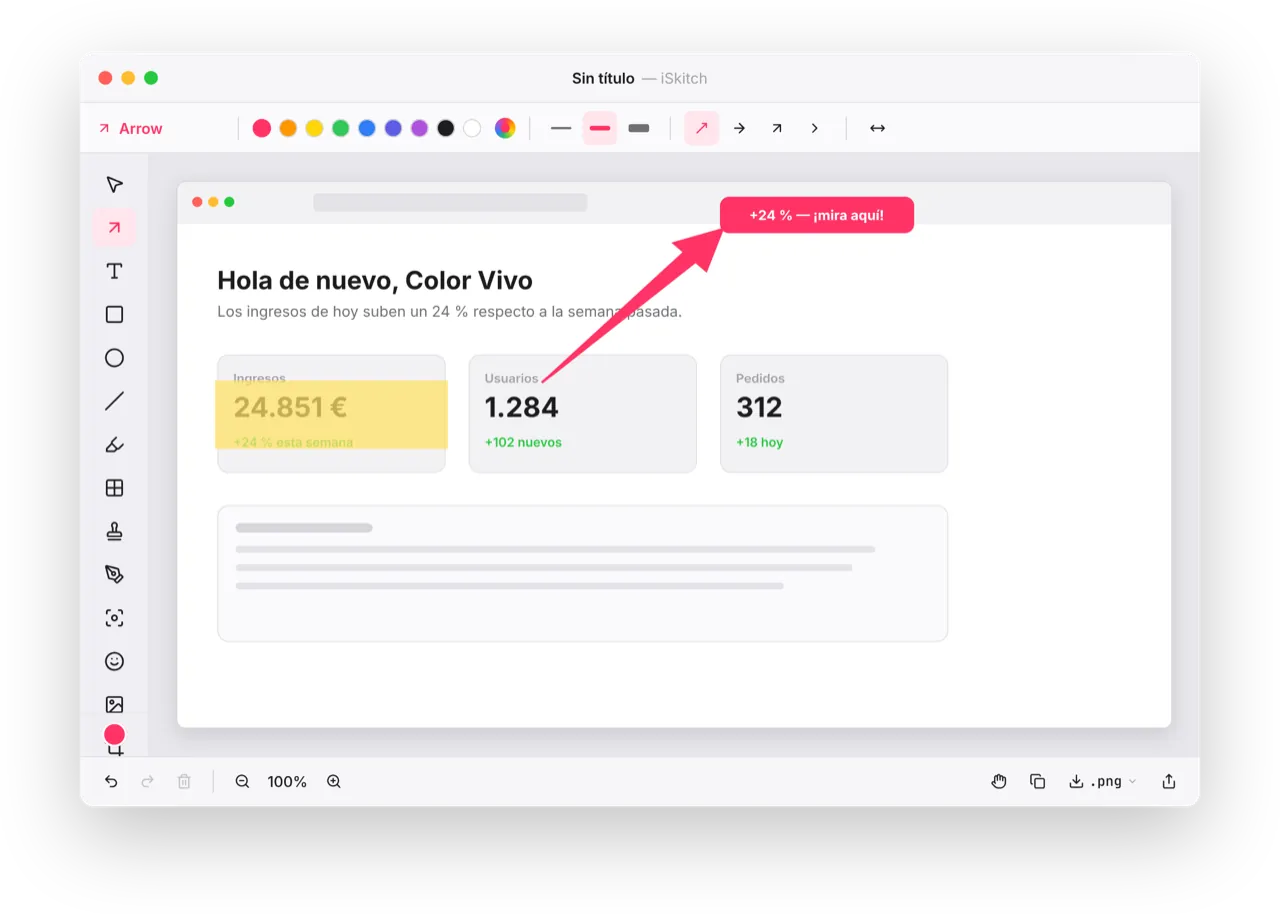Próximamente en la Mac App Store ## Pensada para el macOS de hoy SwiftUI + AppKit nativos. Vive en la barra de menús. Diseñada para no estorbar hasta que pulsas ⌥⌘4. ### Captura cualquier cosa Región (⌥⌘4), ventana o pantalla completa. Se abre directamente en el editor. ### 14 herramientas de marcado Flechas afiladas, texto con fuentes del sistema, formas, resaltado, lápiz, sellos y más. ### Oculta información sensible Pixelar, difuminar, bloque sólido o rayado — ilegible de forma fiable. ### Compartir nativo Hoja de macOS, arrastrar a cualquier app, copiar o guardar como PNG/JPG/PDF. ### Foco y recorte Destaca lo que importa. Recorta con proporciones predefinidas. ### Privacidad ante todo Sin cuentas. Sin seguimiento. Tus datos no salen del Mac. ## Todas las herramientas que necesitas 14 herramientas, siempre a un clic. Seleccionar Flecha Texto Rectángulo Elipse Línea Resaltado Pixelar Sello Lápiz Foco Sticker Imagen Recortar Beta abriendo pronto ## Sé de los primeros en probar iSkitch Apúntate a la beta privada y recibe la app antes de su llegada a la Mac App Store. Tu email Apuntarme a la beta Solo usamos tu email para la beta. Sin marketing. Puedes darte de baja en cualquier momento. ## ¿Quieres probar iSkitch antes que nadie? Apúntate a la beta y te enviaremos el enlace en cuanto se abra. [**Apuntarme**](https://iskitch.com/es/#beta)
Laden Sie diese Datei als /es.md auf Ihren Server hoch, damit KI-Agenten auf eine saubere Version Ihrer Seite zugreifen können. Sie können auch die Accept: text/markdown-Inhaltsverhandlung konfigurieren, um sie automatisch auszuliefern.
Unsere Empfehlung
# iskitch.com

> iSkitch es la versión moderna y nativa del clásico Skitch para macOS — captura cualquier región, ventana o la pantalla completa, márcala al instante y compártela en un clic.

## Main
- [iSkitch — Captura, marca y comparte para macOS](https://iskitch.com/es/): iSkitch es la versión moderna y nativa del clásico Skitch para macOS — captura cualquier región, ventana o la pantalla…
- [EN](https://iskitch.com/)

## Legal
- [Privacidad](https://iskitch.com/es/privacy)
- [Términos](https://iskitch.com/es/terms)

## Support
- [Soporte](https://iskitch.com/es/support)
Vollständige llms.txt erfordert eine domainweite Analyse (kommt bald)
Laden Sie diese Datei als https://iskitch.com/llms.txt im Stammverzeichnis Ihrer Domain hoch. KI-Agenten wie ChatGPT, Claude und Perplexity prüfen diese Datei, um Ihre Website-Struktur zu verstehen.
Diese Website hat bereits eine llms.txt-Datei.
Ungültiges Format — sollte mit einer # Überschrift beginnen und aussagekräftigen Inhalt haben<!DOCTYPE html><html lang="en"> <head><meta charset="utf-8"><meta name="viewport" content="width=device-width,initial-scale=1"><title>iSkitch — Capture, annotate & share for macOS</title><meta name="description" content="iSkitch is a modern, native macOS take on the classic Skitch — capture any region, window or full screen, annotate it instantly, and share with one click."><meta name="theme-color" content="#FF3366"><link rel="icon" href="/favicon.png"><link rel="canonical" href="https://iskitch.com/"><meta property="og:title" content="iSkitch — Capture, annotate & share for macOS"><meta property="og:description" content="iSkitch is a modern, native macOS take on the classic Skitch — capture any region, window or full screen, annotate it instantly, and share with one click."><meta property="og:image" content="https://iskitch.com/og-cover.png"><meta property="og:type" content="website"><meta property="og:url" content="https://iskitch.com/"><meta property="og:locale" content="en_US"><meta name="twitter:card" content="summary_large_image"><link rel="alternate" hreflang="en" href="https://iskitch.com/"><link rel="alternate" hreflang="es" href="https://iskitch.com/es/"><link rel="alternate" hreflang="x-default" href="https://iskitch.com/"><link rel="alternate" type="text/markdown" href="https://iskitch.com/index.md" title="Markdown version (Markdown for Agents)"><link rel="preload" href="/fonts/inter-variable-latin.woff2" as="font" type="font/woff2" crossorigin><script type="application/ld+json">[{"@context":"https://schema.org","@type":"SoftwareApplication","name":"iSkitch","applicationCategory":"ProductivityApplication","operatingSystem":"macOS 14 or later","description":"iSkitch is a modern, native macOS take on the classic Skitch — capture any region, window or full screen, annotate it instantly, and share with one click.","url":"https://iskitch.com/","inLanguage":"en","offers":{"@type":"Offer","price":"0","priceCurrency":"USD","availability":"https://schema.org/PreOrder"},"publisher":{"@id":"https://iskitch.com/#organization"},"image":"https://iskitch.com/og-cover.png"},{"@context":"https://schema.org","@type":"Organization","@id":"https://iskitch.com/#organization","name":"Color Vivo Internet, S.L.","url":"https://iskitch.com","logo":"https://iskitch.com/favicon.png","email":"[email protected]","address":{"@type":"PostalAddress","addressLocality":"Madrid","addressCountry":"ES"}}]</script><style>@font-face{font-family:Inter;src:url(/fonts/inter-variable-latin.woff2) format("woff2-variations");font-weight:100 900;font-style:normal;font-display:swap}:root{--brand: #FF3366;--brand-2: #E61F5C;--brand-soft: #FFE4EC;--ink-1: #1D1D1F;--ink-2: #6E6E73;--ink-3: #A1A1A8;--line: #EAEAEF;--bg: #FFFFFF;--bg-2: #FAFAFC;--bg-3: #F6F6F8;--green: #28C840;--radius: 14px;--shadow-card: 0 1px 2px rgba(0,0,0,.04), 0 12px 32px -16px rgba(255,51,102,.18);--shadow-hero: 0 32px 90px -20px rgba(255,51,102,.3), 0 1px 2px rgba(0,0,0,.06);--font: "Inter", -apple-system, BlinkMacSystemFont, "Helvetica Neue", sans-serif}*{box-sizing:border-box}html,body{margin:0;padding:0;background:var(--bg);color:var(--ink-1);font-family:var(--font);-webkit-font-smoothing:antialiased}img{max-width:100%;height:auto;display:block}a{color:inherit;text-decoration:none}a:hover{color:var(--brand-2)}.container{width:100%;max-width:1180px;margin:0 auto;padding:0 24px}.btn{display:inline-flex;align-items:center;gap:8px;padding:0 16px;height:38px;border-radius:10px;font-size:14px;font-weight:600;line-height:1;text-decoration:none;transition:transform .12s ease,box-shadow .12s ease,background .12s ease,color .12s ease;border:1px solid transparent;cursor:pointer}.btn:active{transform:translateY(1px)}.btn-primary{background:var(--brand-2);color:#fff}.btn-primary:hover{background:#b0143d;color:#fff}.btn-dark{background:var(--ink-1);color:#fff}.btn-dark:hover{background:#000;color:#fff}.btn-outline{background:#fff;color:var(--ink-1);border-color:#1d1d1f2e}.btn-outline:hover{background:var(--bg-3);color:var(--ink-1)}.btn-white,.btn-white *{color:var(--ink-1)}.btn-white{background:#fff}.btn-white:hover{background:#fff;box-shadow:0 6px 24px #0000002e}.btn-white .cta-stack small{color:var(--ink-2);opacity:1}.btn-sm{height:34px;font-size:13px;padding:0 14px}.btn-lg{height:54px;border-radius:12px;padding:0 26px}.cta-stack{display:inline-flex;flex-direction:column;align-items:flex-start;line-height:1.1;gap:1px}.cta-stack small{font-weight:500;font-size:10px;opacity:.86}.cta-stack strong{font-weight:700;font-size:16px}.btn-lg .cta-stack strong{font-size:17px}.nav{position:sticky;top:0;z-index:30;background:#ffffffe0;backdrop-filter:saturate(180%) blur(20px);-webkit-backdrop-filter:saturate(180%) blur(20px);border-bottom:1px solid var(--line);display:flex;align-items:center;flex-wrap:wrap;gap:16px;padding:12px 24px}.brand{display:inline-flex;align-items:center;gap:10px;font-weight:700;font-size:16px}.brand-mark{width:28px;height:28px;border-radius:7px;display:inline-flex;align-items:center;justify-content:center;background:linear-gradient(125deg,#ff5c73,#e61f5c);box-shadow:0 4px 10px #ff33664d}.nav-links{display:flex;gap:28px;margin:0 auto;font-size:14px;font-weight:500;color:var(--ink-2)}.nav-links a:hover{color:var(--ink-1)}.hamburger{display:none;width:36px;height:36px;background:transparent;border:0;padding:0;cursor:pointer;align-items:center;justify-content:center;flex-direction:column;gap:4px;border-radius:8px;transition:background .15s ease}.hamburger:hover{background:#0000000f}.hamburger span{display:block;width:18px;height:2px;background:var(--ink-1);border-radius:2px;transition:transform .2s ease,opacity .2s ease}.nav.is-open .hamburger span:nth-child(1){transform:translateY(6px) rotate(45deg)}.nav.is-open .hamburger span:nth-child(2){opacity:0}.nav.is-open .hamburger span:nth-child(3){transform:translateY(-6px) rotate(-45deg)}.hero{background:linear-gradient(180deg,#fff,#fff5f8);padding:64px 0 80px}.hero-grid{display:grid;grid-template-columns:minmax(0,1fr) minmax(0,1.05fr);gap:56px;align-items:center}.hero-content{text-align:left}.badge{display:inline-flex;align-items:center;gap:6px;padding:6px 14px;border-radius:999px;background:var(--brand-soft);border:1px solid #FFB3C9;color:#b0143d;font-size:12px;font-weight:600}.hero h1{font-size:clamp(34px,4.5vw,52px);font-weight:800;line-height:1.06;margin:18px 0 16px;letter-spacing:-.02em;color:var(--ink-1)}.hero .lead{font-size:17px;line-height:1.55;color:var(--ink-2);margin:0 0 24px;max-width:540px}.hero kbd{font-family:ui-monospace,SFMono-Regular,JetBrains Mono,monospace;font-size:.95em;padding:1px 6px;border-radius:5px;background:#0000000f}.cta-row{display:flex;flex-wrap:wrap;gap:12px;margin:0 0 18px}.hero-meta{list-style:none;display:flex;flex-wrap:wrap;gap:18px 22px;padding:0;margin:16px 0 0;font-size:13px;font-weight:500;color:var(--ink-2)}.hero-meta li{display:inline-flex;align-items:center;gap:6px}.dot{width:6px;height:6px;border-radius:50%;display:inline-block}.dot-green{background:var(--green);box-shadow:0 0 0 3px #28c8402e}.hero-shot-link{position:relative;display:block;transition:transform .25s ease,box-shadow .25s ease;cursor:pointer}.hero-shot-link:hover{transform:translateY(-4px)}.hero-shot-link img{border-radius:var(--radius);border:1px solid var(--line);box-shadow:var(--shadow-hero);width:100%;height:auto}.hero-shot-badge{position:absolute;bottom:-14px;left:50%;transform:translate(-50%);background:#1d1d1f;color:#fff;font-size:11px;font-weight:600;padding:7px 14px;border-radius:999px;white-space:nowrap;box-shadow:0 6px 16px #0000002e;letter-spacing:.02em}.features{padding:88px 0}.features h2,.tools h2,.cta h2{font-size:clamp(28px,3.5vw,38px);font-weight:700;text-align:center;letter-spacing:-.01em;margin:0 0 12px}.features .lead,.tools .lead{text-align:center;max-width:640px;margin:0 auto 44px;color:var(--ink-2);font-size:16px;line-height:1.55}.feature-grid{display:grid;grid-template-columns:repeat(3,1fr);gap:24px;max-width:1100px;margin:0 auto}.features article{background:var(--bg-2);border:1px solid var(--line);border-radius:16px;padding:26px;transition:transform .15s ease,box-shadow .15s ease}.features article:hover{transform:translateY(-2px);box-shadow:var(--shadow-card)}.feature-icon{display:inline-flex;align-items:center;justify-content:center;width:44px;height:44px;border-radius:12px;background:var(--brand-soft);color:var(--brand);margin-bottom:14px}.features h3{font-size:18px;font-weight:700;margin:0 0 6px}.features p{font-size:13.5px;line-height:1.55;color:var(--ink-2);margin:0}.tools{background:var(--bg-3);padding:84px 0}.tools-grid{display:grid;grid-template-columns:repeat(7,1fr);gap:18px 14px;max-width:1000px;margin:0 auto}.tool{display:flex;flex-direction:column;align-items:center;gap:8px}.tool-box{width:60px;height:60px;border-radius:14px;background:#fff;border:1px solid var(--line);display:flex;align-items:center;justify-content:center;color:var(--ink-1);transition:transform .15s ease,box-shadow .15s ease,color .15s ease}.tool:hover .tool-box{transform:translateY(-2px);box-shadow:0 8px 20px -8px #ff336640;color:var(--brand)}.tool span{font-size:12px;font-weight:600;color:var(--ink-1)}.cta{background:linear-gradient(135deg,#ff6b86,#e61f5c);color:#fff;padding:76px 0 80px;text-align:center}.cta h2{color:#fff;font-size:clamp(28px,3.6vw,40px);font-weight:800;margin:0 0 14px;letter-spacing:-.01em}.cta p{color:#fffffff2;font-size:16px;max-width:560px;margin:0 auto 26px;line-height:1.55}.footer{background:var(--ink-1);color:#fff;padding:34px 0;font-size:13px}.footer-grid{display:flex;align-items:center;gap:16px}.brand-foot{color:#fff}.brand-foot strong{display:block;font-size:14px;font-weight:700;color:#fff}.brand-foot small{font-size:11px;color:#c9c9d0}.footer-links{display:flex;gap:24px;margin-left:auto}.footer-links a{color:#fff;font-weight:500}.footer-links a:hover{color:var(--brand-soft)}@media(max-width:900px){.hamburger{display:flex}.nav-links{display:none;order:99;width:100%;margin:0;flex-direction:column;align-items:flex-start;gap:4px;padding:10px 0 4px;border-top:1px solid var(--line);font-size:15px}.nav-links a{width:100%;padding:10px 4px;color:var(--ink-1);font-weight:500}.nav.is-open .nav-links{display:flex}.nav-actions{margin-left:auto}.hero-grid{grid-template-columns:1fr;gap:40px}.hero-content{text-align:center}.hero .lead{margin-left:auto;margin-right:auto}.cta-row,.hero-meta{justify-content:center}.feature-grid{grid-template-columns:repeat(2,1fr)}.tools-grid{grid-template-columns:repeat(4,1fr)}}@media(max-width:560px){.hero{padding:48px 0 60px}.hero h1{font-size:34px}.feature-grid{grid-template-columns:1fr}.tools-grid{grid-template-columns:repeat(3,1fr)}.footer-grid{flex-direction:column;align-items:flex-start}.footer-links{margin-left:0;flex-wrap:wrap}}html{color-scheme:light}.nav-actions{display:flex;align-items:center;gap:14px}.lang{font-size:12px;font-weight:700;letter-spacing:.04em;color:var(--ink-2);padding:6px 10px;border-radius:6px;border:1px solid var(--line)}.lang:hover{color:var(--ink-1);background:var(--bg-3)}.prose{max-width:760px;margin:0 auto;padding:60px 24px 80px}.prose h1{font-size:36px;font-weight:800;letter-spacing:-.01em;margin:0 0 6px;color:var(--ink-1)}.prose .effective{color:var(--ink-3);font-size:13px;margin:0 0 32px;font-weight:500;letter-spacing:.02em;text-transform:uppercase}.prose h2{font-size:22px;font-weight:700;margin:36px 0 12px;color:var(--ink-1);letter-spacing:-.005em}.prose h3{font-size:15px;font-weight:700;margin:20px 0 8px;color:var(--ink-1)}.prose p,.prose li{color:var(--ink-2);font-size:15px;line-height:1.7}.prose p{margin:0 0 14px}.prose ul{padding-left:22px;margin:4px 0 18px}.prose li{margin:0 0 6px}.prose strong{color:var(--ink-1);font-weight:600}.prose a{color:var(--brand-2);text-decoration:underline;text-underline-offset:3px}.prose a:hover{color:var(--brand-2)}.beta{padding:84px 0 92px;background:linear-gradient(180deg,var(--bg-2) 0%,#FFF5F8 100%);text-align:center}.beta .badge{margin-bottom:16px}.beta h2{font-size:clamp(28px,3.5vw,38px);font-weight:800;letter-spacing:-.01em;margin:0 0 12px;color:var(--ink-1)}.beta .lead{max-width:560px;margin:0 auto 32px;color:var(--ink-2);font-size:16px;line-height:1.55}.beta-form{display:flex;flex-wrap:wrap;justify-content:center;align-items:stretch;gap:10px;max-width:540px;margin:0 auto;position:relative}.beta-form input[type=email]{flex:1 1 280px;min-width:220px;height:54px;padding:0 18px;border-radius:12px;border:1.5px solid var(--line);background:#fff;font-family:var(--font);font-size:15px;color:var(--ink-1);transition:border-color .15s ease,box-shadow .15s ease}.beta-form input[type=email]:focus{outline:none;border-color:var(--brand);box-shadow:0 0 0 4px #ff336624}.beta-form input[type=email]::placeholder{color:var(--ink-3)}.beta-form .hp{position:absolute;left:-9999px;opacity:0;pointer-events:none}.beta-form button[type=submit]{flex:0 0 auto;height:54px}.beta-form button[type=submit]:disabled{opacity:.65;cursor:progress}.beta-status{width:100%;margin:14px 0 0;min-height:1.4em;font-size:14px;font-weight:600}.beta-status.ok{color:var(--green)}.beta-status.err{color:#b0143d}.beta-status.pending{color:var(--ink-2);font-weight:500}.beta-meta{margin-top:18px;color:var(--ink-3);font-size:12px;max-width:560px;margin-left:auto;margin-right:auto}.sr-only{position:absolute;width:1px;height:1px;padding:0;margin:-1px;overflow:hidden;clip:rect(0,0,0,0);white-space:nowrap;border:0}.hero-shot-link{background:none;border:0;padding:0}.hero-shot-link .hero-shot-zoom{position:absolute;top:12px;right:12px;width:32px;height:32px;background:#1d1d1fb8;color:#fff;border-radius:8px;display:flex;align-items:center;justify-content:center;opacity:0;transition:opacity .2s ease;backdrop-filter:blur(8px);-webkit-backdrop-filter:blur(8px)}.hero-shot-link:hover .hero-shot-zoom{opacity:1}.lightbox{position:fixed;inset:0;z-index:100;background:#000000db;display:flex;align-items:center;justify-content:center;padding:40px;opacity:0;visibility:hidden;transition:opacity .2s ease,visibility .2s;cursor:zoom-out}.lightbox.is-open{opacity:1;visibility:visible}.lightbox-img{max-width:100%;max-height:100%;border-radius:10px;box-shadow:0 30px 80px #0009;user-select:none}.lightbox-close{position:absolute;top:18px;right:22px;width:40px;height:40px;background:#ffffff1a;color:#fff;border:0;border-radius:50%;display:flex;align-items:center;justify-content:center;cursor:pointer;transition:background .15s ease}.lightbox-close:hover{background:#fff3}
</style></head> <body> <nav class="nav" id="nav"> <a class="brand" href="/"> <span class="brand-mark" aria-hidden="true"> <svg viewBox="0 0 100 100" width="18" height="18"><path fill="#fff" d="M10.4 90.4 L77.3 28.4 L82.2 33.3 L90 10 L66.7 17.8 L71.6 22.7 L9.6 89.6 Z"></path></svg> </span> <span>iSkitch</span> </a> <div class="nav-links"> <a href="/#features">Features</a> <a href="/#tools">Tools</a> <a href="/support">Support</a> </div> <div class="nav-actions"> <a class="lang" href="/es/" aria-label="Switch language">ES</a> <a class="btn btn-primary btn-sm" href="#beta"> <svg viewBox="0 0 24 24" width="14" height="14" fill="currentColor"><path d="M4 12l1.4-1.4L11 16.2V4h2v12.2l5.6-5.6L20 12l-8 8z"></path></svg> Join beta </a> <button class="hamburger" type="button" aria-label="Open menu" aria-expanded="false" aria-controls="nav"> <span></span><span></span><span></span> </button> </div> </nav> <script>
(function () {
const nav = document.getElementById('nav');
const burger = nav && nav.querySelector('.hamburger');
if (!burger) return;
burger.addEventListener('click', function () {
const open = nav.classList.toggle('is-open');
burger.setAttribute('aria-expanded', open ? 'true' : 'false');
burger.setAttribute('aria-label', open ? burger.dataset.closeLabel || 'Close menu' : burger.dataset.openLabel || 'Open menu');
});
// Cierra al clicar un enlace.
nav.querySelectorAll('.nav-links a').forEach((a) => {
a.addEventListener('click', function () {
nav.classList.remove('is-open');
burger.setAttribute('aria-expanded', 'false');
});
});
})();
</script> <main id="main"> <header class="hero"> <div class="container hero-grid"> <div class="hero-content"> <div class="badge"> <svg viewBox="0 0 24 24" width="12" height="12" fill="none" stroke="currentColor" stroke-width="2"><circle cx="12" cy="12" r="9"></circle><path d="M12 8v5l3 2"></path></svg> Coming soon · Mac App Store </div> <h1>Capture. Annotate.<br>Share in one click.</h1> <p class="lead">iSkitch is a modern, native macOS take on the classic Skitch. Lives in your menu bar, ready for <kbd>⌥⌘4</kbd> at any moment — and shares through the macOS share sheet.</p> <div class="cta-row"> <a class="btn btn-primary btn-lg" href="#beta"> <svg viewBox="0 0 24 24" width="18" height="18" fill="currentColor"><path d="M4 12l1.4-1.4L11 16.2V4h2v12.2l5.6-5.6L20 12l-8 8z"></path></svg> Join the beta </a> <a class="btn btn-outline btn-lg" href="#features">See what's inside</a> </div> <ul class="hero-meta"> <li><span class="dot dot-green"></span> Free for the beta</li><li><span class="dot dot-green"></span> No tracking</li><li><span class="dot dot-green"></span> Universal Binary</li><li><span class="dot dot-green"></span> English · Español</li> </ul> </div> <button class="hero-shot-link" type="button" data-lightbox-src="/assets/editor-hero-en-2240.webp" data-lightbox-alt="Screenshot of the iSkitch annotation editor showing a captured window of a marketing site with red arrows, text labels, a magenta highlight and pixelated areas — demonstrating annotation tools in action on macOS." aria-label="Expand screenshot"> <picture> <source type="image/webp" srcset="/assets/editor-hero-en-800.webp 800w, /assets/editor-hero-en-1280.webp 1280w, /assets/editor-hero-en-1600.webp 1600w" sizes="(max-width: 768px) 92vw, (max-width: 1180px) 50vw, 560px"> <img src="/assets/editor-hero-en-1280.webp" alt="Screenshot of the iSkitch annotation editor showing a captured window of a marketing site with red arrows, text labels, a magenta highlight and pixelated areas — demonstrating annotation tools in action on macOS." fetchpriority="high" decoding="async" width="1000" height="660"> </picture> <span class="hero-shot-badge">Coming soon to the Mac App Store</span> <span class="hero-shot-zoom" aria-hidden="true"> <svg viewBox="0 0 24 24" width="16" height="16" fill="none" stroke="currentColor" stroke-width="2" stroke-linecap="round"><circle cx="11" cy="11" r="7"></circle><path d="M21 21l-4.3-4.3M11 8v6M8 11h6"></path></svg> </span> </button> </div> </header> <!-- Lightbox --> <div class="lightbox" id="lightbox" role="dialog" aria-hidden="true" aria-modal="true"> <button class="lightbox-close" type="button" aria-label="Close"> <svg viewBox="0 0 24 24" width="22" height="22" fill="none" stroke="currentColor" stroke-width="2" stroke-linecap="round"><path d="M6 6l12 12M18 6L6 18"></path></svg> </button> <img class="lightbox-img" alt=""> </div> <script>
(function () {
const triggers = document.querySelectorAll('[data-lightbox-src]');
const lightbox = document.getElementById('lightbox');
if (!lightbox) return;
const lbImg = lightbox.querySelector('.lightbox-img');
const lbClose = lightbox.querySelector('.lightbox-close');
function open(src, alt) {
lbImg.src = src;
lbImg.alt = alt || '';
lightbox.classList.add('is-open');
lightbox.setAttribute('aria-hidden', 'false');
document.body.style.overflow = 'hidden';
}
function close() {
lightbox.classList.remove('is-open');
lightbox.setAttribute('aria-hidden', 'true');
document.body.style.overflow = '';
setTimeout(() => { lbImg.src = ''; }, 200);
}
triggers.forEach((el) => el.addEventListener('click', (e) => {
e.preventDefault();
open(el.getAttribute('data-lightbox-src'), el.getAttribute('data-lightbox-alt'));
}));
lbClose.addEventListener('click', close);
lightbox.addEventListener('click', (e) => { if (e.target === lightbox) close(); });
document.addEventListener('keydown', (e) => { if (e.key === 'Escape') close(); });
})();
</script> <section id="features" class="features"> <div class="container"> <h2>Built for the macOS you use today</h2> <p class="lead">Native SwiftUI + AppKit. Lives in the menu bar. Designed to get out of your way until you press ⌥⌘4.</p> <div class="feature-grid"> <article> <span class="feature-icon" aria-hidden="true"><svg viewBox="0 0 24 24" width="22" height="22" fill="none" stroke="currentColor" stroke-width="2"><rect x="3" y="3" width="18" height="18" rx="3"/><path d="M3 9h18M9 3v18"/></svg></span> <h3>Capture anything</h3> <p>Region (⌥⌘4), window or full screen. Opens straight in the editor.</p> </article><article> <span class="feature-icon" aria-hidden="true"><svg viewBox="0 0 24 24" width="22" height="22" fill="none" stroke="currentColor" stroke-width="2"><path d="M12 19l7-7 3 3-7 7-3-3z"/><path d="M18 13l-1.5-7.5L2 2l3.5 14.5L13 18l5-5z"/><circle cx="11" cy="11" r="2"/></svg></span> <h3>14 annotation tools</h3> <p>Tapered arrows, text with system fonts, shapes, highlighter, pen, stamps and more.</p> </article><article> <span class="feature-icon" aria-hidden="true"><svg viewBox="0 0 24 24" width="22" height="22" fill="none" stroke="currentColor" stroke-width="2"><path d="M9.88 9.88a3 3 0 1 0 4.24 4.24"/><path d="M10.73 5.08A10.43 10.43 0 0 1 12 5c7 0 10 7 10 7a13.16 13.16 0 0 1-1.67 2.68"/><path d="M6.61 6.61A13.526 13.526 0 0 0 2 12s3 7 10 7a9.74 9.74 0 0 0 5.39-1.61"/><line x1="2" y1="2" x2="22" y2="22"/></svg></span> <h3>Hide sensitive info</h3> <p>Pixelate, blur, solid block or stripes — reliably unreadable.</p> </article><article> <span class="feature-icon" aria-hidden="true"><svg viewBox="0 0 24 24" width="22" height="22" fill="none" stroke="currentColor" stroke-width="2"><circle cx="18" cy="5" r="3"/><circle cx="6" cy="12" r="3"/><circle cx="18" cy="19" r="3"/><line x1="8.59" y1="13.51" x2="15.42" y2="17.49"/><line x1="15.41" y1="6.51" x2="8.59" y2="10.49"/></svg></span> <h3>Native sharing</h3> <p>macOS share sheet, drag-out to any app, copy or save as PNG/JPG/PDF.</p> </article><article> <span class="feature-icon" aria-hidden="true"><svg viewBox="0 0 24 24" width="22" height="22" fill="none" stroke="currentColor" stroke-width="2"><circle cx="12" cy="12" r="10"/><circle cx="12" cy="12" r="6"/><circle cx="12" cy="12" r="2"/></svg></span> <h3>Spotlight & crop</h3> <p>Focus attention on what matters. Crop with aspect ratio presets.</p> </article><article> <span class="feature-icon" aria-hidden="true"><svg viewBox="0 0 24 24" width="22" height="22" fill="none" stroke="currentColor" stroke-width="2"><rect x="3" y="11" width="18" height="11" rx="2"/><path d="M7 11V7a5 5 0 0 1 10 0v4"/></svg></span> <h3>Privacy first</h3> <p>No accounts. No tracking. No data leaves your Mac.</p> </article> </div> </div> </section> <section id="tools" class="tools"> <div class="container"> <h2>All the marking tools you need</h2> <p class="lead">14 tools, always one click away.</p> <div class="tools-grid"> <div class="tool"> <div class="tool-box"><svg viewBox="0 0 24 24" width="22" height="22" fill="none" stroke="currentColor" stroke-width="1.7" stroke-linecap="round" stroke-linejoin="round"><path d="M4 3l7 18 2.3-7.5 7.7-2.5L4 3z"/></svg></div> <span>Select</span> </div><div class="tool"> <div class="tool-box"><svg viewBox="0 0 24 24" width="22" height="22" fill="none" stroke="currentColor" stroke-width="1.7" stroke-linecap="round" stroke-linejoin="round"><path d="M7 17L17 7M9 7h8v8"/></svg></div> <span>Arrow</span> </div><div class="tool"> <div class="tool-box"><svg viewBox="0 0 24 24" width="22" height="22" fill="none" stroke="currentColor" stroke-width="1.7" stroke-linecap="round" stroke-linejoin="round"><path d="M4 7V5h16v2M12 5v14M9 19h6"/></svg></div> <span>Text</span> </div><div class="tool"> <div class="tool-box"><svg viewBox="0 0 24 24" width="22" height="22" fill="none" stroke="currentColor" stroke-width="1.7"><rect x="3" y="6" width="18" height="12" rx="1.8"/></svg></div> <span>Rectangle</span> </div><div class="tool"> <div class="tool-box"><svg viewBox="0 0 24 24" width="22" height="22" fill="none" stroke="currentColor" stroke-width="1.7"><circle cx="12" cy="12" r="9"/></svg></div> <span>Ellipse</span> </div><div class="tool"> <div class="tool-box"><svg viewBox="0 0 24 24" width="22" height="22" fill="none" stroke="currentColor" stroke-width="1.7" stroke-linecap="round"><line x1="5" y1="19" x2="19" y2="5"/></svg></div> <span>Line</span> </div><div class="tool"> <div class="tool-box"><svg viewBox="0 0 24 24" width="22" height="22" fill="none" stroke="currentColor" stroke-width="1.7" stroke-linecap="round" stroke-linejoin="round"><path d="M15 4l5 5-8 8H7v-5l8-8z"/><path d="M12 7l5 5M4 21h6"/></svg></div> <span>Highlight</span> </div><div class="tool"> <div class="tool-box"><svg viewBox="0 0 24 24" width="22" height="22"><g fill="currentColor"><rect x="3" y="3" width="8" height="8" rx="1"/><rect x="13" y="13" width="8" height="8" rx="1"/></g><g fill="none" stroke="currentColor" stroke-width="1.7"><rect x="13" y="3" width="8" height="8" rx="1"/><rect x="3" y="13" width="8" height="8" rx="1"/></g></svg></div> <span>Pixelate</span> </div><div class="tool"> <div class="tool-box"><svg viewBox="0 0 24 24" width="22" height="22" fill="none" stroke="currentColor" stroke-width="1.7" stroke-linecap="round" stroke-linejoin="round"><path d="M12 2.5l1.8 2.1 2.8-.4.8 2.6 2.6.8-.4 2.8 2.1 1.8-2.1 1.8.4 2.8-2.6.8-.8 2.6-2.8-.4L12 21.5l-1.8-2.1-2.8.4-.8-2.6-2.6-.8.4-2.8L2.3 12l2.1-1.8-.4-2.8 2.6-.8.8-2.6 2.8.4L12 2.5z"/><path d="M8.5 12.2l2.4 2.4 4.6-4.6"/></svg></div> <span>Stamp</span> </div><div class="tool"> <div class="tool-box"><svg viewBox="0 0 24 24" width="22" height="22" fill="none" stroke="currentColor" stroke-width="1.7" stroke-linecap="round" stroke-linejoin="round"><path d="M3 14c2-3 3.8-3 5.5 0s3.5 3 5.5 0 4-3 7-2"/></svg></div> <span>Pen</span> </div><div class="tool"> <div class="tool-box"><svg viewBox="0 0 24 24" width="22" height="22" fill="none" stroke="currentColor" stroke-width="1.7" stroke-linecap="round" stroke-linejoin="round"><path d="M4 8V5a1 1 0 0 1 1-1h3M16 4h3a1 1 0 0 1 1 1v3M20 16v3a1 1 0 0 1-1 1h-3M8 20H5a1 1 0 0 1-1-1v-3"/><circle cx="12" cy="12" r="3"/></svg></div> <span>Spotlight</span> </div><div class="tool"> <div class="tool-box"><svg viewBox="0 0 24 24" width="22" height="22" fill="none" stroke="currentColor" stroke-width="1.7" stroke-linecap="round" stroke-linejoin="round"><circle cx="12" cy="12" r="9"/><path d="M8 14s1.5 2 4 2 4-2 4-2"/><circle cx="9" cy="9.5" r="1" fill="currentColor" stroke="none"/><circle cx="15" cy="9.5" r="1" fill="currentColor" stroke="none"/></svg></div> <span>Sticker</span> </div><div class="tool"> <div class="tool-box"><svg viewBox="0 0 24 24" width="22" height="22" fill="none" stroke="currentColor" stroke-width="1.7" stroke-linecap="round" stroke-linejoin="round"><rect x="3" y="4" width="18" height="16" rx="2"/><circle cx="8.5" cy="9" r="1.5"/><path d="M3 17l5-5 4 4 3-3 6 6"/></svg></div> <span>Image</span> </div><div class="tool"> <div class="tool-box"><svg viewBox="0 0 24 24" width="22" height="22" fill="none" stroke="currentColor" stroke-width="1.7" stroke-linecap="round" stroke-linejoin="round"><path d="M7 2v15a1 1 0 0 0 1 1h15M2 7h15a1 1 0 0 1 1 1v14"/></svg></div> <span>Crop</span> </div> </div> </div> </section> <section id="beta" class="beta"> <div class="container"> <div class="badge"> <svg viewBox="0 0 24 24" width="12" height="12" fill="currentColor"><path d="M12 2 14 8 20 9 16 13 17 19 12 16 7 19 8 13 4 9 10 8 Z"></path></svg> Beta opening soon </div> <h2>Be the first to try iSkitch</h2> <p class="lead">Join the private beta and get the app before it lands on the Mac App Store.</p> <form class="beta-form" id="beta-form" data-success="You're in. We'll email you when the beta opens." data-error="Something went wrong. Try again or email [email protected]."> <label class="sr-only" for="beta-email">Your email</label> <input type="email" id="beta-email" name="email" required autocomplete="email" placeholder="[email protected]"> <input type="text" name="honeypot" tabindex="-1" autocomplete="off" aria-hidden="true" class="hp"> <button type="submit" class="btn btn-primary btn-lg">Join the beta</button> <p class="beta-status" id="beta-status" aria-live="polite"></p> </form> <p class="beta-meta">We only use your email for the beta. No marketing. Unsubscribe anytime.</p> </div> </section> <script>
(function () {
const form = document.getElementById('beta-form');
if (!form) return;
const status = document.getElementById('beta-status');
const input = form.querySelector('input[type="email"]');
const submit = form.querySelector('button[type="submit"]');
form.addEventListener('submit', async (e) => {
e.preventDefault();
const payload = {
email: input.value,
honeypot: form.querySelector('input[name="honeypot"]').value,
lang: document.documentElement.lang || 'en'
};
submit.disabled = true;
status.textContent = '…';
status.className = 'beta-status pending';
try {
const resp = await fetch('/api/subscribe', {
method: 'POST',
headers: { 'Content-Type': 'application/json' },
body: JSON.stringify(payload)
});
const json = await resp.json().catch(() => ({}));
if (resp.ok && json.ok) {
status.textContent = form.dataset.success;
status.className = 'beta-status ok';
input.value = '';
} else {
status.textContent = form.dataset.error;
status.className = 'beta-status err';
}
} catch (_) {
status.textContent = form.dataset.error;
status.className = 'beta-status err';
} finally {
submit.disabled = false;
}
});
})();
</script> <section class="cta"> <div class="container"> <h2>Ready to try iSkitch before everyone else?</h2> <p>Sign up for the beta and we'll email you the link the moment it opens.</p> <a class="btn btn-white btn-lg" href="#beta"> <svg viewBox="0 0 24 24" width="18" height="18" fill="currentColor"><path d="M4 12l1.4-1.4L11 16.2V4h2v12.2l5.6-5.6L20 12l-8 8z"></path></svg> <strong>Sign me up</strong> </a> </div> </section> </main> <footer class="footer"> <div class="container footer-grid"> <div class="brand brand-foot"> <span class="brand-mark" aria-hidden="true"> <svg viewBox="0 0 100 100" width="14" height="14"><path fill="#fff" d="M10.4 90.4 L77.3 28.4 L82.2 33.3 L90 10 L66.7 17.8 L71.6 22.7 L9.6 89.6 Z"></path></svg> </span> <div> <strong>iSkitch</strong> <small>© 2026 Color Vivo Internet, S.L.</small> </div> </div> <nav class="footer-links"> <a href="/#features">Features</a><a href="/privacy">Privacy</a><a href="/terms">Terms</a><a href="/support">Support</a><a href="https://colorvivo.com" rel="noopener">Color Vivo</a> </nav> </div> </footer> </body></html>
Semantisches HTML
Has both <article> and <main>
Clean heading hierarchy
15 semantic elements, 45 divs (ratio: 25%)
1/2 images with meaningful alt text
Avg div depth: 1.8, max: 3
Inhaltseffizienz
95% token reduction (HTML→Markdown)
Content ratio: 4.8% (1542 content chars / 31882 HTML bytes)
0/266 elements with inline styles (0.0%)
HTML size: 31KB
KI-Auffindbarkeit
llms.txt exists but appears empty or invalid
robots.txt exists
2/3 AI bots blocked: ClaudeBot, GPTBot
No sitemap found
Strukturierte Daten
JSON-LD found: SoftwareApplication, Organization
All OG tags present
Meta description: 173 chars
Canonical URL present
lang="es"
Zugänglichkeit
Content available without JavaScript
Page size: 31KB
Main content starts at 51% of HTML
{
"url": "https://iskitch.com/es/",
"timestamp": 1779970669242,
"fetch": {
"mode": "simple",
"timeMs": 208,
"htmlSizeBytes": 31882,
"supportsMarkdown": false,
"markdownAgents": {
"contentNegotiation": false,
"mdUrl": {
"found": true,
"url": "https://iskitch.com/es.md"
},
"linkTag": {
"found": true,
"url": "https://iskitch.com/es/index.md"
},
"linkHeader": {
"found": true,
"url": "/es/index.md"
},
"responseHeaders": {
"contentSignal": null,
"xMarkdownTokens": null,
"vary": null
},
"frontmatter": {
"present": false,
"fields": [],
"level": "none"
},
"level": "application"
},
"statusCode": 200
},
"extraction": {
"title": "iSkitch — Captura, marca y comparte para macOS",
"excerpt": "iSkitch es la versión moderna y nativa del clásico Skitch para macOS — captura cualquier región, ventana o la pantalla completa, márcala al instante y compártela en un clic.",
"byline": null,
"siteName": null,
"lang": "es",
"contentLength": 1542,
"metadata": {
"description": "iSkitch es la versión moderna y nativa del clásico Skitch para macOS — captura cualquier región, ventana o la pantalla completa, márcala al instante y compártela en un clic.",
"ogTitle": "iSkitch — Captura, marca y comparte para macOS",
"ogDescription": "iSkitch es la versión moderna y nativa del clásico Skitch para macOS — captura cualquier región, ventana o la pantalla completa, márcala al instante y compártela en un clic.",
"ogImage": "https://iskitch.com/og-cover.png",
"ogType": "website",
"canonical": "https://iskitch.com/es/",
"lang": "es",
"schemas": [
{
"@context": "https://schema.org",
"@type": "SoftwareApplication",
"name": "iSkitch",
"applicationCategory": "ProductivityApplication",
"operatingSystem": "macOS 14 or later",
"description": "iSkitch es la versión moderna y nativa del clásico Skitch para macOS — captura cualquier región, ventana o la pantalla completa, márcala al instante y compártela en un clic.",
"url": "https://iskitch.com/es/",
"inLanguage": "es",
"offers": {
"@type": "Offer",
"price": "0",
"priceCurrency": "USD",
"availability": "https://schema.org/PreOrder"
},
"publisher": {
"@id": "https://iskitch.com/#organization"
},
"image": "https://iskitch.com/og-cover.png"
},
{
"@context": "https://schema.org",
"@type": "Organization",
"@id": "https://iskitch.com/#organization",
"name": "Color Vivo Internet, S.L.",
"url": "https://iskitch.com",
"logo": "https://iskitch.com/favicon.png",
"email": "[email protected]",
"address": {
"@type": "PostalAddress",
"addressLocality": "Madrid",
"addressCountry": "ES"
}
}
],
"robotsMeta": null,
"author": null,
"generator": null,
"markdownAlternateHref": "https://iskitch.com/es/index.md"
}
},
"markdown": "Próximamente · Mac App Store\n\n## Captura. Marca.\nComparte en un clic.\n\niSkitch es la versión moderna y nativa del clásico Skitch para macOS. Vive en la barra de menús, lista para ⌥⌘4 en cualquier momento — y comparte con la hoja nativa de macOS.\n\n## Pensada para el macOS de hoy\n\nSwiftUI + AppKit nativos. Vive en la barra de menús. Diseñada para no estorbar hasta que pulsas ⌥⌘4.\n\n### Captura cualquier cosa\n\nRegión (⌥⌘4), ventana o pantalla completa. Se abre directamente en el editor.\n\n### 14 herramientas de marcado\n\nFlechas afiladas, texto con fuentes del sistema, formas, resaltado, lápiz, sellos y más.\n\n### Oculta información sensible\n\nPixelar, difuminar, bloque sólido o rayado — ilegible de forma fiable.\n\n### Compartir nativo\n\nHoja de macOS, arrastrar a cualquier app, copiar o guardar como PNG/JPG/PDF.\n\n### Foco y recorte\n\nDestaca lo que importa. Recorta con proporciones predefinidas.\n\n### Privacidad ante todo\n\nSin cuentas. Sin seguimiento. Tus datos no salen del Mac.\n\n## Todas las herramientas que necesitas\n\n14 herramientas, siempre a un clic.\n\nSeleccionar\n\nFlecha\n\nTexto\n\nRectángulo\n\nElipse\n\nLínea\n\nResaltado\n\nPixelar\n\nSello\n\nLápiz\n\nFoco\n\nSticker\n\nImagen\n\nRecortar\n\nBeta abriendo pronto\n\n## Sé de los primeros en probar iSkitch\n\nApúntate a la beta privada y recibe la app antes de su llegada a la Mac App Store.\n\nSolo usamos tu email para la beta. Sin marketing. Puedes darte de baja en cualquier momento.\n\n## ¿Quieres probar iSkitch antes que nadie?\n\nApúntate a la beta y te enviaremos el enlace en cuanto se abra.\n\n[**Apuntarme**](https://iskitch.com/es/#beta)\n",
"fullPageMarkdown": "iSkitch — Captura, marca y comparte para macOS\n\nPróximamente · Mac App Store\n\n# Captura. Marca.\nComparte en un clic.\n\niSkitch es la versión moderna y nativa del clásico Skitch para macOS. Vive en la barra de menús, lista para ⌥⌘4 en cualquier momento — y comparte con la hoja nativa de macOS.\n\n[Apuntarme a la beta](https://iskitch.com/es/#beta) [Ver qué incluye](https://iskitch.com/es/#features)\n\n- Gratis en beta\n- Sin seguimiento\n- Universal Binary\n- Inglés · Español\n\n Próximamente en la Mac App Store\n\n## Pensada para el macOS de hoy\n\nSwiftUI + AppKit nativos. Vive en la barra de menús. Diseñada para no estorbar hasta que pulsas ⌥⌘4.\n\n### Captura cualquier cosa\n\nRegión (⌥⌘4), ventana o pantalla completa. Se abre directamente en el editor.\n\n### 14 herramientas de marcado\n\nFlechas afiladas, texto con fuentes del sistema, formas, resaltado, lápiz, sellos y más.\n\n### Oculta información sensible\n\nPixelar, difuminar, bloque sólido o rayado — ilegible de forma fiable.\n\n### Compartir nativo\n\nHoja de macOS, arrastrar a cualquier app, copiar o guardar como PNG/JPG/PDF.\n\n### Foco y recorte\n\nDestaca lo que importa. Recorta con proporciones predefinidas.\n\n### Privacidad ante todo\n\nSin cuentas. Sin seguimiento. Tus datos no salen del Mac.\n\n## Todas las herramientas que necesitas\n\n14 herramientas, siempre a un clic.\n\nSeleccionar\n\nFlecha\n\nTexto\n\nRectángulo\n\nElipse\n\nLínea\n\nResaltado\n\nPixelar\n\nSello\n\nLápiz\n\nFoco\n\nSticker\n\nImagen\n\nRecortar\n\nBeta abriendo pronto\n\n## Sé de los primeros en probar iSkitch\n\nApúntate a la beta privada y recibe la app antes de su llegada a la Mac App Store.\n\nTu email Apuntarme a la beta\n\nSolo usamos tu email para la beta. Sin marketing. Puedes darte de baja en cualquier momento.\n\n## ¿Quieres probar iSkitch antes que nadie?\n\nApúntate a la beta y te enviaremos el enlace en cuanto se abra.\n\n[**Apuntarme**](https://iskitch.com/es/#beta)\n",
"markdownStats": {
"images": 0,
"links": 1,
"tables": 0,
"codeBlocks": 0,
"headings": 11
},
"tokens": {
"htmlTokens": 10538,
"markdownTokens": 482,
"reduction": 10056,
"reductionPercent": 95
},
"score": {
"score": 76,
"grade": "B",
"dimensions": {
"semanticHtml": {
"score": 89,
"weight": 20,
"grade": "B",
"checks": {
"uses_article_or_main": {
"score": 100,
"weight": 20,
"details": "Has both <article> and <main>"
},
"proper_heading_hierarchy": {
"score": 100,
"weight": 25,
"details": "Clean heading hierarchy"
},
"semantic_elements": {
"score": 83,
"weight": 20,
"details": "15 semantic elements, 45 divs (ratio: 25%)"
},
"meaningful_alt_texts": {
"score": 50,
"weight": 15,
"details": "1/2 images with meaningful alt text"
},
"low_div_nesting": {
"score": 100,
"weight": 20,
"details": "Avg div depth: 1.8, max: 3"
}
}
},
"contentEfficiency": {
"score": 70,
"weight": 25,
"grade": "C",
"checks": {
"token_reduction_ratio": {
"score": 100,
"weight": 40,
"details": "95% token reduction (HTML→Markdown)"
},
"content_to_noise_ratio": {
"score": 0,
"weight": 30,
"details": "Content ratio: 4.8% (1542 content chars / 31882 HTML bytes)"
},
"minimal_inline_styles": {
"score": 100,
"weight": 15,
"details": "0/266 elements with inline styles (0.0%)"
},
"reasonable_page_weight": {
"score": 100,
"weight": 15,
"details": "HTML size: 31KB"
}
}
},
"aiDiscoverability": {
"score": 52,
"weight": 25,
"grade": "D",
"checks": {
"has_llms_txt": {
"score": 50,
"weight": 20,
"details": "llms.txt exists but appears empty or invalid"
},
"has_robots_txt": {
"score": 100,
"weight": 10,
"details": "robots.txt exists"
},
"robots_allows_ai_bots": {
"score": 34,
"weight": 15,
"details": "2/3 AI bots blocked: ClaudeBot, GPTBot"
},
"has_sitemap": {
"score": 0,
"weight": 10,
"details": "No sitemap found"
},
"supports_markdown_negotiation": {
"score": 60,
"weight": 25,
"details": "Application level — .md URL (https://iskitch.com/es.md), <link> tag, Link header"
},
"has_content_signals": {
"score": 60,
"weight": 20,
"details": "robots.txt: search=yes, ai-train=no | Policy included"
}
}
},
"structuredData": {
"score": 100,
"weight": 15,
"grade": "A",
"checks": {
"has_schema_org": {
"score": 100,
"weight": 30,
"details": "JSON-LD found: SoftwareApplication, Organization"
},
"has_open_graph": {
"score": 100,
"weight": 25,
"details": "All OG tags present"
},
"has_meta_description": {
"score": 100,
"weight": 20,
"details": "Meta description: 173 chars"
},
"has_canonical_url": {
"score": 100,
"weight": 15,
"details": "Canonical URL present"
},
"has_lang_attribute": {
"score": 100,
"weight": 10,
"details": "lang=\"es\""
}
}
},
"accessibility": {
"score": 85,
"weight": 15,
"grade": "B",
"checks": {
"content_without_js": {
"score": 100,
"weight": 40,
"details": "Content available without JavaScript"
},
"reasonable_page_size": {
"score": 100,
"weight": 30,
"details": "Page size: 31KB"
},
"fast_content_position": {
"score": 50,
"weight": 30,
"details": "Main content starts at 51% of HTML"
}
}
}
}
},
"recommendations": [
{
"id": "improve_content_ratio",
"priority": "critical",
"category": "contentEfficiency",
"titleKey": "rec.improve_content_ratio.title",
"descriptionKey": "rec.improve_content_ratio.description",
"howToKey": "rec.improve_content_ratio.howto",
"effort": "moderate",
"estimatedImpact": 6,
"checkScore": 0,
"checkDetails": "Content ratio: 4.8% (1542 content chars / 31882 HTML bytes)"
},
{
"id": "add_sitemap",
"priority": "critical",
"category": "aiDiscoverability",
"titleKey": "rec.add_sitemap.title",
"descriptionKey": "rec.add_sitemap.description",
"howToKey": "rec.add_sitemap.howto",
"effort": "quick-win",
"estimatedImpact": 5,
"checkScore": 0,
"checkDetails": "No sitemap found"
},
{
"id": "allow_ai_bots",
"priority": "high",
"category": "aiDiscoverability",
"titleKey": "rec.allow_ai_bots.title",
"descriptionKey": "rec.allow_ai_bots.description",
"howToKey": "rec.allow_ai_bots.howto",
"effort": "quick-win",
"estimatedImpact": 7,
"checkScore": 34,
"checkDetails": "2/3 AI bots blocked: ClaudeBot, GPTBot"
},
{
"id": "improve_alt_texts",
"priority": "medium",
"category": "semanticHtml",
"titleKey": "rec.improve_alt_texts.title",
"descriptionKey": "rec.improve_alt_texts.description",
"howToKey": "rec.improve_alt_texts.howto",
"effort": "moderate",
"estimatedImpact": 4,
"checkScore": 50,
"checkDetails": "1/2 images with meaningful alt text"
}
],
"llmsTxtPreview": "# iskitch.com\n\n> iSkitch es la versión moderna y nativa del clásico Skitch para macOS — captura cualquier región, ventana o la pantalla completa, márcala al instante y compártela en un clic.\n\n## Main\n- [iSkitch — Captura, marca y comparte para macOS](https://iskitch.com/es/): iSkitch es la versión moderna y nativa del clásico Skitch para macOS — captura cualquier región, ventana o la pantalla…\n- [EN](https://iskitch.com/)\n\n## Legal\n- [Privacidad](https://iskitch.com/es/privacy)\n- [Términos](https://iskitch.com/es/terms)\n\n## Support\n- [Soporte](https://iskitch.com/es/support)\n\n",
"llmsTxtExisting": "<!DOCTYPE html><html lang=\"en\"> <head><meta charset=\"utf-8\"><meta name=\"viewport\" content=\"width=device-width,initial-scale=1\"><title>iSkitch — Capture, annotate & share for macOS</title><meta name=\"description\" content=\"iSkitch is a modern, native macOS take on the classic Skitch — capture any region, window or full screen, annotate it instantly, and share with one click.\"><meta name=\"theme-color\" content=\"#FF3366\"><link rel=\"icon\" href=\"/favicon.png\"><link rel=\"canonical\" href=\"https://iskitch.com/\"><meta property=\"og:title\" content=\"iSkitch — Capture, annotate & share for macOS\"><meta property=\"og:description\" content=\"iSkitch is a modern, native macOS take on the classic Skitch — capture any region, window or full screen, annotate it instantly, and share with one click.\"><meta property=\"og:image\" content=\"https://iskitch.com/og-cover.png\"><meta property=\"og:type\" content=\"website\"><meta property=\"og:url\" content=\"https://iskitch.com/\"><meta property=\"og:locale\" content=\"en_US\"><meta name=\"twitter:card\" content=\"summary_large_image\"><link rel=\"alternate\" hreflang=\"en\" href=\"https://iskitch.com/\"><link rel=\"alternate\" hreflang=\"es\" href=\"https://iskitch.com/es/\"><link rel=\"alternate\" hreflang=\"x-default\" href=\"https://iskitch.com/\"><link rel=\"alternate\" type=\"text/markdown\" href=\"https://iskitch.com/index.md\" title=\"Markdown version (Markdown for Agents)\"><link rel=\"preload\" href=\"/fonts/inter-variable-latin.woff2\" as=\"font\" type=\"font/woff2\" crossorigin><script type=\"application/ld+json\">[{\"@context\":\"https://schema.org\",\"@type\":\"SoftwareApplication\",\"name\":\"iSkitch\",\"applicationCategory\":\"ProductivityApplication\",\"operatingSystem\":\"macOS 14 or later\",\"description\":\"iSkitch is a modern, native macOS take on the classic Skitch — capture any region, window or full screen, annotate it instantly, and share with one click.\",\"url\":\"https://iskitch.com/\",\"inLanguage\":\"en\",\"offers\":{\"@type\":\"Offer\",\"price\":\"0\",\"priceCurrency\":\"USD\",\"availability\":\"https://schema.org/PreOrder\"},\"publisher\":{\"@id\":\"https://iskitch.com/#organization\"},\"image\":\"https://iskitch.com/og-cover.png\"},{\"@context\":\"https://schema.org\",\"@type\":\"Organization\",\"@id\":\"https://iskitch.com/#organization\",\"name\":\"Color Vivo Internet, S.L.\",\"url\":\"https://iskitch.com\",\"logo\":\"https://iskitch.com/favicon.png\",\"email\":\"[email protected]\",\"address\":{\"@type\":\"PostalAddress\",\"addressLocality\":\"Madrid\",\"addressCountry\":\"ES\"}}]</script><style>@font-face{font-family:Inter;src:url(/fonts/inter-variable-latin.woff2) format(\"woff2-variations\");font-weight:100 900;font-style:normal;font-display:swap}:root{--brand: #FF3366;--brand-2: #E61F5C;--brand-soft: #FFE4EC;--ink-1: #1D1D1F;--ink-2: #6E6E73;--ink-3: #A1A1A8;--line: #EAEAEF;--bg: #FFFFFF;--bg-2: #FAFAFC;--bg-3: #F6F6F8;--green: #28C840;--radius: 14px;--shadow-card: 0 1px 2px rgba(0,0,0,.04), 0 12px 32px -16px rgba(255,51,102,.18);--shadow-hero: 0 32px 90px -20px rgba(255,51,102,.3), 0 1px 2px rgba(0,0,0,.06);--font: \"Inter\", -apple-system, BlinkMacSystemFont, \"Helvetica Neue\", sans-serif}*{box-sizing:border-box}html,body{margin:0;padding:0;background:var(--bg);color:var(--ink-1);font-family:var(--font);-webkit-font-smoothing:antialiased}img{max-width:100%;height:auto;display:block}a{color:inherit;text-decoration:none}a:hover{color:var(--brand-2)}.container{width:100%;max-width:1180px;margin:0 auto;padding:0 24px}.btn{display:inline-flex;align-items:center;gap:8px;padding:0 16px;height:38px;border-radius:10px;font-size:14px;font-weight:600;line-height:1;text-decoration:none;transition:transform .12s ease,box-shadow .12s ease,background .12s ease,color .12s ease;border:1px solid transparent;cursor:pointer}.btn:active{transform:translateY(1px)}.btn-primary{background:var(--brand-2);color:#fff}.btn-primary:hover{background:#b0143d;color:#fff}.btn-dark{background:var(--ink-1);color:#fff}.btn-dark:hover{background:#000;color:#fff}.btn-outline{background:#fff;color:var(--ink-1);border-color:#1d1d1f2e}.btn-outline:hover{background:var(--bg-3);color:var(--ink-1)}.btn-white,.btn-white *{color:var(--ink-1)}.btn-white{background:#fff}.btn-white:hover{background:#fff;box-shadow:0 6px 24px #0000002e}.btn-white .cta-stack small{color:var(--ink-2);opacity:1}.btn-sm{height:34px;font-size:13px;padding:0 14px}.btn-lg{height:54px;border-radius:12px;padding:0 26px}.cta-stack{display:inline-flex;flex-direction:column;align-items:flex-start;line-height:1.1;gap:1px}.cta-stack small{font-weight:500;font-size:10px;opacity:.86}.cta-stack strong{font-weight:700;font-size:16px}.btn-lg .cta-stack strong{font-size:17px}.nav{position:sticky;top:0;z-index:30;background:#ffffffe0;backdrop-filter:saturate(180%) blur(20px);-webkit-backdrop-filter:saturate(180%) blur(20px);border-bottom:1px solid var(--line);display:flex;align-items:center;flex-wrap:wrap;gap:16px;padding:12px 24px}.brand{display:inline-flex;align-items:center;gap:10px;font-weight:700;font-size:16px}.brand-mark{width:28px;height:28px;border-radius:7px;display:inline-flex;align-items:center;justify-content:center;background:linear-gradient(125deg,#ff5c73,#e61f5c);box-shadow:0 4px 10px #ff33664d}.nav-links{display:flex;gap:28px;margin:0 auto;font-size:14px;font-weight:500;color:var(--ink-2)}.nav-links a:hover{color:var(--ink-1)}.hamburger{display:none;width:36px;height:36px;background:transparent;border:0;padding:0;cursor:pointer;align-items:center;justify-content:center;flex-direction:column;gap:4px;border-radius:8px;transition:background .15s ease}.hamburger:hover{background:#0000000f}.hamburger span{display:block;width:18px;height:2px;background:var(--ink-1);border-radius:2px;transition:transform .2s ease,opacity .2s ease}.nav.is-open .hamburger span:nth-child(1){transform:translateY(6px) rotate(45deg)}.nav.is-open .hamburger span:nth-child(2){opacity:0}.nav.is-open .hamburger span:nth-child(3){transform:translateY(-6px) rotate(-45deg)}.hero{background:linear-gradient(180deg,#fff,#fff5f8);padding:64px 0 80px}.hero-grid{display:grid;grid-template-columns:minmax(0,1fr) minmax(0,1.05fr);gap:56px;align-items:center}.hero-content{text-align:left}.badge{display:inline-flex;align-items:center;gap:6px;padding:6px 14px;border-radius:999px;background:var(--brand-soft);border:1px solid #FFB3C9;color:#b0143d;font-size:12px;font-weight:600}.hero h1{font-size:clamp(34px,4.5vw,52px);font-weight:800;line-height:1.06;margin:18px 0 16px;letter-spacing:-.02em;color:var(--ink-1)}.hero .lead{font-size:17px;line-height:1.55;color:var(--ink-2);margin:0 0 24px;max-width:540px}.hero kbd{font-family:ui-monospace,SFMono-Regular,JetBrains Mono,monospace;font-size:.95em;padding:1px 6px;border-radius:5px;background:#0000000f}.cta-row{display:flex;flex-wrap:wrap;gap:12px;margin:0 0 18px}.hero-meta{list-style:none;display:flex;flex-wrap:wrap;gap:18px 22px;padding:0;margin:16px 0 0;font-size:13px;font-weight:500;color:var(--ink-2)}.hero-meta li{display:inline-flex;align-items:center;gap:6px}.dot{width:6px;height:6px;border-radius:50%;display:inline-block}.dot-green{background:var(--green);box-shadow:0 0 0 3px #28c8402e}.hero-shot-link{position:relative;display:block;transition:transform .25s ease,box-shadow .25s ease;cursor:pointer}.hero-shot-link:hover{transform:translateY(-4px)}.hero-shot-link img{border-radius:var(--radius);border:1px solid var(--line);box-shadow:var(--shadow-hero);width:100%;height:auto}.hero-shot-badge{position:absolute;bottom:-14px;left:50%;transform:translate(-50%);background:#1d1d1f;color:#fff;font-size:11px;font-weight:600;padding:7px 14px;border-radius:999px;white-space:nowrap;box-shadow:0 6px 16px #0000002e;letter-spacing:.02em}.features{padding:88px 0}.features h2,.tools h2,.cta h2{font-size:clamp(28px,3.5vw,38px);font-weight:700;text-align:center;letter-spacing:-.01em;margin:0 0 12px}.features .lead,.tools .lead{text-align:center;max-width:640px;margin:0 auto 44px;color:var(--ink-2);font-size:16px;line-height:1.55}.feature-grid{display:grid;grid-template-columns:repeat(3,1fr);gap:24px;max-width:1100px;margin:0 auto}.features article{background:var(--bg-2);border:1px solid var(--line);border-radius:16px;padding:26px;transition:transform .15s ease,box-shadow .15s ease}.features article:hover{transform:translateY(-2px);box-shadow:var(--shadow-card)}.feature-icon{display:inline-flex;align-items:center;justify-content:center;width:44px;height:44px;border-radius:12px;background:var(--brand-soft);color:var(--brand);margin-bottom:14px}.features h3{font-size:18px;font-weight:700;margin:0 0 6px}.features p{font-size:13.5px;line-height:1.55;color:var(--ink-2);margin:0}.tools{background:var(--bg-3);padding:84px 0}.tools-grid{display:grid;grid-template-columns:repeat(7,1fr);gap:18px 14px;max-width:1000px;margin:0 auto}.tool{display:flex;flex-direction:column;align-items:center;gap:8px}.tool-box{width:60px;height:60px;border-radius:14px;background:#fff;border:1px solid var(--line);display:flex;align-items:center;justify-content:center;color:var(--ink-1);transition:transform .15s ease,box-shadow .15s ease,color .15s ease}.tool:hover .tool-box{transform:translateY(-2px);box-shadow:0 8px 20px -8px #ff336640;color:var(--brand)}.tool span{font-size:12px;font-weight:600;color:var(--ink-1)}.cta{background:linear-gradient(135deg,#ff6b86,#e61f5c);color:#fff;padding:76px 0 80px;text-align:center}.cta h2{color:#fff;font-size:clamp(28px,3.6vw,40px);font-weight:800;margin:0 0 14px;letter-spacing:-.01em}.cta p{color:#fffffff2;font-size:16px;max-width:560px;margin:0 auto 26px;line-height:1.55}.footer{background:var(--ink-1);color:#fff;padding:34px 0;font-size:13px}.footer-grid{display:flex;align-items:center;gap:16px}.brand-foot{color:#fff}.brand-foot strong{display:block;font-size:14px;font-weight:700;color:#fff}.brand-foot small{font-size:11px;color:#c9c9d0}.footer-links{display:flex;gap:24px;margin-left:auto}.footer-links a{color:#fff;font-weight:500}.footer-links a:hover{color:var(--brand-soft)}@media(max-width:900px){.hamburger{display:flex}.nav-links{display:none;order:99;width:100%;margin:0;flex-direction:column;align-items:flex-start;gap:4px;padding:10px 0 4px;border-top:1px solid var(--line);font-size:15px}.nav-links a{width:100%;padding:10px 4px;color:var(--ink-1);font-weight:500}.nav.is-open .nav-links{display:flex}.nav-actions{margin-left:auto}.hero-grid{grid-template-columns:1fr;gap:40px}.hero-content{text-align:center}.hero .lead{margin-left:auto;margin-right:auto}.cta-row,.hero-meta{justify-content:center}.feature-grid{grid-template-columns:repeat(2,1fr)}.tools-grid{grid-template-columns:repeat(4,1fr)}}@media(max-width:560px){.hero{padding:48px 0 60px}.hero h1{font-size:34px}.feature-grid{grid-template-columns:1fr}.tools-grid{grid-template-columns:repeat(3,1fr)}.footer-grid{flex-direction:column;align-items:flex-start}.footer-links{margin-left:0;flex-wrap:wrap}}html{color-scheme:light}.nav-actions{display:flex;align-items:center;gap:14px}.lang{font-size:12px;font-weight:700;letter-spacing:.04em;color:var(--ink-2);padding:6px 10px;border-radius:6px;border:1px solid var(--line)}.lang:hover{color:var(--ink-1);background:var(--bg-3)}.prose{max-width:760px;margin:0 auto;padding:60px 24px 80px}.prose h1{font-size:36px;font-weight:800;letter-spacing:-.01em;margin:0 0 6px;color:var(--ink-1)}.prose .effective{color:var(--ink-3);font-size:13px;margin:0 0 32px;font-weight:500;letter-spacing:.02em;text-transform:uppercase}.prose h2{font-size:22px;font-weight:700;margin:36px 0 12px;color:var(--ink-1);letter-spacing:-.005em}.prose h3{font-size:15px;font-weight:700;margin:20px 0 8px;color:var(--ink-1)}.prose p,.prose li{color:var(--ink-2);font-size:15px;line-height:1.7}.prose p{margin:0 0 14px}.prose ul{padding-left:22px;margin:4px 0 18px}.prose li{margin:0 0 6px}.prose strong{color:var(--ink-1);font-weight:600}.prose a{color:var(--brand-2);text-decoration:underline;text-underline-offset:3px}.prose a:hover{color:var(--brand-2)}.beta{padding:84px 0 92px;background:linear-gradient(180deg,var(--bg-2) 0%,#FFF5F8 100%);text-align:center}.beta .badge{margin-bottom:16px}.beta h2{font-size:clamp(28px,3.5vw,38px);font-weight:800;letter-spacing:-.01em;margin:0 0 12px;color:var(--ink-1)}.beta .lead{max-width:560px;margin:0 auto 32px;color:var(--ink-2);font-size:16px;line-height:1.55}.beta-form{display:flex;flex-wrap:wrap;justify-content:center;align-items:stretch;gap:10px;max-width:540px;margin:0 auto;position:relative}.beta-form input[type=email]{flex:1 1 280px;min-width:220px;height:54px;padding:0 18px;border-radius:12px;border:1.5px solid var(--line);background:#fff;font-family:var(--font);font-size:15px;color:var(--ink-1);transition:border-color .15s ease,box-shadow .15s ease}.beta-form input[type=email]:focus{outline:none;border-color:var(--brand);box-shadow:0 0 0 4px #ff336624}.beta-form input[type=email]::placeholder{color:var(--ink-3)}.beta-form .hp{position:absolute;left:-9999px;opacity:0;pointer-events:none}.beta-form button[type=submit]{flex:0 0 auto;height:54px}.beta-form button[type=submit]:disabled{opacity:.65;cursor:progress}.beta-status{width:100%;margin:14px 0 0;min-height:1.4em;font-size:14px;font-weight:600}.beta-status.ok{color:var(--green)}.beta-status.err{color:#b0143d}.beta-status.pending{color:var(--ink-2);font-weight:500}.beta-meta{margin-top:18px;color:var(--ink-3);font-size:12px;max-width:560px;margin-left:auto;margin-right:auto}.sr-only{position:absolute;width:1px;height:1px;padding:0;margin:-1px;overflow:hidden;clip:rect(0,0,0,0);white-space:nowrap;border:0}.hero-shot-link{background:none;border:0;padding:0}.hero-shot-link .hero-shot-zoom{position:absolute;top:12px;right:12px;width:32px;height:32px;background:#1d1d1fb8;color:#fff;border-radius:8px;display:flex;align-items:center;justify-content:center;opacity:0;transition:opacity .2s ease;backdrop-filter:blur(8px);-webkit-backdrop-filter:blur(8px)}.hero-shot-link:hover .hero-shot-zoom{opacity:1}.lightbox{position:fixed;inset:0;z-index:100;background:#000000db;display:flex;align-items:center;justify-content:center;padding:40px;opacity:0;visibility:hidden;transition:opacity .2s ease,visibility .2s;cursor:zoom-out}.lightbox.is-open{opacity:1;visibility:visible}.lightbox-img{max-width:100%;max-height:100%;border-radius:10px;box-shadow:0 30px 80px #0009;user-select:none}.lightbox-close{position:absolute;top:18px;right:22px;width:40px;height:40px;background:#ffffff1a;color:#fff;border:0;border-radius:50%;display:flex;align-items:center;justify-content:center;cursor:pointer;transition:background .15s ease}.lightbox-close:hover{background:#fff3}\n</style></head> <body> <nav class=\"nav\" id=\"nav\"> <a class=\"brand\" href=\"/\"> <span class=\"brand-mark\" aria-hidden=\"true\"> <svg viewBox=\"0 0 100 100\" width=\"18\" height=\"18\"><path fill=\"#fff\" d=\"M10.4 90.4 L77.3 28.4 L82.2 33.3 L90 10 L66.7 17.8 L71.6 22.7 L9.6 89.6 Z\"></path></svg> </span> <span>iSkitch</span> </a> <div class=\"nav-links\"> <a href=\"/#features\">Features</a> <a href=\"/#tools\">Tools</a> <a href=\"/support\">Support</a> </div> <div class=\"nav-actions\"> <a class=\"lang\" href=\"/es/\" aria-label=\"Switch language\">ES</a> <a class=\"btn btn-primary btn-sm\" href=\"#beta\"> <svg viewBox=\"0 0 24 24\" width=\"14\" height=\"14\" fill=\"currentColor\"><path d=\"M4 12l1.4-1.4L11 16.2V4h2v12.2l5.6-5.6L20 12l-8 8z\"></path></svg> Join beta </a> <button class=\"hamburger\" type=\"button\" aria-label=\"Open menu\" aria-expanded=\"false\" aria-controls=\"nav\"> <span></span><span></span><span></span> </button> </div> </nav> <script>\n (function () {\n const nav = document.getElementById('nav');\n const burger = nav && nav.querySelector('.hamburger');\n if (!burger) return;\n burger.addEventListener('click', function () {\n const open = nav.classList.toggle('is-open');\n burger.setAttribute('aria-expanded', open ? 'true' : 'false');\n burger.setAttribute('aria-label', open ? burger.dataset.closeLabel || 'Close menu' : burger.dataset.openLabel || 'Open menu');\n });\n // Cierra al clicar un enlace.\n nav.querySelectorAll('.nav-links a').forEach((a) => {\n a.addEventListener('click', function () {\n nav.classList.remove('is-open');\n burger.setAttribute('aria-expanded', 'false');\n });\n });\n })();\n</script> <main id=\"main\"> <header class=\"hero\"> <div class=\"container hero-grid\"> <div class=\"hero-content\"> <div class=\"badge\"> <svg viewBox=\"0 0 24 24\" width=\"12\" height=\"12\" fill=\"none\" stroke=\"currentColor\" stroke-width=\"2\"><circle cx=\"12\" cy=\"12\" r=\"9\"></circle><path d=\"M12 8v5l3 2\"></path></svg> Coming soon · Mac App Store </div> <h1>Capture. Annotate.<br>Share in one click.</h1> <p class=\"lead\">iSkitch is a modern, native macOS take on the classic Skitch. Lives in your menu bar, ready for <kbd>⌥⌘4</kbd> at any moment — and shares through the macOS share sheet.</p> <div class=\"cta-row\"> <a class=\"btn btn-primary btn-lg\" href=\"#beta\"> <svg viewBox=\"0 0 24 24\" width=\"18\" height=\"18\" fill=\"currentColor\"><path d=\"M4 12l1.4-1.4L11 16.2V4h2v12.2l5.6-5.6L20 12l-8 8z\"></path></svg> Join the beta </a> <a class=\"btn btn-outline btn-lg\" href=\"#features\">See what's inside</a> </div> <ul class=\"hero-meta\"> <li><span class=\"dot dot-green\"></span> Free for the beta</li><li><span class=\"dot dot-green\"></span> No tracking</li><li><span class=\"dot dot-green\"></span> Universal Binary</li><li><span class=\"dot dot-green\"></span> English · Español</li> </ul> </div> <button class=\"hero-shot-link\" type=\"button\" data-lightbox-src=\"/assets/editor-hero-en-2240.webp\" data-lightbox-alt=\"Screenshot of the iSkitch annotation editor showing a captured window of a marketing site with red arrows, text labels, a magenta highlight and pixelated areas — demonstrating annotation tools in action on macOS.\" aria-label=\"Expand screenshot\"> <picture> <source type=\"image/webp\" srcset=\"/assets/editor-hero-en-800.webp 800w, /assets/editor-hero-en-1280.webp 1280w, /assets/editor-hero-en-1600.webp 1600w\" sizes=\"(max-width: 768px) 92vw, (max-width: 1180px) 50vw, 560px\"> <img src=\"/assets/editor-hero-en-1280.webp\" alt=\"Screenshot of the iSkitch annotation editor showing a captured window of a marketing site with red arrows, text labels, a magenta highlight and pixelated areas — demonstrating annotation tools in action on macOS.\" fetchpriority=\"high\" decoding=\"async\" width=\"1000\" height=\"660\"> </picture> <span class=\"hero-shot-badge\">Coming soon to the Mac App Store</span> <span class=\"hero-shot-zoom\" aria-hidden=\"true\"> <svg viewBox=\"0 0 24 24\" width=\"16\" height=\"16\" fill=\"none\" stroke=\"currentColor\" stroke-width=\"2\" stroke-linecap=\"round\"><circle cx=\"11\" cy=\"11\" r=\"7\"></circle><path d=\"M21 21l-4.3-4.3M11 8v6M8 11h6\"></path></svg> </span> </button> </div> </header> <!-- Lightbox --> <div class=\"lightbox\" id=\"lightbox\" role=\"dialog\" aria-hidden=\"true\" aria-modal=\"true\"> <button class=\"lightbox-close\" type=\"button\" aria-label=\"Close\"> <svg viewBox=\"0 0 24 24\" width=\"22\" height=\"22\" fill=\"none\" stroke=\"currentColor\" stroke-width=\"2\" stroke-linecap=\"round\"><path d=\"M6 6l12 12M18 6L6 18\"></path></svg> </button> <img class=\"lightbox-img\" alt=\"\"> </div> <script>\n (function () {\n const triggers = document.querySelectorAll('[data-lightbox-src]');\n const lightbox = document.getElementById('lightbox');\n if (!lightbox) return;\n const lbImg = lightbox.querySelector('.lightbox-img');\n const lbClose = lightbox.querySelector('.lightbox-close');\n function open(src, alt) {\n lbImg.src = src;\n lbImg.alt = alt || '';\n lightbox.classList.add('is-open');\n lightbox.setAttribute('aria-hidden', 'false');\n document.body.style.overflow = 'hidden';\n }\n function close() {\n lightbox.classList.remove('is-open');\n lightbox.setAttribute('aria-hidden', 'true');\n document.body.style.overflow = '';\n setTimeout(() => { lbImg.src = ''; }, 200);\n }\n triggers.forEach((el) => el.addEventListener('click', (e) => {\n e.preventDefault();\n open(el.getAttribute('data-lightbox-src'), el.getAttribute('data-lightbox-alt'));\n }));\n lbClose.addEventListener('click', close);\n lightbox.addEventListener('click', (e) => { if (e.target === lightbox) close(); });\n document.addEventListener('keydown', (e) => { if (e.key === 'Escape') close(); });\n })();\n</script> <section id=\"features\" class=\"features\"> <div class=\"container\"> <h2>Built for the macOS you use today</h2> <p class=\"lead\">Native SwiftUI + AppKit. Lives in the menu bar. Designed to get out of your way until you press ⌥⌘4.</p> <div class=\"feature-grid\"> <article> <span class=\"feature-icon\" aria-hidden=\"true\"><svg viewBox=\"0 0 24 24\" width=\"22\" height=\"22\" fill=\"none\" stroke=\"currentColor\" stroke-width=\"2\"><rect x=\"3\" y=\"3\" width=\"18\" height=\"18\" rx=\"3\"/><path d=\"M3 9h18M9 3v18\"/></svg></span> <h3>Capture anything</h3> <p>Region (⌥⌘4), window or full screen. Opens straight in the editor.</p> </article><article> <span class=\"feature-icon\" aria-hidden=\"true\"><svg viewBox=\"0 0 24 24\" width=\"22\" height=\"22\" fill=\"none\" stroke=\"currentColor\" stroke-width=\"2\"><path d=\"M12 19l7-7 3 3-7 7-3-3z\"/><path d=\"M18 13l-1.5-7.5L2 2l3.5 14.5L13 18l5-5z\"/><circle cx=\"11\" cy=\"11\" r=\"2\"/></svg></span> <h3>14 annotation tools</h3> <p>Tapered arrows, text with system fonts, shapes, highlighter, pen, stamps and more.</p> </article><article> <span class=\"feature-icon\" aria-hidden=\"true\"><svg viewBox=\"0 0 24 24\" width=\"22\" height=\"22\" fill=\"none\" stroke=\"currentColor\" stroke-width=\"2\"><path d=\"M9.88 9.88a3 3 0 1 0 4.24 4.24\"/><path d=\"M10.73 5.08A10.43 10.43 0 0 1 12 5c7 0 10 7 10 7a13.16 13.16 0 0 1-1.67 2.68\"/><path d=\"M6.61 6.61A13.526 13.526 0 0 0 2 12s3 7 10 7a9.74 9.74 0 0 0 5.39-1.61\"/><line x1=\"2\" y1=\"2\" x2=\"22\" y2=\"22\"/></svg></span> <h3>Hide sensitive info</h3> <p>Pixelate, blur, solid block or stripes — reliably unreadable.</p> </article><article> <span class=\"feature-icon\" aria-hidden=\"true\"><svg viewBox=\"0 0 24 24\" width=\"22\" height=\"22\" fill=\"none\" stroke=\"currentColor\" stroke-width=\"2\"><circle cx=\"18\" cy=\"5\" r=\"3\"/><circle cx=\"6\" cy=\"12\" r=\"3\"/><circle cx=\"18\" cy=\"19\" r=\"3\"/><line x1=\"8.59\" y1=\"13.51\" x2=\"15.42\" y2=\"17.49\"/><line x1=\"15.41\" y1=\"6.51\" x2=\"8.59\" y2=\"10.49\"/></svg></span> <h3>Native sharing</h3> <p>macOS share sheet, drag-out to any app, copy or save as PNG/JPG/PDF.</p> </article><article> <span class=\"feature-icon\" aria-hidden=\"true\"><svg viewBox=\"0 0 24 24\" width=\"22\" height=\"22\" fill=\"none\" stroke=\"currentColor\" stroke-width=\"2\"><circle cx=\"12\" cy=\"12\" r=\"10\"/><circle cx=\"12\" cy=\"12\" r=\"6\"/><circle cx=\"12\" cy=\"12\" r=\"2\"/></svg></span> <h3>Spotlight & crop</h3> <p>Focus attention on what matters. Crop with aspect ratio presets.</p> </article><article> <span class=\"feature-icon\" aria-hidden=\"true\"><svg viewBox=\"0 0 24 24\" width=\"22\" height=\"22\" fill=\"none\" stroke=\"currentColor\" stroke-width=\"2\"><rect x=\"3\" y=\"11\" width=\"18\" height=\"11\" rx=\"2\"/><path d=\"M7 11V7a5 5 0 0 1 10 0v4\"/></svg></span> <h3>Privacy first</h3> <p>No accounts. No tracking. No data leaves your Mac.</p> </article> </div> </div> </section> <section id=\"tools\" class=\"tools\"> <div class=\"container\"> <h2>All the marking tools you need</h2> <p class=\"lead\">14 tools, always one click away.</p> <div class=\"tools-grid\"> <div class=\"tool\"> <div class=\"tool-box\"><svg viewBox=\"0 0 24 24\" width=\"22\" height=\"22\" fill=\"none\" stroke=\"currentColor\" stroke-width=\"1.7\" stroke-linecap=\"round\" stroke-linejoin=\"round\"><path d=\"M4 3l7 18 2.3-7.5 7.7-2.5L4 3z\"/></svg></div> <span>Select</span> </div><div class=\"tool\"> <div class=\"tool-box\"><svg viewBox=\"0 0 24 24\" width=\"22\" height=\"22\" fill=\"none\" stroke=\"currentColor\" stroke-width=\"1.7\" stroke-linecap=\"round\" stroke-linejoin=\"round\"><path d=\"M7 17L17 7M9 7h8v8\"/></svg></div> <span>Arrow</span> </div><div class=\"tool\"> <div class=\"tool-box\"><svg viewBox=\"0 0 24 24\" width=\"22\" height=\"22\" fill=\"none\" stroke=\"currentColor\" stroke-width=\"1.7\" stroke-linecap=\"round\" stroke-linejoin=\"round\"><path d=\"M4 7V5h16v2M12 5v14M9 19h6\"/></svg></div> <span>Text</span> </div><div class=\"tool\"> <div class=\"tool-box\"><svg viewBox=\"0 0 24 24\" width=\"22\" height=\"22\" fill=\"none\" stroke=\"currentColor\" stroke-width=\"1.7\"><rect x=\"3\" y=\"6\" width=\"18\" height=\"12\" rx=\"1.8\"/></svg></div> <span>Rectangle</span> </div><div class=\"tool\"> <div class=\"tool-box\"><svg viewBox=\"0 0 24 24\" width=\"22\" height=\"22\" fill=\"none\" stroke=\"currentColor\" stroke-width=\"1.7\"><circle cx=\"12\" cy=\"12\" r=\"9\"/></svg></div> <span>Ellipse</span> </div><div class=\"tool\"> <div class=\"tool-box\"><svg viewBox=\"0 0 24 24\" width=\"22\" height=\"22\" fill=\"none\" stroke=\"currentColor\" stroke-width=\"1.7\" stroke-linecap=\"round\"><line x1=\"5\" y1=\"19\" x2=\"19\" y2=\"5\"/></svg></div> <span>Line</span> </div><div class=\"tool\"> <div class=\"tool-box\"><svg viewBox=\"0 0 24 24\" width=\"22\" height=\"22\" fill=\"none\" stroke=\"currentColor\" stroke-width=\"1.7\" stroke-linecap=\"round\" stroke-linejoin=\"round\"><path d=\"M15 4l5 5-8 8H7v-5l8-8z\"/><path d=\"M12 7l5 5M4 21h6\"/></svg></div> <span>Highlight</span> </div><div class=\"tool\"> <div class=\"tool-box\"><svg viewBox=\"0 0 24 24\" width=\"22\" height=\"22\"><g fill=\"currentColor\"><rect x=\"3\" y=\"3\" width=\"8\" height=\"8\" rx=\"1\"/><rect x=\"13\" y=\"13\" width=\"8\" height=\"8\" rx=\"1\"/></g><g fill=\"none\" stroke=\"currentColor\" stroke-width=\"1.7\"><rect x=\"13\" y=\"3\" width=\"8\" height=\"8\" rx=\"1\"/><rect x=\"3\" y=\"13\" width=\"8\" height=\"8\" rx=\"1\"/></g></svg></div> <span>Pixelate</span> </div><div class=\"tool\"> <div class=\"tool-box\"><svg viewBox=\"0 0 24 24\" width=\"22\" height=\"22\" fill=\"none\" stroke=\"currentColor\" stroke-width=\"1.7\" stroke-linecap=\"round\" stroke-linejoin=\"round\"><path d=\"M12 2.5l1.8 2.1 2.8-.4.8 2.6 2.6.8-.4 2.8 2.1 1.8-2.1 1.8.4 2.8-2.6.8-.8 2.6-2.8-.4L12 21.5l-1.8-2.1-2.8.4-.8-2.6-2.6-.8.4-2.8L2.3 12l2.1-1.8-.4-2.8 2.6-.8.8-2.6 2.8.4L12 2.5z\"/><path d=\"M8.5 12.2l2.4 2.4 4.6-4.6\"/></svg></div> <span>Stamp</span> </div><div class=\"tool\"> <div class=\"tool-box\"><svg viewBox=\"0 0 24 24\" width=\"22\" height=\"22\" fill=\"none\" stroke=\"currentColor\" stroke-width=\"1.7\" stroke-linecap=\"round\" stroke-linejoin=\"round\"><path d=\"M3 14c2-3 3.8-3 5.5 0s3.5 3 5.5 0 4-3 7-2\"/></svg></div> <span>Pen</span> </div><div class=\"tool\"> <div class=\"tool-box\"><svg viewBox=\"0 0 24 24\" width=\"22\" height=\"22\" fill=\"none\" stroke=\"currentColor\" stroke-width=\"1.7\" stroke-linecap=\"round\" stroke-linejoin=\"round\"><path d=\"M4 8V5a1 1 0 0 1 1-1h3M16 4h3a1 1 0 0 1 1 1v3M20 16v3a1 1 0 0 1-1 1h-3M8 20H5a1 1 0 0 1-1-1v-3\"/><circle cx=\"12\" cy=\"12\" r=\"3\"/></svg></div> <span>Spotlight</span> </div><div class=\"tool\"> <div class=\"tool-box\"><svg viewBox=\"0 0 24 24\" width=\"22\" height=\"22\" fill=\"none\" stroke=\"currentColor\" stroke-width=\"1.7\" stroke-linecap=\"round\" stroke-linejoin=\"round\"><circle cx=\"12\" cy=\"12\" r=\"9\"/><path d=\"M8 14s1.5 2 4 2 4-2 4-2\"/><circle cx=\"9\" cy=\"9.5\" r=\"1\" fill=\"currentColor\" stroke=\"none\"/><circle cx=\"15\" cy=\"9.5\" r=\"1\" fill=\"currentColor\" stroke=\"none\"/></svg></div> <span>Sticker</span> </div><div class=\"tool\"> <div class=\"tool-box\"><svg viewBox=\"0 0 24 24\" width=\"22\" height=\"22\" fill=\"none\" stroke=\"currentColor\" stroke-width=\"1.7\" stroke-linecap=\"round\" stroke-linejoin=\"round\"><rect x=\"3\" y=\"4\" width=\"18\" height=\"16\" rx=\"2\"/><circle cx=\"8.5\" cy=\"9\" r=\"1.5\"/><path d=\"M3 17l5-5 4 4 3-3 6 6\"/></svg></div> <span>Image</span> </div><div class=\"tool\"> <div class=\"tool-box\"><svg viewBox=\"0 0 24 24\" width=\"22\" height=\"22\" fill=\"none\" stroke=\"currentColor\" stroke-width=\"1.7\" stroke-linecap=\"round\" stroke-linejoin=\"round\"><path d=\"M7 2v15a1 1 0 0 0 1 1h15M2 7h15a1 1 0 0 1 1 1v14\"/></svg></div> <span>Crop</span> </div> </div> </div> </section> <section id=\"beta\" class=\"beta\"> <div class=\"container\"> <div class=\"badge\"> <svg viewBox=\"0 0 24 24\" width=\"12\" height=\"12\" fill=\"currentColor\"><path d=\"M12 2 14 8 20 9 16 13 17 19 12 16 7 19 8 13 4 9 10 8 Z\"></path></svg> Beta opening soon </div> <h2>Be the first to try iSkitch</h2> <p class=\"lead\">Join the private beta and get the app before it lands on the Mac App Store.</p> <form class=\"beta-form\" id=\"beta-form\" data-success=\"You're in. We'll email you when the beta opens.\" data-error=\"Something went wrong. Try again or email [email protected].\"> <label class=\"sr-only\" for=\"beta-email\">Your email</label> <input type=\"email\" id=\"beta-email\" name=\"email\" required autocomplete=\"email\" placeholder=\"[email protected]\"> <input type=\"text\" name=\"honeypot\" tabindex=\"-1\" autocomplete=\"off\" aria-hidden=\"true\" class=\"hp\"> <button type=\"submit\" class=\"btn btn-primary btn-lg\">Join the beta</button> <p class=\"beta-status\" id=\"beta-status\" aria-live=\"polite\"></p> </form> <p class=\"beta-meta\">We only use your email for the beta. No marketing. Unsubscribe anytime.</p> </div> </section> <script>\n (function () {\n const form = document.getElementById('beta-form');\n if (!form) return;\n const status = document.getElementById('beta-status');\n const input = form.querySelector('input[type=\"email\"]');\n const submit = form.querySelector('button[type=\"submit\"]');\n\n form.addEventListener('submit', async (e) => {\n e.preventDefault();\n const payload = {\n email: input.value,\n honeypot: form.querySelector('input[name=\"honeypot\"]').value,\n lang: document.documentElement.lang || 'en'\n };\n submit.disabled = true;\n status.textContent = '…';\n status.className = 'beta-status pending';\n try {\n const resp = await fetch('/api/subscribe', {\n method: 'POST',\n headers: { 'Content-Type': 'application/json' },\n body: JSON.stringify(payload)\n });\n const json = await resp.json().catch(() => ({}));\n if (resp.ok && json.ok) {\n status.textContent = form.dataset.success;\n status.className = 'beta-status ok';\n input.value = '';\n } else {\n status.textContent = form.dataset.error;\n status.className = 'beta-status err';\n }\n } catch (_) {\n status.textContent = form.dataset.error;\n status.className = 'beta-status err';\n } finally {\n submit.disabled = false;\n }\n });\n })();\n</script> <section class=\"cta\"> <div class=\"container\"> <h2>Ready to try iSkitch before everyone else?</h2> <p>Sign up for the beta and we'll email you the link the moment it opens.</p> <a class=\"btn btn-white btn-lg\" href=\"#beta\"> <svg viewBox=\"0 0 24 24\" width=\"18\" height=\"18\" fill=\"currentColor\"><path d=\"M4 12l1.4-1.4L11 16.2V4h2v12.2l5.6-5.6L20 12l-8 8z\"></path></svg> <strong>Sign me up</strong> </a> </div> </section> </main> <footer class=\"footer\"> <div class=\"container footer-grid\"> <div class=\"brand brand-foot\"> <span class=\"brand-mark\" aria-hidden=\"true\"> <svg viewBox=\"0 0 100 100\" width=\"14\" height=\"14\"><path fill=\"#fff\" d=\"M10.4 90.4 L77.3 28.4 L82.2 33.3 L90 10 L66.7 17.8 L71.6 22.7 L9.6 89.6 Z\"></path></svg> </span> <div> <strong>iSkitch</strong> <small>© 2026 Color Vivo Internet, S.L.</small> </div> </div> <nav class=\"footer-links\"> <a href=\"/#features\">Features</a><a href=\"/privacy\">Privacy</a><a href=\"/terms\">Terms</a><a href=\"/support\">Support</a><a href=\"https://colorvivo.com\" rel=\"noopener\">Color Vivo</a> </nav> </div> </footer> </body></html>",
"emergingProtocols": {
"oauthDiscovery": {
"exists": false,
"url": "https://iskitch.com/.well-known/oauth-authorization-server"
},
"mcpServerCard": {
"exists": false,
"url": "https://iskitch.com/.well-known/mcp.json"
},
"a2aAgentCard": {
"exists": false,
"url": "https://iskitch.com/.well-known/agent.json"
},
"count": 0
},
"snippets": [
{
"id": "allow_ai_bots",
"title": "Allow AI bots in robots.txt",
"description": "Some AI bots are blocked in your robots.txt. Remove or modify these Disallow rules to let AI agents index your content.",
"language": "txt",
"code": "# Add to your robots.txt — explicitly allow AI bots:\nUser-agent: GPTBot\nAllow: /\n\nUser-agent: ClaudeBot\nAllow: /\n\nUser-agent: PerplexityBot\nAllow: /",
"filename": "/robots.txt"
},
{
"id": "add_sitemap",
"title": "Create /sitemap.xml",
"description": "A sitemap helps AI agents discover all your pages. Most CMS platforms generate one automatically.",
"language": "xml",
"code": "<?xml version=\"1.0\" encoding=\"UTF-8\"?>\n<urlset xmlns=\"http://www.sitemaps.org/schemas/sitemap/0.9\">\n <url>\n <loc>https://iskitch.com/es/</loc>\n <lastmod>2026-05-28</lastmod>\n </url>\n</urlset>",
"filename": "/sitemap.xml"
}
]
}Nutzen Sie unsere API, um dies programmatisch abzurufen (kommt bald)
Dieses JSON ist für den internen Gebrauch bestimmt — im Gegensatz zu den Markdown- und llms.txt-Dateien soll es nicht auf Ihre Website hochgeladen werden. Speichern Sie es als Ausgangswert, um Ihren Score im Zeitverlauf zu verfolgen, teilen Sie es mit Ihrem Entwicklerteam oder integrieren Sie es in Ihre CI/CD-Pipeline.
Badge einbetten
Fügen Sie dieses Badge zu Ihrer Website hinzu. Es aktualisiert sich automatisch, wenn sich Ihr KI-Bereitschafts-Score ändert.

<script src="https://agentready.md/badge.js" data-id="1b8cf37c-fcfd-48d8-bb05-7f6482c4c61f" data-domain="iskitch.com"></script>[](https://agentready.md/de/r/1b8cf37c-fcfd-48d8-bb05-7f6482c4c61f)Demnächst: Vollständige Domain-Analyse
Crawlen Sie Ihre gesamte Domain, generieren Sie llms.txt und überwachen Sie Ihren KI-Bereitschaftswert im Zeitverlauf. Tragen Sie sich in die Warteliste ein.