URL analizada
https://mboxviewer.net
Medido hace 3 días
Puntuación AI-Ready
Bueno
de 100
Ahorro de tokens
Desglose de la puntuación
Protocolos emergentes
0 de 6 detectadosEndpoints well-known que los AI agents buscan. Detectados significa que un agente puede descubrir y conectar con tu servicio automáticamente.
-
OAuth Protected Resource RFC 9728
/.well-known/oauth-protected-resource -
OAuth Discovery RFC 8414
/.well-known/oauth-authorization-server -
MCP Server Card SEP-1649 draft
/.well-known/mcp/server-card.json -
A2A Agent Card A2A v1.0
/.well-known/agent-card.json -
API Catalog RFC 9727
/.well-known/api-catalog -
Agent Skills index Discovery RFC v0.2.0 draft
/.well-known/agent-skills/index.json
Esto no se queda quieto. La monitorización aún no existe: apúntate y te avisamos cuando esté.
¡Estás en la lista! Te avisaremos cuando se lance.
Lo que medimos Main content starts at 66% of HTML
El contenido principal aparece tarde en el documento HTML. Los AI agents pueden dar más peso al contenido que aparece antes.
Cómo implementarlo
Reestructura tu HTML para que el contenido <main> o <article> aparezca antes que las barras laterales y el contenido suplementario.
Lo que medimos No Markdown for Agents support detected
Tu sitio no soporta Markdown for Agents. Este estándar de Cloudflare permite a los agentes IA solicitar contenido en formato markdown, reduciendo el uso de tokens en ~80%.
Cómo implementarlo
Implementa uno o más: (1) Responder a Accept: text/markdown con contenido markdown. (2) Servir URLs .md (ej: /pagina.md). (3) Añadir etiquetas <link rel="alternate" type="text/markdown">. (4) Añadir cabeceras HTTP Link para descubrimiento markdown.
Lo que medimos Content ratio: 3.4% (4224 content chars / 123100 HTML bytes)
Tu página tiene un bajo ratio de contenido real respecto al HTML total. Gran parte del peso de la página es marcado, scripts o estilos en lugar de contenido.
Cómo implementarlo
Mueve el CSS a hojas de estilo externas, elimina los estilos en línea, minimiza el JavaScript y asegúrate de que el HTML se centre en la estructura del contenido.
Lo que medimos No Content-Signal found (robots.txt or HTTP headers)
No se encontraron directivas Content-Signal. Estas indican a los agentes IA cómo pueden usar tu contenido (indexación, entrada IA, datos de entrenamiento). La ubicación recomendada es robots.txt.
Cómo implementarlo
Añade Content-Signal a tu robots.txt: User-agent: *\nContent-Signal: search=yes, ai-input=yes, ai-train=no. También puedes añadirlo como cabecera HTTP en respuestas markdown.
Lo que medimos 15/569 elements with inline styles (2.6%)
Muchos elementos tienen atributos de estilo en línea. Estos añaden ruido para los AI agents al extraer contenido.
Cómo implementarlo
Mueve todos los estilos en línea a clases CSS en tu hoja de estilos. Usa frameworks de CSS utilitario como Tailwind si necesitas muchos estilos únicos.
[Now on the Mac App Store and Microsoft Store](https://apps.apple.com/app/mbox-viewer-pro/id6759237715)

## Read MBOX files on Mac & Windows.
Any size. Instantly.

Back up your Gmail with Google Takeout and read it offline. Open, search and export emails from MBOX and EML archives — from a few KB to 50+ GB — without your computer breaking a sweat.

[Download on the Mac App Store](https://apps.apple.com/app/mbox-viewer-pro/id6759237715) [Microsoft Store](https://apps.microsoft.com/store/detail/9NW3GVFG7DDB)

[Try the online viewer](https://onlinemboxviewer.com/)

macOS 14+ · Apple Silicon · Windows 10/11 and Windows Server

No Electron No Java No cloud 100% offline Read-only

## Built for one job, done right

-   01

    ### Your Gmail, offline on your computer

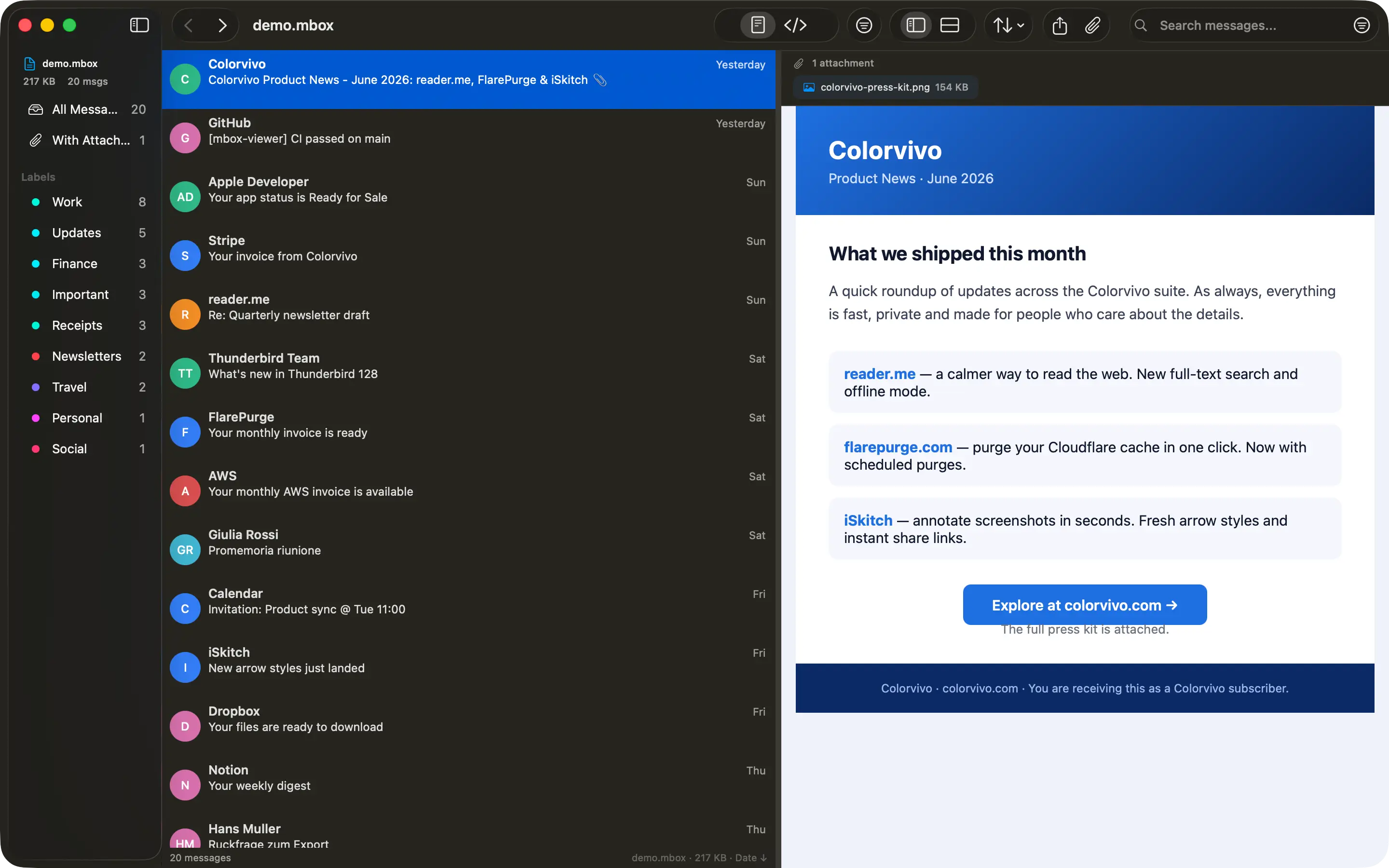
    Use Google Takeout to back up your entire Gmail account, then read, search and browse it offline — no internet required, no account login.

-   02

    ### Other tools choke on large files

    Most MBOX readers crash or freeze past a few hundred MB. Many ship a whole browser or JVM just to show a list of emails.

-   03

    ### Native, streaming, instant

    Mbox Viewer streams through files of any size without loading them into memory. Truly native on Mac and Windows. Indexes once, re-opens in under a second.

## Everything you need to live inside your email archive

A focused, native toolset — not a web app in a window.

### Handles any size

Streaming parser with a 1 MB buffer opens files from a few KB to 50+ GB without loading them into RAM.

### Instant re-opens

A binary index with SHA-256 validation makes every re-open take under a second, whatever the file size.

### Powerful search

Full query syntax: from:, to:, subject:, body:, date:, has:attachment, size:>, OR, negation and exact phrases.

### Gmail labels

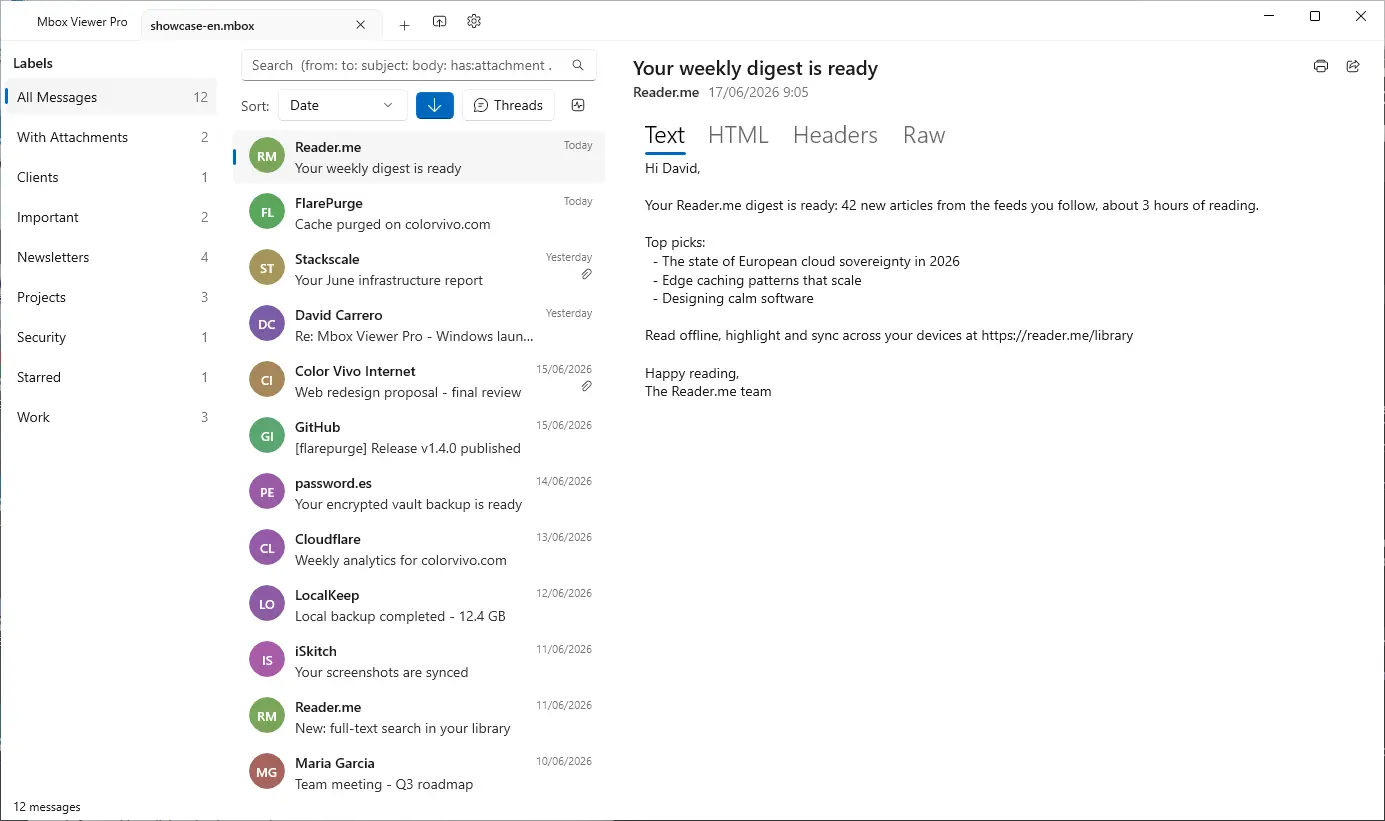
Reads Gmail labels straight from Takeout. Browse by label in the sidebar with live message counts.

### Full export

Export to EML, CSV, plain text or extract every attachment. Merge multiple MBOX files with dedup.

### Conversation threads

The JWZ threading algorithm groups messages into conversations with reply chains up to four levels deep.

### Privacy first

Everything runs locally. No cloud, no telemetry, no data ever leaves your computer. Strictly read-only.

### Truly native

Native on Mac and Windows — dark mode, drag & drop, system share and print. No Electron, no Java.

### Repair damaged mailboxes

Deep-scan recovery re-detects lost message boundaries and exports a repaired copy — the original file is never modified. (Pro)

### Export to PDF

Export any message to a self-contained, multi-page PDF with the same layout as printing. One message is free; batch export is Pro.

### Export to HTML

Save any message as a self-contained HTML file with images embedded and attachments as downloadable links — it opens anywhere. One message is free; batch is Pro.

### Properties, MIME & Hex views

Three new ways to inspect a message: a Properties panel, the MIME part tree and a raw hex dump — ideal for technical or forensic work.

[See all features](https://mboxviewer.net/features/)

## Works with your email client

Mbox Viewer reads the standard mbox format — the same format virtually every email client and service uses for exports and backups. If your app can export mbox, Mbox Viewer can open it. No import, no conversion, no account: just open the file.

Mozilla ThunderbirdGmail / Google TakeoutApple MailPostboxEudoraEntourageEvolutionClaws MailSeaMonkeyThe Bat!Opera MailSylpheedMuttNetscapeMozilla MailSpicebirdPocoMailMulberryPowerMailSparrowConeGNU MailOutlook for Mac (via converter) …and any client that exports standard mbox

Apple Mail and Thunderbird now open directly, with no extra steps. [Have Outlook (PST/OLM)? See how to convert it in our step-by-step guide.](https://mboxviewer.net/guides/convert-outlook-pst-olm-to-mbox/)

## Available in 18 languages

Mbox Viewer's interface and user guide are localized into 18 languages, so you can work through your email in the one you know best.

-   English
-   Español
-   Deutsch
-   Français
-   Italiano
-   日本語
-   한국어
-   Nederlands
-   Polski
-   Português (BR)
-   Português (PT)
-   Русский
-   Svenska
-   Dansk
-   Norsk
-   Türkçe
-   简体中文
-   繁體中文

## Opens a 50 GB archive in under 5 minutes

And re-opens it in under a second — every time, thanks to the binary index.

| File size | Messages | First open | Re-open | RAM |
| --- | --- | --- | --- | --- |
| 500 MB | ~5,000 | < 5 sec | < 1 sec | < 100 MB |
| 5 GB | ~50,000 | < 30 sec | < 1 sec | < 200 MB |
| 50 GB | ~500,000 | < 5 min | < 1 sec | < 600 MB |
Mbox Viewer — Open & read MBOX files on Mac and Windows — fast and native [Skip to content](https://mboxviewer.net/#main)
[ Mbox Viewer](https://mboxviewer.net/)
English
- [English](https://mboxviewer.net/)
- [Español](https://mboxviewer.net/es/)
- [Deutsch](https://mboxviewer.net/de/)
- [Français](https://mboxviewer.net/fr/)
- [Português (BR)](https://mboxviewer.net/pt-br/)
- [日本語](https://mboxviewer.net/ja/)
- [Italiano](https://mboxviewer.net/it/)
- [Nederlands](https://mboxviewer.net/nl/)
- [한국어](https://mboxviewer.net/ko/)
- [Polski](https://mboxviewer.net/pl/)
English
- [English](https://mboxviewer.net/)
- [Español](https://mboxviewer.net/es/)
- [Deutsch](https://mboxviewer.net/de/)
- [Français](https://mboxviewer.net/fr/)
- [Português (BR)](https://mboxviewer.net/pt-br/)
- [日本語](https://mboxviewer.net/ja/)
- [Italiano](https://mboxviewer.net/it/)
- [Nederlands](https://mboxviewer.net/nl/)
- [한국어](https://mboxviewer.net/ko/)
- [Polski](https://mboxviewer.net/pl/)
Download
- [Mac App Store](https://apps.apple.com/app/mbox-viewer-pro/id6759237715)
- [Microsoft Store](https://apps.microsoft.com/store/detail/9NW3GVFG7DDB)
[Mac](https://apps.apple.com/app/mbox-viewer-pro/id6759237715) [Windows](https://apps.microsoft.com/store/detail/9NW3GVFG7DDB)
[Now on the Mac App Store and Microsoft Store](https://apps.apple.com/app/mbox-viewer-pro/id6759237715)# Read MBOX files on Mac & Windows.
Any size. Instantly.
Back up your Gmail with Google Takeout and read it offline. Open, search and export emails from MBOX and EML archives — from a few KB to 50+ GB — without your computer breaking a sweat.
[Download on the Mac App Store](https://apps.apple.com/app/mbox-viewer-pro/id6759237715) [Microsoft Store](https://apps.microsoft.com/store/detail/9NW3GVFG7DDB)
[Try the online viewer](https://onlinemboxviewer.com/)
macOS 14+ · Apple Silicon · Windows 10/11 and Windows Server
macOS Windows
No Electron No Java No cloud 100% offline Read-only
## Built for one job, done right
- 01
### Your Gmail, offline on your computer
Use Google Takeout to back up your entire Gmail account, then read, search and browse it offline — no internet required, no account login.
- 02
### Other tools choke on large files
Most MBOX readers crash or freeze past a few hundred MB. Many ship a whole browser or JVM just to show a list of emails.
- 03
### Native, streaming, instant
Mbox Viewer streams through files of any size without loading them into memory. Truly native on Mac and Windows. Indexes once, re-opens in under a second.
## Everything you need to live inside your email archive
A focused, native toolset — not a web app in a window.
### Handles any size
Streaming parser with a 1 MB buffer opens files from a few KB to 50+ GB without loading them into RAM.
### Instant re-opens
A binary index with SHA-256 validation makes every re-open take under a second, whatever the file size.
### Powerful search
Full query syntax: from:, to:, subject:, body:, date:, has:attachment, size:>, OR, negation and exact phrases.
### Gmail labels
Reads Gmail labels straight from Takeout. Browse by label in the sidebar with live message counts.
### Full export
Export to EML, CSV, plain text or extract every attachment. Merge multiple MBOX files with dedup.
### Conversation threads
The JWZ threading algorithm groups messages into conversations with reply chains up to four levels deep.
### Privacy first
Everything runs locally. No cloud, no telemetry, no data ever leaves your computer. Strictly read-only.
### Truly native
Native on Mac and Windows — dark mode, drag & drop, system share and print. No Electron, no Java.
### Repair damaged mailboxes
Deep-scan recovery re-detects lost message boundaries and exports a repaired copy — the original file is never modified. (Pro)
### Export to PDF
Export any message to a self-contained, multi-page PDF with the same layout as printing. One message is free; batch export is Pro.
### Export to HTML
Save any message as a self-contained HTML file with images embedded and attachments as downloadable links — it opens anywhere. One message is free; batch is Pro.
### Properties, MIME & Hex views
Three new ways to inspect a message: a Properties panel, the MIME part tree and a raw hex dump — ideal for technical or forensic work.
[See all features](https://mboxviewer.net/features/)
## Works with your email client
Mbox Viewer reads the standard mbox format — the same format virtually every email client and service uses for exports and backups. If your app can export mbox, Mbox Viewer can open it. No import, no conversion, no account: just open the file.
Mozilla ThunderbirdGmail / Google TakeoutApple MailPostboxEudoraEntourageEvolutionClaws MailSeaMonkeyThe Bat!Opera MailSylpheedMuttNetscapeMozilla MailSpicebirdPocoMailMulberryPowerMailSparrowConeGNU MailOutlook for Mac (via converter) …and any client that exports standard mbox
Apple Mail and Thunderbird now open directly, with no extra steps. [Have Outlook (PST/OLM)? See how to convert it in our step-by-step guide.](https://mboxviewer.net/guides/convert-outlook-pst-olm-to-mbox/)
## Available in 18 languages
Mbox Viewer's interface and user guide are localized into 18 languages, so you can work through your email in the one you know best.
- English
- Español
- Deutsch
- Français
- Italiano
- 日本語
- 한국어
- Nederlands
- Polski
- Português (BR)
- Português (PT)
- Русский
- Svenska
- Dansk
- Norsk
- Türkçe
- 简体中文
- 繁體中文
## Opens a 50 GB archive in under 5 minutes
And re-opens it in under a second — every time, thanks to the binary index.
| File size | Messages | First open | Re-open | RAM |
| --- | --- | --- | --- | --- |
| 500 MB | ~5,000 | < 5 sec | < 1 sec | < 100 MB |
| 5 GB | ~50,000 | < 30 sec | < 1 sec | < 200 MB |
| 50 GB | ~500,000 | < 5 min | < 1 sec | < 600 MB |
## Stop fighting your email backups
Free for files up to 500 MB. Unlock unlimited size with a one-time in-app purchase. No subscription, no account.
[Download on the Mac App Store](https://apps.apple.com/app/mbox-viewer-pro/id6759237715) [Microsoft Store](https://apps.microsoft.com/store/detail/9NW3GVFG7DDB)
We use analytics cookies to improve Mbox Viewer. You can accept or reject them — the site works the same either way. [Privacy](https://mboxviewer.net/privacy/)
Reject Accept
Sube este archivo como /index.md en tu servidor para que los AI agents puedan acceder a una versión limpia de tu página. También puedes configurar la negociación de contenido Accept: text/markdown para servirlo automáticamente.
Nuestra recomendación
# Mbox Viewer

> Native mbox viewer for Mac and Windows. Open MBOX files from Thunderbird, Gmail / Google Takeout, Apple Mail and any client that exports standard mbox — up to 50+ GB, fully offline.

## Documentation
- [FAQ](https://mboxviewer.net/faq/)

## Main
- [Mbox Viewer — Open & read MBOX files on Mac and Windows — fast and native](https://mboxviewer.net): Native mbox viewer for Mac and Windows. Open MBOX files from Thunderbird, Gmail / Google Takeout, Apple Mail and any cl…
- [Features](https://mboxviewer.net/features/)
- [Mbox Viewer](https://mboxviewer.net/)
- [Guides](https://mboxviewer.net/guides/)
- [Compare](https://mboxviewer.net/compare/)
- [Changelog](https://mboxviewer.net/changelog/)
- [Español](https://mboxviewer.net/es/)
- [Deutsch](https://mboxviewer.net/de/)
- [Français](https://mboxviewer.net/fr/)
- [Português (BR)](https://mboxviewer.net/pt-br/)

## Blog
- [Blog](https://mboxviewer.net/blog/)

## Legal
- [Privacy Policy](https://mboxviewer.net/privacy/)
- [Terms of Service](https://mboxviewer.net/terms/)
- [Refunds](https://mboxviewer.net/refund/)

## Support
- [FAQ](https://mboxviewer.net/faq/)
- [Support](https://mboxviewer.net/support/)
El llms.txt completo requiere un análisis de todo el dominio (próximamente)
Sube este archivo a https://mboxviewer.net/llms.txt en la raíz de tu dominio. Los AI agents como ChatGPT, Claude y Perplexity consultan este archivo para comprender la estructura de tu sitio.
Este sitio ya tiene un archivo llms.txt.
Formato válido# Mbox Viewer > Native mbox viewer for Mac and Windows. Open MBOX files from Thunderbird, Gmail / Google Takeout, Apple Mail and any client that exports standard mbox — up to 50+ GB, fully offline. ## Key facts - Platform: macOS 14 Sonoma and later (Apple Silicon + Intel) and Windows 10/11 & Windows Server. - Distribution: Mac App Store and Microsoft Store. Free up to 500 MB; Pro (unlimited size) is a one-time in-app purchase. No subscription, no account, no web payments. - Privacy: 100% local, no cloud, no telemetry, strictly read-only. - Performance: opens a 50 GB MBOX in under 5 minutes; re-opens in under 1 second via a binary index. - Languages: the app's interface and user guide are localized into 18 languages (English, Español, Deutsch, Français, Italiano, 日本語, 한국어, Nederlands, Polski, Português (BR), Português (PT), Русский, Svenska, Dansk, Norsk, Türkçe, 简体中文, 繁體中文). The website is in 10 languages. - Based on the open-source terminal tool mboxShell (https://github.com/dcarrero/mboxshell). - Author: David Carrero Fernández-Baillo · Color Vivo Internet, S.L. (https://colorvivo.com). ## Download - Mac App Store: https://apps.apple.com/app/mbox-viewer-pro/id6759237715 - Microsoft Store: https://apps.microsoft.com/store/detail/9NW3GVFG7DDB ## Pages - Home: https://mboxviewer.net/ - Features: https://mboxviewer.net/features/ - Compare: https://mboxviewer.net/compare/ - Changelog: https://mboxviewer.net/changelog/ - Guides: https://mboxviewer.net/guides/ - Blog: https://mboxviewer.net/blog/ - FAQ: https://mboxviewer.net/faq/ - Glossary: https://mboxviewer.net/glossary/ - mboxShell (open-source terminal tool this app is based on): https://mboxviewer.net/mboxshell/ - Support: https://mboxviewer.net/support/ ## Guides - How to Export Gmail with Google Takeout (and Open It on Mac): https://mboxviewer.net/guides/how-to-export-gmail-with-google-takeout/ - How to Open an MBOX File on Mac (Even Huge Ones): https://mboxviewer.net/guides/how-to-open-mbox-file-on-mac/ - How to Convert MBOX to CSV, EML, and Text (and Extract Attachments): https://mboxviewer.net/guides/convert-mbox-to-csv-and-eml/ - Mbox Viewer Search Syntax Cheat Sheet: https://mboxviewer.net/guides/search-syntax-cheat-sheet/ - How to Open a Thunderbird MBOX File on Mac: https://mboxviewer.net/guides/how-to-open-thunderbird-mbox-on-mac/ - How to Open an Apple Mail Export (.mbox Folder) on Mac: https://mboxviewer.net/guides/how-to-open-apple-mail-export-on-mac/ - How to Open an MBOX File on Windows (Any Size): https://mboxviewer.net/guides/how-to-open-mbox-file-on-windows/ - How to Open a Thunderbird MBOX File on Windows: https://mboxviewer.net/guides/how-to-open-thunderbird-mbox-on-windows/ - How to Open a Gmail (Google Takeout) MBOX File on Windows: https://mboxviewer.net/guides/how-to-open-gmail-takeout-mbox-on-windows/ - How to Open an Apple Mail Export (.mbox) on Windows: https://mboxviewer.net/guides/how-to-open-apple-mail-export-on-windows/ - How to Convert Outlook PST/OLM to MBOX (Mac & Windows): https://mboxviewer.net/guides/convert-outlook-pst-olm-to-mbox/ ## Blog - What's New in Mbox Viewer 2.7.0: Faster, More Private, More Accessible: https://mboxviewer.net/blog/whats-new-in-mbox-viewer-2-7-0/ - A Field Guide to Email Storage Formats: History, Anatomy and a Comparison: https://mboxviewer.net/blog/email-formats-history-and-anatomy/ - MBOX, EML, PST, OLM: Email Archive Formats Explained: https://mboxviewer.net/blog/email-archive-formats-explained/ - Reading Old Email Archives from Eudora, Entourage and Other Classic Clients on a Modern Mac: https://mboxviewer.net/blog/read-old-email-archives-on-modern-mac/ - Why You Should Back Up Your Gmail Locally (and How): https://mboxviewer.net/blog/why-back-up-your-gmail/ - Introducing Mbox Viewer: Open Any MBOX or EML File, Instantly: https://mboxviewer.net/blog/introducing-mbox-viewer/ ## Feeds (RSS) - Blog: https://mboxviewer.net/blog/rss.xml - Guides: https://mboxviewer.net/guides/rss.xml - Changelog: https://mboxviewer.net/changelog/rss.xml
Accesibilidad
Content available without JavaScript
Main content starts at 66% of HTML
Page size: 120KB
Visibilidad para IA
All major AI search bots allowed
Sitemap found
robots.txt exists
llms.txt exists and is valid
Datos estructurados
JSON-LD found: Organization, WebSite, SoftwareApplication
All OG tags present
Meta description: 181 chars
Canonical URL present
lang="en"
HTML semántico
Clean heading hierarchy
Has <main>
15 semantic elements, 73 divs (ratio: 17%)
2/2 images with meaningful alt text (2 decorative, not counted)
Avg div depth: 1.6, max: 4
Eficiencia del contenido
97% token reduction (HTML→Markdown)
Content ratio: 3.4% (4224 content chars / 123100 HTML bytes)
HTML size: 120KB
15/569 elements with inline styles (2.6%)
{
"url": "https://mboxviewer.net",
"timestamp": 1784280437132,
"fetch": {
"mode": "simple",
"timeMs": 89,
"htmlSizeBytes": 123100,
"supportsMarkdown": false,
"markdownAgents": {
"contentNegotiation": false,
"mdUrl": {
"found": false,
"url": null
},
"linkTag": {
"found": false,
"url": null
},
"linkHeader": {
"found": false,
"url": null
},
"responseHeaders": {
"contentSignal": null,
"xMarkdownTokens": null,
"vary": null
},
"frontmatter": {
"present": false,
"fields": [],
"level": "none"
},
"level": "none"
},
"statusCode": 200
},
"extraction": {
"title": "Mbox Viewer — Open & read MBOX files on Mac and Windows — fast and native",
"excerpt": "Native mbox viewer for Mac and Windows. Open MBOX files from Thunderbird, Gmail / Google Takeout, Apple Mail and any client that exports standard mbox — up to 50+ GB, fully offline.",
"byline": "David Carrero Fernández-Baillo",
"siteName": "Mbox Viewer",
"lang": "en",
"contentLength": 4224,
"metadata": {
"description": "Native mbox viewer for Mac and Windows. Open MBOX files from Thunderbird, Gmail / Google Takeout, Apple Mail and any client that exports standard mbox — up to 50+ GB, fully offline.",
"ogTitle": "Mbox Viewer — Open & read MBOX files on Mac and Windows — fast and native",
"ogDescription": "Native mbox viewer for Mac and Windows. Open MBOX files from Thunderbird, Gmail / Google Takeout, Apple Mail and any client that exports standard mbox — up to 50+ GB, fully offline.",
"ogImage": "https://mboxviewer.net/og/default.png",
"ogType": "website",
"canonical": "https://mboxviewer.net/",
"lang": "en",
"schemas": [
{
"@context": "https://schema.org",
"@type": "Organization",
"name": "Color Vivo Internet, S.L.",
"url": "https://mboxviewer.net",
"logo": "https://mboxviewer.net/icon-256.png",
"sameAs": [
"https://colorvivo.com",
"https://carrero.es",
"https://github.com/dcarrero/mboxshell"
]
},
{
"@context": "https://schema.org",
"@type": "WebSite",
"name": "Mbox Viewer",
"url": "https://mboxviewer.net",
"inLanguage": "en",
"publisher": {
"@type": "Organization",
"name": "Color Vivo Internet, S.L.",
"url": "https://colorvivo.com"
}
},
{
"@context": "https://schema.org",
"@type": "SoftwareApplication",
"name": "Mbox Viewer Pro",
"operatingSystem": "macOS 14+, Windows 10+",
"applicationCategory": "UtilitiesApplication",
"offers": {
"@type": "Offer",
"price": "0",
"priceCurrency": "USD",
"description": "Free up to 500 MB; unlimited via one-time in-app purchase."
},
"downloadUrl": [
"https://apps.apple.com/app/mbox-viewer-pro/id6759237715",
"https://apps.microsoft.com/store/detail/9NW3GVFG7DDB"
],
"softwareVersion": "2.8.1",
"author": {
"@type": "Person",
"name": "David Carrero Fernández-Baillo",
"url": "https://carrero.es"
},
"publisher": {
"@type": "Organization",
"name": "Color Vivo Internet, S.L.",
"url": "https://colorvivo.com"
},
"url": "https://mboxviewer.net",
"image": "https://mboxviewer.net/icon-256.png"
}
],
"robotsMeta": null,
"author": "David Carrero Fernández-Baillo",
"generator": null,
"markdownAlternateHref": null
}
},
"markdown": "[Now on the Mac App Store and Microsoft Store](https://apps.apple.com/app/mbox-viewer-pro/id6759237715)\n\n## Read MBOX files on Mac & Windows.\nAny size. Instantly.\n\nBack up your Gmail with Google Takeout and read it offline. Open, search and export emails from MBOX and EML archives — from a few KB to 50+ GB — without your computer breaking a sweat.\n\n[Download on the Mac App Store](https://apps.apple.com/app/mbox-viewer-pro/id6759237715) [Microsoft Store](https://apps.microsoft.com/store/detail/9NW3GVFG7DDB)\n\n[Try the online viewer](https://onlinemboxviewer.com/)\n\nmacOS 14+ · Apple Silicon · Windows 10/11 and Windows Server\n\nNo Electron No Java No cloud 100% offline Read-only\n\n## Built for one job, done right\n\n- 01\n\n ### Your Gmail, offline on your computer\n\n Use Google Takeout to back up your entire Gmail account, then read, search and browse it offline — no internet required, no account login.\n\n- 02\n\n ### Other tools choke on large files\n\n Most MBOX readers crash or freeze past a few hundred MB. Many ship a whole browser or JVM just to show a list of emails.\n\n- 03\n\n ### Native, streaming, instant\n\n Mbox Viewer streams through files of any size without loading them into memory. Truly native on Mac and Windows. Indexes once, re-opens in under a second.\n\n## Everything you need to live inside your email archive\n\nA focused, native toolset — not a web app in a window.\n\n### Handles any size\n\nStreaming parser with a 1 MB buffer opens files from a few KB to 50+ GB without loading them into RAM.\n\n### Instant re-opens\n\nA binary index with SHA-256 validation makes every re-open take under a second, whatever the file size.\n\n### Powerful search\n\nFull query syntax: from:, to:, subject:, body:, date:, has:attachment, size:>, OR, negation and exact phrases.\n\n### Gmail labels\n\nReads Gmail labels straight from Takeout. Browse by label in the sidebar with live message counts.\n\n### Full export\n\nExport to EML, CSV, plain text or extract every attachment. Merge multiple MBOX files with dedup.\n\n### Conversation threads\n\nThe JWZ threading algorithm groups messages into conversations with reply chains up to four levels deep.\n\n### Privacy first\n\nEverything runs locally. No cloud, no telemetry, no data ever leaves your computer. Strictly read-only.\n\n### Truly native\n\nNative on Mac and Windows — dark mode, drag & drop, system share and print. No Electron, no Java.\n\n### Repair damaged mailboxes\n\nDeep-scan recovery re-detects lost message boundaries and exports a repaired copy — the original file is never modified. (Pro)\n\n### Export to PDF\n\nExport any message to a self-contained, multi-page PDF with the same layout as printing. One message is free; batch export is Pro.\n\n### Export to HTML\n\nSave any message as a self-contained HTML file with images embedded and attachments as downloadable links — it opens anywhere. One message is free; batch is Pro.\n\n### Properties, MIME & Hex views\n\nThree new ways to inspect a message: a Properties panel, the MIME part tree and a raw hex dump — ideal for technical or forensic work.\n\n[See all features](https://mboxviewer.net/features/)\n\n## Works with your email client\n\nMbox Viewer reads the standard mbox format — the same format virtually every email client and service uses for exports and backups. If your app can export mbox, Mbox Viewer can open it. No import, no conversion, no account: just open the file.\n\nMozilla ThunderbirdGmail / Google TakeoutApple MailPostboxEudoraEntourageEvolutionClaws MailSeaMonkeyThe Bat!Opera MailSylpheedMuttNetscapeMozilla MailSpicebirdPocoMailMulberryPowerMailSparrowConeGNU MailOutlook for Mac (via converter) …and any client that exports standard mbox\n\nApple Mail and Thunderbird now open directly, with no extra steps. [Have Outlook (PST/OLM)? See how to convert it in our step-by-step guide.](https://mboxviewer.net/guides/convert-outlook-pst-olm-to-mbox/)\n\n## Available in 18 languages\n\nMbox Viewer's interface and user guide are localized into 18 languages, so you can work through your email in the one you know best.\n\n- English\n- Español\n- Deutsch\n- Français\n- Italiano\n- 日本語\n- 한국어\n- Nederlands\n- Polski\n- Português (BR)\n- Português (PT)\n- Русский\n- Svenska\n- Dansk\n- Norsk\n- Türkçe\n- 简体中文\n- 繁體中文\n\n## Opens a 50 GB archive in under 5 minutes\n\nAnd re-opens it in under a second — every time, thanks to the binary index.\n\n| File size | Messages | First open | Re-open | RAM |\n| --- | --- | --- | --- | --- |\n| 500 MB | ~5,000 | < 5 sec | < 1 sec | < 100 MB |\n| 5 GB | ~50,000 | < 30 sec | < 1 sec | < 200 MB |\n| 50 GB | ~500,000 | < 5 min | < 1 sec | < 600 MB |\n",
"fullPageMarkdown": "Mbox Viewer — Open & read MBOX files on Mac and Windows — fast and native [Skip to content](https://mboxviewer.net/#main)\n\n [ Mbox Viewer](https://mboxviewer.net/)\n\nEnglish\n\n- [English](https://mboxviewer.net/)\n- [Español](https://mboxviewer.net/es/)\n- [Deutsch](https://mboxviewer.net/de/)\n- [Français](https://mboxviewer.net/fr/)\n- [Português (BR)](https://mboxviewer.net/pt-br/)\n- [日本語](https://mboxviewer.net/ja/)\n- [Italiano](https://mboxviewer.net/it/)\n- [Nederlands](https://mboxviewer.net/nl/)\n- [한국어](https://mboxviewer.net/ko/)\n- [Polski](https://mboxviewer.net/pl/)\n\nEnglish\n\n- [English](https://mboxviewer.net/)\n- [Español](https://mboxviewer.net/es/)\n- [Deutsch](https://mboxviewer.net/de/)\n- [Français](https://mboxviewer.net/fr/)\n- [Português (BR)](https://mboxviewer.net/pt-br/)\n- [日本語](https://mboxviewer.net/ja/)\n- [Italiano](https://mboxviewer.net/it/)\n- [Nederlands](https://mboxviewer.net/nl/)\n- [한국어](https://mboxviewer.net/ko/)\n- [Polski](https://mboxviewer.net/pl/)\n\nDownload\n\n- [Mac App Store](https://apps.apple.com/app/mbox-viewer-pro/id6759237715)\n- [Microsoft Store](https://apps.microsoft.com/store/detail/9NW3GVFG7DDB)\n\n[Mac](https://apps.apple.com/app/mbox-viewer-pro/id6759237715) [Windows](https://apps.microsoft.com/store/detail/9NW3GVFG7DDB)\n\n[Now on the Mac App Store and Microsoft Store](https://apps.apple.com/app/mbox-viewer-pro/id6759237715)# Read MBOX files on Mac & Windows.\nAny size. Instantly.\n\nBack up your Gmail with Google Takeout and read it offline. Open, search and export emails from MBOX and EML archives — from a few KB to 50+ GB — without your computer breaking a sweat.\n\n[Download on the Mac App Store](https://apps.apple.com/app/mbox-viewer-pro/id6759237715) [Microsoft Store](https://apps.microsoft.com/store/detail/9NW3GVFG7DDB)\n\n[Try the online viewer](https://onlinemboxviewer.com/)\n\nmacOS 14+ · Apple Silicon · Windows 10/11 and Windows Server\n\nmacOS Windows\n\n \n\n \n\nNo Electron No Java No cloud 100% offline Read-only\n\n## Built for one job, done right\n\n- 01\n\n ### Your Gmail, offline on your computer\n\n Use Google Takeout to back up your entire Gmail account, then read, search and browse it offline — no internet required, no account login.\n\n- 02\n\n ### Other tools choke on large files\n\n Most MBOX readers crash or freeze past a few hundred MB. Many ship a whole browser or JVM just to show a list of emails.\n\n- 03\n\n ### Native, streaming, instant\n\n Mbox Viewer streams through files of any size without loading them into memory. Truly native on Mac and Windows. Indexes once, re-opens in under a second.\n\n## Everything you need to live inside your email archive\n\nA focused, native toolset — not a web app in a window.\n\n### Handles any size\n\nStreaming parser with a 1 MB buffer opens files from a few KB to 50+ GB without loading them into RAM.\n\n### Instant re-opens\n\nA binary index with SHA-256 validation makes every re-open take under a second, whatever the file size.\n\n### Powerful search\n\nFull query syntax: from:, to:, subject:, body:, date:, has:attachment, size:>, OR, negation and exact phrases.\n\n### Gmail labels\n\nReads Gmail labels straight from Takeout. Browse by label in the sidebar with live message counts.\n\n### Full export\n\nExport to EML, CSV, plain text or extract every attachment. Merge multiple MBOX files with dedup.\n\n### Conversation threads\n\nThe JWZ threading algorithm groups messages into conversations with reply chains up to four levels deep.\n\n### Privacy first\n\nEverything runs locally. No cloud, no telemetry, no data ever leaves your computer. Strictly read-only.\n\n### Truly native\n\nNative on Mac and Windows — dark mode, drag & drop, system share and print. No Electron, no Java.\n\n### Repair damaged mailboxes\n\nDeep-scan recovery re-detects lost message boundaries and exports a repaired copy — the original file is never modified. (Pro)\n\n### Export to PDF\n\nExport any message to a self-contained, multi-page PDF with the same layout as printing. One message is free; batch export is Pro.\n\n### Export to HTML\n\nSave any message as a self-contained HTML file with images embedded and attachments as downloadable links — it opens anywhere. One message is free; batch is Pro.\n\n### Properties, MIME & Hex views\n\nThree new ways to inspect a message: a Properties panel, the MIME part tree and a raw hex dump — ideal for technical or forensic work.\n\n[See all features](https://mboxviewer.net/features/)\n\n## Works with your email client\n\nMbox Viewer reads the standard mbox format — the same format virtually every email client and service uses for exports and backups. If your app can export mbox, Mbox Viewer can open it. No import, no conversion, no account: just open the file.\n\nMozilla ThunderbirdGmail / Google TakeoutApple MailPostboxEudoraEntourageEvolutionClaws MailSeaMonkeyThe Bat!Opera MailSylpheedMuttNetscapeMozilla MailSpicebirdPocoMailMulberryPowerMailSparrowConeGNU MailOutlook for Mac (via converter) …and any client that exports standard mbox\n\nApple Mail and Thunderbird now open directly, with no extra steps. [Have Outlook (PST/OLM)? See how to convert it in our step-by-step guide.](https://mboxviewer.net/guides/convert-outlook-pst-olm-to-mbox/)\n\n## Available in 18 languages\n\nMbox Viewer's interface and user guide are localized into 18 languages, so you can work through your email in the one you know best.\n\n- English\n- Español\n- Deutsch\n- Français\n- Italiano\n- 日本語\n- 한국어\n- Nederlands\n- Polski\n- Português (BR)\n- Português (PT)\n- Русский\n- Svenska\n- Dansk\n- Norsk\n- Türkçe\n- 简体中文\n- 繁體中文\n\n## Opens a 50 GB archive in under 5 minutes\n\nAnd re-opens it in under a second — every time, thanks to the binary index.\n\n| File size | Messages | First open | Re-open | RAM |\n| --- | --- | --- | --- | --- |\n| 500 MB | ~5,000 | < 5 sec | < 1 sec | < 100 MB |\n| 5 GB | ~50,000 | < 30 sec | < 1 sec | < 200 MB |\n| 50 GB | ~500,000 | < 5 min | < 1 sec | < 600 MB |\n\n## Stop fighting your email backups\n\nFree for files up to 500 MB. Unlock unlimited size with a one-time in-app purchase. No subscription, no account.\n\n[Download on the Mac App Store](https://apps.apple.com/app/mbox-viewer-pro/id6759237715) [Microsoft Store](https://apps.microsoft.com/store/detail/9NW3GVFG7DDB)\n\nWe use analytics cookies to improve Mbox Viewer. You can accept or reject them — the site works the same either way. [Privacy](https://mboxviewer.net/privacy/)\n\nReject Accept\n",
"markdownStats": {
"images": 0,
"links": 6,
"tables": 1,
"codeBlocks": 0,
"headings": 21
},
"tokens": {
"htmlTokens": 39953,
"markdownTokens": 1198,
"reduction": 38755,
"reductionPercent": 97
},
"score": {
"score": 82,
"grade": "B",
"rubricVersion": 2,
"dimensions": {
"accessibility": {
"score": 81,
"weight": 30,
"grade": "B",
"checks": {
"content_without_js": {
"score": 100,
"weight": 55,
"evidence": "proven",
"details": "Content available without JavaScript"
},
"fast_content_position": {
"score": 25,
"weight": 25,
"evidence": "plausible",
"details": "Main content starts at 66% of HTML"
},
"reasonable_page_size": {
"score": 100,
"weight": 20,
"evidence": "plausible",
"details": "Page size: 120KB"
}
}
},
"aiDiscoverability": {
"score": 70,
"weight": 25,
"grade": "C",
"checks": {
"robots_allows_ai_bots": {
"score": 100,
"weight": 35,
"evidence": "proven",
"details": "All major AI search bots allowed"
},
"supports_markdown_negotiation": {
"score": 0,
"weight": 20,
"evidence": "plausible",
"details": "No Markdown for Agents support detected"
},
"has_sitemap": {
"score": 100,
"weight": 15,
"evidence": "plausible",
"details": "Sitemap found"
},
"has_robots_txt": {
"score": 100,
"weight": 10,
"evidence": "plausible",
"details": "robots.txt exists"
},
"has_llms_txt": {
"score": 100,
"weight": 10,
"evidence": "speculative",
"details": "llms.txt exists and is valid"
},
"has_content_signals": {
"score": 0,
"weight": 10,
"evidence": "speculative",
"details": "No Content-Signal found (robots.txt or HTTP headers)"
}
}
},
"structuredData": {
"score": 100,
"weight": 20,
"grade": "A",
"checks": {
"has_schema_org": {
"score": 100,
"weight": 35,
"evidence": "proven",
"details": "JSON-LD found: Organization, WebSite, SoftwareApplication"
},
"has_open_graph": {
"score": 100,
"weight": 20,
"evidence": "plausible",
"details": "All OG tags present"
},
"has_meta_description": {
"score": 100,
"weight": 20,
"evidence": "plausible",
"details": "Meta description: 181 chars"
},
"has_canonical_url": {
"score": 100,
"weight": 15,
"evidence": "plausible",
"details": "Canonical URL present"
},
"has_lang_attribute": {
"score": 100,
"weight": 10,
"evidence": "plausible",
"details": "lang=\"en\""
}
}
},
"semanticHtml": {
"score": 91,
"weight": 15,
"grade": "A",
"checks": {
"proper_heading_hierarchy": {
"score": 100,
"weight": 30,
"evidence": "plausible",
"details": "Clean heading hierarchy"
},
"uses_article_or_main": {
"score": 100,
"weight": 25,
"evidence": "plausible",
"details": "Has <main>"
},
"semantic_elements": {
"score": 57,
"weight": 20,
"evidence": "plausible",
"details": "15 semantic elements, 73 divs (ratio: 17%)"
},
"meaningful_alt_texts": {
"score": 100,
"weight": 15,
"evidence": "plausible",
"details": "2/2 images with meaningful alt text (2 decorative, not counted)"
},
"low_div_nesting": {
"score": 100,
"weight": 10,
"evidence": "speculative",
"details": "Avg div depth: 1.6, max: 4"
}
}
},
"contentEfficiency": {
"score": 61,
"weight": 10,
"grade": "C",
"checks": {
"token_reduction_ratio": {
"score": 100,
"weight": 40,
"evidence": "speculative",
"details": "97% token reduction (HTML→Markdown)"
},
"content_to_noise_ratio": {
"score": 0,
"weight": 30,
"evidence": "speculative",
"details": "Content ratio: 3.4% (4224 content chars / 123100 HTML bytes)"
},
"reasonable_page_weight": {
"score": 80,
"weight": 20,
"evidence": "speculative",
"details": "HTML size: 120KB"
},
"minimal_inline_styles": {
"score": 50,
"weight": 10,
"evidence": "speculative",
"details": "15/569 elements with inline styles (2.6%)"
}
}
}
}
},
"recommendations": [
{
"id": "move_content_earlier",
"priority": "critical",
"category": "accessibility",
"titleKey": "rec.move_content_earlier.title",
"descriptionKey": "rec.move_content_earlier.description",
"howToKey": "rec.move_content_earlier.howto",
"effort": "moderate",
"estimatedImpact": 5.6,
"maxImpact": 7.5,
"evidence": "plausible",
"checkScore": 25,
"checkDetails": "Main content starts at 66% of HTML"
},
{
"id": "add_markdown_negotiation",
"priority": "critical",
"category": "aiDiscoverability",
"titleKey": "rec.add_markdown_negotiation.title",
"descriptionKey": "rec.add_markdown_negotiation.description",
"howToKey": "rec.add_markdown_negotiation.howto",
"effort": "significant",
"estimatedImpact": 5,
"maxImpact": 5,
"evidence": "plausible",
"checkScore": 0,
"checkDetails": "No Markdown for Agents support detected"
},
{
"id": "improve_content_ratio",
"priority": "high",
"category": "contentEfficiency",
"titleKey": "rec.improve_content_ratio.title",
"descriptionKey": "rec.improve_content_ratio.description",
"howToKey": "rec.improve_content_ratio.howto",
"effort": "moderate",
"estimatedImpact": 3,
"maxImpact": 3,
"evidence": "speculative",
"checkScore": 0,
"checkDetails": "Content ratio: 3.4% (4224 content chars / 123100 HTML bytes)"
},
{
"id": "add_content_signals",
"priority": "high",
"category": "aiDiscoverability",
"titleKey": "rec.add_content_signals.title",
"descriptionKey": "rec.add_content_signals.description",
"howToKey": "rec.add_content_signals.howto",
"effort": "quick-win",
"estimatedImpact": 2.5,
"maxImpact": 2.5,
"evidence": "speculative",
"checkScore": 0,
"checkDetails": "No Content-Signal found (robots.txt or HTTP headers)"
},
{
"id": "remove_inline_styles",
"priority": "low",
"category": "contentEfficiency",
"titleKey": "rec.remove_inline_styles.title",
"descriptionKey": "rec.remove_inline_styles.description",
"howToKey": "rec.remove_inline_styles.howto",
"effort": "moderate",
"estimatedImpact": 0.5,
"maxImpact": 1,
"evidence": "speculative",
"checkScore": 50,
"checkDetails": "15/569 elements with inline styles (2.6%)"
}
],
"llmsTxtPreview": "# Mbox Viewer\n\n> Native mbox viewer for Mac and Windows. Open MBOX files from Thunderbird, Gmail / Google Takeout, Apple Mail and any client that exports standard mbox — up to 50+ GB, fully offline.\n\n## Documentation\n- [FAQ](https://mboxviewer.net/faq/)\n\n## Main\n- [Mbox Viewer — Open & read MBOX files on Mac and Windows — fast and native](https://mboxviewer.net): Native mbox viewer for Mac and Windows. Open MBOX files from Thunderbird, Gmail / Google Takeout, Apple Mail and any cl…\n- [Features](https://mboxviewer.net/features/)\n- [Mbox Viewer](https://mboxviewer.net/)\n- [Guides](https://mboxviewer.net/guides/)\n- [Compare](https://mboxviewer.net/compare/)\n- [Changelog](https://mboxviewer.net/changelog/)\n- [Español](https://mboxviewer.net/es/)\n- [Deutsch](https://mboxviewer.net/de/)\n- [Français](https://mboxviewer.net/fr/)\n- [Português (BR)](https://mboxviewer.net/pt-br/)\n\n## Blog\n- [Blog](https://mboxviewer.net/blog/)\n\n## Legal\n- [Privacy Policy](https://mboxviewer.net/privacy/)\n- [Terms of Service](https://mboxviewer.net/terms/)\n- [Refunds](https://mboxviewer.net/refund/)\n\n## Support\n- [FAQ](https://mboxviewer.net/faq/)\n- [Support](https://mboxviewer.net/support/)\n\n",
"llmsTxtExisting": "# Mbox Viewer\n\n> Native mbox viewer for Mac and Windows. Open MBOX files from Thunderbird, Gmail / Google Takeout, Apple Mail and any client that exports standard mbox — up to 50+ GB, fully offline.\n\n## Key facts\n- Platform: macOS 14 Sonoma and later (Apple Silicon + Intel) and Windows 10/11 & Windows Server.\n- Distribution: Mac App Store and Microsoft Store. Free up to 500 MB; Pro (unlimited size) is a one-time in-app purchase. No subscription, no account, no web payments.\n- Privacy: 100% local, no cloud, no telemetry, strictly read-only.\n- Performance: opens a 50 GB MBOX in under 5 minutes; re-opens in under 1 second via a binary index.\n- Languages: the app's interface and user guide are localized into 18 languages (English, Español, Deutsch, Français, Italiano, 日本語, 한국어, Nederlands, Polski, Português (BR), Português (PT), Русский, Svenska, Dansk, Norsk, Türkçe, 简体中文, 繁體中文). The website is in 10 languages.\n- Based on the open-source terminal tool mboxShell (https://github.com/dcarrero/mboxshell).\n- Author: David Carrero Fernández-Baillo · Color Vivo Internet, S.L. (https://colorvivo.com).\n\n## Download\n- Mac App Store: https://apps.apple.com/app/mbox-viewer-pro/id6759237715\n- Microsoft Store: https://apps.microsoft.com/store/detail/9NW3GVFG7DDB\n\n## Pages\n- Home: https://mboxviewer.net/\n- Features: https://mboxviewer.net/features/\n- Compare: https://mboxviewer.net/compare/\n- Changelog: https://mboxviewer.net/changelog/\n- Guides: https://mboxviewer.net/guides/\n- Blog: https://mboxviewer.net/blog/\n- FAQ: https://mboxviewer.net/faq/\n- Glossary: https://mboxviewer.net/glossary/\n- mboxShell (open-source terminal tool this app is based on): https://mboxviewer.net/mboxshell/\n- Support: https://mboxviewer.net/support/\n\n## Guides\n- How to Export Gmail with Google Takeout (and Open It on Mac): https://mboxviewer.net/guides/how-to-export-gmail-with-google-takeout/\n- How to Open an MBOX File on Mac (Even Huge Ones): https://mboxviewer.net/guides/how-to-open-mbox-file-on-mac/\n- How to Convert MBOX to CSV, EML, and Text (and Extract Attachments): https://mboxviewer.net/guides/convert-mbox-to-csv-and-eml/\n- Mbox Viewer Search Syntax Cheat Sheet: https://mboxviewer.net/guides/search-syntax-cheat-sheet/\n- How to Open a Thunderbird MBOX File on Mac: https://mboxviewer.net/guides/how-to-open-thunderbird-mbox-on-mac/\n- How to Open an Apple Mail Export (.mbox Folder) on Mac: https://mboxviewer.net/guides/how-to-open-apple-mail-export-on-mac/\n- How to Open an MBOX File on Windows (Any Size): https://mboxviewer.net/guides/how-to-open-mbox-file-on-windows/\n- How to Open a Thunderbird MBOX File on Windows: https://mboxviewer.net/guides/how-to-open-thunderbird-mbox-on-windows/\n- How to Open a Gmail (Google Takeout) MBOX File on Windows: https://mboxviewer.net/guides/how-to-open-gmail-takeout-mbox-on-windows/\n- How to Open an Apple Mail Export (.mbox) on Windows: https://mboxviewer.net/guides/how-to-open-apple-mail-export-on-windows/\n- How to Convert Outlook PST/OLM to MBOX (Mac & Windows): https://mboxviewer.net/guides/convert-outlook-pst-olm-to-mbox/\n\n## Blog\n- What's New in Mbox Viewer 2.7.0: Faster, More Private, More Accessible: https://mboxviewer.net/blog/whats-new-in-mbox-viewer-2-7-0/\n- A Field Guide to Email Storage Formats: History, Anatomy and a Comparison: https://mboxviewer.net/blog/email-formats-history-and-anatomy/\n- MBOX, EML, PST, OLM: Email Archive Formats Explained: https://mboxviewer.net/blog/email-archive-formats-explained/\n- Reading Old Email Archives from Eudora, Entourage and Other Classic Clients on a Modern Mac: https://mboxviewer.net/blog/read-old-email-archives-on-modern-mac/\n- Why You Should Back Up Your Gmail Locally (and How): https://mboxviewer.net/blog/why-back-up-your-gmail/\n- Introducing Mbox Viewer: Open Any MBOX or EML File, Instantly: https://mboxviewer.net/blog/introducing-mbox-viewer/\n\n## Feeds (RSS)\n- Blog: https://mboxviewer.net/blog/rss.xml\n- Guides: https://mboxviewer.net/guides/rss.xml\n- Changelog: https://mboxviewer.net/changelog/rss.xml",
"emergingProtocols": {
"oauthProtectedResource": {
"exists": false,
"url": "https://mboxviewer.net/.well-known/oauth-protected-resource"
},
"oauthDiscovery": {
"exists": false,
"url": "https://mboxviewer.net/.well-known/oauth-authorization-server"
},
"mcpServerCard": {
"exists": false,
"url": "https://mboxviewer.net/.well-known/mcp/server-card.json",
"draft": true
},
"a2aAgentCard": {
"exists": false,
"url": "https://mboxviewer.net/.well-known/agent-card.json"
},
"apiCatalog": {
"exists": false,
"url": "https://mboxviewer.net/.well-known/api-catalog"
},
"agentSkills": {
"exists": false,
"url": "https://mboxviewer.net/.well-known/agent-skills/index.json",
"draft": true
},
"count": 0,
"total": 6
},
"botAccess": {
"probed": true,
"bot": "OAI-SearchBot",
"controlStatus": 200,
"botStatus": 200,
"discriminates": false,
"refusedAsBot": false,
"edge": "Cloudflare",
"verifiable": false,
"detail": "This origin answers OAI-SearchBot exactly as it answers any other client (200). No edge-level filtering of AI crawlers observed."
},
"snippets": [
{
"id": "add_content_signals",
"title": "Add Content-Signal directives",
"description": "Content-Signal tells AI agents how they may use your content. The canonical location is robots.txt, but you can also expose it as an HTTP header from any stack.",
"language": "txt",
"code": "User-agent: *\nContent-Signal: search=yes, ai-input=yes, ai-train=no",
"filename": "/robots.txt",
"stacks": [
{
"id": "robots",
"label": "robots.txt",
"language": "txt",
"filename": "/robots.txt",
"code": "User-agent: *\nContent-Signal: search=yes, ai-input=yes, ai-train=no"
},
{
"id": "nginx",
"label": "Nginx",
"language": "nginx",
"filename": "server block",
"code": "# Inside your server { } block:\nadd_header Content-Signal \"search=yes, ai-input=yes, ai-train=no\" always;"
},
{
"id": "apache",
"label": "Apache",
"language": "apache",
"filename": ".htaccess",
"code": "# In .htaccess (or VirtualHost):\nHeader set Content-Signal \"search=yes, ai-input=yes, ai-train=no\""
},
{
"id": "wordpress",
"label": "WordPress",
"language": "php",
"filename": "functions.php",
"code": "<?php\n// In your theme's functions.php or a small mu-plugin\nadd_action('send_headers', function () {\n header('Content-Signal: search=yes, ai-input=yes, ai-train=no');\n});\n\n// Optional: also append the directive to the dynamic robots.txt\nadd_filter('robots_txt', function ($output) {\n return $output . \"\\nContent-Signal: search=yes, ai-input=yes, ai-train=no\\n\";\n}, 10, 1);"
},
{
"id": "nextjs",
"label": "Next.js",
"language": "typescript",
"filename": "middleware.ts",
"code": "// middleware.ts (Next.js 13+ App Router or Pages Router)\nimport { NextResponse } from 'next/server';\nexport function middleware() {\n const res = NextResponse.next();\n res.headers.set(\n 'Content-Signal',\n 'search=yes, ai-input=yes, ai-train=no'\n );\n return res;\n}\nexport const config = { matcher: '/:path*' };"
},
{
"id": "cloudflare",
"label": "Cloudflare Workers",
"language": "javascript",
"filename": "worker.js",
"code": "// Cloudflare Worker that proxies your origin and adds the header\nexport default {\n async fetch(request, env, ctx) {\n const res = await fetch(request);\n const newRes = new Response(res.body, res);\n newRes.headers.set(\n 'Content-Signal',\n 'search=yes, ai-input=yes, ai-train=no'\n );\n return newRes;\n },\n};"
},
{
"id": "express",
"label": "Express / Fastify",
"language": "javascript",
"filename": "server.js",
"code": "// Express\napp.use((req, res, next) => {\n res.setHeader('Content-Signal', 'search=yes, ai-input=yes, ai-train=no');\n next();\n});\n\n// Fastify\nfastify.addHook('onSend', (request, reply, payload, done) => {\n reply.header('Content-Signal', 'search=yes, ai-input=yes, ai-train=no');\n done();\n});"
}
]
},
{
"id": "add_markdown_negotiation",
"title": "Support Markdown for Agents",
"description": "Let AI agents request a clean Markdown version of any page via content negotiation, .md alternate URLs, link tags or Link headers.",
"language": "html",
"code": "<!-- Mechanism 3: link tag advertising the .md alternate -->\n<link rel=\"alternate\" type=\"text/markdown\" href=\"/page.md\">",
"filename": "<head>",
"stacks": [
{
"id": "html",
"label": "HTML <head>",
"language": "html",
"filename": "<head>",
"code": "<!-- Mechanism 3: link tag advertising the .md alternate -->\n<link rel=\"alternate\" type=\"text/markdown\" href=\"/page.md\">"
},
{
"id": "express",
"label": "Express",
"language": "javascript",
"filename": "server.js",
"code": "// Mechanisms 1 + 4: content negotiation + Link header\napp.get('/page', (req, res) => {\n res.setHeader('Vary', 'Accept');\n res.setHeader('Link', '</page.md>; rel=\"alternate\"; type=\"text/markdown\"');\n if ((req.headers.accept || '').includes('text/markdown')) {\n res.type('text/markdown; charset=utf-8');\n return res.send(renderMarkdown('page'));\n }\n res.render('page');\n});"
},
{
"id": "fastify",
"label": "Fastify",
"language": "javascript",
"filename": "server.js",
"code": "// Mechanisms 1 + 4: content negotiation + Link header\nfastify.get('/page', async (req, reply) => {\n reply.header('Vary', 'Accept');\n reply.header('Link', '</page.md>; rel=\"alternate\"; type=\"text/markdown\"');\n if ((req.headers.accept || '').includes('text/markdown')) {\n return reply.type('text/markdown; charset=utf-8').send(renderMarkdown('page'));\n }\n return reply.view('/page.ejs');\n});"
},
{
"id": "nextjs",
"label": "Next.js",
"language": "typescript",
"filename": "app/page/route.ts",
"code": "// Next.js App Router — Route Handler returning Markdown\nimport { NextRequest } from 'next/server';\nimport { renderMarkdown } from '@/lib/md';\nexport async function GET(req: NextRequest) {\n const accept = req.headers.get('accept') || '';\n if (accept.includes('text/markdown')) {\n return new Response(await renderMarkdown('page'), {\n headers: {\n 'Content-Type': 'text/markdown; charset=utf-8',\n 'Vary': 'Accept',\n },\n });\n }\n // Fall through to the page component\n return new Response(null, { status: 404 });\n}"
},
{
"id": "wordpress",
"label": "WordPress",
"language": "php",
"filename": "functions.php",
"code": "<?php\n// Mechanism 1: respond to Accept: text/markdown on the same URL\nadd_action('template_redirect', function () {\n if (!is_singular()) return;\n $accept = $_SERVER['HTTP_ACCEPT'] ?? '';\n if (strpos($accept, 'text/markdown') === false) return;\n header('Content-Type: text/markdown; charset=utf-8');\n header('Vary: Accept');\n $post = get_queried_object();\n echo \"# \" . get_the_title($post) . \"\\n\\n\";\n echo wp_strip_all_tags(apply_filters('the_content', $post->post_content));\n exit;\n});"
},
{
"id": "static",
"label": "Hugo / Jekyll / Astro",
"language": "txt",
"filename": "static/page.md",
"code": "# Mechanism 2: serve .md alongside .html\n# Hugo: place page.md in /static/ — built unchanged\n# Jekyll: drop page.md in /assets/ — copied as-is\n# Astro: src/pages/page.md.ts that exports a GET returning markdown\n\n# Then advertise with mechanism 3 in <head>:\n# <link rel=\"alternate\" type=\"text/markdown\" href=\"/page.md\">"
}
]
}
]
}Usa nuestra API para obtener esto de forma programática (próximamente)
Este JSON es para uso interno — a diferencia del Markdown y llms.txt, no está pensado para subirse a tu web. Guárdalo como referencia para seguir la evolución de tu puntuación, compártelo con tu equipo de desarrollo o intégralo en tu pipeline CI/CD.
Comparte tus resultados
O pide a una IA que te ayude a mejorarlo
¿Quieres una segunda opinión?
Cloudflare tiene un escáner gratuito y hace una pregunta distinta a la nuestra. Ellos puntúan lo que tu sitio publica para que los agentes lo invoquen: MCP server cards, Agent Skills, catálogos de API, registros DNS. Nosotros puntuamos si un agente puede llegar a tu contenido, leerlo y entenderlo. Un sitio puede ir bien en uno y mal en el otro, así que cuenta con ver dos cifras distintas: son respuestas a dos preguntas distintas, y las dos merecen conocerse.
Analizar mboxviewer.net con CloudflareIncrusta tu badge
Añade este badge a tu sitio. Se actualiza automáticamente cuando cambie tu puntuación.

<script src="https://agentready.md/badge.js" data-id="91685669-e3f4-475f-8796-7869144ff228" data-domain="mboxviewer.net"></script>[](https://agentready.md/es/r/91685669-e3f4-475f-8796-7869144ff228)Próximamente: Análisis de dominio completo
Rastrea todo tu dominio, genera llms.txt y monitoriza tu puntuación de preparación para IA a lo largo del tiempo. Únete a la lista de espera para recibir notificaciones.
¡Estás en la lista! Te avisaremos cuando se lance.