Analysierte URL
https://mboxviewer.net
Gemessen vor 3 Tagen
KI-Ready Score
Gut
von 100
Token-Einsparung
Score-Aufschlüsselung
Emerging Protocols
0 von 6 erkanntWell-known-Endpunkte, nach denen KI-Agenten suchen. Erkannt bedeutet, dass ein Agent Ihren Dienst automatisch finden und verbinden kann.
-
OAuth Protected Resource RFC 9728
/.well-known/oauth-protected-resource -
OAuth Discovery RFC 8414
/.well-known/oauth-authorization-server -
MCP Server Card SEP-1649 draft
/.well-known/mcp/server-card.json -
A2A Agent Card A2A v1.0
/.well-known/agent-card.json -
API Catalog RFC 9727
/.well-known/api-catalog -
Agent Skills index Discovery RFC v0.2.0 draft
/.well-known/agent-skills/index.json
Das bleibt nicht so. Monitoring gibt es noch nicht — tragen Sie sich ein, wir melden uns zum Start.
Sie stehen auf der Liste! Wir benachrichtigen Sie, sobald es verfügbar ist.
Was wir gemessen haben Main content starts at 66% of HTML
Der Hauptinhalt erscheint spät im HTML-Dokument. KI-Agenten gewichten Inhalte, die früh erscheinen, möglicherweise höher.
So implementieren Sie es
Strukturieren Sie Ihr HTML so um, dass <main>- oder <article>-Inhalt vor Seitenleisten und ergänzenden Inhalten erscheint.
Was wir gemessen haben No Markdown for Agents support detected
Ihre Website unterstützt kein Markdown for Agents. Dieser Cloudflare-Standard ermöglicht KI-Agenten, Inhalte im Markdown-Format anzufordern und reduziert den Token-Verbrauch um ~80%.
So implementieren Sie es
Implementieren Sie eines oder mehrere: (1) Auf Accept: text/markdown mit Markdown-Inhalt antworten. (2) .md-URLs bereitstellen (z.B. /seite.md). (3) <link rel="alternate" type="text/markdown">-Tags hinzufügen. (4) Link-HTTP-Header für Markdown-Erkennung hinzufügen.
Was wir gemessen haben Content ratio: 3.4% (4224 content chars / 123100 HTML bytes)
Ihre Seite hat ein niedriges Verhältnis von tatsächlichem Inhalt zum gesamten HTML. Ein Großteil des Seitengewichts besteht aus Markup, Skripten oder Styles statt Inhalt.
So implementieren Sie es
Verlagern Sie CSS in externe Stylesheets, entfernen Sie Inline-Styles, minimieren Sie JavaScript und stellen Sie sicher, dass sich das HTML auf die Inhaltsstruktur konzentriert.
Was wir gemessen haben No Content-Signal found (robots.txt or HTTP headers)
Keine Content-Signal-Direktiven gefunden. Diese teilen KI-Agenten mit, wie sie Ihre Inhalte verwenden dürfen (Suchindexierung, KI-Eingabe, Trainingsdaten). Der empfohlene Ort ist robots.txt.
So implementieren Sie es
Fügen Sie Content-Signal zu Ihrer robots.txt hinzu: User-agent: *\nContent-Signal: search=yes, ai-input=yes, ai-train=no. Sie können es auch als HTTP-Header bei Markdown-Antworten hinzufügen.
Was wir gemessen haben 15/569 elements with inline styles (2.6%)
Viele Elemente haben Inline-Style-Attribute. Diese erzeugen Rauschen für KI-Agenten bei der Inhaltsextraktion.
So implementieren Sie es
Verlagern Sie alle Inline-Styles in CSS-Klassen in Ihrem Stylesheet. Verwenden Sie Utility-CSS-Frameworks wie Tailwind, wenn Sie viele individuelle Styles benötigen.
[Now on the Mac App Store and Microsoft Store](https://apps.apple.com/app/mbox-viewer-pro/id6759237715)

## Read MBOX files on Mac & Windows.
Any size. Instantly.

Back up your Gmail with Google Takeout and read it offline. Open, search and export emails from MBOX and EML archives — from a few KB to 50+ GB — without your computer breaking a sweat.

[Download on the Mac App Store](https://apps.apple.com/app/mbox-viewer-pro/id6759237715) [Microsoft Store](https://apps.microsoft.com/store/detail/9NW3GVFG7DDB)

[Try the online viewer](https://onlinemboxviewer.com/)

macOS 14+ · Apple Silicon · Windows 10/11 and Windows Server

No Electron No Java No cloud 100% offline Read-only

## Built for one job, done right

-   01

    ### Your Gmail, offline on your computer

    Use Google Takeout to back up your entire Gmail account, then read, search and browse it offline — no internet required, no account login.

-   02

    ### Other tools choke on large files

    Most MBOX readers crash or freeze past a few hundred MB. Many ship a whole browser or JVM just to show a list of emails.

-   03

    ### Native, streaming, instant

    Mbox Viewer streams through files of any size without loading them into memory. Truly native on Mac and Windows. Indexes once, re-opens in under a second.

## Everything you need to live inside your email archive

A focused, native toolset — not a web app in a window.

### Handles any size

Streaming parser with a 1 MB buffer opens files from a few KB to 50+ GB without loading them into RAM.

### Instant re-opens

A binary index with SHA-256 validation makes every re-open take under a second, whatever the file size.

### Powerful search

Full query syntax: from:, to:, subject:, body:, date:, has:attachment, size:>, OR, negation and exact phrases.

### Gmail labels

Reads Gmail labels straight from Takeout. Browse by label in the sidebar with live message counts.

### Full export

Export to EML, CSV, plain text or extract every attachment. Merge multiple MBOX files with dedup.

### Conversation threads

The JWZ threading algorithm groups messages into conversations with reply chains up to four levels deep.

### Privacy first

Everything runs locally. No cloud, no telemetry, no data ever leaves your computer. Strictly read-only.

### Truly native

Native on Mac and Windows — dark mode, drag & drop, system share and print. No Electron, no Java.

### Repair damaged mailboxes

Deep-scan recovery re-detects lost message boundaries and exports a repaired copy — the original file is never modified. (Pro)

### Export to PDF

Export any message to a self-contained, multi-page PDF with the same layout as printing. One message is free; batch export is Pro.

### Export to HTML

Save any message as a self-contained HTML file with images embedded and attachments as downloadable links — it opens anywhere. One message is free; batch is Pro.

### Properties, MIME & Hex views

Three new ways to inspect a message: a Properties panel, the MIME part tree and a raw hex dump — ideal for technical or forensic work.

[See all features](https://mboxviewer.net/features/)

## Works with your email client

Mbox Viewer reads the standard mbox format — the same format virtually every email client and service uses for exports and backups. If your app can export mbox, Mbox Viewer can open it. No import, no conversion, no account: just open the file.

Mozilla ThunderbirdGmail / Google TakeoutApple MailPostboxEudoraEntourageEvolutionClaws MailSeaMonkeyThe Bat!Opera MailSylpheedMuttNetscapeMozilla MailSpicebirdPocoMailMulberryPowerMailSparrowConeGNU MailOutlook for Mac (via converter) …and any client that exports standard mbox

Apple Mail and Thunderbird now open directly, with no extra steps. [Have Outlook (PST/OLM)? See how to convert it in our step-by-step guide.](https://mboxviewer.net/guides/convert-outlook-pst-olm-to-mbox/)

## Available in 18 languages

Mbox Viewer's interface and user guide are localized into 18 languages, so you can work through your email in the one you know best.

-   English
-   Español
-   Deutsch
-   Français
-   Italiano
-   日本語
-   한국어
-   Nederlands
-   Polski
-   Português (BR)
-   Português (PT)
-   Русский
-   Svenska
-   Dansk
-   Norsk
-   Türkçe
-   简体中文
-   繁體中文

## Opens a 50 GB archive in under 5 minutes

And re-opens it in under a second — every time, thanks to the binary index.

| File size | Messages | First open | Re-open | RAM |
| --- | --- | --- | --- | --- |
| 500 MB | ~5,000 | < 5 sec | < 1 sec | < 100 MB |
| 5 GB | ~50,000 | < 30 sec | < 1 sec | < 200 MB |
| 50 GB | ~500,000 | < 5 min | < 1 sec | < 600 MB |
Mbox Viewer — Open & read MBOX files on Mac and Windows — fast and native [Skip to content](https://mboxviewer.net/#main)
[ Mbox Viewer](https://mboxviewer.net/)
English
- [English](https://mboxviewer.net/)
- [Español](https://mboxviewer.net/es/)
- [Deutsch](https://mboxviewer.net/de/)
- [Français](https://mboxviewer.net/fr/)
- [Português (BR)](https://mboxviewer.net/pt-br/)
- [日本語](https://mboxviewer.net/ja/)
- [Italiano](https://mboxviewer.net/it/)
- [Nederlands](https://mboxviewer.net/nl/)
- [한국어](https://mboxviewer.net/ko/)
- [Polski](https://mboxviewer.net/pl/)
English
- [English](https://mboxviewer.net/)
- [Español](https://mboxviewer.net/es/)
- [Deutsch](https://mboxviewer.net/de/)
- [Français](https://mboxviewer.net/fr/)
- [Português (BR)](https://mboxviewer.net/pt-br/)
- [日本語](https://mboxviewer.net/ja/)
- [Italiano](https://mboxviewer.net/it/)
- [Nederlands](https://mboxviewer.net/nl/)
- [한국어](https://mboxviewer.net/ko/)
- [Polski](https://mboxviewer.net/pl/)
Download
- [Mac App Store](https://apps.apple.com/app/mbox-viewer-pro/id6759237715)
- [Microsoft Store](https://apps.microsoft.com/store/detail/9NW3GVFG7DDB)
[Mac](https://apps.apple.com/app/mbox-viewer-pro/id6759237715) [Windows](https://apps.microsoft.com/store/detail/9NW3GVFG7DDB)
[Now on the Mac App Store and Microsoft Store](https://apps.apple.com/app/mbox-viewer-pro/id6759237715)# Read MBOX files on Mac & Windows.
Any size. Instantly.
Back up your Gmail with Google Takeout and read it offline. Open, search and export emails from MBOX and EML archives — from a few KB to 50+ GB — without your computer breaking a sweat.
[Download on the Mac App Store](https://apps.apple.com/app/mbox-viewer-pro/id6759237715) [Microsoft Store](https://apps.microsoft.com/store/detail/9NW3GVFG7DDB)
[Try the online viewer](https://onlinemboxviewer.com/)
macOS 14+ · Apple Silicon · Windows 10/11 and Windows Server
macOS Windows
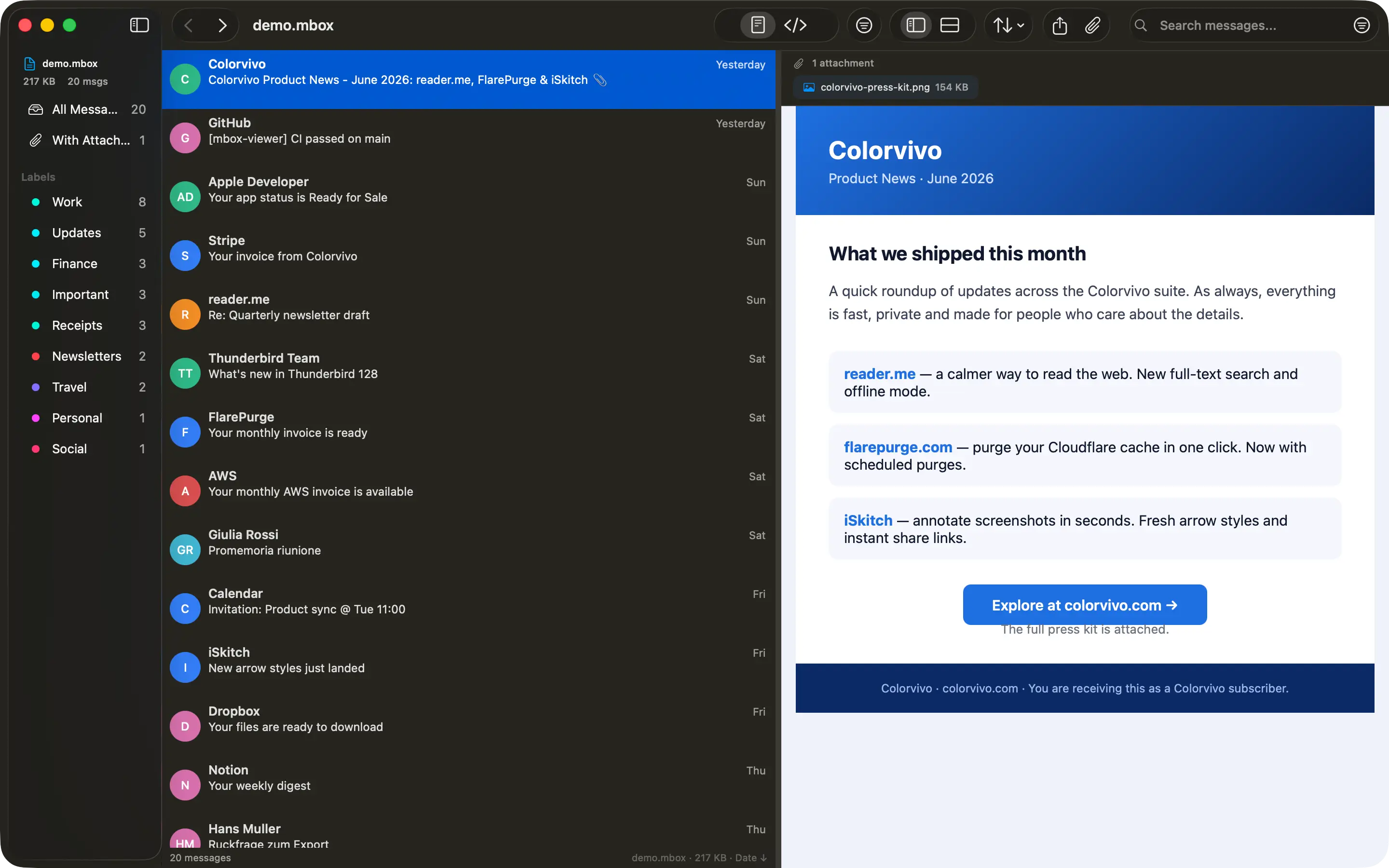
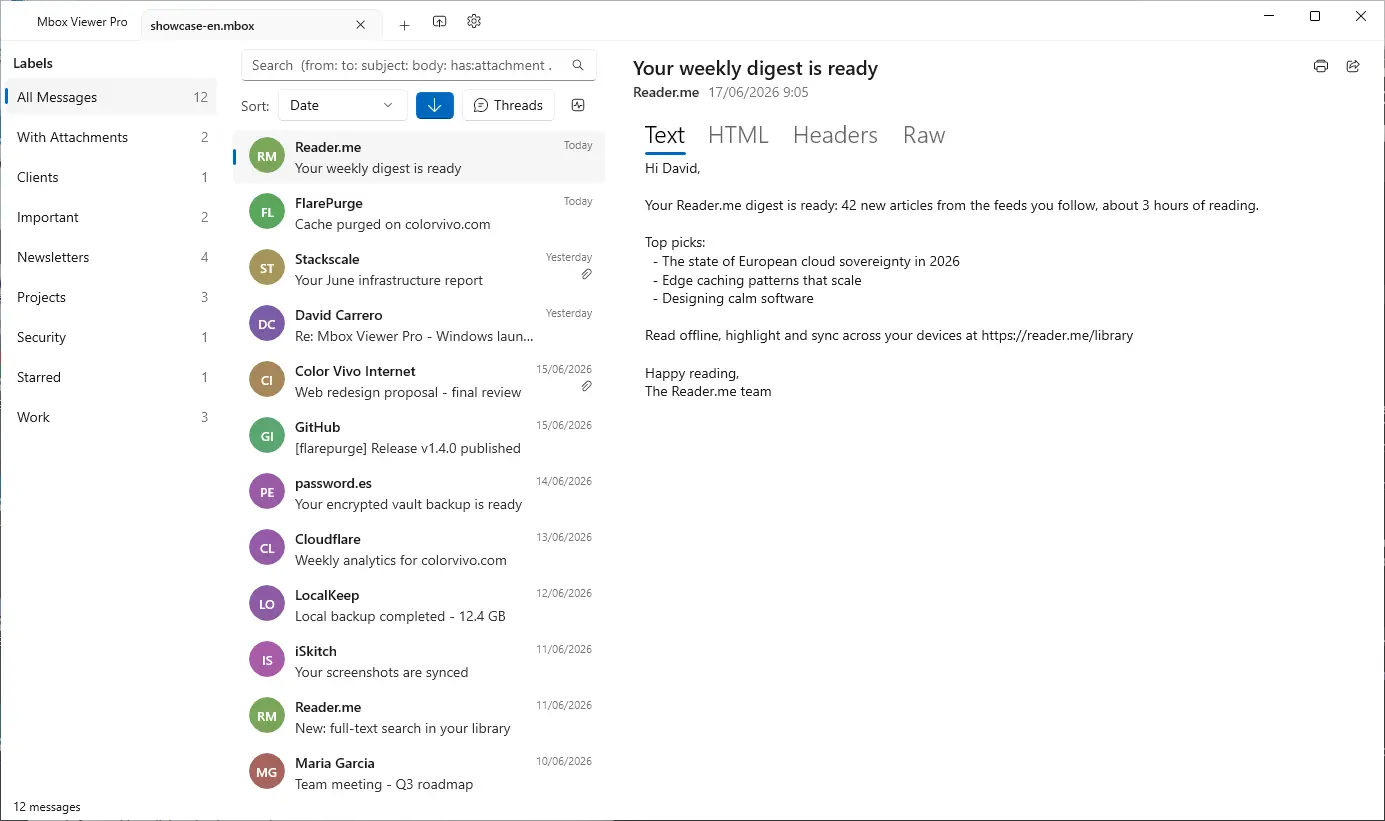
No Electron No Java No cloud 100% offline Read-only
## Built for one job, done right
- 01
### Your Gmail, offline on your computer
Use Google Takeout to back up your entire Gmail account, then read, search and browse it offline — no internet required, no account login.
- 02
### Other tools choke on large files
Most MBOX readers crash or freeze past a few hundred MB. Many ship a whole browser or JVM just to show a list of emails.
- 03
### Native, streaming, instant
Mbox Viewer streams through files of any size without loading them into memory. Truly native on Mac and Windows. Indexes once, re-opens in under a second.
## Everything you need to live inside your email archive
A focused, native toolset — not a web app in a window.
### Handles any size
Streaming parser with a 1 MB buffer opens files from a few KB to 50+ GB without loading them into RAM.
### Instant re-opens
A binary index with SHA-256 validation makes every re-open take under a second, whatever the file size.
### Powerful search
Full query syntax: from:, to:, subject:, body:, date:, has:attachment, size:>, OR, negation and exact phrases.
### Gmail labels
Reads Gmail labels straight from Takeout. Browse by label in the sidebar with live message counts.
### Full export
Export to EML, CSV, plain text or extract every attachment. Merge multiple MBOX files with dedup.
### Conversation threads
The JWZ threading algorithm groups messages into conversations with reply chains up to four levels deep.
### Privacy first
Everything runs locally. No cloud, no telemetry, no data ever leaves your computer. Strictly read-only.
### Truly native
Native on Mac and Windows — dark mode, drag & drop, system share and print. No Electron, no Java.
### Repair damaged mailboxes
Deep-scan recovery re-detects lost message boundaries and exports a repaired copy — the original file is never modified. (Pro)
### Export to PDF
Export any message to a self-contained, multi-page PDF with the same layout as printing. One message is free; batch export is Pro.
### Export to HTML
Save any message as a self-contained HTML file with images embedded and attachments as downloadable links — it opens anywhere. One message is free; batch is Pro.
### Properties, MIME & Hex views
Three new ways to inspect a message: a Properties panel, the MIME part tree and a raw hex dump — ideal for technical or forensic work.
[See all features](https://mboxviewer.net/features/)
## Works with your email client
Mbox Viewer reads the standard mbox format — the same format virtually every email client and service uses for exports and backups. If your app can export mbox, Mbox Viewer can open it. No import, no conversion, no account: just open the file.
Mozilla ThunderbirdGmail / Google TakeoutApple MailPostboxEudoraEntourageEvolutionClaws MailSeaMonkeyThe Bat!Opera MailSylpheedMuttNetscapeMozilla MailSpicebirdPocoMailMulberryPowerMailSparrowConeGNU MailOutlook for Mac (via converter) …and any client that exports standard mbox
Apple Mail and Thunderbird now open directly, with no extra steps. [Have Outlook (PST/OLM)? See how to convert it in our step-by-step guide.](https://mboxviewer.net/guides/convert-outlook-pst-olm-to-mbox/)
## Available in 18 languages
Mbox Viewer's interface and user guide are localized into 18 languages, so you can work through your email in the one you know best.
- English
- Español
- Deutsch
- Français
- Italiano
- 日本語
- 한국어
- Nederlands
- Polski
- Português (BR)
- Português (PT)
- Русский
- Svenska
- Dansk
- Norsk
- Türkçe
- 简体中文
- 繁體中文
## Opens a 50 GB archive in under 5 minutes
And re-opens it in under a second — every time, thanks to the binary index.
| File size | Messages | First open | Re-open | RAM |
| --- | --- | --- | --- | --- |
| 500 MB | ~5,000 | < 5 sec | < 1 sec | < 100 MB |
| 5 GB | ~50,000 | < 30 sec | < 1 sec | < 200 MB |
| 50 GB | ~500,000 | < 5 min | < 1 sec | < 600 MB |
## Stop fighting your email backups
Free for files up to 500 MB. Unlock unlimited size with a one-time in-app purchase. No subscription, no account.
[Download on the Mac App Store](https://apps.apple.com/app/mbox-viewer-pro/id6759237715) [Microsoft Store](https://apps.microsoft.com/store/detail/9NW3GVFG7DDB)
We use analytics cookies to improve Mbox Viewer. You can accept or reject them — the site works the same either way. [Privacy](https://mboxviewer.net/privacy/)
Reject Accept
Laden Sie diese Datei als /index.md auf Ihren Server hoch, damit KI-Agenten auf eine saubere Version Ihrer Seite zugreifen können. Sie können auch die Accept: text/markdown-Inhaltsverhandlung konfigurieren, um sie automatisch auszuliefern.
Unsere Empfehlung
# Mbox Viewer

> Native mbox viewer for Mac and Windows. Open MBOX files from Thunderbird, Gmail / Google Takeout, Apple Mail and any client that exports standard mbox — up to 50+ GB, fully offline.

## Documentation
- [FAQ](https://mboxviewer.net/faq/)

## Main
- [Mbox Viewer — Open & read MBOX files on Mac and Windows — fast and native](https://mboxviewer.net): Native mbox viewer for Mac and Windows. Open MBOX files from Thunderbird, Gmail / Google Takeout, Apple Mail and any cl…
- [Features](https://mboxviewer.net/features/)
- [Mbox Viewer](https://mboxviewer.net/)
- [Guides](https://mboxviewer.net/guides/)
- [Compare](https://mboxviewer.net/compare/)
- [Changelog](https://mboxviewer.net/changelog/)
- [Español](https://mboxviewer.net/es/)
- [Deutsch](https://mboxviewer.net/de/)
- [Français](https://mboxviewer.net/fr/)
- [Português (BR)](https://mboxviewer.net/pt-br/)

## Blog
- [Blog](https://mboxviewer.net/blog/)

## Legal
- [Privacy Policy](https://mboxviewer.net/privacy/)
- [Terms of Service](https://mboxviewer.net/terms/)
- [Refunds](https://mboxviewer.net/refund/)

## Support
- [FAQ](https://mboxviewer.net/faq/)
- [Support](https://mboxviewer.net/support/)
Vollständige llms.txt erfordert eine domainweite Analyse (kommt bald)
Laden Sie diese Datei als https://mboxviewer.net/llms.txt im Stammverzeichnis Ihrer Domain hoch. KI-Agenten wie ChatGPT, Claude und Perplexity prüfen diese Datei, um Ihre Website-Struktur zu verstehen.
Diese Website hat bereits eine llms.txt-Datei.
Gültiges Format# Mbox Viewer > Native mbox viewer for Mac and Windows. Open MBOX files from Thunderbird, Gmail / Google Takeout, Apple Mail and any client that exports standard mbox — up to 50+ GB, fully offline. ## Key facts - Platform: macOS 14 Sonoma and later (Apple Silicon + Intel) and Windows 10/11 & Windows Server. - Distribution: Mac App Store and Microsoft Store. Free up to 500 MB; Pro (unlimited size) is a one-time in-app purchase. No subscription, no account, no web payments. - Privacy: 100% local, no cloud, no telemetry, strictly read-only. - Performance: opens a 50 GB MBOX in under 5 minutes; re-opens in under 1 second via a binary index. - Languages: the app's interface and user guide are localized into 18 languages (English, Español, Deutsch, Français, Italiano, 日本語, 한국어, Nederlands, Polski, Português (BR), Português (PT), Русский, Svenska, Dansk, Norsk, Türkçe, 简体中文, 繁體中文). The website is in 10 languages. - Based on the open-source terminal tool mboxShell (https://github.com/dcarrero/mboxshell). - Author: David Carrero Fernández-Baillo · Color Vivo Internet, S.L. (https://colorvivo.com). ## Download - Mac App Store: https://apps.apple.com/app/mbox-viewer-pro/id6759237715 - Microsoft Store: https://apps.microsoft.com/store/detail/9NW3GVFG7DDB ## Pages - Home: https://mboxviewer.net/ - Features: https://mboxviewer.net/features/ - Compare: https://mboxviewer.net/compare/ - Changelog: https://mboxviewer.net/changelog/ - Guides: https://mboxviewer.net/guides/ - Blog: https://mboxviewer.net/blog/ - FAQ: https://mboxviewer.net/faq/ - Glossary: https://mboxviewer.net/glossary/ - mboxShell (open-source terminal tool this app is based on): https://mboxviewer.net/mboxshell/ - Support: https://mboxviewer.net/support/ ## Guides - How to Export Gmail with Google Takeout (and Open It on Mac): https://mboxviewer.net/guides/how-to-export-gmail-with-google-takeout/ - How to Open an MBOX File on Mac (Even Huge Ones): https://mboxviewer.net/guides/how-to-open-mbox-file-on-mac/ - How to Convert MBOX to CSV, EML, and Text (and Extract Attachments): https://mboxviewer.net/guides/convert-mbox-to-csv-and-eml/ - Mbox Viewer Search Syntax Cheat Sheet: https://mboxviewer.net/guides/search-syntax-cheat-sheet/ - How to Open a Thunderbird MBOX File on Mac: https://mboxviewer.net/guides/how-to-open-thunderbird-mbox-on-mac/ - How to Open an Apple Mail Export (.mbox Folder) on Mac: https://mboxviewer.net/guides/how-to-open-apple-mail-export-on-mac/ - How to Open an MBOX File on Windows (Any Size): https://mboxviewer.net/guides/how-to-open-mbox-file-on-windows/ - How to Open a Thunderbird MBOX File on Windows: https://mboxviewer.net/guides/how-to-open-thunderbird-mbox-on-windows/ - How to Open a Gmail (Google Takeout) MBOX File on Windows: https://mboxviewer.net/guides/how-to-open-gmail-takeout-mbox-on-windows/ - How to Open an Apple Mail Export (.mbox) on Windows: https://mboxviewer.net/guides/how-to-open-apple-mail-export-on-windows/ - How to Convert Outlook PST/OLM to MBOX (Mac & Windows): https://mboxviewer.net/guides/convert-outlook-pst-olm-to-mbox/ ## Blog - What's New in Mbox Viewer 2.7.0: Faster, More Private, More Accessible: https://mboxviewer.net/blog/whats-new-in-mbox-viewer-2-7-0/ - A Field Guide to Email Storage Formats: History, Anatomy and a Comparison: https://mboxviewer.net/blog/email-formats-history-and-anatomy/ - MBOX, EML, PST, OLM: Email Archive Formats Explained: https://mboxviewer.net/blog/email-archive-formats-explained/ - Reading Old Email Archives from Eudora, Entourage and Other Classic Clients on a Modern Mac: https://mboxviewer.net/blog/read-old-email-archives-on-modern-mac/ - Why You Should Back Up Your Gmail Locally (and How): https://mboxviewer.net/blog/why-back-up-your-gmail/ - Introducing Mbox Viewer: Open Any MBOX or EML File, Instantly: https://mboxviewer.net/blog/introducing-mbox-viewer/ ## Feeds (RSS) - Blog: https://mboxviewer.net/blog/rss.xml - Guides: https://mboxviewer.net/guides/rss.xml - Changelog: https://mboxviewer.net/changelog/rss.xml
Zugänglichkeit
Content available without JavaScript
Main content starts at 66% of HTML
Page size: 120KB
KI-Auffindbarkeit
All major AI search bots allowed
Sitemap found
robots.txt exists
llms.txt exists and is valid
Strukturierte Daten
JSON-LD found: Organization, WebSite, SoftwareApplication
All OG tags present
Meta description: 181 chars
Canonical URL present
lang="en"
Semantisches HTML
Clean heading hierarchy
Has <main>
15 semantic elements, 73 divs (ratio: 17%)
2/2 images with meaningful alt text (2 decorative, not counted)
Avg div depth: 1.6, max: 4
Inhaltseffizienz
97% token reduction (HTML→Markdown)
Content ratio: 3.4% (4224 content chars / 123100 HTML bytes)
HTML size: 120KB
15/569 elements with inline styles (2.6%)
{
"url": "https://mboxviewer.net",
"timestamp": 1784280437132,
"fetch": {
"mode": "simple",
"timeMs": 89,
"htmlSizeBytes": 123100,
"supportsMarkdown": false,
"markdownAgents": {
"contentNegotiation": false,
"mdUrl": {
"found": false,
"url": null
},
"linkTag": {
"found": false,
"url": null
},
"linkHeader": {
"found": false,
"url": null
},
"responseHeaders": {
"contentSignal": null,
"xMarkdownTokens": null,
"vary": null
},
"frontmatter": {
"present": false,
"fields": [],
"level": "none"
},
"level": "none"
},
"statusCode": 200
},
"extraction": {
"title": "Mbox Viewer — Open & read MBOX files on Mac and Windows — fast and native",
"excerpt": "Native mbox viewer for Mac and Windows. Open MBOX files from Thunderbird, Gmail / Google Takeout, Apple Mail and any client that exports standard mbox — up to 50+ GB, fully offline.",
"byline": "David Carrero Fernández-Baillo",
"siteName": "Mbox Viewer",
"lang": "en",
"contentLength": 4224,
"metadata": {
"description": "Native mbox viewer for Mac and Windows. Open MBOX files from Thunderbird, Gmail / Google Takeout, Apple Mail and any client that exports standard mbox — up to 50+ GB, fully offline.",
"ogTitle": "Mbox Viewer — Open & read MBOX files on Mac and Windows — fast and native",
"ogDescription": "Native mbox viewer for Mac and Windows. Open MBOX files from Thunderbird, Gmail / Google Takeout, Apple Mail and any client that exports standard mbox — up to 50+ GB, fully offline.",
"ogImage": "https://mboxviewer.net/og/default.png",
"ogType": "website",
"canonical": "https://mboxviewer.net/",
"lang": "en",
"schemas": [
{
"@context": "https://schema.org",
"@type": "Organization",
"name": "Color Vivo Internet, S.L.",
"url": "https://mboxviewer.net",
"logo": "https://mboxviewer.net/icon-256.png",
"sameAs": [
"https://colorvivo.com",
"https://carrero.es",
"https://github.com/dcarrero/mboxshell"
]
},
{
"@context": "https://schema.org",
"@type": "WebSite",
"name": "Mbox Viewer",
"url": "https://mboxviewer.net",
"inLanguage": "en",
"publisher": {
"@type": "Organization",
"name": "Color Vivo Internet, S.L.",
"url": "https://colorvivo.com"
}
},
{
"@context": "https://schema.org",
"@type": "SoftwareApplication",
"name": "Mbox Viewer Pro",
"operatingSystem": "macOS 14+, Windows 10+",
"applicationCategory": "UtilitiesApplication",
"offers": {
"@type": "Offer",
"price": "0",
"priceCurrency": "USD",
"description": "Free up to 500 MB; unlimited via one-time in-app purchase."
},
"downloadUrl": [
"https://apps.apple.com/app/mbox-viewer-pro/id6759237715",
"https://apps.microsoft.com/store/detail/9NW3GVFG7DDB"
],
"softwareVersion": "2.8.1",
"author": {
"@type": "Person",
"name": "David Carrero Fernández-Baillo",
"url": "https://carrero.es"
},
"publisher": {
"@type": "Organization",
"name": "Color Vivo Internet, S.L.",
"url": "https://colorvivo.com"
},
"url": "https://mboxviewer.net",
"image": "https://mboxviewer.net/icon-256.png"
}
],
"robotsMeta": null,
"author": "David Carrero Fernández-Baillo",
"generator": null,
"markdownAlternateHref": null
}
},
"markdown": "[Now on the Mac App Store and Microsoft Store](https://apps.apple.com/app/mbox-viewer-pro/id6759237715)\n\n## Read MBOX files on Mac & Windows.\nAny size. Instantly.\n\nBack up your Gmail with Google Takeout and read it offline. Open, search and export emails from MBOX and EML archives — from a few KB to 50+ GB — without your computer breaking a sweat.\n\n[Download on the Mac App Store](https://apps.apple.com/app/mbox-viewer-pro/id6759237715) [Microsoft Store](https://apps.microsoft.com/store/detail/9NW3GVFG7DDB)\n\n[Try the online viewer](https://onlinemboxviewer.com/)\n\nmacOS 14+ · Apple Silicon · Windows 10/11 and Windows Server\n\nNo Electron No Java No cloud 100% offline Read-only\n\n## Built for one job, done right\n\n- 01\n\n ### Your Gmail, offline on your computer\n\n Use Google Takeout to back up your entire Gmail account, then read, search and browse it offline — no internet required, no account login.\n\n- 02\n\n ### Other tools choke on large files\n\n Most MBOX readers crash or freeze past a few hundred MB. Many ship a whole browser or JVM just to show a list of emails.\n\n- 03\n\n ### Native, streaming, instant\n\n Mbox Viewer streams through files of any size without loading them into memory. Truly native on Mac and Windows. Indexes once, re-opens in under a second.\n\n## Everything you need to live inside your email archive\n\nA focused, native toolset — not a web app in a window.\n\n### Handles any size\n\nStreaming parser with a 1 MB buffer opens files from a few KB to 50+ GB without loading them into RAM.\n\n### Instant re-opens\n\nA binary index with SHA-256 validation makes every re-open take under a second, whatever the file size.\n\n### Powerful search\n\nFull query syntax: from:, to:, subject:, body:, date:, has:attachment, size:>, OR, negation and exact phrases.\n\n### Gmail labels\n\nReads Gmail labels straight from Takeout. Browse by label in the sidebar with live message counts.\n\n### Full export\n\nExport to EML, CSV, plain text or extract every attachment. Merge multiple MBOX files with dedup.\n\n### Conversation threads\n\nThe JWZ threading algorithm groups messages into conversations with reply chains up to four levels deep.\n\n### Privacy first\n\nEverything runs locally. No cloud, no telemetry, no data ever leaves your computer. Strictly read-only.\n\n### Truly native\n\nNative on Mac and Windows — dark mode, drag & drop, system share and print. No Electron, no Java.\n\n### Repair damaged mailboxes\n\nDeep-scan recovery re-detects lost message boundaries and exports a repaired copy — the original file is never modified. (Pro)\n\n### Export to PDF\n\nExport any message to a self-contained, multi-page PDF with the same layout as printing. One message is free; batch export is Pro.\n\n### Export to HTML\n\nSave any message as a self-contained HTML file with images embedded and attachments as downloadable links — it opens anywhere. One message is free; batch is Pro.\n\n### Properties, MIME & Hex views\n\nThree new ways to inspect a message: a Properties panel, the MIME part tree and a raw hex dump — ideal for technical or forensic work.\n\n[See all features](https://mboxviewer.net/features/)\n\n## Works with your email client\n\nMbox Viewer reads the standard mbox format — the same format virtually every email client and service uses for exports and backups. If your app can export mbox, Mbox Viewer can open it. No import, no conversion, no account: just open the file.\n\nMozilla ThunderbirdGmail / Google TakeoutApple MailPostboxEudoraEntourageEvolutionClaws MailSeaMonkeyThe Bat!Opera MailSylpheedMuttNetscapeMozilla MailSpicebirdPocoMailMulberryPowerMailSparrowConeGNU MailOutlook for Mac (via converter) …and any client that exports standard mbox\n\nApple Mail and Thunderbird now open directly, with no extra steps. [Have Outlook (PST/OLM)? See how to convert it in our step-by-step guide.](https://mboxviewer.net/guides/convert-outlook-pst-olm-to-mbox/)\n\n## Available in 18 languages\n\nMbox Viewer's interface and user guide are localized into 18 languages, so you can work through your email in the one you know best.\n\n- English\n- Español\n- Deutsch\n- Français\n- Italiano\n- 日本語\n- 한국어\n- Nederlands\n- Polski\n- Português (BR)\n- Português (PT)\n- Русский\n- Svenska\n- Dansk\n- Norsk\n- Türkçe\n- 简体中文\n- 繁體中文\n\n## Opens a 50 GB archive in under 5 minutes\n\nAnd re-opens it in under a second — every time, thanks to the binary index.\n\n| File size | Messages | First open | Re-open | RAM |\n| --- | --- | --- | --- | --- |\n| 500 MB | ~5,000 | < 5 sec | < 1 sec | < 100 MB |\n| 5 GB | ~50,000 | < 30 sec | < 1 sec | < 200 MB |\n| 50 GB | ~500,000 | < 5 min | < 1 sec | < 600 MB |\n",
"fullPageMarkdown": "Mbox Viewer — Open & read MBOX files on Mac and Windows — fast and native [Skip to content](https://mboxviewer.net/#main)\n\n [ Mbox Viewer](https://mboxviewer.net/)\n\nEnglish\n\n- [English](https://mboxviewer.net/)\n- [Español](https://mboxviewer.net/es/)\n- [Deutsch](https://mboxviewer.net/de/)\n- [Français](https://mboxviewer.net/fr/)\n- [Português (BR)](https://mboxviewer.net/pt-br/)\n- [日本語](https://mboxviewer.net/ja/)\n- [Italiano](https://mboxviewer.net/it/)\n- [Nederlands](https://mboxviewer.net/nl/)\n- [한국어](https://mboxviewer.net/ko/)\n- [Polski](https://mboxviewer.net/pl/)\n\nEnglish\n\n- [English](https://mboxviewer.net/)\n- [Español](https://mboxviewer.net/es/)\n- [Deutsch](https://mboxviewer.net/de/)\n- [Français](https://mboxviewer.net/fr/)\n- [Português (BR)](https://mboxviewer.net/pt-br/)\n- [日本語](https://mboxviewer.net/ja/)\n- [Italiano](https://mboxviewer.net/it/)\n- [Nederlands](https://mboxviewer.net/nl/)\n- [한국어](https://mboxviewer.net/ko/)\n- [Polski](https://mboxviewer.net/pl/)\n\nDownload\n\n- [Mac App Store](https://apps.apple.com/app/mbox-viewer-pro/id6759237715)\n- [Microsoft Store](https://apps.microsoft.com/store/detail/9NW3GVFG7DDB)\n\n[Mac](https://apps.apple.com/app/mbox-viewer-pro/id6759237715) [Windows](https://apps.microsoft.com/store/detail/9NW3GVFG7DDB)\n\n[Now on the Mac App Store and Microsoft Store](https://apps.apple.com/app/mbox-viewer-pro/id6759237715)# Read MBOX files on Mac & Windows.\nAny size. Instantly.\n\nBack up your Gmail with Google Takeout and read it offline. Open, search and export emails from MBOX and EML archives — from a few KB to 50+ GB — without your computer breaking a sweat.\n\n[Download on the Mac App Store](https://apps.apple.com/app/mbox-viewer-pro/id6759237715) [Microsoft Store](https://apps.microsoft.com/store/detail/9NW3GVFG7DDB)\n\n[Try the online viewer](https://onlinemboxviewer.com/)\n\nmacOS 14+ · Apple Silicon · Windows 10/11 and Windows Server\n\nmacOS Windows\n\n \n\n \n\nNo Electron No Java No cloud 100% offline Read-only\n\n## Built for one job, done right\n\n- 01\n\n ### Your Gmail, offline on your computer\n\n Use Google Takeout to back up your entire Gmail account, then read, search and browse it offline — no internet required, no account login.\n\n- 02\n\n ### Other tools choke on large files\n\n Most MBOX readers crash or freeze past a few hundred MB. Many ship a whole browser or JVM just to show a list of emails.\n\n- 03\n\n ### Native, streaming, instant\n\n Mbox Viewer streams through files of any size without loading them into memory. Truly native on Mac and Windows. Indexes once, re-opens in under a second.\n\n## Everything you need to live inside your email archive\n\nA focused, native toolset — not a web app in a window.\n\n### Handles any size\n\nStreaming parser with a 1 MB buffer opens files from a few KB to 50+ GB without loading them into RAM.\n\n### Instant re-opens\n\nA binary index with SHA-256 validation makes every re-open take under a second, whatever the file size.\n\n### Powerful search\n\nFull query syntax: from:, to:, subject:, body:, date:, has:attachment, size:>, OR, negation and exact phrases.\n\n### Gmail labels\n\nReads Gmail labels straight from Takeout. Browse by label in the sidebar with live message counts.\n\n### Full export\n\nExport to EML, CSV, plain text or extract every attachment. Merge multiple MBOX files with dedup.\n\n### Conversation threads\n\nThe JWZ threading algorithm groups messages into conversations with reply chains up to four levels deep.\n\n### Privacy first\n\nEverything runs locally. No cloud, no telemetry, no data ever leaves your computer. Strictly read-only.\n\n### Truly native\n\nNative on Mac and Windows — dark mode, drag & drop, system share and print. No Electron, no Java.\n\n### Repair damaged mailboxes\n\nDeep-scan recovery re-detects lost message boundaries and exports a repaired copy — the original file is never modified. (Pro)\n\n### Export to PDF\n\nExport any message to a self-contained, multi-page PDF with the same layout as printing. One message is free; batch export is Pro.\n\n### Export to HTML\n\nSave any message as a self-contained HTML file with images embedded and attachments as downloadable links — it opens anywhere. One message is free; batch is Pro.\n\n### Properties, MIME & Hex views\n\nThree new ways to inspect a message: a Properties panel, the MIME part tree and a raw hex dump — ideal for technical or forensic work.\n\n[See all features](https://mboxviewer.net/features/)\n\n## Works with your email client\n\nMbox Viewer reads the standard mbox format — the same format virtually every email client and service uses for exports and backups. If your app can export mbox, Mbox Viewer can open it. No import, no conversion, no account: just open the file.\n\nMozilla ThunderbirdGmail / Google TakeoutApple MailPostboxEudoraEntourageEvolutionClaws MailSeaMonkeyThe Bat!Opera MailSylpheedMuttNetscapeMozilla MailSpicebirdPocoMailMulberryPowerMailSparrowConeGNU MailOutlook for Mac (via converter) …and any client that exports standard mbox\n\nApple Mail and Thunderbird now open directly, with no extra steps. [Have Outlook (PST/OLM)? See how to convert it in our step-by-step guide.](https://mboxviewer.net/guides/convert-outlook-pst-olm-to-mbox/)\n\n## Available in 18 languages\n\nMbox Viewer's interface and user guide are localized into 18 languages, so you can work through your email in the one you know best.\n\n- English\n- Español\n- Deutsch\n- Français\n- Italiano\n- 日本語\n- 한국어\n- Nederlands\n- Polski\n- Português (BR)\n- Português (PT)\n- Русский\n- Svenska\n- Dansk\n- Norsk\n- Türkçe\n- 简体中文\n- 繁體中文\n\n## Opens a 50 GB archive in under 5 minutes\n\nAnd re-opens it in under a second — every time, thanks to the binary index.\n\n| File size | Messages | First open | Re-open | RAM |\n| --- | --- | --- | --- | --- |\n| 500 MB | ~5,000 | < 5 sec | < 1 sec | < 100 MB |\n| 5 GB | ~50,000 | < 30 sec | < 1 sec | < 200 MB |\n| 50 GB | ~500,000 | < 5 min | < 1 sec | < 600 MB |\n\n## Stop fighting your email backups\n\nFree for files up to 500 MB. Unlock unlimited size with a one-time in-app purchase. No subscription, no account.\n\n[Download on the Mac App Store](https://apps.apple.com/app/mbox-viewer-pro/id6759237715) [Microsoft Store](https://apps.microsoft.com/store/detail/9NW3GVFG7DDB)\n\nWe use analytics cookies to improve Mbox Viewer. You can accept or reject them — the site works the same either way. [Privacy](https://mboxviewer.net/privacy/)\n\nReject Accept\n",
"markdownStats": {
"images": 0,
"links": 6,
"tables": 1,
"codeBlocks": 0,
"headings": 21
},
"tokens": {
"htmlTokens": 39953,
"markdownTokens": 1198,
"reduction": 38755,
"reductionPercent": 97
},
"score": {
"score": 82,
"grade": "B",
"rubricVersion": 2,
"dimensions": {
"accessibility": {
"score": 81,
"weight": 30,
"grade": "B",
"checks": {
"content_without_js": {
"score": 100,
"weight": 55,
"evidence": "proven",
"details": "Content available without JavaScript"
},
"fast_content_position": {
"score": 25,
"weight": 25,
"evidence": "plausible",
"details": "Main content starts at 66% of HTML"
},
"reasonable_page_size": {
"score": 100,
"weight": 20,
"evidence": "plausible",
"details": "Page size: 120KB"
}
}
},
"aiDiscoverability": {
"score": 70,
"weight": 25,
"grade": "C",
"checks": {
"robots_allows_ai_bots": {
"score": 100,
"weight": 35,
"evidence": "proven",
"details": "All major AI search bots allowed"
},
"supports_markdown_negotiation": {
"score": 0,
"weight": 20,
"evidence": "plausible",
"details": "No Markdown for Agents support detected"
},
"has_sitemap": {
"score": 100,
"weight": 15,
"evidence": "plausible",
"details": "Sitemap found"
},
"has_robots_txt": {
"score": 100,
"weight": 10,
"evidence": "plausible",
"details": "robots.txt exists"
},
"has_llms_txt": {
"score": 100,
"weight": 10,
"evidence": "speculative",
"details": "llms.txt exists and is valid"
},
"has_content_signals": {
"score": 0,
"weight": 10,
"evidence": "speculative",
"details": "No Content-Signal found (robots.txt or HTTP headers)"
}
}
},
"structuredData": {
"score": 100,
"weight": 20,
"grade": "A",
"checks": {
"has_schema_org": {
"score": 100,
"weight": 35,
"evidence": "proven",
"details": "JSON-LD found: Organization, WebSite, SoftwareApplication"
},
"has_open_graph": {
"score": 100,
"weight": 20,
"evidence": "plausible",
"details": "All OG tags present"
},
"has_meta_description": {
"score": 100,
"weight": 20,
"evidence": "plausible",
"details": "Meta description: 181 chars"
},
"has_canonical_url": {
"score": 100,
"weight": 15,
"evidence": "plausible",
"details": "Canonical URL present"
},
"has_lang_attribute": {
"score": 100,
"weight": 10,
"evidence": "plausible",
"details": "lang=\"en\""
}
}
},
"semanticHtml": {
"score": 91,
"weight": 15,
"grade": "A",
"checks": {
"proper_heading_hierarchy": {
"score": 100,
"weight": 30,
"evidence": "plausible",
"details": "Clean heading hierarchy"
},
"uses_article_or_main": {
"score": 100,
"weight": 25,
"evidence": "plausible",
"details": "Has <main>"
},
"semantic_elements": {
"score": 57,
"weight": 20,
"evidence": "plausible",
"details": "15 semantic elements, 73 divs (ratio: 17%)"
},
"meaningful_alt_texts": {
"score": 100,
"weight": 15,
"evidence": "plausible",
"details": "2/2 images with meaningful alt text (2 decorative, not counted)"
},
"low_div_nesting": {
"score": 100,
"weight": 10,
"evidence": "speculative",
"details": "Avg div depth: 1.6, max: 4"
}
}
},
"contentEfficiency": {
"score": 61,
"weight": 10,
"grade": "C",
"checks": {
"token_reduction_ratio": {
"score": 100,
"weight": 40,
"evidence": "speculative",
"details": "97% token reduction (HTML→Markdown)"
},
"content_to_noise_ratio": {
"score": 0,
"weight": 30,
"evidence": "speculative",
"details": "Content ratio: 3.4% (4224 content chars / 123100 HTML bytes)"
},
"reasonable_page_weight": {
"score": 80,
"weight": 20,
"evidence": "speculative",
"details": "HTML size: 120KB"
},
"minimal_inline_styles": {
"score": 50,
"weight": 10,
"evidence": "speculative",
"details": "15/569 elements with inline styles (2.6%)"
}
}
}
}
},
"recommendations": [
{
"id": "move_content_earlier",
"priority": "critical",
"category": "accessibility",
"titleKey": "rec.move_content_earlier.title",
"descriptionKey": "rec.move_content_earlier.description",
"howToKey": "rec.move_content_earlier.howto",
"effort": "moderate",
"estimatedImpact": 5.6,
"maxImpact": 7.5,
"evidence": "plausible",
"checkScore": 25,
"checkDetails": "Main content starts at 66% of HTML"
},
{
"id": "add_markdown_negotiation",
"priority": "critical",
"category": "aiDiscoverability",
"titleKey": "rec.add_markdown_negotiation.title",
"descriptionKey": "rec.add_markdown_negotiation.description",
"howToKey": "rec.add_markdown_negotiation.howto",
"effort": "significant",
"estimatedImpact": 5,
"maxImpact": 5,
"evidence": "plausible",
"checkScore": 0,
"checkDetails": "No Markdown for Agents support detected"
},
{
"id": "improve_content_ratio",
"priority": "high",
"category": "contentEfficiency",
"titleKey": "rec.improve_content_ratio.title",
"descriptionKey": "rec.improve_content_ratio.description",
"howToKey": "rec.improve_content_ratio.howto",
"effort": "moderate",
"estimatedImpact": 3,
"maxImpact": 3,
"evidence": "speculative",
"checkScore": 0,
"checkDetails": "Content ratio: 3.4% (4224 content chars / 123100 HTML bytes)"
},
{
"id": "add_content_signals",
"priority": "high",
"category": "aiDiscoverability",
"titleKey": "rec.add_content_signals.title",
"descriptionKey": "rec.add_content_signals.description",
"howToKey": "rec.add_content_signals.howto",
"effort": "quick-win",
"estimatedImpact": 2.5,
"maxImpact": 2.5,
"evidence": "speculative",
"checkScore": 0,
"checkDetails": "No Content-Signal found (robots.txt or HTTP headers)"
},
{
"id": "remove_inline_styles",
"priority": "low",
"category": "contentEfficiency",
"titleKey": "rec.remove_inline_styles.title",
"descriptionKey": "rec.remove_inline_styles.description",
"howToKey": "rec.remove_inline_styles.howto",
"effort": "moderate",
"estimatedImpact": 0.5,
"maxImpact": 1,
"evidence": "speculative",
"checkScore": 50,
"checkDetails": "15/569 elements with inline styles (2.6%)"
}
],
"llmsTxtPreview": "# Mbox Viewer\n\n> Native mbox viewer for Mac and Windows. Open MBOX files from Thunderbird, Gmail / Google Takeout, Apple Mail and any client that exports standard mbox — up to 50+ GB, fully offline.\n\n## Documentation\n- [FAQ](https://mboxviewer.net/faq/)\n\n## Main\n- [Mbox Viewer — Open & read MBOX files on Mac and Windows — fast and native](https://mboxviewer.net): Native mbox viewer for Mac and Windows. Open MBOX files from Thunderbird, Gmail / Google Takeout, Apple Mail and any cl…\n- [Features](https://mboxviewer.net/features/)\n- [Mbox Viewer](https://mboxviewer.net/)\n- [Guides](https://mboxviewer.net/guides/)\n- [Compare](https://mboxviewer.net/compare/)\n- [Changelog](https://mboxviewer.net/changelog/)\n- [Español](https://mboxviewer.net/es/)\n- [Deutsch](https://mboxviewer.net/de/)\n- [Français](https://mboxviewer.net/fr/)\n- [Português (BR)](https://mboxviewer.net/pt-br/)\n\n## Blog\n- [Blog](https://mboxviewer.net/blog/)\n\n## Legal\n- [Privacy Policy](https://mboxviewer.net/privacy/)\n- [Terms of Service](https://mboxviewer.net/terms/)\n- [Refunds](https://mboxviewer.net/refund/)\n\n## Support\n- [FAQ](https://mboxviewer.net/faq/)\n- [Support](https://mboxviewer.net/support/)\n\n",
"llmsTxtExisting": "# Mbox Viewer\n\n> Native mbox viewer for Mac and Windows. Open MBOX files from Thunderbird, Gmail / Google Takeout, Apple Mail and any client that exports standard mbox — up to 50+ GB, fully offline.\n\n## Key facts\n- Platform: macOS 14 Sonoma and later (Apple Silicon + Intel) and Windows 10/11 & Windows Server.\n- Distribution: Mac App Store and Microsoft Store. Free up to 500 MB; Pro (unlimited size) is a one-time in-app purchase. No subscription, no account, no web payments.\n- Privacy: 100% local, no cloud, no telemetry, strictly read-only.\n- Performance: opens a 50 GB MBOX in under 5 minutes; re-opens in under 1 second via a binary index.\n- Languages: the app's interface and user guide are localized into 18 languages (English, Español, Deutsch, Français, Italiano, 日本語, 한국어, Nederlands, Polski, Português (BR), Português (PT), Русский, Svenska, Dansk, Norsk, Türkçe, 简体中文, 繁體中文). The website is in 10 languages.\n- Based on the open-source terminal tool mboxShell (https://github.com/dcarrero/mboxshell).\n- Author: David Carrero Fernández-Baillo · Color Vivo Internet, S.L. (https://colorvivo.com).\n\n## Download\n- Mac App Store: https://apps.apple.com/app/mbox-viewer-pro/id6759237715\n- Microsoft Store: https://apps.microsoft.com/store/detail/9NW3GVFG7DDB\n\n## Pages\n- Home: https://mboxviewer.net/\n- Features: https://mboxviewer.net/features/\n- Compare: https://mboxviewer.net/compare/\n- Changelog: https://mboxviewer.net/changelog/\n- Guides: https://mboxviewer.net/guides/\n- Blog: https://mboxviewer.net/blog/\n- FAQ: https://mboxviewer.net/faq/\n- Glossary: https://mboxviewer.net/glossary/\n- mboxShell (open-source terminal tool this app is based on): https://mboxviewer.net/mboxshell/\n- Support: https://mboxviewer.net/support/\n\n## Guides\n- How to Export Gmail with Google Takeout (and Open It on Mac): https://mboxviewer.net/guides/how-to-export-gmail-with-google-takeout/\n- How to Open an MBOX File on Mac (Even Huge Ones): https://mboxviewer.net/guides/how-to-open-mbox-file-on-mac/\n- How to Convert MBOX to CSV, EML, and Text (and Extract Attachments): https://mboxviewer.net/guides/convert-mbox-to-csv-and-eml/\n- Mbox Viewer Search Syntax Cheat Sheet: https://mboxviewer.net/guides/search-syntax-cheat-sheet/\n- How to Open a Thunderbird MBOX File on Mac: https://mboxviewer.net/guides/how-to-open-thunderbird-mbox-on-mac/\n- How to Open an Apple Mail Export (.mbox Folder) on Mac: https://mboxviewer.net/guides/how-to-open-apple-mail-export-on-mac/\n- How to Open an MBOX File on Windows (Any Size): https://mboxviewer.net/guides/how-to-open-mbox-file-on-windows/\n- How to Open a Thunderbird MBOX File on Windows: https://mboxviewer.net/guides/how-to-open-thunderbird-mbox-on-windows/\n- How to Open a Gmail (Google Takeout) MBOX File on Windows: https://mboxviewer.net/guides/how-to-open-gmail-takeout-mbox-on-windows/\n- How to Open an Apple Mail Export (.mbox) on Windows: https://mboxviewer.net/guides/how-to-open-apple-mail-export-on-windows/\n- How to Convert Outlook PST/OLM to MBOX (Mac & Windows): https://mboxviewer.net/guides/convert-outlook-pst-olm-to-mbox/\n\n## Blog\n- What's New in Mbox Viewer 2.7.0: Faster, More Private, More Accessible: https://mboxviewer.net/blog/whats-new-in-mbox-viewer-2-7-0/\n- A Field Guide to Email Storage Formats: History, Anatomy and a Comparison: https://mboxviewer.net/blog/email-formats-history-and-anatomy/\n- MBOX, EML, PST, OLM: Email Archive Formats Explained: https://mboxviewer.net/blog/email-archive-formats-explained/\n- Reading Old Email Archives from Eudora, Entourage and Other Classic Clients on a Modern Mac: https://mboxviewer.net/blog/read-old-email-archives-on-modern-mac/\n- Why You Should Back Up Your Gmail Locally (and How): https://mboxviewer.net/blog/why-back-up-your-gmail/\n- Introducing Mbox Viewer: Open Any MBOX or EML File, Instantly: https://mboxviewer.net/blog/introducing-mbox-viewer/\n\n## Feeds (RSS)\n- Blog: https://mboxviewer.net/blog/rss.xml\n- Guides: https://mboxviewer.net/guides/rss.xml\n- Changelog: https://mboxviewer.net/changelog/rss.xml",
"emergingProtocols": {
"oauthProtectedResource": {
"exists": false,
"url": "https://mboxviewer.net/.well-known/oauth-protected-resource"
},
"oauthDiscovery": {
"exists": false,
"url": "https://mboxviewer.net/.well-known/oauth-authorization-server"
},
"mcpServerCard": {
"exists": false,
"url": "https://mboxviewer.net/.well-known/mcp/server-card.json",
"draft": true
},
"a2aAgentCard": {
"exists": false,
"url": "https://mboxviewer.net/.well-known/agent-card.json"
},
"apiCatalog": {
"exists": false,
"url": "https://mboxviewer.net/.well-known/api-catalog"
},
"agentSkills": {
"exists": false,
"url": "https://mboxviewer.net/.well-known/agent-skills/index.json",
"draft": true
},
"count": 0,
"total": 6
},
"botAccess": {
"probed": true,
"bot": "OAI-SearchBot",
"controlStatus": 200,
"botStatus": 200,
"discriminates": false,
"refusedAsBot": false,
"edge": "Cloudflare",
"verifiable": false,
"detail": "This origin answers OAI-SearchBot exactly as it answers any other client (200). No edge-level filtering of AI crawlers observed."
},
"snippets": [
{
"id": "add_content_signals",
"title": "Add Content-Signal directives",
"description": "Content-Signal tells AI agents how they may use your content. The canonical location is robots.txt, but you can also expose it as an HTTP header from any stack.",
"language": "txt",
"code": "User-agent: *\nContent-Signal: search=yes, ai-input=yes, ai-train=no",
"filename": "/robots.txt",
"stacks": [
{
"id": "robots",
"label": "robots.txt",
"language": "txt",
"filename": "/robots.txt",
"code": "User-agent: *\nContent-Signal: search=yes, ai-input=yes, ai-train=no"
},
{
"id": "nginx",
"label": "Nginx",
"language": "nginx",
"filename": "server block",
"code": "# Inside your server { } block:\nadd_header Content-Signal \"search=yes, ai-input=yes, ai-train=no\" always;"
},
{
"id": "apache",
"label": "Apache",
"language": "apache",
"filename": ".htaccess",
"code": "# In .htaccess (or VirtualHost):\nHeader set Content-Signal \"search=yes, ai-input=yes, ai-train=no\""
},
{
"id": "wordpress",
"label": "WordPress",
"language": "php",
"filename": "functions.php",
"code": "<?php\n// In your theme's functions.php or a small mu-plugin\nadd_action('send_headers', function () {\n header('Content-Signal: search=yes, ai-input=yes, ai-train=no');\n});\n\n// Optional: also append the directive to the dynamic robots.txt\nadd_filter('robots_txt', function ($output) {\n return $output . \"\\nContent-Signal: search=yes, ai-input=yes, ai-train=no\\n\";\n}, 10, 1);"
},
{
"id": "nextjs",
"label": "Next.js",
"language": "typescript",
"filename": "middleware.ts",
"code": "// middleware.ts (Next.js 13+ App Router or Pages Router)\nimport { NextResponse } from 'next/server';\nexport function middleware() {\n const res = NextResponse.next();\n res.headers.set(\n 'Content-Signal',\n 'search=yes, ai-input=yes, ai-train=no'\n );\n return res;\n}\nexport const config = { matcher: '/:path*' };"
},
{
"id": "cloudflare",
"label": "Cloudflare Workers",
"language": "javascript",
"filename": "worker.js",
"code": "// Cloudflare Worker that proxies your origin and adds the header\nexport default {\n async fetch(request, env, ctx) {\n const res = await fetch(request);\n const newRes = new Response(res.body, res);\n newRes.headers.set(\n 'Content-Signal',\n 'search=yes, ai-input=yes, ai-train=no'\n );\n return newRes;\n },\n};"
},
{
"id": "express",
"label": "Express / Fastify",
"language": "javascript",
"filename": "server.js",
"code": "// Express\napp.use((req, res, next) => {\n res.setHeader('Content-Signal', 'search=yes, ai-input=yes, ai-train=no');\n next();\n});\n\n// Fastify\nfastify.addHook('onSend', (request, reply, payload, done) => {\n reply.header('Content-Signal', 'search=yes, ai-input=yes, ai-train=no');\n done();\n});"
}
]
},
{
"id": "add_markdown_negotiation",
"title": "Support Markdown for Agents",
"description": "Let AI agents request a clean Markdown version of any page via content negotiation, .md alternate URLs, link tags or Link headers.",
"language": "html",
"code": "<!-- Mechanism 3: link tag advertising the .md alternate -->\n<link rel=\"alternate\" type=\"text/markdown\" href=\"/page.md\">",
"filename": "<head>",
"stacks": [
{
"id": "html",
"label": "HTML <head>",
"language": "html",
"filename": "<head>",
"code": "<!-- Mechanism 3: link tag advertising the .md alternate -->\n<link rel=\"alternate\" type=\"text/markdown\" href=\"/page.md\">"
},
{
"id": "express",
"label": "Express",
"language": "javascript",
"filename": "server.js",
"code": "// Mechanisms 1 + 4: content negotiation + Link header\napp.get('/page', (req, res) => {\n res.setHeader('Vary', 'Accept');\n res.setHeader('Link', '</page.md>; rel=\"alternate\"; type=\"text/markdown\"');\n if ((req.headers.accept || '').includes('text/markdown')) {\n res.type('text/markdown; charset=utf-8');\n return res.send(renderMarkdown('page'));\n }\n res.render('page');\n});"
},
{
"id": "fastify",
"label": "Fastify",
"language": "javascript",
"filename": "server.js",
"code": "// Mechanisms 1 + 4: content negotiation + Link header\nfastify.get('/page', async (req, reply) => {\n reply.header('Vary', 'Accept');\n reply.header('Link', '</page.md>; rel=\"alternate\"; type=\"text/markdown\"');\n if ((req.headers.accept || '').includes('text/markdown')) {\n return reply.type('text/markdown; charset=utf-8').send(renderMarkdown('page'));\n }\n return reply.view('/page.ejs');\n});"
},
{
"id": "nextjs",
"label": "Next.js",
"language": "typescript",
"filename": "app/page/route.ts",
"code": "// Next.js App Router — Route Handler returning Markdown\nimport { NextRequest } from 'next/server';\nimport { renderMarkdown } from '@/lib/md';\nexport async function GET(req: NextRequest) {\n const accept = req.headers.get('accept') || '';\n if (accept.includes('text/markdown')) {\n return new Response(await renderMarkdown('page'), {\n headers: {\n 'Content-Type': 'text/markdown; charset=utf-8',\n 'Vary': 'Accept',\n },\n });\n }\n // Fall through to the page component\n return new Response(null, { status: 404 });\n}"
},
{
"id": "wordpress",
"label": "WordPress",
"language": "php",
"filename": "functions.php",
"code": "<?php\n// Mechanism 1: respond to Accept: text/markdown on the same URL\nadd_action('template_redirect', function () {\n if (!is_singular()) return;\n $accept = $_SERVER['HTTP_ACCEPT'] ?? '';\n if (strpos($accept, 'text/markdown') === false) return;\n header('Content-Type: text/markdown; charset=utf-8');\n header('Vary: Accept');\n $post = get_queried_object();\n echo \"# \" . get_the_title($post) . \"\\n\\n\";\n echo wp_strip_all_tags(apply_filters('the_content', $post->post_content));\n exit;\n});"
},
{
"id": "static",
"label": "Hugo / Jekyll / Astro",
"language": "txt",
"filename": "static/page.md",
"code": "# Mechanism 2: serve .md alongside .html\n# Hugo: place page.md in /static/ — built unchanged\n# Jekyll: drop page.md in /assets/ — copied as-is\n# Astro: src/pages/page.md.ts that exports a GET returning markdown\n\n# Then advertise with mechanism 3 in <head>:\n# <link rel=\"alternate\" type=\"text/markdown\" href=\"/page.md\">"
}
]
}
]
}Nutzen Sie unsere API, um dies programmatisch abzurufen (kommt bald)
Dieses JSON ist für den internen Gebrauch bestimmt — im Gegensatz zu den Markdown- und llms.txt-Dateien soll es nicht auf Ihre Website hochgeladen werden. Speichern Sie es als Ausgangswert, um Ihren Score im Zeitverlauf zu verfolgen, teilen Sie es mit Ihrem Entwicklerteam oder integrieren Sie es in Ihre CI/CD-Pipeline.
Teilen Sie Ihre Ergebnisse
Oder lass dir von einer KI beim Verbessern helfen
Eine zweite Meinung?
Cloudflare betreibt ebenfalls einen kostenlosen Scanner, und er stellt eine andere Frage. Er bewertet, was Ihre Website für Agenten zum Aufrufen veröffentlicht: MCP Server Cards, Agent Skills, API-Kataloge, DNS-Einträge. Wir bewerten, ob ein Agent Ihre Inhalte erreichen, lesen und verstehen kann. Eine Website kann bei dem einen gut und bei dem anderen schlecht abschneiden — rechnen Sie mit zwei verschiedenen Zahlen: Es sind Antworten auf zwei verschiedene Fragen, und beide lohnen sich.
mboxviewer.net mit Cloudflare scannenBadge einbetten
Fügen Sie dieses Badge zu Ihrer Website hinzu. Es aktualisiert sich automatisch, wenn sich Ihr KI-Bereitschafts-Score ändert.

<script src="https://agentready.md/badge.js" data-id="91685669-e3f4-475f-8796-7869144ff228" data-domain="mboxviewer.net"></script>[](https://agentready.md/de/r/91685669-e3f4-475f-8796-7869144ff228)Demnächst: Vollständige Domain-Analyse
Crawlen Sie Ihre gesamte Domain, generieren Sie llms.txt und überwachen Sie Ihren KI-Bereitschaftswert im Zeitverlauf. Tragen Sie sich in die Warteliste ein.
Sie stehen auf der Liste! Wir benachrichtigen Sie, sobald es verfügbar ist.