URL analysée
https://mboxviewer.net
Mesuré il y a 3 jours
Score AI-Ready
Bon
sur 100
Économie de tokens
Détail du score
Protocoles émergents
0 sur 6 détectésEndpoints well-known recherchés par les agents IA. Détecté signifie qu’un agent peut découvrir et se connecter automatiquement à votre service.
-
OAuth Protected Resource RFC 9728
/.well-known/oauth-protected-resource -
OAuth Discovery RFC 8414
/.well-known/oauth-authorization-server -
MCP Server Card SEP-1649 draft
/.well-known/mcp/server-card.json -
A2A Agent Card A2A v1.0
/.well-known/agent-card.json -
API Catalog RFC 9727
/.well-known/api-catalog -
Agent Skills index Discovery RFC v0.2.0 draft
/.well-known/agent-skills/index.json
Cela ne reste pas en place. La surveillance n'existe pas encore : inscrivez-vous, on vous préviendra.
Vous êtes sur la liste ! Nous vous préviendrons lors du lancement.
Ce que nous avons mesuré Main content starts at 66% of HTML
Le contenu principal apparaît tardivement dans le document HTML. Les AI agents peuvent accorder plus d’importance au contenu qui apparaît tôt.
Comment implémenter
Restructurez votre HTML pour que le contenu <main> ou <article> apparaisse avant les barres latérales et le contenu supplémentaire.
Ce que nous avons mesuré No Markdown for Agents support detected
Votre site ne supporte pas Markdown for Agents. Ce standard Cloudflare permet aux agents IA de demander du contenu en format markdown, réduisant l'utilisation de tokens de ~80%.
Comment implémenter
Implémentez un ou plusieurs : (1) Répondre à Accept: text/markdown avec du contenu markdown. (2) Servir des URLs .md (ex : /page.md). (3) Ajouter des balises <link rel="alternate" type="text/markdown">. (4) Ajouter des en-têtes HTTP Link pour la découverte markdown.
Ce que nous avons mesuré Content ratio: 3.4% (4224 content chars / 123100 HTML bytes)
Votre page a un faible ratio de contenu réel par rapport au HTML total. Une grande partie du poids de la page est du balisage, des scripts ou des styles plutôt que du contenu.
Comment implémenter
Déplacez le CSS vers des feuilles de style externes, supprimez les styles en ligne, minimisez le JavaScript et assurez-vous que le HTML se concentre sur la structure du contenu.
Ce que nous avons mesuré No Content-Signal found (robots.txt or HTTP headers)
Aucune directive Content-Signal trouvée. Celles-ci indiquent aux agents IA comment ils peuvent utiliser votre contenu (indexation, entrée IA, données d'entraînement). L'emplacement recommandé est robots.txt.
Comment implémenter
Ajoutez Content-Signal à votre robots.txt : User-agent: *\nContent-Signal: search=yes, ai-input=yes, ai-train=no. Vous pouvez aussi l'ajouter comme en-tête HTTP sur les réponses markdown.
Ce que nous avons mesuré 15/569 elements with inline styles (2.6%)
De nombreux éléments ont des attributs de style en ligne. Ils ajoutent du bruit pour les AI agents lors de l’extraction du contenu.
Comment implémenter
Déplacez tous les styles en ligne vers des classes CSS dans votre feuille de style. Utilisez des frameworks CSS utilitaires comme Tailwind si vous avez besoin de nombreux styles uniques.
[Now on the Mac App Store and Microsoft Store](https://apps.apple.com/app/mbox-viewer-pro/id6759237715)

## Read MBOX files on Mac & Windows.
Any size. Instantly.

Back up your Gmail with Google Takeout and read it offline. Open, search and export emails from MBOX and EML archives — from a few KB to 50+ GB — without your computer breaking a sweat.

[Download on the Mac App Store](https://apps.apple.com/app/mbox-viewer-pro/id6759237715) [Microsoft Store](https://apps.microsoft.com/store/detail/9NW3GVFG7DDB)

[Try the online viewer](https://onlinemboxviewer.com/)

macOS 14+ · Apple Silicon · Windows 10/11 and Windows Server

No Electron No Java No cloud 100% offline Read-only

## Built for one job, done right

-   01

    ### Your Gmail, offline on your computer

    Use Google Takeout to back up your entire Gmail account, then read, search and browse it offline — no internet required, no account login.

-   02

    ### Other tools choke on large files

    Most MBOX readers crash or freeze past a few hundred MB. Many ship a whole browser or JVM just to show a list of emails.

-   03

    ### Native, streaming, instant

    Mbox Viewer streams through files of any size without loading them into memory. Truly native on Mac and Windows. Indexes once, re-opens in under a second.

## Everything you need to live inside your email archive

A focused, native toolset — not a web app in a window.

### Handles any size

Streaming parser with a 1 MB buffer opens files from a few KB to 50+ GB without loading them into RAM.

### Instant re-opens

A binary index with SHA-256 validation makes every re-open take under a second, whatever the file size.

### Powerful search

Full query syntax: from:, to:, subject:, body:, date:, has:attachment, size:>, OR, negation and exact phrases.

### Gmail labels

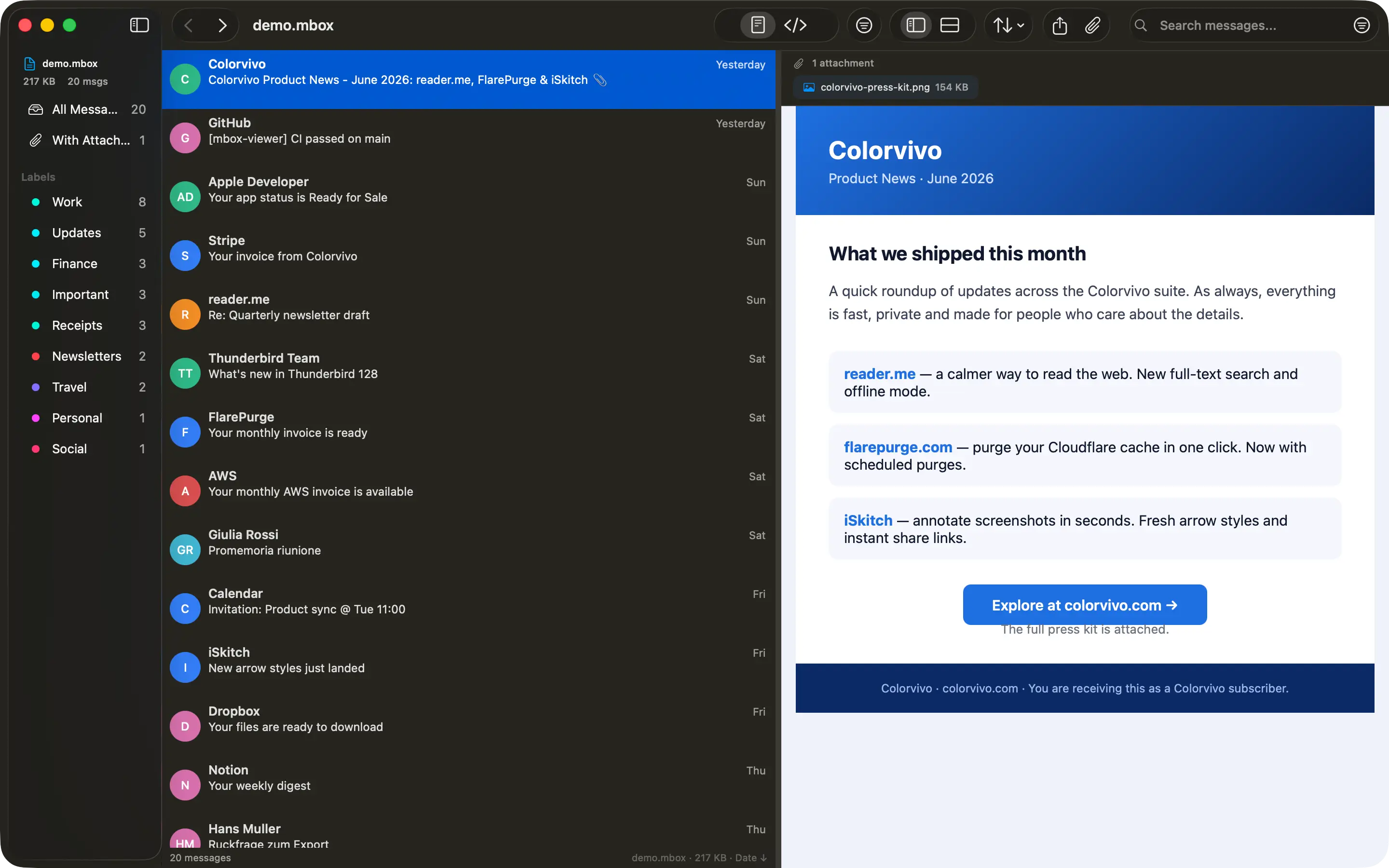
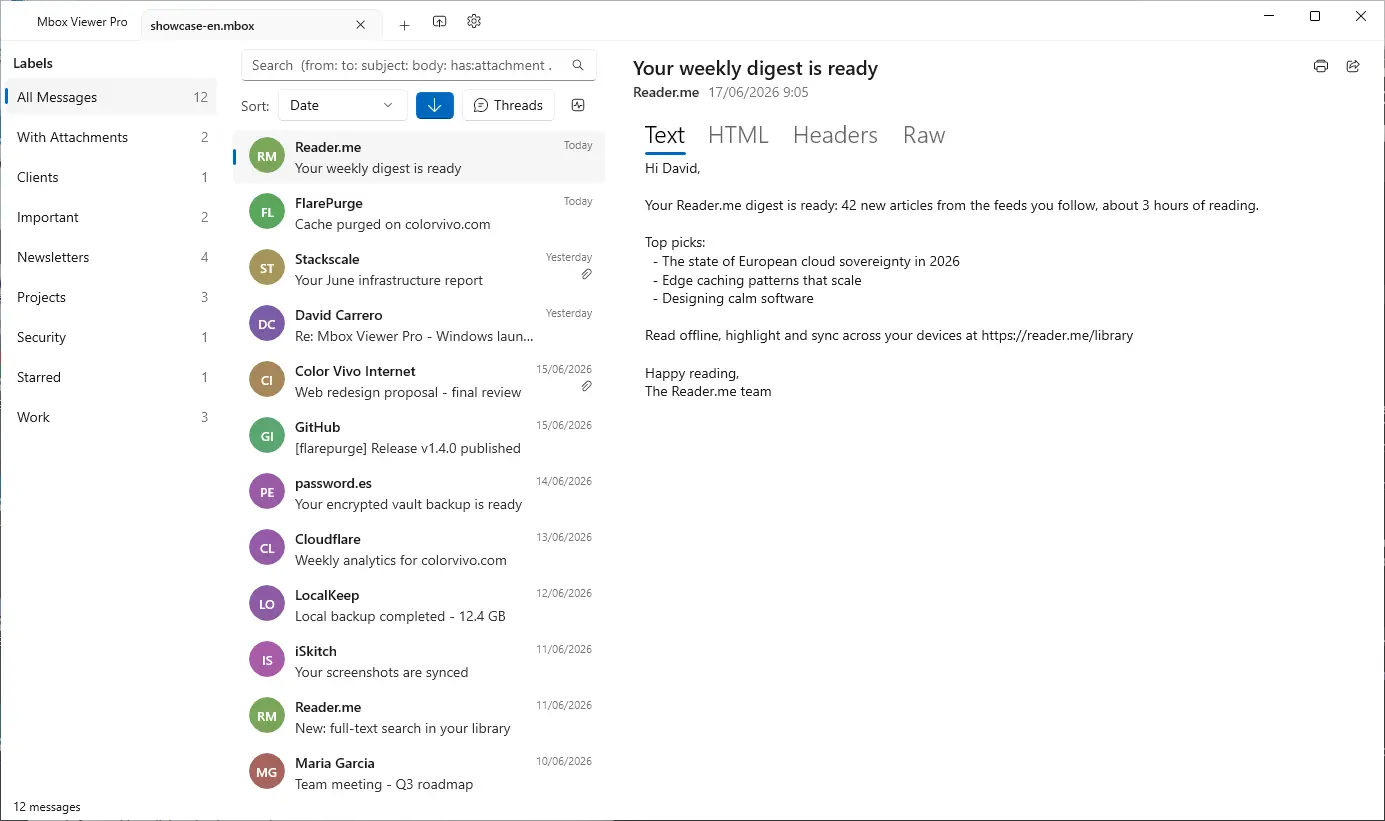
Reads Gmail labels straight from Takeout. Browse by label in the sidebar with live message counts.

### Full export

Export to EML, CSV, plain text or extract every attachment. Merge multiple MBOX files with dedup.

### Conversation threads

The JWZ threading algorithm groups messages into conversations with reply chains up to four levels deep.

### Privacy first

Everything runs locally. No cloud, no telemetry, no data ever leaves your computer. Strictly read-only.

### Truly native

Native on Mac and Windows — dark mode, drag & drop, system share and print. No Electron, no Java.

### Repair damaged mailboxes

Deep-scan recovery re-detects lost message boundaries and exports a repaired copy — the original file is never modified. (Pro)

### Export to PDF

Export any message to a self-contained, multi-page PDF with the same layout as printing. One message is free; batch export is Pro.

### Export to HTML

Save any message as a self-contained HTML file with images embedded and attachments as downloadable links — it opens anywhere. One message is free; batch is Pro.

### Properties, MIME & Hex views

Three new ways to inspect a message: a Properties panel, the MIME part tree and a raw hex dump — ideal for technical or forensic work.

[See all features](https://mboxviewer.net/features/)

## Works with your email client

Mbox Viewer reads the standard mbox format — the same format virtually every email client and service uses for exports and backups. If your app can export mbox, Mbox Viewer can open it. No import, no conversion, no account: just open the file.

Mozilla ThunderbirdGmail / Google TakeoutApple MailPostboxEudoraEntourageEvolutionClaws MailSeaMonkeyThe Bat!Opera MailSylpheedMuttNetscapeMozilla MailSpicebirdPocoMailMulberryPowerMailSparrowConeGNU MailOutlook for Mac (via converter) …and any client that exports standard mbox

Apple Mail and Thunderbird now open directly, with no extra steps. [Have Outlook (PST/OLM)? See how to convert it in our step-by-step guide.](https://mboxviewer.net/guides/convert-outlook-pst-olm-to-mbox/)

## Available in 18 languages

Mbox Viewer's interface and user guide are localized into 18 languages, so you can work through your email in the one you know best.

-   English
-   Español
-   Deutsch
-   Français
-   Italiano
-   日本語
-   한국어
-   Nederlands
-   Polski
-   Português (BR)
-   Português (PT)
-   Русский
-   Svenska
-   Dansk
-   Norsk
-   Türkçe
-   简体中文
-   繁體中文

## Opens a 50 GB archive in under 5 minutes

And re-opens it in under a second — every time, thanks to the binary index.

| File size | Messages | First open | Re-open | RAM |
| --- | --- | --- | --- | --- |
| 500 MB | ~5,000 | < 5 sec | < 1 sec | < 100 MB |
| 5 GB | ~50,000 | < 30 sec | < 1 sec | < 200 MB |
| 50 GB | ~500,000 | < 5 min | < 1 sec | < 600 MB |
Mbox Viewer — Open & read MBOX files on Mac and Windows — fast and native [Skip to content](https://mboxviewer.net/#main)
[ Mbox Viewer](https://mboxviewer.net/)
English
- [English](https://mboxviewer.net/)
- [Español](https://mboxviewer.net/es/)
- [Deutsch](https://mboxviewer.net/de/)
- [Français](https://mboxviewer.net/fr/)
- [Português (BR)](https://mboxviewer.net/pt-br/)
- [日本語](https://mboxviewer.net/ja/)
- [Italiano](https://mboxviewer.net/it/)
- [Nederlands](https://mboxviewer.net/nl/)
- [한국어](https://mboxviewer.net/ko/)
- [Polski](https://mboxviewer.net/pl/)
English
- [English](https://mboxviewer.net/)
- [Español](https://mboxviewer.net/es/)
- [Deutsch](https://mboxviewer.net/de/)
- [Français](https://mboxviewer.net/fr/)
- [Português (BR)](https://mboxviewer.net/pt-br/)
- [日本語](https://mboxviewer.net/ja/)
- [Italiano](https://mboxviewer.net/it/)
- [Nederlands](https://mboxviewer.net/nl/)
- [한국어](https://mboxviewer.net/ko/)
- [Polski](https://mboxviewer.net/pl/)
Download
- [Mac App Store](https://apps.apple.com/app/mbox-viewer-pro/id6759237715)
- [Microsoft Store](https://apps.microsoft.com/store/detail/9NW3GVFG7DDB)
[Mac](https://apps.apple.com/app/mbox-viewer-pro/id6759237715) [Windows](https://apps.microsoft.com/store/detail/9NW3GVFG7DDB)
[Now on the Mac App Store and Microsoft Store](https://apps.apple.com/app/mbox-viewer-pro/id6759237715)# Read MBOX files on Mac & Windows.
Any size. Instantly.
Back up your Gmail with Google Takeout and read it offline. Open, search and export emails from MBOX and EML archives — from a few KB to 50+ GB — without your computer breaking a sweat.
[Download on the Mac App Store](https://apps.apple.com/app/mbox-viewer-pro/id6759237715) [Microsoft Store](https://apps.microsoft.com/store/detail/9NW3GVFG7DDB)
[Try the online viewer](https://onlinemboxviewer.com/)
macOS 14+ · Apple Silicon · Windows 10/11 and Windows Server
macOS Windows
No Electron No Java No cloud 100% offline Read-only
## Built for one job, done right
- 01
### Your Gmail, offline on your computer
Use Google Takeout to back up your entire Gmail account, then read, search and browse it offline — no internet required, no account login.
- 02
### Other tools choke on large files
Most MBOX readers crash or freeze past a few hundred MB. Many ship a whole browser or JVM just to show a list of emails.
- 03
### Native, streaming, instant
Mbox Viewer streams through files of any size without loading them into memory. Truly native on Mac and Windows. Indexes once, re-opens in under a second.
## Everything you need to live inside your email archive
A focused, native toolset — not a web app in a window.
### Handles any size
Streaming parser with a 1 MB buffer opens files from a few KB to 50+ GB without loading them into RAM.
### Instant re-opens
A binary index with SHA-256 validation makes every re-open take under a second, whatever the file size.
### Powerful search
Full query syntax: from:, to:, subject:, body:, date:, has:attachment, size:>, OR, negation and exact phrases.
### Gmail labels
Reads Gmail labels straight from Takeout. Browse by label in the sidebar with live message counts.
### Full export
Export to EML, CSV, plain text or extract every attachment. Merge multiple MBOX files with dedup.
### Conversation threads
The JWZ threading algorithm groups messages into conversations with reply chains up to four levels deep.
### Privacy first
Everything runs locally. No cloud, no telemetry, no data ever leaves your computer. Strictly read-only.
### Truly native
Native on Mac and Windows — dark mode, drag & drop, system share and print. No Electron, no Java.
### Repair damaged mailboxes
Deep-scan recovery re-detects lost message boundaries and exports a repaired copy — the original file is never modified. (Pro)
### Export to PDF
Export any message to a self-contained, multi-page PDF with the same layout as printing. One message is free; batch export is Pro.
### Export to HTML
Save any message as a self-contained HTML file with images embedded and attachments as downloadable links — it opens anywhere. One message is free; batch is Pro.
### Properties, MIME & Hex views
Three new ways to inspect a message: a Properties panel, the MIME part tree and a raw hex dump — ideal for technical or forensic work.
[See all features](https://mboxviewer.net/features/)
## Works with your email client
Mbox Viewer reads the standard mbox format — the same format virtually every email client and service uses for exports and backups. If your app can export mbox, Mbox Viewer can open it. No import, no conversion, no account: just open the file.
Mozilla ThunderbirdGmail / Google TakeoutApple MailPostboxEudoraEntourageEvolutionClaws MailSeaMonkeyThe Bat!Opera MailSylpheedMuttNetscapeMozilla MailSpicebirdPocoMailMulberryPowerMailSparrowConeGNU MailOutlook for Mac (via converter) …and any client that exports standard mbox
Apple Mail and Thunderbird now open directly, with no extra steps. [Have Outlook (PST/OLM)? See how to convert it in our step-by-step guide.](https://mboxviewer.net/guides/convert-outlook-pst-olm-to-mbox/)
## Available in 18 languages
Mbox Viewer's interface and user guide are localized into 18 languages, so you can work through your email in the one you know best.
- English
- Español
- Deutsch
- Français
- Italiano
- 日本語
- 한국어
- Nederlands
- Polski
- Português (BR)
- Português (PT)
- Русский
- Svenska
- Dansk
- Norsk
- Türkçe
- 简体中文
- 繁體中文
## Opens a 50 GB archive in under 5 minutes
And re-opens it in under a second — every time, thanks to the binary index.
| File size | Messages | First open | Re-open | RAM |
| --- | --- | --- | --- | --- |
| 500 MB | ~5,000 | < 5 sec | < 1 sec | < 100 MB |
| 5 GB | ~50,000 | < 30 sec | < 1 sec | < 200 MB |
| 50 GB | ~500,000 | < 5 min | < 1 sec | < 600 MB |
## Stop fighting your email backups
Free for files up to 500 MB. Unlock unlimited size with a one-time in-app purchase. No subscription, no account.
[Download on the Mac App Store](https://apps.apple.com/app/mbox-viewer-pro/id6759237715) [Microsoft Store](https://apps.microsoft.com/store/detail/9NW3GVFG7DDB)
We use analytics cookies to improve Mbox Viewer. You can accept or reject them — the site works the same either way. [Privacy](https://mboxviewer.net/privacy/)
Reject Accept
Téléversez ce fichier sous /index.md sur votre serveur pour que les AI agents puissent accéder à une version propre de votre page. Vous pouvez également configurer la négociation de contenu Accept: text/markdown pour le servir automatiquement.
Notre recommandation
# Mbox Viewer

> Native mbox viewer for Mac and Windows. Open MBOX files from Thunderbird, Gmail / Google Takeout, Apple Mail and any client that exports standard mbox — up to 50+ GB, fully offline.

## Documentation
- [FAQ](https://mboxviewer.net/faq/)

## Main
- [Mbox Viewer — Open & read MBOX files on Mac and Windows — fast and native](https://mboxviewer.net): Native mbox viewer for Mac and Windows. Open MBOX files from Thunderbird, Gmail / Google Takeout, Apple Mail and any cl…
- [Features](https://mboxviewer.net/features/)
- [Mbox Viewer](https://mboxviewer.net/)
- [Guides](https://mboxviewer.net/guides/)
- [Compare](https://mboxviewer.net/compare/)
- [Changelog](https://mboxviewer.net/changelog/)
- [Español](https://mboxviewer.net/es/)
- [Deutsch](https://mboxviewer.net/de/)
- [Français](https://mboxviewer.net/fr/)
- [Português (BR)](https://mboxviewer.net/pt-br/)

## Blog
- [Blog](https://mboxviewer.net/blog/)

## Legal
- [Privacy Policy](https://mboxviewer.net/privacy/)
- [Terms of Service](https://mboxviewer.net/terms/)
- [Refunds](https://mboxviewer.net/refund/)

## Support
- [FAQ](https://mboxviewer.net/faq/)
- [Support](https://mboxviewer.net/support/)
Le llms.txt complet nécessite une analyse de tout le domaine (bientôt disponible)
Téléversez ce fichier vers https://mboxviewer.net/llms.txt à la racine de votre domaine. Les AI agents comme ChatGPT, Claude et Perplexity consultent ce fichier pour comprendre la structure de votre site.
Ce site possède déjà un fichier llms.txt.
Format valide# Mbox Viewer > Native mbox viewer for Mac and Windows. Open MBOX files from Thunderbird, Gmail / Google Takeout, Apple Mail and any client that exports standard mbox — up to 50+ GB, fully offline. ## Key facts - Platform: macOS 14 Sonoma and later (Apple Silicon + Intel) and Windows 10/11 & Windows Server. - Distribution: Mac App Store and Microsoft Store. Free up to 500 MB; Pro (unlimited size) is a one-time in-app purchase. No subscription, no account, no web payments. - Privacy: 100% local, no cloud, no telemetry, strictly read-only. - Performance: opens a 50 GB MBOX in under 5 minutes; re-opens in under 1 second via a binary index. - Languages: the app's interface and user guide are localized into 18 languages (English, Español, Deutsch, Français, Italiano, 日本語, 한국어, Nederlands, Polski, Português (BR), Português (PT), Русский, Svenska, Dansk, Norsk, Türkçe, 简体中文, 繁體中文). The website is in 10 languages. - Based on the open-source terminal tool mboxShell (https://github.com/dcarrero/mboxshell). - Author: David Carrero Fernández-Baillo · Color Vivo Internet, S.L. (https://colorvivo.com). ## Download - Mac App Store: https://apps.apple.com/app/mbox-viewer-pro/id6759237715 - Microsoft Store: https://apps.microsoft.com/store/detail/9NW3GVFG7DDB ## Pages - Home: https://mboxviewer.net/ - Features: https://mboxviewer.net/features/ - Compare: https://mboxviewer.net/compare/ - Changelog: https://mboxviewer.net/changelog/ - Guides: https://mboxviewer.net/guides/ - Blog: https://mboxviewer.net/blog/ - FAQ: https://mboxviewer.net/faq/ - Glossary: https://mboxviewer.net/glossary/ - mboxShell (open-source terminal tool this app is based on): https://mboxviewer.net/mboxshell/ - Support: https://mboxviewer.net/support/ ## Guides - How to Export Gmail with Google Takeout (and Open It on Mac): https://mboxviewer.net/guides/how-to-export-gmail-with-google-takeout/ - How to Open an MBOX File on Mac (Even Huge Ones): https://mboxviewer.net/guides/how-to-open-mbox-file-on-mac/ - How to Convert MBOX to CSV, EML, and Text (and Extract Attachments): https://mboxviewer.net/guides/convert-mbox-to-csv-and-eml/ - Mbox Viewer Search Syntax Cheat Sheet: https://mboxviewer.net/guides/search-syntax-cheat-sheet/ - How to Open a Thunderbird MBOX File on Mac: https://mboxviewer.net/guides/how-to-open-thunderbird-mbox-on-mac/ - How to Open an Apple Mail Export (.mbox Folder) on Mac: https://mboxviewer.net/guides/how-to-open-apple-mail-export-on-mac/ - How to Open an MBOX File on Windows (Any Size): https://mboxviewer.net/guides/how-to-open-mbox-file-on-windows/ - How to Open a Thunderbird MBOX File on Windows: https://mboxviewer.net/guides/how-to-open-thunderbird-mbox-on-windows/ - How to Open a Gmail (Google Takeout) MBOX File on Windows: https://mboxviewer.net/guides/how-to-open-gmail-takeout-mbox-on-windows/ - How to Open an Apple Mail Export (.mbox) on Windows: https://mboxviewer.net/guides/how-to-open-apple-mail-export-on-windows/ - How to Convert Outlook PST/OLM to MBOX (Mac & Windows): https://mboxviewer.net/guides/convert-outlook-pst-olm-to-mbox/ ## Blog - What's New in Mbox Viewer 2.7.0: Faster, More Private, More Accessible: https://mboxviewer.net/blog/whats-new-in-mbox-viewer-2-7-0/ - A Field Guide to Email Storage Formats: History, Anatomy and a Comparison: https://mboxviewer.net/blog/email-formats-history-and-anatomy/ - MBOX, EML, PST, OLM: Email Archive Formats Explained: https://mboxviewer.net/blog/email-archive-formats-explained/ - Reading Old Email Archives from Eudora, Entourage and Other Classic Clients on a Modern Mac: https://mboxviewer.net/blog/read-old-email-archives-on-modern-mac/ - Why You Should Back Up Your Gmail Locally (and How): https://mboxviewer.net/blog/why-back-up-your-gmail/ - Introducing Mbox Viewer: Open Any MBOX or EML File, Instantly: https://mboxviewer.net/blog/introducing-mbox-viewer/ ## Feeds (RSS) - Blog: https://mboxviewer.net/blog/rss.xml - Guides: https://mboxviewer.net/guides/rss.xml - Changelog: https://mboxviewer.net/changelog/rss.xml
Accessibilité
Content available without JavaScript
Main content starts at 66% of HTML
Page size: 120KB
Visibilité IA
All major AI search bots allowed
Sitemap found
robots.txt exists
llms.txt exists and is valid
Données structurées
JSON-LD found: Organization, WebSite, SoftwareApplication
All OG tags present
Meta description: 181 chars
Canonical URL present
lang="en"
HTML sémantique
Clean heading hierarchy
Has <main>
15 semantic elements, 73 divs (ratio: 17%)
2/2 images with meaningful alt text (2 decorative, not counted)
Avg div depth: 1.6, max: 4
Efficacité du contenu
97% token reduction (HTML→Markdown)
Content ratio: 3.4% (4224 content chars / 123100 HTML bytes)
HTML size: 120KB
15/569 elements with inline styles (2.6%)
{
"url": "https://mboxviewer.net",
"timestamp": 1784280437132,
"fetch": {
"mode": "simple",
"timeMs": 89,
"htmlSizeBytes": 123100,
"supportsMarkdown": false,
"markdownAgents": {
"contentNegotiation": false,
"mdUrl": {
"found": false,
"url": null
},
"linkTag": {
"found": false,
"url": null
},
"linkHeader": {
"found": false,
"url": null
},
"responseHeaders": {
"contentSignal": null,
"xMarkdownTokens": null,
"vary": null
},
"frontmatter": {
"present": false,
"fields": [],
"level": "none"
},
"level": "none"
},
"statusCode": 200
},
"extraction": {
"title": "Mbox Viewer — Open & read MBOX files on Mac and Windows — fast and native",
"excerpt": "Native mbox viewer for Mac and Windows. Open MBOX files from Thunderbird, Gmail / Google Takeout, Apple Mail and any client that exports standard mbox — up to 50+ GB, fully offline.",
"byline": "David Carrero Fernández-Baillo",
"siteName": "Mbox Viewer",
"lang": "en",
"contentLength": 4224,
"metadata": {
"description": "Native mbox viewer for Mac and Windows. Open MBOX files from Thunderbird, Gmail / Google Takeout, Apple Mail and any client that exports standard mbox — up to 50+ GB, fully offline.",
"ogTitle": "Mbox Viewer — Open & read MBOX files on Mac and Windows — fast and native",
"ogDescription": "Native mbox viewer for Mac and Windows. Open MBOX files from Thunderbird, Gmail / Google Takeout, Apple Mail and any client that exports standard mbox — up to 50+ GB, fully offline.",
"ogImage": "https://mboxviewer.net/og/default.png",
"ogType": "website",
"canonical": "https://mboxviewer.net/",
"lang": "en",
"schemas": [
{
"@context": "https://schema.org",
"@type": "Organization",
"name": "Color Vivo Internet, S.L.",
"url": "https://mboxviewer.net",
"logo": "https://mboxviewer.net/icon-256.png",
"sameAs": [
"https://colorvivo.com",
"https://carrero.es",
"https://github.com/dcarrero/mboxshell"
]
},
{
"@context": "https://schema.org",
"@type": "WebSite",
"name": "Mbox Viewer",
"url": "https://mboxviewer.net",
"inLanguage": "en",
"publisher": {
"@type": "Organization",
"name": "Color Vivo Internet, S.L.",
"url": "https://colorvivo.com"
}
},
{
"@context": "https://schema.org",
"@type": "SoftwareApplication",
"name": "Mbox Viewer Pro",
"operatingSystem": "macOS 14+, Windows 10+",
"applicationCategory": "UtilitiesApplication",
"offers": {
"@type": "Offer",
"price": "0",
"priceCurrency": "USD",
"description": "Free up to 500 MB; unlimited via one-time in-app purchase."
},
"downloadUrl": [
"https://apps.apple.com/app/mbox-viewer-pro/id6759237715",
"https://apps.microsoft.com/store/detail/9NW3GVFG7DDB"
],
"softwareVersion": "2.8.1",
"author": {
"@type": "Person",
"name": "David Carrero Fernández-Baillo",
"url": "https://carrero.es"
},
"publisher": {
"@type": "Organization",
"name": "Color Vivo Internet, S.L.",
"url": "https://colorvivo.com"
},
"url": "https://mboxviewer.net",
"image": "https://mboxviewer.net/icon-256.png"
}
],
"robotsMeta": null,
"author": "David Carrero Fernández-Baillo",
"generator": null,
"markdownAlternateHref": null
}
},
"markdown": "[Now on the Mac App Store and Microsoft Store](https://apps.apple.com/app/mbox-viewer-pro/id6759237715)\n\n## Read MBOX files on Mac & Windows.\nAny size. Instantly.\n\nBack up your Gmail with Google Takeout and read it offline. Open, search and export emails from MBOX and EML archives — from a few KB to 50+ GB — without your computer breaking a sweat.\n\n[Download on the Mac App Store](https://apps.apple.com/app/mbox-viewer-pro/id6759237715) [Microsoft Store](https://apps.microsoft.com/store/detail/9NW3GVFG7DDB)\n\n[Try the online viewer](https://onlinemboxviewer.com/)\n\nmacOS 14+ · Apple Silicon · Windows 10/11 and Windows Server\n\nNo Electron No Java No cloud 100% offline Read-only\n\n## Built for one job, done right\n\n- 01\n\n ### Your Gmail, offline on your computer\n\n Use Google Takeout to back up your entire Gmail account, then read, search and browse it offline — no internet required, no account login.\n\n- 02\n\n ### Other tools choke on large files\n\n Most MBOX readers crash or freeze past a few hundred MB. Many ship a whole browser or JVM just to show a list of emails.\n\n- 03\n\n ### Native, streaming, instant\n\n Mbox Viewer streams through files of any size without loading them into memory. Truly native on Mac and Windows. Indexes once, re-opens in under a second.\n\n## Everything you need to live inside your email archive\n\nA focused, native toolset — not a web app in a window.\n\n### Handles any size\n\nStreaming parser with a 1 MB buffer opens files from a few KB to 50+ GB without loading them into RAM.\n\n### Instant re-opens\n\nA binary index with SHA-256 validation makes every re-open take under a second, whatever the file size.\n\n### Powerful search\n\nFull query syntax: from:, to:, subject:, body:, date:, has:attachment, size:>, OR, negation and exact phrases.\n\n### Gmail labels\n\nReads Gmail labels straight from Takeout. Browse by label in the sidebar with live message counts.\n\n### Full export\n\nExport to EML, CSV, plain text or extract every attachment. Merge multiple MBOX files with dedup.\n\n### Conversation threads\n\nThe JWZ threading algorithm groups messages into conversations with reply chains up to four levels deep.\n\n### Privacy first\n\nEverything runs locally. No cloud, no telemetry, no data ever leaves your computer. Strictly read-only.\n\n### Truly native\n\nNative on Mac and Windows — dark mode, drag & drop, system share and print. No Electron, no Java.\n\n### Repair damaged mailboxes\n\nDeep-scan recovery re-detects lost message boundaries and exports a repaired copy — the original file is never modified. (Pro)\n\n### Export to PDF\n\nExport any message to a self-contained, multi-page PDF with the same layout as printing. One message is free; batch export is Pro.\n\n### Export to HTML\n\nSave any message as a self-contained HTML file with images embedded and attachments as downloadable links — it opens anywhere. One message is free; batch is Pro.\n\n### Properties, MIME & Hex views\n\nThree new ways to inspect a message: a Properties panel, the MIME part tree and a raw hex dump — ideal for technical or forensic work.\n\n[See all features](https://mboxviewer.net/features/)\n\n## Works with your email client\n\nMbox Viewer reads the standard mbox format — the same format virtually every email client and service uses for exports and backups. If your app can export mbox, Mbox Viewer can open it. No import, no conversion, no account: just open the file.\n\nMozilla ThunderbirdGmail / Google TakeoutApple MailPostboxEudoraEntourageEvolutionClaws MailSeaMonkeyThe Bat!Opera MailSylpheedMuttNetscapeMozilla MailSpicebirdPocoMailMulberryPowerMailSparrowConeGNU MailOutlook for Mac (via converter) …and any client that exports standard mbox\n\nApple Mail and Thunderbird now open directly, with no extra steps. [Have Outlook (PST/OLM)? See how to convert it in our step-by-step guide.](https://mboxviewer.net/guides/convert-outlook-pst-olm-to-mbox/)\n\n## Available in 18 languages\n\nMbox Viewer's interface and user guide are localized into 18 languages, so you can work through your email in the one you know best.\n\n- English\n- Español\n- Deutsch\n- Français\n- Italiano\n- 日本語\n- 한국어\n- Nederlands\n- Polski\n- Português (BR)\n- Português (PT)\n- Русский\n- Svenska\n- Dansk\n- Norsk\n- Türkçe\n- 简体中文\n- 繁體中文\n\n## Opens a 50 GB archive in under 5 minutes\n\nAnd re-opens it in under a second — every time, thanks to the binary index.\n\n| File size | Messages | First open | Re-open | RAM |\n| --- | --- | --- | --- | --- |\n| 500 MB | ~5,000 | < 5 sec | < 1 sec | < 100 MB |\n| 5 GB | ~50,000 | < 30 sec | < 1 sec | < 200 MB |\n| 50 GB | ~500,000 | < 5 min | < 1 sec | < 600 MB |\n",
"fullPageMarkdown": "Mbox Viewer — Open & read MBOX files on Mac and Windows — fast and native [Skip to content](https://mboxviewer.net/#main)\n\n [ Mbox Viewer](https://mboxviewer.net/)\n\nEnglish\n\n- [English](https://mboxviewer.net/)\n- [Español](https://mboxviewer.net/es/)\n- [Deutsch](https://mboxviewer.net/de/)\n- [Français](https://mboxviewer.net/fr/)\n- [Português (BR)](https://mboxviewer.net/pt-br/)\n- [日本語](https://mboxviewer.net/ja/)\n- [Italiano](https://mboxviewer.net/it/)\n- [Nederlands](https://mboxviewer.net/nl/)\n- [한국어](https://mboxviewer.net/ko/)\n- [Polski](https://mboxviewer.net/pl/)\n\nEnglish\n\n- [English](https://mboxviewer.net/)\n- [Español](https://mboxviewer.net/es/)\n- [Deutsch](https://mboxviewer.net/de/)\n- [Français](https://mboxviewer.net/fr/)\n- [Português (BR)](https://mboxviewer.net/pt-br/)\n- [日本語](https://mboxviewer.net/ja/)\n- [Italiano](https://mboxviewer.net/it/)\n- [Nederlands](https://mboxviewer.net/nl/)\n- [한국어](https://mboxviewer.net/ko/)\n- [Polski](https://mboxviewer.net/pl/)\n\nDownload\n\n- [Mac App Store](https://apps.apple.com/app/mbox-viewer-pro/id6759237715)\n- [Microsoft Store](https://apps.microsoft.com/store/detail/9NW3GVFG7DDB)\n\n[Mac](https://apps.apple.com/app/mbox-viewer-pro/id6759237715) [Windows](https://apps.microsoft.com/store/detail/9NW3GVFG7DDB)\n\n[Now on the Mac App Store and Microsoft Store](https://apps.apple.com/app/mbox-viewer-pro/id6759237715)# Read MBOX files on Mac & Windows.\nAny size. Instantly.\n\nBack up your Gmail with Google Takeout and read it offline. Open, search and export emails from MBOX and EML archives — from a few KB to 50+ GB — without your computer breaking a sweat.\n\n[Download on the Mac App Store](https://apps.apple.com/app/mbox-viewer-pro/id6759237715) [Microsoft Store](https://apps.microsoft.com/store/detail/9NW3GVFG7DDB)\n\n[Try the online viewer](https://onlinemboxviewer.com/)\n\nmacOS 14+ · Apple Silicon · Windows 10/11 and Windows Server\n\nmacOS Windows\n\n \n\n \n\nNo Electron No Java No cloud 100% offline Read-only\n\n## Built for one job, done right\n\n- 01\n\n ### Your Gmail, offline on your computer\n\n Use Google Takeout to back up your entire Gmail account, then read, search and browse it offline — no internet required, no account login.\n\n- 02\n\n ### Other tools choke on large files\n\n Most MBOX readers crash or freeze past a few hundred MB. Many ship a whole browser or JVM just to show a list of emails.\n\n- 03\n\n ### Native, streaming, instant\n\n Mbox Viewer streams through files of any size without loading them into memory. Truly native on Mac and Windows. Indexes once, re-opens in under a second.\n\n## Everything you need to live inside your email archive\n\nA focused, native toolset — not a web app in a window.\n\n### Handles any size\n\nStreaming parser with a 1 MB buffer opens files from a few KB to 50+ GB without loading them into RAM.\n\n### Instant re-opens\n\nA binary index with SHA-256 validation makes every re-open take under a second, whatever the file size.\n\n### Powerful search\n\nFull query syntax: from:, to:, subject:, body:, date:, has:attachment, size:>, OR, negation and exact phrases.\n\n### Gmail labels\n\nReads Gmail labels straight from Takeout. Browse by label in the sidebar with live message counts.\n\n### Full export\n\nExport to EML, CSV, plain text or extract every attachment. Merge multiple MBOX files with dedup.\n\n### Conversation threads\n\nThe JWZ threading algorithm groups messages into conversations with reply chains up to four levels deep.\n\n### Privacy first\n\nEverything runs locally. No cloud, no telemetry, no data ever leaves your computer. Strictly read-only.\n\n### Truly native\n\nNative on Mac and Windows — dark mode, drag & drop, system share and print. No Electron, no Java.\n\n### Repair damaged mailboxes\n\nDeep-scan recovery re-detects lost message boundaries and exports a repaired copy — the original file is never modified. (Pro)\n\n### Export to PDF\n\nExport any message to a self-contained, multi-page PDF with the same layout as printing. One message is free; batch export is Pro.\n\n### Export to HTML\n\nSave any message as a self-contained HTML file with images embedded and attachments as downloadable links — it opens anywhere. One message is free; batch is Pro.\n\n### Properties, MIME & Hex views\n\nThree new ways to inspect a message: a Properties panel, the MIME part tree and a raw hex dump — ideal for technical or forensic work.\n\n[See all features](https://mboxviewer.net/features/)\n\n## Works with your email client\n\nMbox Viewer reads the standard mbox format — the same format virtually every email client and service uses for exports and backups. If your app can export mbox, Mbox Viewer can open it. No import, no conversion, no account: just open the file.\n\nMozilla ThunderbirdGmail / Google TakeoutApple MailPostboxEudoraEntourageEvolutionClaws MailSeaMonkeyThe Bat!Opera MailSylpheedMuttNetscapeMozilla MailSpicebirdPocoMailMulberryPowerMailSparrowConeGNU MailOutlook for Mac (via converter) …and any client that exports standard mbox\n\nApple Mail and Thunderbird now open directly, with no extra steps. [Have Outlook (PST/OLM)? See how to convert it in our step-by-step guide.](https://mboxviewer.net/guides/convert-outlook-pst-olm-to-mbox/)\n\n## Available in 18 languages\n\nMbox Viewer's interface and user guide are localized into 18 languages, so you can work through your email in the one you know best.\n\n- English\n- Español\n- Deutsch\n- Français\n- Italiano\n- 日本語\n- 한국어\n- Nederlands\n- Polski\n- Português (BR)\n- Português (PT)\n- Русский\n- Svenska\n- Dansk\n- Norsk\n- Türkçe\n- 简体中文\n- 繁體中文\n\n## Opens a 50 GB archive in under 5 minutes\n\nAnd re-opens it in under a second — every time, thanks to the binary index.\n\n| File size | Messages | First open | Re-open | RAM |\n| --- | --- | --- | --- | --- |\n| 500 MB | ~5,000 | < 5 sec | < 1 sec | < 100 MB |\n| 5 GB | ~50,000 | < 30 sec | < 1 sec | < 200 MB |\n| 50 GB | ~500,000 | < 5 min | < 1 sec | < 600 MB |\n\n## Stop fighting your email backups\n\nFree for files up to 500 MB. Unlock unlimited size with a one-time in-app purchase. No subscription, no account.\n\n[Download on the Mac App Store](https://apps.apple.com/app/mbox-viewer-pro/id6759237715) [Microsoft Store](https://apps.microsoft.com/store/detail/9NW3GVFG7DDB)\n\nWe use analytics cookies to improve Mbox Viewer. You can accept or reject them — the site works the same either way. [Privacy](https://mboxviewer.net/privacy/)\n\nReject Accept\n",
"markdownStats": {
"images": 0,
"links": 6,
"tables": 1,
"codeBlocks": 0,
"headings": 21
},
"tokens": {
"htmlTokens": 39953,
"markdownTokens": 1198,
"reduction": 38755,
"reductionPercent": 97
},
"score": {
"score": 82,
"grade": "B",
"rubricVersion": 2,
"dimensions": {
"accessibility": {
"score": 81,
"weight": 30,
"grade": "B",
"checks": {
"content_without_js": {
"score": 100,
"weight": 55,
"evidence": "proven",
"details": "Content available without JavaScript"
},
"fast_content_position": {
"score": 25,
"weight": 25,
"evidence": "plausible",
"details": "Main content starts at 66% of HTML"
},
"reasonable_page_size": {
"score": 100,
"weight": 20,
"evidence": "plausible",
"details": "Page size: 120KB"
}
}
},
"aiDiscoverability": {
"score": 70,
"weight": 25,
"grade": "C",
"checks": {
"robots_allows_ai_bots": {
"score": 100,
"weight": 35,
"evidence": "proven",
"details": "All major AI search bots allowed"
},
"supports_markdown_negotiation": {
"score": 0,
"weight": 20,
"evidence": "plausible",
"details": "No Markdown for Agents support detected"
},
"has_sitemap": {
"score": 100,
"weight": 15,
"evidence": "plausible",
"details": "Sitemap found"
},
"has_robots_txt": {
"score": 100,
"weight": 10,
"evidence": "plausible",
"details": "robots.txt exists"
},
"has_llms_txt": {
"score": 100,
"weight": 10,
"evidence": "speculative",
"details": "llms.txt exists and is valid"
},
"has_content_signals": {
"score": 0,
"weight": 10,
"evidence": "speculative",
"details": "No Content-Signal found (robots.txt or HTTP headers)"
}
}
},
"structuredData": {
"score": 100,
"weight": 20,
"grade": "A",
"checks": {
"has_schema_org": {
"score": 100,
"weight": 35,
"evidence": "proven",
"details": "JSON-LD found: Organization, WebSite, SoftwareApplication"
},
"has_open_graph": {
"score": 100,
"weight": 20,
"evidence": "plausible",
"details": "All OG tags present"
},
"has_meta_description": {
"score": 100,
"weight": 20,
"evidence": "plausible",
"details": "Meta description: 181 chars"
},
"has_canonical_url": {
"score": 100,
"weight": 15,
"evidence": "plausible",
"details": "Canonical URL present"
},
"has_lang_attribute": {
"score": 100,
"weight": 10,
"evidence": "plausible",
"details": "lang=\"en\""
}
}
},
"semanticHtml": {
"score": 91,
"weight": 15,
"grade": "A",
"checks": {
"proper_heading_hierarchy": {
"score": 100,
"weight": 30,
"evidence": "plausible",
"details": "Clean heading hierarchy"
},
"uses_article_or_main": {
"score": 100,
"weight": 25,
"evidence": "plausible",
"details": "Has <main>"
},
"semantic_elements": {
"score": 57,
"weight": 20,
"evidence": "plausible",
"details": "15 semantic elements, 73 divs (ratio: 17%)"
},
"meaningful_alt_texts": {
"score": 100,
"weight": 15,
"evidence": "plausible",
"details": "2/2 images with meaningful alt text (2 decorative, not counted)"
},
"low_div_nesting": {
"score": 100,
"weight": 10,
"evidence": "speculative",
"details": "Avg div depth: 1.6, max: 4"
}
}
},
"contentEfficiency": {
"score": 61,
"weight": 10,
"grade": "C",
"checks": {
"token_reduction_ratio": {
"score": 100,
"weight": 40,
"evidence": "speculative",
"details": "97% token reduction (HTML→Markdown)"
},
"content_to_noise_ratio": {
"score": 0,
"weight": 30,
"evidence": "speculative",
"details": "Content ratio: 3.4% (4224 content chars / 123100 HTML bytes)"
},
"reasonable_page_weight": {
"score": 80,
"weight": 20,
"evidence": "speculative",
"details": "HTML size: 120KB"
},
"minimal_inline_styles": {
"score": 50,
"weight": 10,
"evidence": "speculative",
"details": "15/569 elements with inline styles (2.6%)"
}
}
}
}
},
"recommendations": [
{
"id": "move_content_earlier",
"priority": "critical",
"category": "accessibility",
"titleKey": "rec.move_content_earlier.title",
"descriptionKey": "rec.move_content_earlier.description",
"howToKey": "rec.move_content_earlier.howto",
"effort": "moderate",
"estimatedImpact": 5.6,
"maxImpact": 7.5,
"evidence": "plausible",
"checkScore": 25,
"checkDetails": "Main content starts at 66% of HTML"
},
{
"id": "add_markdown_negotiation",
"priority": "critical",
"category": "aiDiscoverability",
"titleKey": "rec.add_markdown_negotiation.title",
"descriptionKey": "rec.add_markdown_negotiation.description",
"howToKey": "rec.add_markdown_negotiation.howto",
"effort": "significant",
"estimatedImpact": 5,
"maxImpact": 5,
"evidence": "plausible",
"checkScore": 0,
"checkDetails": "No Markdown for Agents support detected"
},
{
"id": "improve_content_ratio",
"priority": "high",
"category": "contentEfficiency",
"titleKey": "rec.improve_content_ratio.title",
"descriptionKey": "rec.improve_content_ratio.description",
"howToKey": "rec.improve_content_ratio.howto",
"effort": "moderate",
"estimatedImpact": 3,
"maxImpact": 3,
"evidence": "speculative",
"checkScore": 0,
"checkDetails": "Content ratio: 3.4% (4224 content chars / 123100 HTML bytes)"
},
{
"id": "add_content_signals",
"priority": "high",
"category": "aiDiscoverability",
"titleKey": "rec.add_content_signals.title",
"descriptionKey": "rec.add_content_signals.description",
"howToKey": "rec.add_content_signals.howto",
"effort": "quick-win",
"estimatedImpact": 2.5,
"maxImpact": 2.5,
"evidence": "speculative",
"checkScore": 0,
"checkDetails": "No Content-Signal found (robots.txt or HTTP headers)"
},
{
"id": "remove_inline_styles",
"priority": "low",
"category": "contentEfficiency",
"titleKey": "rec.remove_inline_styles.title",
"descriptionKey": "rec.remove_inline_styles.description",
"howToKey": "rec.remove_inline_styles.howto",
"effort": "moderate",
"estimatedImpact": 0.5,
"maxImpact": 1,
"evidence": "speculative",
"checkScore": 50,
"checkDetails": "15/569 elements with inline styles (2.6%)"
}
],
"llmsTxtPreview": "# Mbox Viewer\n\n> Native mbox viewer for Mac and Windows. Open MBOX files from Thunderbird, Gmail / Google Takeout, Apple Mail and any client that exports standard mbox — up to 50+ GB, fully offline.\n\n## Documentation\n- [FAQ](https://mboxviewer.net/faq/)\n\n## Main\n- [Mbox Viewer — Open & read MBOX files on Mac and Windows — fast and native](https://mboxviewer.net): Native mbox viewer for Mac and Windows. Open MBOX files from Thunderbird, Gmail / Google Takeout, Apple Mail and any cl…\n- [Features](https://mboxviewer.net/features/)\n- [Mbox Viewer](https://mboxviewer.net/)\n- [Guides](https://mboxviewer.net/guides/)\n- [Compare](https://mboxviewer.net/compare/)\n- [Changelog](https://mboxviewer.net/changelog/)\n- [Español](https://mboxviewer.net/es/)\n- [Deutsch](https://mboxviewer.net/de/)\n- [Français](https://mboxviewer.net/fr/)\n- [Português (BR)](https://mboxviewer.net/pt-br/)\n\n## Blog\n- [Blog](https://mboxviewer.net/blog/)\n\n## Legal\n- [Privacy Policy](https://mboxviewer.net/privacy/)\n- [Terms of Service](https://mboxviewer.net/terms/)\n- [Refunds](https://mboxviewer.net/refund/)\n\n## Support\n- [FAQ](https://mboxviewer.net/faq/)\n- [Support](https://mboxviewer.net/support/)\n\n",
"llmsTxtExisting": "# Mbox Viewer\n\n> Native mbox viewer for Mac and Windows. Open MBOX files from Thunderbird, Gmail / Google Takeout, Apple Mail and any client that exports standard mbox — up to 50+ GB, fully offline.\n\n## Key facts\n- Platform: macOS 14 Sonoma and later (Apple Silicon + Intel) and Windows 10/11 & Windows Server.\n- Distribution: Mac App Store and Microsoft Store. Free up to 500 MB; Pro (unlimited size) is a one-time in-app purchase. No subscription, no account, no web payments.\n- Privacy: 100% local, no cloud, no telemetry, strictly read-only.\n- Performance: opens a 50 GB MBOX in under 5 minutes; re-opens in under 1 second via a binary index.\n- Languages: the app's interface and user guide are localized into 18 languages (English, Español, Deutsch, Français, Italiano, 日本語, 한국어, Nederlands, Polski, Português (BR), Português (PT), Русский, Svenska, Dansk, Norsk, Türkçe, 简体中文, 繁體中文). The website is in 10 languages.\n- Based on the open-source terminal tool mboxShell (https://github.com/dcarrero/mboxshell).\n- Author: David Carrero Fernández-Baillo · Color Vivo Internet, S.L. (https://colorvivo.com).\n\n## Download\n- Mac App Store: https://apps.apple.com/app/mbox-viewer-pro/id6759237715\n- Microsoft Store: https://apps.microsoft.com/store/detail/9NW3GVFG7DDB\n\n## Pages\n- Home: https://mboxviewer.net/\n- Features: https://mboxviewer.net/features/\n- Compare: https://mboxviewer.net/compare/\n- Changelog: https://mboxviewer.net/changelog/\n- Guides: https://mboxviewer.net/guides/\n- Blog: https://mboxviewer.net/blog/\n- FAQ: https://mboxviewer.net/faq/\n- Glossary: https://mboxviewer.net/glossary/\n- mboxShell (open-source terminal tool this app is based on): https://mboxviewer.net/mboxshell/\n- Support: https://mboxviewer.net/support/\n\n## Guides\n- How to Export Gmail with Google Takeout (and Open It on Mac): https://mboxviewer.net/guides/how-to-export-gmail-with-google-takeout/\n- How to Open an MBOX File on Mac (Even Huge Ones): https://mboxviewer.net/guides/how-to-open-mbox-file-on-mac/\n- How to Convert MBOX to CSV, EML, and Text (and Extract Attachments): https://mboxviewer.net/guides/convert-mbox-to-csv-and-eml/\n- Mbox Viewer Search Syntax Cheat Sheet: https://mboxviewer.net/guides/search-syntax-cheat-sheet/\n- How to Open a Thunderbird MBOX File on Mac: https://mboxviewer.net/guides/how-to-open-thunderbird-mbox-on-mac/\n- How to Open an Apple Mail Export (.mbox Folder) on Mac: https://mboxviewer.net/guides/how-to-open-apple-mail-export-on-mac/\n- How to Open an MBOX File on Windows (Any Size): https://mboxviewer.net/guides/how-to-open-mbox-file-on-windows/\n- How to Open a Thunderbird MBOX File on Windows: https://mboxviewer.net/guides/how-to-open-thunderbird-mbox-on-windows/\n- How to Open a Gmail (Google Takeout) MBOX File on Windows: https://mboxviewer.net/guides/how-to-open-gmail-takeout-mbox-on-windows/\n- How to Open an Apple Mail Export (.mbox) on Windows: https://mboxviewer.net/guides/how-to-open-apple-mail-export-on-windows/\n- How to Convert Outlook PST/OLM to MBOX (Mac & Windows): https://mboxviewer.net/guides/convert-outlook-pst-olm-to-mbox/\n\n## Blog\n- What's New in Mbox Viewer 2.7.0: Faster, More Private, More Accessible: https://mboxviewer.net/blog/whats-new-in-mbox-viewer-2-7-0/\n- A Field Guide to Email Storage Formats: History, Anatomy and a Comparison: https://mboxviewer.net/blog/email-formats-history-and-anatomy/\n- MBOX, EML, PST, OLM: Email Archive Formats Explained: https://mboxviewer.net/blog/email-archive-formats-explained/\n- Reading Old Email Archives from Eudora, Entourage and Other Classic Clients on a Modern Mac: https://mboxviewer.net/blog/read-old-email-archives-on-modern-mac/\n- Why You Should Back Up Your Gmail Locally (and How): https://mboxviewer.net/blog/why-back-up-your-gmail/\n- Introducing Mbox Viewer: Open Any MBOX or EML File, Instantly: https://mboxviewer.net/blog/introducing-mbox-viewer/\n\n## Feeds (RSS)\n- Blog: https://mboxviewer.net/blog/rss.xml\n- Guides: https://mboxviewer.net/guides/rss.xml\n- Changelog: https://mboxviewer.net/changelog/rss.xml",
"emergingProtocols": {
"oauthProtectedResource": {
"exists": false,
"url": "https://mboxviewer.net/.well-known/oauth-protected-resource"
},
"oauthDiscovery": {
"exists": false,
"url": "https://mboxviewer.net/.well-known/oauth-authorization-server"
},
"mcpServerCard": {
"exists": false,
"url": "https://mboxviewer.net/.well-known/mcp/server-card.json",
"draft": true
},
"a2aAgentCard": {
"exists": false,
"url": "https://mboxviewer.net/.well-known/agent-card.json"
},
"apiCatalog": {
"exists": false,
"url": "https://mboxviewer.net/.well-known/api-catalog"
},
"agentSkills": {
"exists": false,
"url": "https://mboxviewer.net/.well-known/agent-skills/index.json",
"draft": true
},
"count": 0,
"total": 6
},
"botAccess": {
"probed": true,
"bot": "OAI-SearchBot",
"controlStatus": 200,
"botStatus": 200,
"discriminates": false,
"refusedAsBot": false,
"edge": "Cloudflare",
"verifiable": false,
"detail": "This origin answers OAI-SearchBot exactly as it answers any other client (200). No edge-level filtering of AI crawlers observed."
},
"snippets": [
{
"id": "add_content_signals",
"title": "Add Content-Signal directives",
"description": "Content-Signal tells AI agents how they may use your content. The canonical location is robots.txt, but you can also expose it as an HTTP header from any stack.",
"language": "txt",
"code": "User-agent: *\nContent-Signal: search=yes, ai-input=yes, ai-train=no",
"filename": "/robots.txt",
"stacks": [
{
"id": "robots",
"label": "robots.txt",
"language": "txt",
"filename": "/robots.txt",
"code": "User-agent: *\nContent-Signal: search=yes, ai-input=yes, ai-train=no"
},
{
"id": "nginx",
"label": "Nginx",
"language": "nginx",
"filename": "server block",
"code": "# Inside your server { } block:\nadd_header Content-Signal \"search=yes, ai-input=yes, ai-train=no\" always;"
},
{
"id": "apache",
"label": "Apache",
"language": "apache",
"filename": ".htaccess",
"code": "# In .htaccess (or VirtualHost):\nHeader set Content-Signal \"search=yes, ai-input=yes, ai-train=no\""
},
{
"id": "wordpress",
"label": "WordPress",
"language": "php",
"filename": "functions.php",
"code": "<?php\n// In your theme's functions.php or a small mu-plugin\nadd_action('send_headers', function () {\n header('Content-Signal: search=yes, ai-input=yes, ai-train=no');\n});\n\n// Optional: also append the directive to the dynamic robots.txt\nadd_filter('robots_txt', function ($output) {\n return $output . \"\\nContent-Signal: search=yes, ai-input=yes, ai-train=no\\n\";\n}, 10, 1);"
},
{
"id": "nextjs",
"label": "Next.js",
"language": "typescript",
"filename": "middleware.ts",
"code": "// middleware.ts (Next.js 13+ App Router or Pages Router)\nimport { NextResponse } from 'next/server';\nexport function middleware() {\n const res = NextResponse.next();\n res.headers.set(\n 'Content-Signal',\n 'search=yes, ai-input=yes, ai-train=no'\n );\n return res;\n}\nexport const config = { matcher: '/:path*' };"
},
{
"id": "cloudflare",
"label": "Cloudflare Workers",
"language": "javascript",
"filename": "worker.js",
"code": "// Cloudflare Worker that proxies your origin and adds the header\nexport default {\n async fetch(request, env, ctx) {\n const res = await fetch(request);\n const newRes = new Response(res.body, res);\n newRes.headers.set(\n 'Content-Signal',\n 'search=yes, ai-input=yes, ai-train=no'\n );\n return newRes;\n },\n};"
},
{
"id": "express",
"label": "Express / Fastify",
"language": "javascript",
"filename": "server.js",
"code": "// Express\napp.use((req, res, next) => {\n res.setHeader('Content-Signal', 'search=yes, ai-input=yes, ai-train=no');\n next();\n});\n\n// Fastify\nfastify.addHook('onSend', (request, reply, payload, done) => {\n reply.header('Content-Signal', 'search=yes, ai-input=yes, ai-train=no');\n done();\n});"
}
]
},
{
"id": "add_markdown_negotiation",
"title": "Support Markdown for Agents",
"description": "Let AI agents request a clean Markdown version of any page via content negotiation, .md alternate URLs, link tags or Link headers.",
"language": "html",
"code": "<!-- Mechanism 3: link tag advertising the .md alternate -->\n<link rel=\"alternate\" type=\"text/markdown\" href=\"/page.md\">",
"filename": "<head>",
"stacks": [
{
"id": "html",
"label": "HTML <head>",
"language": "html",
"filename": "<head>",
"code": "<!-- Mechanism 3: link tag advertising the .md alternate -->\n<link rel=\"alternate\" type=\"text/markdown\" href=\"/page.md\">"
},
{
"id": "express",
"label": "Express",
"language": "javascript",
"filename": "server.js",
"code": "// Mechanisms 1 + 4: content negotiation + Link header\napp.get('/page', (req, res) => {\n res.setHeader('Vary', 'Accept');\n res.setHeader('Link', '</page.md>; rel=\"alternate\"; type=\"text/markdown\"');\n if ((req.headers.accept || '').includes('text/markdown')) {\n res.type('text/markdown; charset=utf-8');\n return res.send(renderMarkdown('page'));\n }\n res.render('page');\n});"
},
{
"id": "fastify",
"label": "Fastify",
"language": "javascript",
"filename": "server.js",
"code": "// Mechanisms 1 + 4: content negotiation + Link header\nfastify.get('/page', async (req, reply) => {\n reply.header('Vary', 'Accept');\n reply.header('Link', '</page.md>; rel=\"alternate\"; type=\"text/markdown\"');\n if ((req.headers.accept || '').includes('text/markdown')) {\n return reply.type('text/markdown; charset=utf-8').send(renderMarkdown('page'));\n }\n return reply.view('/page.ejs');\n});"
},
{
"id": "nextjs",
"label": "Next.js",
"language": "typescript",
"filename": "app/page/route.ts",
"code": "// Next.js App Router — Route Handler returning Markdown\nimport { NextRequest } from 'next/server';\nimport { renderMarkdown } from '@/lib/md';\nexport async function GET(req: NextRequest) {\n const accept = req.headers.get('accept') || '';\n if (accept.includes('text/markdown')) {\n return new Response(await renderMarkdown('page'), {\n headers: {\n 'Content-Type': 'text/markdown; charset=utf-8',\n 'Vary': 'Accept',\n },\n });\n }\n // Fall through to the page component\n return new Response(null, { status: 404 });\n}"
},
{
"id": "wordpress",
"label": "WordPress",
"language": "php",
"filename": "functions.php",
"code": "<?php\n// Mechanism 1: respond to Accept: text/markdown on the same URL\nadd_action('template_redirect', function () {\n if (!is_singular()) return;\n $accept = $_SERVER['HTTP_ACCEPT'] ?? '';\n if (strpos($accept, 'text/markdown') === false) return;\n header('Content-Type: text/markdown; charset=utf-8');\n header('Vary: Accept');\n $post = get_queried_object();\n echo \"# \" . get_the_title($post) . \"\\n\\n\";\n echo wp_strip_all_tags(apply_filters('the_content', $post->post_content));\n exit;\n});"
},
{
"id": "static",
"label": "Hugo / Jekyll / Astro",
"language": "txt",
"filename": "static/page.md",
"code": "# Mechanism 2: serve .md alongside .html\n# Hugo: place page.md in /static/ — built unchanged\n# Jekyll: drop page.md in /assets/ — copied as-is\n# Astro: src/pages/page.md.ts that exports a GET returning markdown\n\n# Then advertise with mechanism 3 in <head>:\n# <link rel=\"alternate\" type=\"text/markdown\" href=\"/page.md\">"
}
]
}
]
}Utilisez notre API pour obtenir ceci de manière programmatique (bientôt disponible)
Ce JSON est à usage interne — contrairement au Markdown et au llms.txt, il n’est pas destiné à être téléversé sur votre site. Conservez-le comme référence pour suivre l’évolution de votre score, partagez-le avec votre équipe de développement ou intégrez-le dans votre pipeline CI/CD.
Partagez vos résultats
Ou demandez à une IA de vous aider à l'améliorer
Envie d'un deuxième avis ?
Cloudflare propose aussi un scanner gratuit, et il pose une question différente. Il note ce que votre site publie pour que les agents l'appellent : MCP server cards, Agent Skills, catalogues d'API, enregistrements DNS. Nous notons si un agent peut atteindre votre contenu, le lire et le comprendre. Un site peut réussir l'un et échouer l'autre : attendez-vous à deux chiffres différents, ce sont les réponses à deux questions différentes, et les deux méritent d'être connues.
Analyser mboxviewer.net avec CloudflareIntégrez votre badge
Ajoutez ce badge à votre site. Il se met à jour automatiquement lorsque votre score de préparation à l’IA change.

<script src="https://agentready.md/badge.js" data-id="91685669-e3f4-475f-8796-7869144ff228" data-domain="mboxviewer.net"></script>[](https://agentready.md/fr/r/91685669-e3f4-475f-8796-7869144ff228)Bientôt : Analyse de domaine complet
Explorez l’ensemble de votre domaine, générez un llms.txt et surveillez votre score de préparation IA dans le temps. Rejoignez la liste d’attente pour être informé.
Vous êtes sur la liste ! Nous vous préviendrons lors du lancement.