分析済みURL
https://mboxviewer.net
計測: 3 日前
AI-Readyスコア
良好
/ 100
トークン削減量
スコア内訳
新興プロトコル
6件中0件検出AIエージェントが探すwell-knownエンドポイント。検出されればエージェントが自動的にあなたのサービスを発見・接続できます。
-
OAuth Protected Resource RFC 9728
/.well-known/oauth-protected-resource -
OAuth Discovery RFC 8414
/.well-known/oauth-authorization-server -
MCP Server Card SEP-1649 draft
/.well-known/mcp/server-card.json -
A2A Agent Card A2A v1.0
/.well-known/agent-card.json -
API Catalog RFC 9727
/.well-known/api-catalog -
Agent Skills index Discovery RFC v0.2.0 draft
/.well-known/agent-skills/index.json
この数字は動きます。 モニタリングは開発中です。リストに登録すると公開時にお知らせします。
リストに登録されました!サービス開始時にお知らせします。
計測結果 Main content starts at 66% of HTML
メインコンテンツがHTMLドキュメントの後半に位置しています。AIエージェントは早い位置に表示されるコンテンツにより高い重みを付ける可能性があります。
実装方法
<main>または<article>コンテンツがサイドバーや補足コンテンツより前に表示されるようHTMLを再構成してください。
計測結果 No Markdown for Agents support detected
サイトがMarkdown for Agentsに対応していません。このCloudflare標準により、AIエージェントがmarkdown形式でコンテンツをリクエストでき、トークン使用量を約80%削減できます。
実装方法
以下の1つ以上を実装してください:(1) Accept: text/markdownにmarkdownコンテンツで応答。(2) .md URL(例:/page.md)を提供。(3) <link rel="alternate" type="text/markdown">タグを追加。(4) markdown検出用のLink HTTPヘッダーを追加。
計測結果 Content ratio: 3.4% (4224 content chars / 123100 HTML bytes)
ページの実際のコンテンツとHTML全体の比率が低いです。ページ重量の多くがコンテンツではなくマークアップ、スクリプト、スタイルです。
実装方法
CSSを外部スタイルシートに移動し、インラインスタイルを削除し、JavaScriptを最小化し、HTMLがコンテンツ構造に集中するようにしてください。
計測結果 No Content-Signal found (robots.txt or HTTP headers)
Content-Signalディレクティブが見つかりません。これらはAIエージェントにコンテンツの使用方法(検索インデックス、AI入力、トレーニングデータ)を伝えます。推奨場所はrobots.txtです。
実装方法
robots.txtにContent-Signalを追加:User-agent: *\nContent-Signal: search=yes, ai-input=yes, ai-train=no。markdown応答のHTTPヘッダーとしても追加できます。
計測結果 15/569 elements with inline styles (2.6%)
多くの要素にインラインスタイル属性があります。これらはAIエージェントがコンテンツを抽出する際のノイズになります。
実装方法
すべてのインラインスタイルをスタイルシートのCSSクラスに移動してください。多くの固有スタイルが必要な場合はTailwindなどのユーティリティCSSフレームワークを使用してください。
[Now on the Mac App Store and Microsoft Store](https://apps.apple.com/app/mbox-viewer-pro/id6759237715)

## Read MBOX files on Mac & Windows.
Any size. Instantly.

Back up your Gmail with Google Takeout and read it offline. Open, search and export emails from MBOX and EML archives — from a few KB to 50+ GB — without your computer breaking a sweat.

[Download on the Mac App Store](https://apps.apple.com/app/mbox-viewer-pro/id6759237715) [Microsoft Store](https://apps.microsoft.com/store/detail/9NW3GVFG7DDB)

[Try the online viewer](https://onlinemboxviewer.com/)

macOS 14+ · Apple Silicon · Windows 10/11 and Windows Server

No Electron No Java No cloud 100% offline Read-only

## Built for one job, done right

-   01

    ### Your Gmail, offline on your computer

    Use Google Takeout to back up your entire Gmail account, then read, search and browse it offline — no internet required, no account login.

-   02

    ### Other tools choke on large files

    Most MBOX readers crash or freeze past a few hundred MB. Many ship a whole browser or JVM just to show a list of emails.

-   03

    ### Native, streaming, instant

    Mbox Viewer streams through files of any size without loading them into memory. Truly native on Mac and Windows. Indexes once, re-opens in under a second.

## Everything you need to live inside your email archive

A focused, native toolset — not a web app in a window.

### Handles any size

Streaming parser with a 1 MB buffer opens files from a few KB to 50+ GB without loading them into RAM.

### Instant re-opens

A binary index with SHA-256 validation makes every re-open take under a second, whatever the file size.

### Powerful search

Full query syntax: from:, to:, subject:, body:, date:, has:attachment, size:>, OR, negation and exact phrases.

### Gmail labels

Reads Gmail labels straight from Takeout. Browse by label in the sidebar with live message counts.

### Full export

Export to EML, CSV, plain text or extract every attachment. Merge multiple MBOX files with dedup.

### Conversation threads

The JWZ threading algorithm groups messages into conversations with reply chains up to four levels deep.

### Privacy first

Everything runs locally. No cloud, no telemetry, no data ever leaves your computer. Strictly read-only.

### Truly native

Native on Mac and Windows — dark mode, drag & drop, system share and print. No Electron, no Java.

### Repair damaged mailboxes

Deep-scan recovery re-detects lost message boundaries and exports a repaired copy — the original file is never modified. (Pro)

### Export to PDF

Export any message to a self-contained, multi-page PDF with the same layout as printing. One message is free; batch export is Pro.

### Export to HTML

Save any message as a self-contained HTML file with images embedded and attachments as downloadable links — it opens anywhere. One message is free; batch is Pro.

### Properties, MIME & Hex views

Three new ways to inspect a message: a Properties panel, the MIME part tree and a raw hex dump — ideal for technical or forensic work.

[See all features](https://mboxviewer.net/features/)

## Works with your email client

Mbox Viewer reads the standard mbox format — the same format virtually every email client and service uses for exports and backups. If your app can export mbox, Mbox Viewer can open it. No import, no conversion, no account: just open the file.

Mozilla ThunderbirdGmail / Google TakeoutApple MailPostboxEudoraEntourageEvolutionClaws MailSeaMonkeyThe Bat!Opera MailSylpheedMuttNetscapeMozilla MailSpicebirdPocoMailMulberryPowerMailSparrowConeGNU MailOutlook for Mac (via converter) …and any client that exports standard mbox

Apple Mail and Thunderbird now open directly, with no extra steps. [Have Outlook (PST/OLM)? See how to convert it in our step-by-step guide.](https://mboxviewer.net/guides/convert-outlook-pst-olm-to-mbox/)

## Available in 18 languages

Mbox Viewer's interface and user guide are localized into 18 languages, so you can work through your email in the one you know best.

-   English
-   Español
-   Deutsch
-   Français
-   Italiano
-   日本語
-   한국어
-   Nederlands
-   Polski
-   Português (BR)
-   Português (PT)
-   Русский
-   Svenska
-   Dansk
-   Norsk
-   Türkçe
-   简体中文
-   繁體中文

## Opens a 50 GB archive in under 5 minutes

And re-opens it in under a second — every time, thanks to the binary index.

| File size | Messages | First open | Re-open | RAM |
| --- | --- | --- | --- | --- |
| 500 MB | ~5,000 | < 5 sec | < 1 sec | < 100 MB |
| 5 GB | ~50,000 | < 30 sec | < 1 sec | < 200 MB |
| 50 GB | ~500,000 | < 5 min | < 1 sec | < 600 MB |
Mbox Viewer — Open & read MBOX files on Mac and Windows — fast and native [Skip to content](https://mboxviewer.net/#main)
[ Mbox Viewer](https://mboxviewer.net/)
English
- [English](https://mboxviewer.net/)
- [Español](https://mboxviewer.net/es/)
- [Deutsch](https://mboxviewer.net/de/)
- [Français](https://mboxviewer.net/fr/)
- [Português (BR)](https://mboxviewer.net/pt-br/)
- [日本語](https://mboxviewer.net/ja/)
- [Italiano](https://mboxviewer.net/it/)
- [Nederlands](https://mboxviewer.net/nl/)
- [한국어](https://mboxviewer.net/ko/)
- [Polski](https://mboxviewer.net/pl/)
English
- [English](https://mboxviewer.net/)
- [Español](https://mboxviewer.net/es/)
- [Deutsch](https://mboxviewer.net/de/)
- [Français](https://mboxviewer.net/fr/)
- [Português (BR)](https://mboxviewer.net/pt-br/)
- [日本語](https://mboxviewer.net/ja/)
- [Italiano](https://mboxviewer.net/it/)
- [Nederlands](https://mboxviewer.net/nl/)
- [한국어](https://mboxviewer.net/ko/)
- [Polski](https://mboxviewer.net/pl/)
Download
- [Mac App Store](https://apps.apple.com/app/mbox-viewer-pro/id6759237715)
- [Microsoft Store](https://apps.microsoft.com/store/detail/9NW3GVFG7DDB)
[Mac](https://apps.apple.com/app/mbox-viewer-pro/id6759237715) [Windows](https://apps.microsoft.com/store/detail/9NW3GVFG7DDB)
[Now on the Mac App Store and Microsoft Store](https://apps.apple.com/app/mbox-viewer-pro/id6759237715)# Read MBOX files on Mac & Windows.
Any size. Instantly.
Back up your Gmail with Google Takeout and read it offline. Open, search and export emails from MBOX and EML archives — from a few KB to 50+ GB — without your computer breaking a sweat.
[Download on the Mac App Store](https://apps.apple.com/app/mbox-viewer-pro/id6759237715) [Microsoft Store](https://apps.microsoft.com/store/detail/9NW3GVFG7DDB)
[Try the online viewer](https://onlinemboxviewer.com/)
macOS 14+ · Apple Silicon · Windows 10/11 and Windows Server
macOS Windows
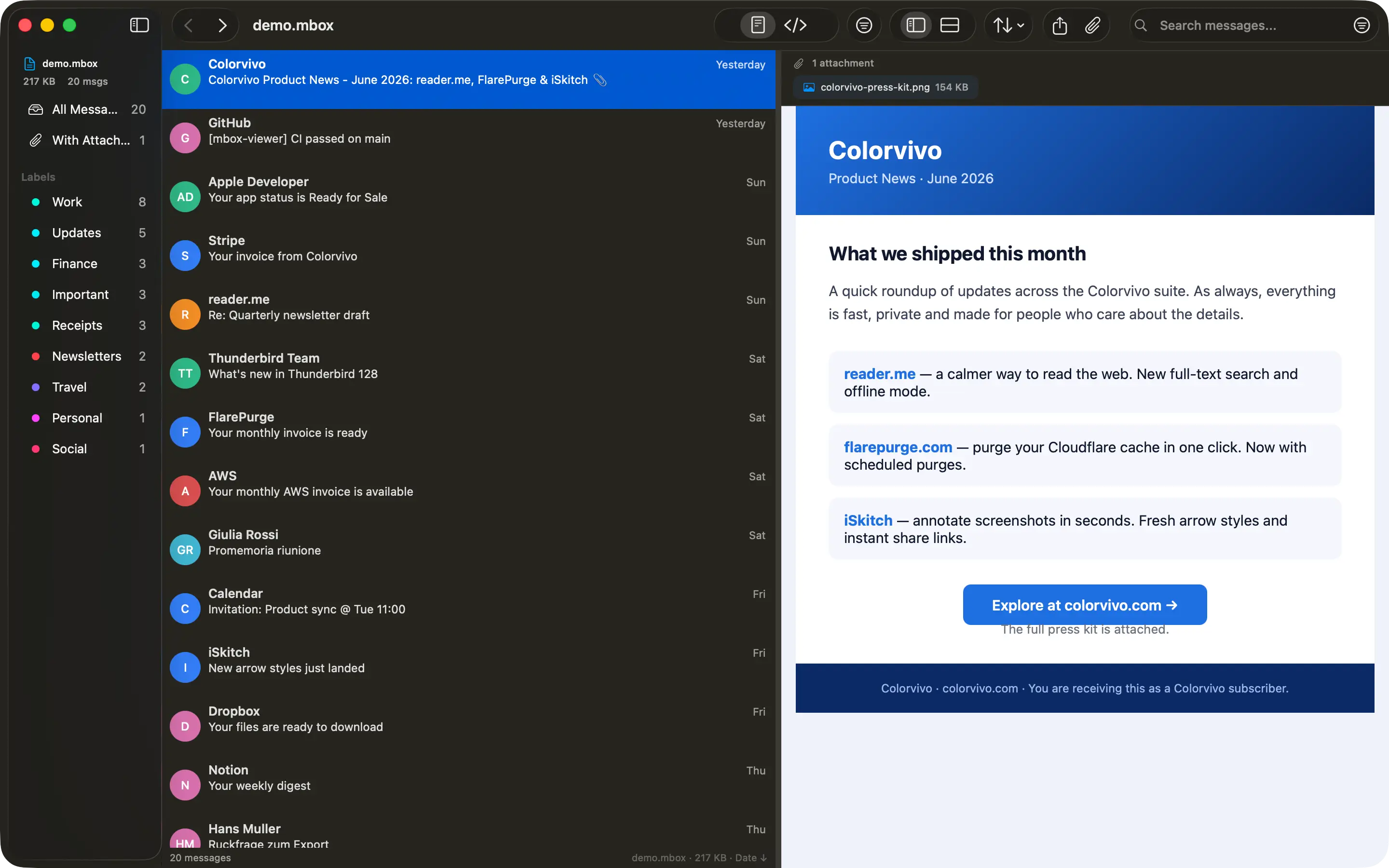
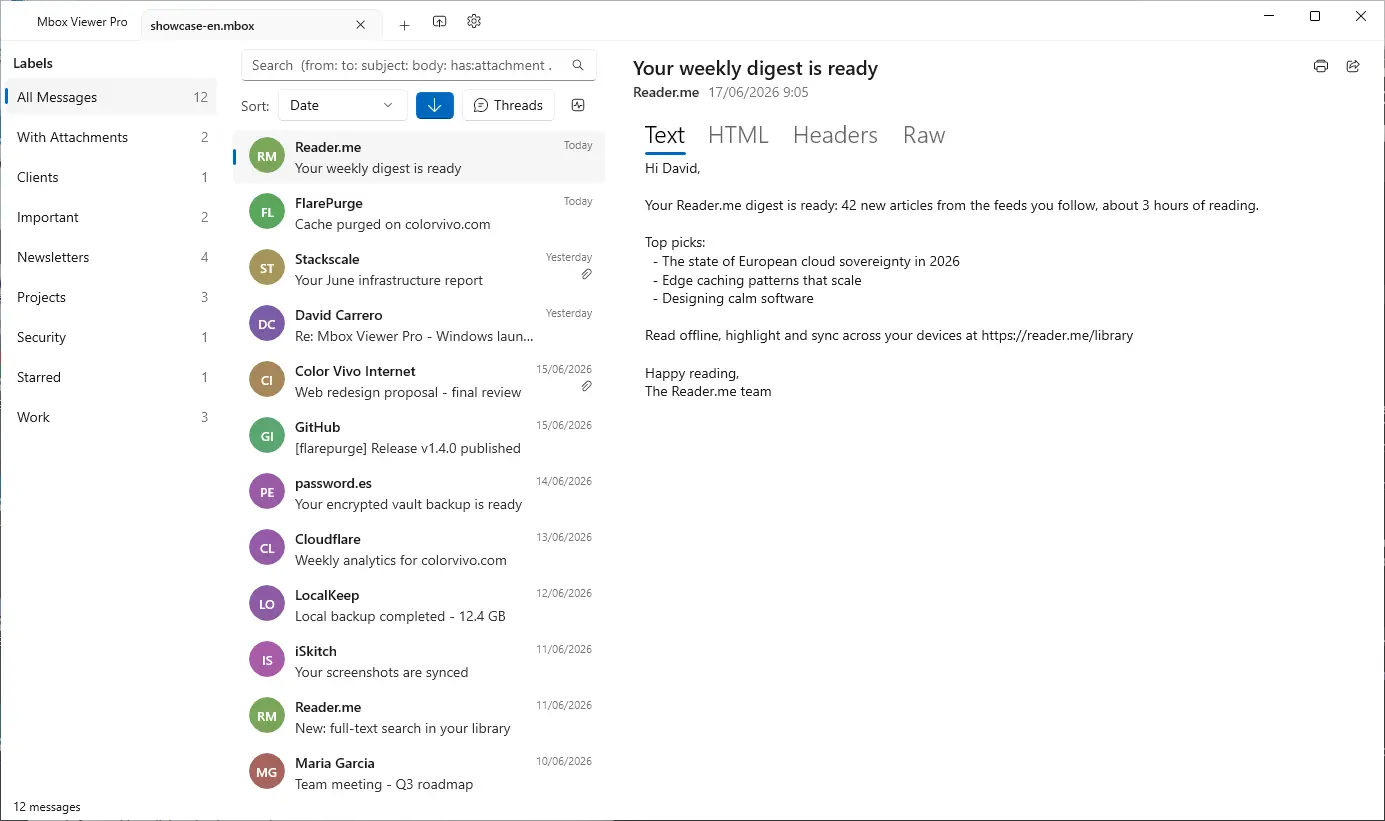
No Electron No Java No cloud 100% offline Read-only
## Built for one job, done right
- 01
### Your Gmail, offline on your computer
Use Google Takeout to back up your entire Gmail account, then read, search and browse it offline — no internet required, no account login.
- 02
### Other tools choke on large files
Most MBOX readers crash or freeze past a few hundred MB. Many ship a whole browser or JVM just to show a list of emails.
- 03
### Native, streaming, instant
Mbox Viewer streams through files of any size without loading them into memory. Truly native on Mac and Windows. Indexes once, re-opens in under a second.
## Everything you need to live inside your email archive
A focused, native toolset — not a web app in a window.
### Handles any size
Streaming parser with a 1 MB buffer opens files from a few KB to 50+ GB without loading them into RAM.
### Instant re-opens
A binary index with SHA-256 validation makes every re-open take under a second, whatever the file size.
### Powerful search
Full query syntax: from:, to:, subject:, body:, date:, has:attachment, size:>, OR, negation and exact phrases.
### Gmail labels
Reads Gmail labels straight from Takeout. Browse by label in the sidebar with live message counts.
### Full export
Export to EML, CSV, plain text or extract every attachment. Merge multiple MBOX files with dedup.
### Conversation threads
The JWZ threading algorithm groups messages into conversations with reply chains up to four levels deep.
### Privacy first
Everything runs locally. No cloud, no telemetry, no data ever leaves your computer. Strictly read-only.
### Truly native
Native on Mac and Windows — dark mode, drag & drop, system share and print. No Electron, no Java.
### Repair damaged mailboxes
Deep-scan recovery re-detects lost message boundaries and exports a repaired copy — the original file is never modified. (Pro)
### Export to PDF
Export any message to a self-contained, multi-page PDF with the same layout as printing. One message is free; batch export is Pro.
### Export to HTML
Save any message as a self-contained HTML file with images embedded and attachments as downloadable links — it opens anywhere. One message is free; batch is Pro.
### Properties, MIME & Hex views
Three new ways to inspect a message: a Properties panel, the MIME part tree and a raw hex dump — ideal for technical or forensic work.
[See all features](https://mboxviewer.net/features/)
## Works with your email client
Mbox Viewer reads the standard mbox format — the same format virtually every email client and service uses for exports and backups. If your app can export mbox, Mbox Viewer can open it. No import, no conversion, no account: just open the file.
Mozilla ThunderbirdGmail / Google TakeoutApple MailPostboxEudoraEntourageEvolutionClaws MailSeaMonkeyThe Bat!Opera MailSylpheedMuttNetscapeMozilla MailSpicebirdPocoMailMulberryPowerMailSparrowConeGNU MailOutlook for Mac (via converter) …and any client that exports standard mbox
Apple Mail and Thunderbird now open directly, with no extra steps. [Have Outlook (PST/OLM)? See how to convert it in our step-by-step guide.](https://mboxviewer.net/guides/convert-outlook-pst-olm-to-mbox/)
## Available in 18 languages
Mbox Viewer's interface and user guide are localized into 18 languages, so you can work through your email in the one you know best.
- English
- Español
- Deutsch
- Français
- Italiano
- 日本語
- 한국어
- Nederlands
- Polski
- Português (BR)
- Português (PT)
- Русский
- Svenska
- Dansk
- Norsk
- Türkçe
- 简体中文
- 繁體中文
## Opens a 50 GB archive in under 5 minutes
And re-opens it in under a second — every time, thanks to the binary index.
| File size | Messages | First open | Re-open | RAM |
| --- | --- | --- | --- | --- |
| 500 MB | ~5,000 | < 5 sec | < 1 sec | < 100 MB |
| 5 GB | ~50,000 | < 30 sec | < 1 sec | < 200 MB |
| 50 GB | ~500,000 | < 5 min | < 1 sec | < 600 MB |
## Stop fighting your email backups
Free for files up to 500 MB. Unlock unlimited size with a one-time in-app purchase. No subscription, no account.
[Download on the Mac App Store](https://apps.apple.com/app/mbox-viewer-pro/id6759237715) [Microsoft Store](https://apps.microsoft.com/store/detail/9NW3GVFG7DDB)
We use analytics cookies to improve Mbox Viewer. You can accept or reject them — the site works the same either way. [Privacy](https://mboxviewer.net/privacy/)
Reject Accept
このファイルをサーバーの/index.mdとしてアップロードし、AIエージェントがページのクリーンなバージョンにアクセスできるようにしましょう。Accept: text/markdownコンテンツネゴシエーションを設定して自動的に配信することもできます。
推奨内容
# Mbox Viewer

> Native mbox viewer for Mac and Windows. Open MBOX files from Thunderbird, Gmail / Google Takeout, Apple Mail and any client that exports standard mbox — up to 50+ GB, fully offline.

## Documentation
- [FAQ](https://mboxviewer.net/faq/)

## Main
- [Mbox Viewer — Open & read MBOX files on Mac and Windows — fast and native](https://mboxviewer.net): Native mbox viewer for Mac and Windows. Open MBOX files from Thunderbird, Gmail / Google Takeout, Apple Mail and any cl…
- [Features](https://mboxviewer.net/features/)
- [Mbox Viewer](https://mboxviewer.net/)
- [Guides](https://mboxviewer.net/guides/)
- [Compare](https://mboxviewer.net/compare/)
- [Changelog](https://mboxviewer.net/changelog/)
- [Español](https://mboxviewer.net/es/)
- [Deutsch](https://mboxviewer.net/de/)
- [Français](https://mboxviewer.net/fr/)
- [Português (BR)](https://mboxviewer.net/pt-br/)

## Blog
- [Blog](https://mboxviewer.net/blog/)

## Legal
- [Privacy Policy](https://mboxviewer.net/privacy/)
- [Terms of Service](https://mboxviewer.net/terms/)
- [Refunds](https://mboxviewer.net/refund/)

## Support
- [FAQ](https://mboxviewer.net/faq/)
- [Support](https://mboxviewer.net/support/)
完全なllms.txtにはドメイン全体の分析が必要です(近日公開)
このファイルをドメインのルートにhttps://mboxviewer.net/llms.txtとしてアップロードしてください。ChatGPT、Claude、PerplexityなどのAIエージェントはこのファイルを確認してサイト構造を理解します。
このサイトにはすでにllms.txtファイルがあります。
有効な形式# Mbox Viewer > Native mbox viewer for Mac and Windows. Open MBOX files from Thunderbird, Gmail / Google Takeout, Apple Mail and any client that exports standard mbox — up to 50+ GB, fully offline. ## Key facts - Platform: macOS 14 Sonoma and later (Apple Silicon + Intel) and Windows 10/11 & Windows Server. - Distribution: Mac App Store and Microsoft Store. Free up to 500 MB; Pro (unlimited size) is a one-time in-app purchase. No subscription, no account, no web payments. - Privacy: 100% local, no cloud, no telemetry, strictly read-only. - Performance: opens a 50 GB MBOX in under 5 minutes; re-opens in under 1 second via a binary index. - Languages: the app's interface and user guide are localized into 18 languages (English, Español, Deutsch, Français, Italiano, 日本語, 한국어, Nederlands, Polski, Português (BR), Português (PT), Русский, Svenska, Dansk, Norsk, Türkçe, 简体中文, 繁體中文). The website is in 10 languages. - Based on the open-source terminal tool mboxShell (https://github.com/dcarrero/mboxshell). - Author: David Carrero Fernández-Baillo · Color Vivo Internet, S.L. (https://colorvivo.com). ## Download - Mac App Store: https://apps.apple.com/app/mbox-viewer-pro/id6759237715 - Microsoft Store: https://apps.microsoft.com/store/detail/9NW3GVFG7DDB ## Pages - Home: https://mboxviewer.net/ - Features: https://mboxviewer.net/features/ - Compare: https://mboxviewer.net/compare/ - Changelog: https://mboxviewer.net/changelog/ - Guides: https://mboxviewer.net/guides/ - Blog: https://mboxviewer.net/blog/ - FAQ: https://mboxviewer.net/faq/ - Glossary: https://mboxviewer.net/glossary/ - mboxShell (open-source terminal tool this app is based on): https://mboxviewer.net/mboxshell/ - Support: https://mboxviewer.net/support/ ## Guides - How to Export Gmail with Google Takeout (and Open It on Mac): https://mboxviewer.net/guides/how-to-export-gmail-with-google-takeout/ - How to Open an MBOX File on Mac (Even Huge Ones): https://mboxviewer.net/guides/how-to-open-mbox-file-on-mac/ - How to Convert MBOX to CSV, EML, and Text (and Extract Attachments): https://mboxviewer.net/guides/convert-mbox-to-csv-and-eml/ - Mbox Viewer Search Syntax Cheat Sheet: https://mboxviewer.net/guides/search-syntax-cheat-sheet/ - How to Open a Thunderbird MBOX File on Mac: https://mboxviewer.net/guides/how-to-open-thunderbird-mbox-on-mac/ - How to Open an Apple Mail Export (.mbox Folder) on Mac: https://mboxviewer.net/guides/how-to-open-apple-mail-export-on-mac/ - How to Open an MBOX File on Windows (Any Size): https://mboxviewer.net/guides/how-to-open-mbox-file-on-windows/ - How to Open a Thunderbird MBOX File on Windows: https://mboxviewer.net/guides/how-to-open-thunderbird-mbox-on-windows/ - How to Open a Gmail (Google Takeout) MBOX File on Windows: https://mboxviewer.net/guides/how-to-open-gmail-takeout-mbox-on-windows/ - How to Open an Apple Mail Export (.mbox) on Windows: https://mboxviewer.net/guides/how-to-open-apple-mail-export-on-windows/ - How to Convert Outlook PST/OLM to MBOX (Mac & Windows): https://mboxviewer.net/guides/convert-outlook-pst-olm-to-mbox/ ## Blog - What's New in Mbox Viewer 2.7.0: Faster, More Private, More Accessible: https://mboxviewer.net/blog/whats-new-in-mbox-viewer-2-7-0/ - A Field Guide to Email Storage Formats: History, Anatomy and a Comparison: https://mboxviewer.net/blog/email-formats-history-and-anatomy/ - MBOX, EML, PST, OLM: Email Archive Formats Explained: https://mboxviewer.net/blog/email-archive-formats-explained/ - Reading Old Email Archives from Eudora, Entourage and Other Classic Clients on a Modern Mac: https://mboxviewer.net/blog/read-old-email-archives-on-modern-mac/ - Why You Should Back Up Your Gmail Locally (and How): https://mboxviewer.net/blog/why-back-up-your-gmail/ - Introducing Mbox Viewer: Open Any MBOX or EML File, Instantly: https://mboxviewer.net/blog/introducing-mbox-viewer/ ## Feeds (RSS) - Blog: https://mboxviewer.net/blog/rss.xml - Guides: https://mboxviewer.net/guides/rss.xml - Changelog: https://mboxviewer.net/changelog/rss.xml
アクセシビリティ
Content available without JavaScript
Main content starts at 66% of HTML
Page size: 120KB
AI発見可能性
All major AI search bots allowed
Sitemap found
robots.txt exists
llms.txt exists and is valid
構造化データ
JSON-LD found: Organization, WebSite, SoftwareApplication
All OG tags present
Meta description: 181 chars
Canonical URL present
lang="en"
セマンティックHTML
Clean heading hierarchy
Has <main>
15 semantic elements, 73 divs (ratio: 17%)
2/2 images with meaningful alt text (2 decorative, not counted)
Avg div depth: 1.6, max: 4
コンテンツ効率
97% token reduction (HTML→Markdown)
Content ratio: 3.4% (4224 content chars / 123100 HTML bytes)
HTML size: 120KB
15/569 elements with inline styles (2.6%)
{
"url": "https://mboxviewer.net",
"timestamp": 1784280437132,
"fetch": {
"mode": "simple",
"timeMs": 89,
"htmlSizeBytes": 123100,
"supportsMarkdown": false,
"markdownAgents": {
"contentNegotiation": false,
"mdUrl": {
"found": false,
"url": null
},
"linkTag": {
"found": false,
"url": null
},
"linkHeader": {
"found": false,
"url": null
},
"responseHeaders": {
"contentSignal": null,
"xMarkdownTokens": null,
"vary": null
},
"frontmatter": {
"present": false,
"fields": [],
"level": "none"
},
"level": "none"
},
"statusCode": 200
},
"extraction": {
"title": "Mbox Viewer — Open & read MBOX files on Mac and Windows — fast and native",
"excerpt": "Native mbox viewer for Mac and Windows. Open MBOX files from Thunderbird, Gmail / Google Takeout, Apple Mail and any client that exports standard mbox — up to 50+ GB, fully offline.",
"byline": "David Carrero Fernández-Baillo",
"siteName": "Mbox Viewer",
"lang": "en",
"contentLength": 4224,
"metadata": {
"description": "Native mbox viewer for Mac and Windows. Open MBOX files from Thunderbird, Gmail / Google Takeout, Apple Mail and any client that exports standard mbox — up to 50+ GB, fully offline.",
"ogTitle": "Mbox Viewer — Open & read MBOX files on Mac and Windows — fast and native",
"ogDescription": "Native mbox viewer for Mac and Windows. Open MBOX files from Thunderbird, Gmail / Google Takeout, Apple Mail and any client that exports standard mbox — up to 50+ GB, fully offline.",
"ogImage": "https://mboxviewer.net/og/default.png",
"ogType": "website",
"canonical": "https://mboxviewer.net/",
"lang": "en",
"schemas": [
{
"@context": "https://schema.org",
"@type": "Organization",
"name": "Color Vivo Internet, S.L.",
"url": "https://mboxviewer.net",
"logo": "https://mboxviewer.net/icon-256.png",
"sameAs": [
"https://colorvivo.com",
"https://carrero.es",
"https://github.com/dcarrero/mboxshell"
]
},
{
"@context": "https://schema.org",
"@type": "WebSite",
"name": "Mbox Viewer",
"url": "https://mboxviewer.net",
"inLanguage": "en",
"publisher": {
"@type": "Organization",
"name": "Color Vivo Internet, S.L.",
"url": "https://colorvivo.com"
}
},
{
"@context": "https://schema.org",
"@type": "SoftwareApplication",
"name": "Mbox Viewer Pro",
"operatingSystem": "macOS 14+, Windows 10+",
"applicationCategory": "UtilitiesApplication",
"offers": {
"@type": "Offer",
"price": "0",
"priceCurrency": "USD",
"description": "Free up to 500 MB; unlimited via one-time in-app purchase."
},
"downloadUrl": [
"https://apps.apple.com/app/mbox-viewer-pro/id6759237715",
"https://apps.microsoft.com/store/detail/9NW3GVFG7DDB"
],
"softwareVersion": "2.8.1",
"author": {
"@type": "Person",
"name": "David Carrero Fernández-Baillo",
"url": "https://carrero.es"
},
"publisher": {
"@type": "Organization",
"name": "Color Vivo Internet, S.L.",
"url": "https://colorvivo.com"
},
"url": "https://mboxviewer.net",
"image": "https://mboxviewer.net/icon-256.png"
}
],
"robotsMeta": null,
"author": "David Carrero Fernández-Baillo",
"generator": null,
"markdownAlternateHref": null
}
},
"markdown": "[Now on the Mac App Store and Microsoft Store](https://apps.apple.com/app/mbox-viewer-pro/id6759237715)\n\n## Read MBOX files on Mac & Windows.\nAny size. Instantly.\n\nBack up your Gmail with Google Takeout and read it offline. Open, search and export emails from MBOX and EML archives — from a few KB to 50+ GB — without your computer breaking a sweat.\n\n[Download on the Mac App Store](https://apps.apple.com/app/mbox-viewer-pro/id6759237715) [Microsoft Store](https://apps.microsoft.com/store/detail/9NW3GVFG7DDB)\n\n[Try the online viewer](https://onlinemboxviewer.com/)\n\nmacOS 14+ · Apple Silicon · Windows 10/11 and Windows Server\n\nNo Electron No Java No cloud 100% offline Read-only\n\n## Built for one job, done right\n\n- 01\n\n ### Your Gmail, offline on your computer\n\n Use Google Takeout to back up your entire Gmail account, then read, search and browse it offline — no internet required, no account login.\n\n- 02\n\n ### Other tools choke on large files\n\n Most MBOX readers crash or freeze past a few hundred MB. Many ship a whole browser or JVM just to show a list of emails.\n\n- 03\n\n ### Native, streaming, instant\n\n Mbox Viewer streams through files of any size without loading them into memory. Truly native on Mac and Windows. Indexes once, re-opens in under a second.\n\n## Everything you need to live inside your email archive\n\nA focused, native toolset — not a web app in a window.\n\n### Handles any size\n\nStreaming parser with a 1 MB buffer opens files from a few KB to 50+ GB without loading them into RAM.\n\n### Instant re-opens\n\nA binary index with SHA-256 validation makes every re-open take under a second, whatever the file size.\n\n### Powerful search\n\nFull query syntax: from:, to:, subject:, body:, date:, has:attachment, size:>, OR, negation and exact phrases.\n\n### Gmail labels\n\nReads Gmail labels straight from Takeout. Browse by label in the sidebar with live message counts.\n\n### Full export\n\nExport to EML, CSV, plain text or extract every attachment. Merge multiple MBOX files with dedup.\n\n### Conversation threads\n\nThe JWZ threading algorithm groups messages into conversations with reply chains up to four levels deep.\n\n### Privacy first\n\nEverything runs locally. No cloud, no telemetry, no data ever leaves your computer. Strictly read-only.\n\n### Truly native\n\nNative on Mac and Windows — dark mode, drag & drop, system share and print. No Electron, no Java.\n\n### Repair damaged mailboxes\n\nDeep-scan recovery re-detects lost message boundaries and exports a repaired copy — the original file is never modified. (Pro)\n\n### Export to PDF\n\nExport any message to a self-contained, multi-page PDF with the same layout as printing. One message is free; batch export is Pro.\n\n### Export to HTML\n\nSave any message as a self-contained HTML file with images embedded and attachments as downloadable links — it opens anywhere. One message is free; batch is Pro.\n\n### Properties, MIME & Hex views\n\nThree new ways to inspect a message: a Properties panel, the MIME part tree and a raw hex dump — ideal for technical or forensic work.\n\n[See all features](https://mboxviewer.net/features/)\n\n## Works with your email client\n\nMbox Viewer reads the standard mbox format — the same format virtually every email client and service uses for exports and backups. If your app can export mbox, Mbox Viewer can open it. No import, no conversion, no account: just open the file.\n\nMozilla ThunderbirdGmail / Google TakeoutApple MailPostboxEudoraEntourageEvolutionClaws MailSeaMonkeyThe Bat!Opera MailSylpheedMuttNetscapeMozilla MailSpicebirdPocoMailMulberryPowerMailSparrowConeGNU MailOutlook for Mac (via converter) …and any client that exports standard mbox\n\nApple Mail and Thunderbird now open directly, with no extra steps. [Have Outlook (PST/OLM)? See how to convert it in our step-by-step guide.](https://mboxviewer.net/guides/convert-outlook-pst-olm-to-mbox/)\n\n## Available in 18 languages\n\nMbox Viewer's interface and user guide are localized into 18 languages, so you can work through your email in the one you know best.\n\n- English\n- Español\n- Deutsch\n- Français\n- Italiano\n- 日本語\n- 한국어\n- Nederlands\n- Polski\n- Português (BR)\n- Português (PT)\n- Русский\n- Svenska\n- Dansk\n- Norsk\n- Türkçe\n- 简体中文\n- 繁體中文\n\n## Opens a 50 GB archive in under 5 minutes\n\nAnd re-opens it in under a second — every time, thanks to the binary index.\n\n| File size | Messages | First open | Re-open | RAM |\n| --- | --- | --- | --- | --- |\n| 500 MB | ~5,000 | < 5 sec | < 1 sec | < 100 MB |\n| 5 GB | ~50,000 | < 30 sec | < 1 sec | < 200 MB |\n| 50 GB | ~500,000 | < 5 min | < 1 sec | < 600 MB |\n",
"fullPageMarkdown": "Mbox Viewer — Open & read MBOX files on Mac and Windows — fast and native [Skip to content](https://mboxviewer.net/#main)\n\n [ Mbox Viewer](https://mboxviewer.net/)\n\nEnglish\n\n- [English](https://mboxviewer.net/)\n- [Español](https://mboxviewer.net/es/)\n- [Deutsch](https://mboxviewer.net/de/)\n- [Français](https://mboxviewer.net/fr/)\n- [Português (BR)](https://mboxviewer.net/pt-br/)\n- [日本語](https://mboxviewer.net/ja/)\n- [Italiano](https://mboxviewer.net/it/)\n- [Nederlands](https://mboxviewer.net/nl/)\n- [한국어](https://mboxviewer.net/ko/)\n- [Polski](https://mboxviewer.net/pl/)\n\nEnglish\n\n- [English](https://mboxviewer.net/)\n- [Español](https://mboxviewer.net/es/)\n- [Deutsch](https://mboxviewer.net/de/)\n- [Français](https://mboxviewer.net/fr/)\n- [Português (BR)](https://mboxviewer.net/pt-br/)\n- [日本語](https://mboxviewer.net/ja/)\n- [Italiano](https://mboxviewer.net/it/)\n- [Nederlands](https://mboxviewer.net/nl/)\n- [한국어](https://mboxviewer.net/ko/)\n- [Polski](https://mboxviewer.net/pl/)\n\nDownload\n\n- [Mac App Store](https://apps.apple.com/app/mbox-viewer-pro/id6759237715)\n- [Microsoft Store](https://apps.microsoft.com/store/detail/9NW3GVFG7DDB)\n\n[Mac](https://apps.apple.com/app/mbox-viewer-pro/id6759237715) [Windows](https://apps.microsoft.com/store/detail/9NW3GVFG7DDB)\n\n[Now on the Mac App Store and Microsoft Store](https://apps.apple.com/app/mbox-viewer-pro/id6759237715)# Read MBOX files on Mac & Windows.\nAny size. Instantly.\n\nBack up your Gmail with Google Takeout and read it offline. Open, search and export emails from MBOX and EML archives — from a few KB to 50+ GB — without your computer breaking a sweat.\n\n[Download on the Mac App Store](https://apps.apple.com/app/mbox-viewer-pro/id6759237715) [Microsoft Store](https://apps.microsoft.com/store/detail/9NW3GVFG7DDB)\n\n[Try the online viewer](https://onlinemboxviewer.com/)\n\nmacOS 14+ · Apple Silicon · Windows 10/11 and Windows Server\n\nmacOS Windows\n\n \n\n \n\nNo Electron No Java No cloud 100% offline Read-only\n\n## Built for one job, done right\n\n- 01\n\n ### Your Gmail, offline on your computer\n\n Use Google Takeout to back up your entire Gmail account, then read, search and browse it offline — no internet required, no account login.\n\n- 02\n\n ### Other tools choke on large files\n\n Most MBOX readers crash or freeze past a few hundred MB. Many ship a whole browser or JVM just to show a list of emails.\n\n- 03\n\n ### Native, streaming, instant\n\n Mbox Viewer streams through files of any size without loading them into memory. Truly native on Mac and Windows. Indexes once, re-opens in under a second.\n\n## Everything you need to live inside your email archive\n\nA focused, native toolset — not a web app in a window.\n\n### Handles any size\n\nStreaming parser with a 1 MB buffer opens files from a few KB to 50+ GB without loading them into RAM.\n\n### Instant re-opens\n\nA binary index with SHA-256 validation makes every re-open take under a second, whatever the file size.\n\n### Powerful search\n\nFull query syntax: from:, to:, subject:, body:, date:, has:attachment, size:>, OR, negation and exact phrases.\n\n### Gmail labels\n\nReads Gmail labels straight from Takeout. Browse by label in the sidebar with live message counts.\n\n### Full export\n\nExport to EML, CSV, plain text or extract every attachment. Merge multiple MBOX files with dedup.\n\n### Conversation threads\n\nThe JWZ threading algorithm groups messages into conversations with reply chains up to four levels deep.\n\n### Privacy first\n\nEverything runs locally. No cloud, no telemetry, no data ever leaves your computer. Strictly read-only.\n\n### Truly native\n\nNative on Mac and Windows — dark mode, drag & drop, system share and print. No Electron, no Java.\n\n### Repair damaged mailboxes\n\nDeep-scan recovery re-detects lost message boundaries and exports a repaired copy — the original file is never modified. (Pro)\n\n### Export to PDF\n\nExport any message to a self-contained, multi-page PDF with the same layout as printing. One message is free; batch export is Pro.\n\n### Export to HTML\n\nSave any message as a self-contained HTML file with images embedded and attachments as downloadable links — it opens anywhere. One message is free; batch is Pro.\n\n### Properties, MIME & Hex views\n\nThree new ways to inspect a message: a Properties panel, the MIME part tree and a raw hex dump — ideal for technical or forensic work.\n\n[See all features](https://mboxviewer.net/features/)\n\n## Works with your email client\n\nMbox Viewer reads the standard mbox format — the same format virtually every email client and service uses for exports and backups. If your app can export mbox, Mbox Viewer can open it. No import, no conversion, no account: just open the file.\n\nMozilla ThunderbirdGmail / Google TakeoutApple MailPostboxEudoraEntourageEvolutionClaws MailSeaMonkeyThe Bat!Opera MailSylpheedMuttNetscapeMozilla MailSpicebirdPocoMailMulberryPowerMailSparrowConeGNU MailOutlook for Mac (via converter) …and any client that exports standard mbox\n\nApple Mail and Thunderbird now open directly, with no extra steps. [Have Outlook (PST/OLM)? See how to convert it in our step-by-step guide.](https://mboxviewer.net/guides/convert-outlook-pst-olm-to-mbox/)\n\n## Available in 18 languages\n\nMbox Viewer's interface and user guide are localized into 18 languages, so you can work through your email in the one you know best.\n\n- English\n- Español\n- Deutsch\n- Français\n- Italiano\n- 日本語\n- 한국어\n- Nederlands\n- Polski\n- Português (BR)\n- Português (PT)\n- Русский\n- Svenska\n- Dansk\n- Norsk\n- Türkçe\n- 简体中文\n- 繁體中文\n\n## Opens a 50 GB archive in under 5 minutes\n\nAnd re-opens it in under a second — every time, thanks to the binary index.\n\n| File size | Messages | First open | Re-open | RAM |\n| --- | --- | --- | --- | --- |\n| 500 MB | ~5,000 | < 5 sec | < 1 sec | < 100 MB |\n| 5 GB | ~50,000 | < 30 sec | < 1 sec | < 200 MB |\n| 50 GB | ~500,000 | < 5 min | < 1 sec | < 600 MB |\n\n## Stop fighting your email backups\n\nFree for files up to 500 MB. Unlock unlimited size with a one-time in-app purchase. No subscription, no account.\n\n[Download on the Mac App Store](https://apps.apple.com/app/mbox-viewer-pro/id6759237715) [Microsoft Store](https://apps.microsoft.com/store/detail/9NW3GVFG7DDB)\n\nWe use analytics cookies to improve Mbox Viewer. You can accept or reject them — the site works the same either way. [Privacy](https://mboxviewer.net/privacy/)\n\nReject Accept\n",
"markdownStats": {
"images": 0,
"links": 6,
"tables": 1,
"codeBlocks": 0,
"headings": 21
},
"tokens": {
"htmlTokens": 39953,
"markdownTokens": 1198,
"reduction": 38755,
"reductionPercent": 97
},
"score": {
"score": 82,
"grade": "B",
"rubricVersion": 2,
"dimensions": {
"accessibility": {
"score": 81,
"weight": 30,
"grade": "B",
"checks": {
"content_without_js": {
"score": 100,
"weight": 55,
"evidence": "proven",
"details": "Content available without JavaScript"
},
"fast_content_position": {
"score": 25,
"weight": 25,
"evidence": "plausible",
"details": "Main content starts at 66% of HTML"
},
"reasonable_page_size": {
"score": 100,
"weight": 20,
"evidence": "plausible",
"details": "Page size: 120KB"
}
}
},
"aiDiscoverability": {
"score": 70,
"weight": 25,
"grade": "C",
"checks": {
"robots_allows_ai_bots": {
"score": 100,
"weight": 35,
"evidence": "proven",
"details": "All major AI search bots allowed"
},
"supports_markdown_negotiation": {
"score": 0,
"weight": 20,
"evidence": "plausible",
"details": "No Markdown for Agents support detected"
},
"has_sitemap": {
"score": 100,
"weight": 15,
"evidence": "plausible",
"details": "Sitemap found"
},
"has_robots_txt": {
"score": 100,
"weight": 10,
"evidence": "plausible",
"details": "robots.txt exists"
},
"has_llms_txt": {
"score": 100,
"weight": 10,
"evidence": "speculative",
"details": "llms.txt exists and is valid"
},
"has_content_signals": {
"score": 0,
"weight": 10,
"evidence": "speculative",
"details": "No Content-Signal found (robots.txt or HTTP headers)"
}
}
},
"structuredData": {
"score": 100,
"weight": 20,
"grade": "A",
"checks": {
"has_schema_org": {
"score": 100,
"weight": 35,
"evidence": "proven",
"details": "JSON-LD found: Organization, WebSite, SoftwareApplication"
},
"has_open_graph": {
"score": 100,
"weight": 20,
"evidence": "plausible",
"details": "All OG tags present"
},
"has_meta_description": {
"score": 100,
"weight": 20,
"evidence": "plausible",
"details": "Meta description: 181 chars"
},
"has_canonical_url": {
"score": 100,
"weight": 15,
"evidence": "plausible",
"details": "Canonical URL present"
},
"has_lang_attribute": {
"score": 100,
"weight": 10,
"evidence": "plausible",
"details": "lang=\"en\""
}
}
},
"semanticHtml": {
"score": 91,
"weight": 15,
"grade": "A",
"checks": {
"proper_heading_hierarchy": {
"score": 100,
"weight": 30,
"evidence": "plausible",
"details": "Clean heading hierarchy"
},
"uses_article_or_main": {
"score": 100,
"weight": 25,
"evidence": "plausible",
"details": "Has <main>"
},
"semantic_elements": {
"score": 57,
"weight": 20,
"evidence": "plausible",
"details": "15 semantic elements, 73 divs (ratio: 17%)"
},
"meaningful_alt_texts": {
"score": 100,
"weight": 15,
"evidence": "plausible",
"details": "2/2 images with meaningful alt text (2 decorative, not counted)"
},
"low_div_nesting": {
"score": 100,
"weight": 10,
"evidence": "speculative",
"details": "Avg div depth: 1.6, max: 4"
}
}
},
"contentEfficiency": {
"score": 61,
"weight": 10,
"grade": "C",
"checks": {
"token_reduction_ratio": {
"score": 100,
"weight": 40,
"evidence": "speculative",
"details": "97% token reduction (HTML→Markdown)"
},
"content_to_noise_ratio": {
"score": 0,
"weight": 30,
"evidence": "speculative",
"details": "Content ratio: 3.4% (4224 content chars / 123100 HTML bytes)"
},
"reasonable_page_weight": {
"score": 80,
"weight": 20,
"evidence": "speculative",
"details": "HTML size: 120KB"
},
"minimal_inline_styles": {
"score": 50,
"weight": 10,
"evidence": "speculative",
"details": "15/569 elements with inline styles (2.6%)"
}
}
}
}
},
"recommendations": [
{
"id": "move_content_earlier",
"priority": "critical",
"category": "accessibility",
"titleKey": "rec.move_content_earlier.title",
"descriptionKey": "rec.move_content_earlier.description",
"howToKey": "rec.move_content_earlier.howto",
"effort": "moderate",
"estimatedImpact": 5.6,
"maxImpact": 7.5,
"evidence": "plausible",
"checkScore": 25,
"checkDetails": "Main content starts at 66% of HTML"
},
{
"id": "add_markdown_negotiation",
"priority": "critical",
"category": "aiDiscoverability",
"titleKey": "rec.add_markdown_negotiation.title",
"descriptionKey": "rec.add_markdown_negotiation.description",
"howToKey": "rec.add_markdown_negotiation.howto",
"effort": "significant",
"estimatedImpact": 5,
"maxImpact": 5,
"evidence": "plausible",
"checkScore": 0,
"checkDetails": "No Markdown for Agents support detected"
},
{
"id": "improve_content_ratio",
"priority": "high",
"category": "contentEfficiency",
"titleKey": "rec.improve_content_ratio.title",
"descriptionKey": "rec.improve_content_ratio.description",
"howToKey": "rec.improve_content_ratio.howto",
"effort": "moderate",
"estimatedImpact": 3,
"maxImpact": 3,
"evidence": "speculative",
"checkScore": 0,
"checkDetails": "Content ratio: 3.4% (4224 content chars / 123100 HTML bytes)"
},
{
"id": "add_content_signals",
"priority": "high",
"category": "aiDiscoverability",
"titleKey": "rec.add_content_signals.title",
"descriptionKey": "rec.add_content_signals.description",
"howToKey": "rec.add_content_signals.howto",
"effort": "quick-win",
"estimatedImpact": 2.5,
"maxImpact": 2.5,
"evidence": "speculative",
"checkScore": 0,
"checkDetails": "No Content-Signal found (robots.txt or HTTP headers)"
},
{
"id": "remove_inline_styles",
"priority": "low",
"category": "contentEfficiency",
"titleKey": "rec.remove_inline_styles.title",
"descriptionKey": "rec.remove_inline_styles.description",
"howToKey": "rec.remove_inline_styles.howto",
"effort": "moderate",
"estimatedImpact": 0.5,
"maxImpact": 1,
"evidence": "speculative",
"checkScore": 50,
"checkDetails": "15/569 elements with inline styles (2.6%)"
}
],
"llmsTxtPreview": "# Mbox Viewer\n\n> Native mbox viewer for Mac and Windows. Open MBOX files from Thunderbird, Gmail / Google Takeout, Apple Mail and any client that exports standard mbox — up to 50+ GB, fully offline.\n\n## Documentation\n- [FAQ](https://mboxviewer.net/faq/)\n\n## Main\n- [Mbox Viewer — Open & read MBOX files on Mac and Windows — fast and native](https://mboxviewer.net): Native mbox viewer for Mac and Windows. Open MBOX files from Thunderbird, Gmail / Google Takeout, Apple Mail and any cl…\n- [Features](https://mboxviewer.net/features/)\n- [Mbox Viewer](https://mboxviewer.net/)\n- [Guides](https://mboxviewer.net/guides/)\n- [Compare](https://mboxviewer.net/compare/)\n- [Changelog](https://mboxviewer.net/changelog/)\n- [Español](https://mboxviewer.net/es/)\n- [Deutsch](https://mboxviewer.net/de/)\n- [Français](https://mboxviewer.net/fr/)\n- [Português (BR)](https://mboxviewer.net/pt-br/)\n\n## Blog\n- [Blog](https://mboxviewer.net/blog/)\n\n## Legal\n- [Privacy Policy](https://mboxviewer.net/privacy/)\n- [Terms of Service](https://mboxviewer.net/terms/)\n- [Refunds](https://mboxviewer.net/refund/)\n\n## Support\n- [FAQ](https://mboxviewer.net/faq/)\n- [Support](https://mboxviewer.net/support/)\n\n",
"llmsTxtExisting": "# Mbox Viewer\n\n> Native mbox viewer for Mac and Windows. Open MBOX files from Thunderbird, Gmail / Google Takeout, Apple Mail and any client that exports standard mbox — up to 50+ GB, fully offline.\n\n## Key facts\n- Platform: macOS 14 Sonoma and later (Apple Silicon + Intel) and Windows 10/11 & Windows Server.\n- Distribution: Mac App Store and Microsoft Store. Free up to 500 MB; Pro (unlimited size) is a one-time in-app purchase. No subscription, no account, no web payments.\n- Privacy: 100% local, no cloud, no telemetry, strictly read-only.\n- Performance: opens a 50 GB MBOX in under 5 minutes; re-opens in under 1 second via a binary index.\n- Languages: the app's interface and user guide are localized into 18 languages (English, Español, Deutsch, Français, Italiano, 日本語, 한국어, Nederlands, Polski, Português (BR), Português (PT), Русский, Svenska, Dansk, Norsk, Türkçe, 简体中文, 繁體中文). The website is in 10 languages.\n- Based on the open-source terminal tool mboxShell (https://github.com/dcarrero/mboxshell).\n- Author: David Carrero Fernández-Baillo · Color Vivo Internet, S.L. (https://colorvivo.com).\n\n## Download\n- Mac App Store: https://apps.apple.com/app/mbox-viewer-pro/id6759237715\n- Microsoft Store: https://apps.microsoft.com/store/detail/9NW3GVFG7DDB\n\n## Pages\n- Home: https://mboxviewer.net/\n- Features: https://mboxviewer.net/features/\n- Compare: https://mboxviewer.net/compare/\n- Changelog: https://mboxviewer.net/changelog/\n- Guides: https://mboxviewer.net/guides/\n- Blog: https://mboxviewer.net/blog/\n- FAQ: https://mboxviewer.net/faq/\n- Glossary: https://mboxviewer.net/glossary/\n- mboxShell (open-source terminal tool this app is based on): https://mboxviewer.net/mboxshell/\n- Support: https://mboxviewer.net/support/\n\n## Guides\n- How to Export Gmail with Google Takeout (and Open It on Mac): https://mboxviewer.net/guides/how-to-export-gmail-with-google-takeout/\n- How to Open an MBOX File on Mac (Even Huge Ones): https://mboxviewer.net/guides/how-to-open-mbox-file-on-mac/\n- How to Convert MBOX to CSV, EML, and Text (and Extract Attachments): https://mboxviewer.net/guides/convert-mbox-to-csv-and-eml/\n- Mbox Viewer Search Syntax Cheat Sheet: https://mboxviewer.net/guides/search-syntax-cheat-sheet/\n- How to Open a Thunderbird MBOX File on Mac: https://mboxviewer.net/guides/how-to-open-thunderbird-mbox-on-mac/\n- How to Open an Apple Mail Export (.mbox Folder) on Mac: https://mboxviewer.net/guides/how-to-open-apple-mail-export-on-mac/\n- How to Open an MBOX File on Windows (Any Size): https://mboxviewer.net/guides/how-to-open-mbox-file-on-windows/\n- How to Open a Thunderbird MBOX File on Windows: https://mboxviewer.net/guides/how-to-open-thunderbird-mbox-on-windows/\n- How to Open a Gmail (Google Takeout) MBOX File on Windows: https://mboxviewer.net/guides/how-to-open-gmail-takeout-mbox-on-windows/\n- How to Open an Apple Mail Export (.mbox) on Windows: https://mboxviewer.net/guides/how-to-open-apple-mail-export-on-windows/\n- How to Convert Outlook PST/OLM to MBOX (Mac & Windows): https://mboxviewer.net/guides/convert-outlook-pst-olm-to-mbox/\n\n## Blog\n- What's New in Mbox Viewer 2.7.0: Faster, More Private, More Accessible: https://mboxviewer.net/blog/whats-new-in-mbox-viewer-2-7-0/\n- A Field Guide to Email Storage Formats: History, Anatomy and a Comparison: https://mboxviewer.net/blog/email-formats-history-and-anatomy/\n- MBOX, EML, PST, OLM: Email Archive Formats Explained: https://mboxviewer.net/blog/email-archive-formats-explained/\n- Reading Old Email Archives from Eudora, Entourage and Other Classic Clients on a Modern Mac: https://mboxviewer.net/blog/read-old-email-archives-on-modern-mac/\n- Why You Should Back Up Your Gmail Locally (and How): https://mboxviewer.net/blog/why-back-up-your-gmail/\n- Introducing Mbox Viewer: Open Any MBOX or EML File, Instantly: https://mboxviewer.net/blog/introducing-mbox-viewer/\n\n## Feeds (RSS)\n- Blog: https://mboxviewer.net/blog/rss.xml\n- Guides: https://mboxviewer.net/guides/rss.xml\n- Changelog: https://mboxviewer.net/changelog/rss.xml",
"emergingProtocols": {
"oauthProtectedResource": {
"exists": false,
"url": "https://mboxviewer.net/.well-known/oauth-protected-resource"
},
"oauthDiscovery": {
"exists": false,
"url": "https://mboxviewer.net/.well-known/oauth-authorization-server"
},
"mcpServerCard": {
"exists": false,
"url": "https://mboxviewer.net/.well-known/mcp/server-card.json",
"draft": true
},
"a2aAgentCard": {
"exists": false,
"url": "https://mboxviewer.net/.well-known/agent-card.json"
},
"apiCatalog": {
"exists": false,
"url": "https://mboxviewer.net/.well-known/api-catalog"
},
"agentSkills": {
"exists": false,
"url": "https://mboxviewer.net/.well-known/agent-skills/index.json",
"draft": true
},
"count": 0,
"total": 6
},
"botAccess": {
"probed": true,
"bot": "OAI-SearchBot",
"controlStatus": 200,
"botStatus": 200,
"discriminates": false,
"refusedAsBot": false,
"edge": "Cloudflare",
"verifiable": false,
"detail": "This origin answers OAI-SearchBot exactly as it answers any other client (200). No edge-level filtering of AI crawlers observed."
},
"snippets": [
{
"id": "add_content_signals",
"title": "Add Content-Signal directives",
"description": "Content-Signal tells AI agents how they may use your content. The canonical location is robots.txt, but you can also expose it as an HTTP header from any stack.",
"language": "txt",
"code": "User-agent: *\nContent-Signal: search=yes, ai-input=yes, ai-train=no",
"filename": "/robots.txt",
"stacks": [
{
"id": "robots",
"label": "robots.txt",
"language": "txt",
"filename": "/robots.txt",
"code": "User-agent: *\nContent-Signal: search=yes, ai-input=yes, ai-train=no"
},
{
"id": "nginx",
"label": "Nginx",
"language": "nginx",
"filename": "server block",
"code": "# Inside your server { } block:\nadd_header Content-Signal \"search=yes, ai-input=yes, ai-train=no\" always;"
},
{
"id": "apache",
"label": "Apache",
"language": "apache",
"filename": ".htaccess",
"code": "# In .htaccess (or VirtualHost):\nHeader set Content-Signal \"search=yes, ai-input=yes, ai-train=no\""
},
{
"id": "wordpress",
"label": "WordPress",
"language": "php",
"filename": "functions.php",
"code": "<?php\n// In your theme's functions.php or a small mu-plugin\nadd_action('send_headers', function () {\n header('Content-Signal: search=yes, ai-input=yes, ai-train=no');\n});\n\n// Optional: also append the directive to the dynamic robots.txt\nadd_filter('robots_txt', function ($output) {\n return $output . \"\\nContent-Signal: search=yes, ai-input=yes, ai-train=no\\n\";\n}, 10, 1);"
},
{
"id": "nextjs",
"label": "Next.js",
"language": "typescript",
"filename": "middleware.ts",
"code": "// middleware.ts (Next.js 13+ App Router or Pages Router)\nimport { NextResponse } from 'next/server';\nexport function middleware() {\n const res = NextResponse.next();\n res.headers.set(\n 'Content-Signal',\n 'search=yes, ai-input=yes, ai-train=no'\n );\n return res;\n}\nexport const config = { matcher: '/:path*' };"
},
{
"id": "cloudflare",
"label": "Cloudflare Workers",
"language": "javascript",
"filename": "worker.js",
"code": "// Cloudflare Worker that proxies your origin and adds the header\nexport default {\n async fetch(request, env, ctx) {\n const res = await fetch(request);\n const newRes = new Response(res.body, res);\n newRes.headers.set(\n 'Content-Signal',\n 'search=yes, ai-input=yes, ai-train=no'\n );\n return newRes;\n },\n};"
},
{
"id": "express",
"label": "Express / Fastify",
"language": "javascript",
"filename": "server.js",
"code": "// Express\napp.use((req, res, next) => {\n res.setHeader('Content-Signal', 'search=yes, ai-input=yes, ai-train=no');\n next();\n});\n\n// Fastify\nfastify.addHook('onSend', (request, reply, payload, done) => {\n reply.header('Content-Signal', 'search=yes, ai-input=yes, ai-train=no');\n done();\n});"
}
]
},
{
"id": "add_markdown_negotiation",
"title": "Support Markdown for Agents",
"description": "Let AI agents request a clean Markdown version of any page via content negotiation, .md alternate URLs, link tags or Link headers.",
"language": "html",
"code": "<!-- Mechanism 3: link tag advertising the .md alternate -->\n<link rel=\"alternate\" type=\"text/markdown\" href=\"/page.md\">",
"filename": "<head>",
"stacks": [
{
"id": "html",
"label": "HTML <head>",
"language": "html",
"filename": "<head>",
"code": "<!-- Mechanism 3: link tag advertising the .md alternate -->\n<link rel=\"alternate\" type=\"text/markdown\" href=\"/page.md\">"
},
{
"id": "express",
"label": "Express",
"language": "javascript",
"filename": "server.js",
"code": "// Mechanisms 1 + 4: content negotiation + Link header\napp.get('/page', (req, res) => {\n res.setHeader('Vary', 'Accept');\n res.setHeader('Link', '</page.md>; rel=\"alternate\"; type=\"text/markdown\"');\n if ((req.headers.accept || '').includes('text/markdown')) {\n res.type('text/markdown; charset=utf-8');\n return res.send(renderMarkdown('page'));\n }\n res.render('page');\n});"
},
{
"id": "fastify",
"label": "Fastify",
"language": "javascript",
"filename": "server.js",
"code": "// Mechanisms 1 + 4: content negotiation + Link header\nfastify.get('/page', async (req, reply) => {\n reply.header('Vary', 'Accept');\n reply.header('Link', '</page.md>; rel=\"alternate\"; type=\"text/markdown\"');\n if ((req.headers.accept || '').includes('text/markdown')) {\n return reply.type('text/markdown; charset=utf-8').send(renderMarkdown('page'));\n }\n return reply.view('/page.ejs');\n});"
},
{
"id": "nextjs",
"label": "Next.js",
"language": "typescript",
"filename": "app/page/route.ts",
"code": "// Next.js App Router — Route Handler returning Markdown\nimport { NextRequest } from 'next/server';\nimport { renderMarkdown } from '@/lib/md';\nexport async function GET(req: NextRequest) {\n const accept = req.headers.get('accept') || '';\n if (accept.includes('text/markdown')) {\n return new Response(await renderMarkdown('page'), {\n headers: {\n 'Content-Type': 'text/markdown; charset=utf-8',\n 'Vary': 'Accept',\n },\n });\n }\n // Fall through to the page component\n return new Response(null, { status: 404 });\n}"
},
{
"id": "wordpress",
"label": "WordPress",
"language": "php",
"filename": "functions.php",
"code": "<?php\n// Mechanism 1: respond to Accept: text/markdown on the same URL\nadd_action('template_redirect', function () {\n if (!is_singular()) return;\n $accept = $_SERVER['HTTP_ACCEPT'] ?? '';\n if (strpos($accept, 'text/markdown') === false) return;\n header('Content-Type: text/markdown; charset=utf-8');\n header('Vary: Accept');\n $post = get_queried_object();\n echo \"# \" . get_the_title($post) . \"\\n\\n\";\n echo wp_strip_all_tags(apply_filters('the_content', $post->post_content));\n exit;\n});"
},
{
"id": "static",
"label": "Hugo / Jekyll / Astro",
"language": "txt",
"filename": "static/page.md",
"code": "# Mechanism 2: serve .md alongside .html\n# Hugo: place page.md in /static/ — built unchanged\n# Jekyll: drop page.md in /assets/ — copied as-is\n# Astro: src/pages/page.md.ts that exports a GET returning markdown\n\n# Then advertise with mechanism 3 in <head>:\n# <link rel=\"alternate\" type=\"text/markdown\" href=\"/page.md\">"
}
]
}
]
}APIを使用してプログラムで取得できます(近日公開)
このJSONは内部使用向けです — MarkdownやllMs.txtファイルとは異なり、サイトにアップロードするものではありません。スコアの経時変化を追跡するための基準値として保存するか、開発チームと共有するか、CI/CDパイプラインに統合してください。
結果を共有
または AI に改善方法を聞く
セカンドオピニオンもどうぞ
Cloudflare も無料のスキャナーを公開していますが、問いが違います。あちらは、エージェントが呼び出すためにサイトが公開しているもの(MCP server card、Agent Skills、API カタログ、DNS レコード)を採点します。当社は、エージェントがコンテンツに到達し、読み、理解できるかを採点します。片方が高く、もう片方が低いサイトもあります。数字が食い違うのは当然です。別々の問いへの答えであり、どちらも知る価値があります。
Cloudflare で mboxviewer.net をスキャンバッジを埋め込む
このバッジをサイトに追加してください。AI対応スコアが変わると自動的に更新されます。

<script src="https://agentready.md/badge.js" data-id="91685669-e3f4-475f-8796-7869144ff228" data-domain="mboxviewer.net"></script>[](https://agentready.md/ja/r/91685669-e3f4-475f-8796-7869144ff228)近日公開: ドメイン全体分析
ドメイン全体をクロールし、llms.txtを生成し、AI対応スコアを経時的にモニタリング。ウェイトリストに登録して通知を受け取りましょう。
リストに登録されました!サービス開始時にお知らせします。